
Instafill.ai
7 days free
AI form filling · 46 fields · 2 pages · done in seconds

Yes! You can use AI to fill out Form 1096, Annual Summary and Transmittal of U.S. Information Returns

Don't type 46 fields by hand. Tell our AI about yourself, or upload a document you already have, and it fills every field in seconds. You check it, then download, print or sign.
7 days free, then $19.99/month · Cancel anytime
AI fills it, no typingEncrypted, never used to train AICancel in two clicks
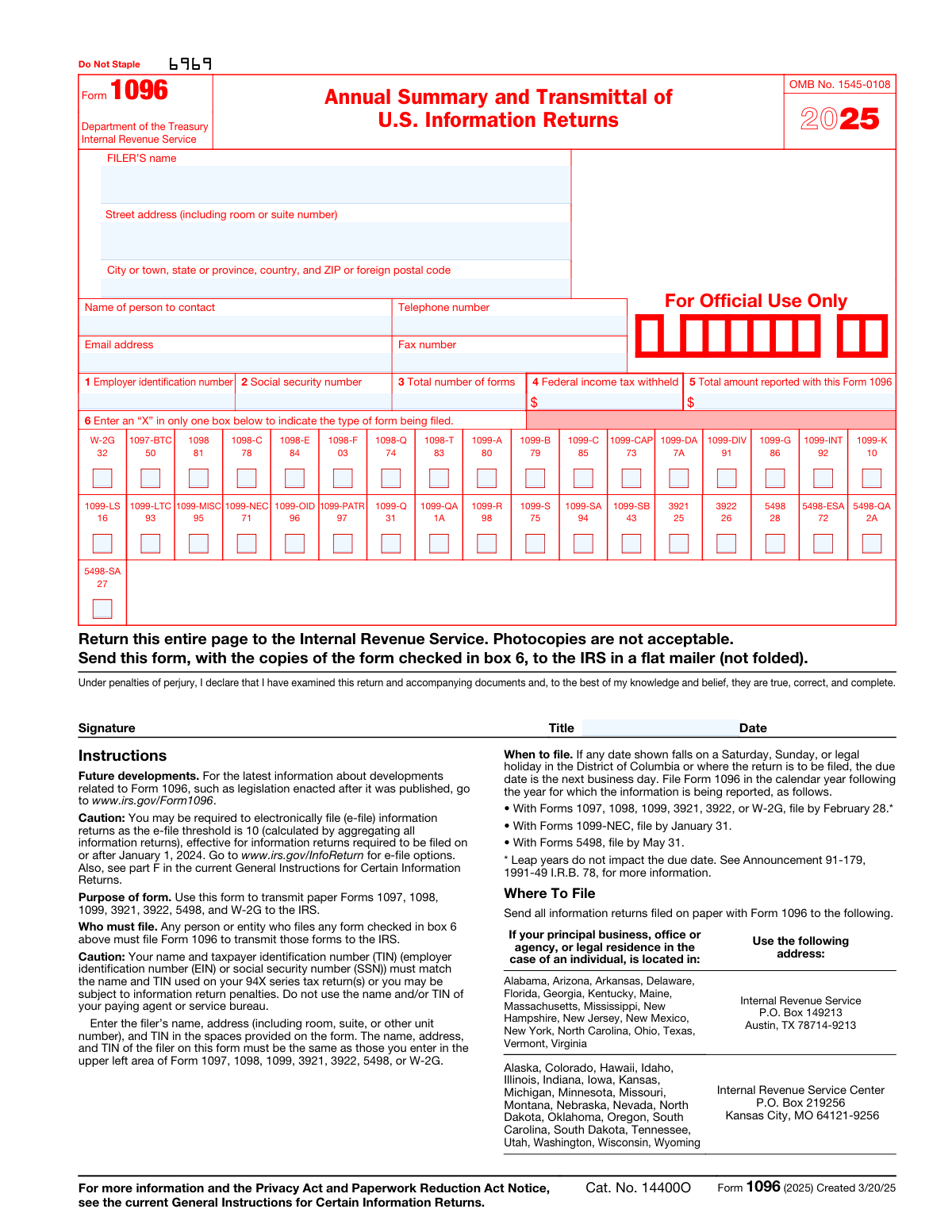
Form 1096, Annual Summary and Transmittal of U.S. Information Returns, page 1
Basic · 35/100Form Complexity Index

The AI does the filling. You just check it.

No typing into boxes, nothing to install.

Tell the AI about youAnswer a few questions in plain words, or upload a document you already have. That is all the typing there is.
AI fills every field in secondsIt puts each answer in the right box on every page, checkboxes included.
Check it and downloadReview every field, change anything, then download, print or sign the PDF.

What this form asks for

The AI fills all of it, from your answers or your documents.

Form 1096, Annual Summary and Transmittal of U.S. Information Returns, is used to transmit paper Forms 1097, 1098, 1099, 3921, 3922, 5498, and W-2G to the IRS. It is important to fill out this form correctly to avoid penalties and ensure compliance with IRS regulations.
Fillable fields46
Pages2
Sections4
Form Complexity IndexBasic, 35/100

The AI checks your answers before you download

15 checks built for this form, so a wrong date or a missing answer is caught before anyone else sees it.

Filer's Information Completeness

Ensures that the filer's name, address, city, state, country, and ZIP or foreign postal code are accurately entered. This information is crucial for the IRS to identify the filer and for any necessary correspondence. The system checks for completeness and proper formatting of all address components.

Contact Information Accuracy

Verifies that the contact person's name, telephone number, email address, and fax number are provided and correctly formatted. This information is essential for the IRS to reach out to the filer if there are any questions or issues with the submitted forms.

Taxpayer Identification Numbers Validation

Confirms that the Employer Identification Number (EIN) or Social Security Number (SSN) is provided as applicable. The system checks for the correct number of digits and the validity of the provided TIN against IRS records to prevent filing errors.

Form Totals Calculation

Calculates and verifies the total number of forms being transmitted, the total federal income tax withheld, and the total amount reported. The system ensures that these totals are accurate and correspond to the attached forms to avoid discrepancies.

Type of Form Being Filed Selection

Ensures that an 'X' is marked in only one box in box 6 to indicate the type of form being filed. The system checks for a single selection to prevent confusion and ensure that the IRS can process the forms correctly.

Signature Presence

Confirms that the form has been signed and dated by the filer. The system checks for the presence of a signature and date to ensure the form is legally binding and has been reviewed by the filer.

And 9 more checks
  • Signer's Title Verification
  • Correct Filing Address
  • Filing Deadlines Adherence
  • Electronic Filing Eligibility
  • Form Stapling Prevention
  • Official IRS Form Usage
  • Summary Information Exclusion
  • Corrected Returns Handling
  • Name and TIN Consistency

Let AI fill out your Form 1096

No typing. Every field filled in seconds, checked, ready to sign.

7 days free, then $19.99/month · Cancel anytime

How to Fill Out Form 1096 Online for Free in 2026

What the AI walks you through.

  1. Visit instafill.ai site and select Form 1096.
  2. Enter your name and address details.
  3. Provide your TIN in the appropriate box.
  4. Indicate the total number of forms being filed.
  5. Sign and date the form electronically.
  6. Check for accuracy and submit the form.

Common Mistakes in Completing Form 1096

The ones the AI is built to catch.

Incorrect or Missing Filer's Information
Filers often forget to include their complete name, address, and contact information, or they provide incorrect details. To avoid this mistake, double-check the filer's information for accuracy before submission. Ensure that the street address, including room or suite number, city, state, and ZIP code are all correctly entered. Additionally, provide a valid contact name, telephone number, email address, and fax number for potential IRS inquiries.
Mixing EIN and SSN
A common error is entering the Employer Identification Number (EIN) in the Social Security Number (SSN) box, or vice versa. To prevent this, carefully enter the EIN in box 1 only if it is applicable to your situation, and the SSN in box 2 if that is the identifier you use. Do not fill both boxes unless both numbers are legitimately used in your tax documents.
Incorrect Form Totals
Filers sometimes report incorrect totals in boxes 3, 4, and 5. It is crucial to accurately tally the number of forms, the total federal income tax withheld, and the total amount reported. To avoid errors, use a calculator to sum up the totals and cross-verify the amounts with the individual forms being transmitted with Form 1096.
Multiple Forms Indicated
One of the frequent mistakes is marking more than one type of form in box 6. Ensure that you mark an 'X' in only one box that corresponds to the type of form you are filing. If you are filing multiple types of forms, you must use a separate Form 1096 for each form type.
Unsigned or Undated Form
Forgetting to sign and date the form is a common oversight. The IRS requires that Form 1096 be signed and dated by the filer. Remember to include the title of the person signing the form. Unsigned or undated forms may be considered invalid and can lead to processing delays or penalties.
Incorrect Filing Address
Sending Form 1096 to the wrong IRS address can result in processing delays. The correct filing address depends on your principal business location. Refer to the IRS-provided addresses in the form instructions and ensure you send your forms to the appropriate address for your state or territory.
Missing Filing Deadlines
Filers sometimes miss the filing deadlines for the different types of forms. To avoid penalties, file Form 1096 with the appropriate forms by the specified deadlines. For most forms, the deadline is February 28, for Form 1099-NEC it's January 31, and for Form 5498, it's May 31 of the year following the reporting year.
Failure to Consider Electronic Filing
Not considering electronic filing can be a missed opportunity for a more efficient process. Electronic filing through the IRS FIRE or AIR systems can be faster and more secure. Review the electronic filing options and consider using them to submit your information returns.
Use of Stapled or Photocopied Forms
Stapling any part of Form 1096 or using photocopies can cause issues during processing. Use only official IRS forms and do not staple them. Ensure that all forms are free of staples and other attachments before mailing.
Mismatched Name and TIN
A mismatch between the name and TIN on Form 1096 and the 94X series tax returns can lead to processing errors. Verify that the name and TIN on Form 1096 exactly match those used on your tax returns to prevent any discrepancies and potential penalties.

Frequently Asked Questions About Form 1096


Is it really free for 7 days?
Yes. You pay $0 today. Cancel before Nov 12 and you are never charged. Keep it, and it is $19.99 a month for 5 fills of your Form 1096.
Can I fill other forms too?
This plan is for your Form 1096: your own AI agent fills it as often as 5 times a month. To fill other forms and upload your own, choose a Professional plan from your account.
How do I cancel?
From your account, in two clicks, any time. No email, no call.
How does the AI fill out Form 1096?
You answer a few questions in plain words, or upload a document you already have. The AI reads what you give it and puts each answer into the right field of Form 1096, on every page, in seconds. It checks the answers against the form's own rules, and you review and change anything before you download, print or sign.
What happens to my information?
It is encrypted in transit and at rest, and it is never used to train AI.
How complex is Form 1096 to fill out?
Form 1096 has a Form Complexity Index of 35 out of 100, in the basic tier: 46 fillable fields across 2 pages. Instafill.ai's AI fills it in under a minute, with every field there for you to review before you download.
What is Form 1096 used for?
Form 1096 is used to transmit paper Forms 1097, 1098, 1099, 3921, 3922, 5498, and W-2G to the IRS.
Can I print and file a Form 1096 downloaded from the IRS website?
No, you should not print and file a Form 1096 downloaded from the IRS website as it is not scannable and may result in a penalty.
How can I obtain an official scannable Form 1096?
To order official IRS information returns, which include a scannable Form 1096, visit www.IRS.gov/orderforms.
Is it possible to file information returns electronically?
Yes, information returns can be filed electronically using the IRS Filing Information Returns Electronically (FIRE) system or the IRS Affordable Care Act Information Returns (AIR) program.
Who must file Form 1096?
Any person or entity who files any form checked in box 6 of Form 1096 must file Form 1096 to transmit those forms to the IRS.
When is Form 1096 due?
Form 1096 is due by February 28 for most forms, by January 31 for Forms 1099-NEC, and by May 31 for Forms 5498, in the calendar year following the year for which the information is being reported.
Where should I send Form 1096?
The mailing address for Form 1096 depends on the location of your principal business, office, agency, or legal residence. Specific addresses are provided in the form instructions based on these locations.
What should I do if I need to correct information after submitting Form 1096?
For information about filing corrections, refer to the General Instructions for Certain Information Returns for the relevant tax year.
What information is required in boxes 1 and 2 of Form 1096?
Enter your Employer Identification Number (EIN) in box 1 or your Social Security Number (SSN) in box 2, not both. Sole proprietors without an EIN must enter their SSN in box 2.
What should I include in box 5 of Form 1096?
In box 5, enter the total of the amounts from the specific boxes identified for each form being transmitted, except if you are filing Form 1098-T, 1099-A, or 1099-G, in which case no entry is required.
Encrypted in transit and at restNever used to train AIDelete your forms any time

Get your Form 1096 filled out by AI

$0 today. Cancel before Nov 12 and you pay nothing.

7 days free, then $19.99/month · Cancel anytime