
Instafill.ai
7 days free
AI form filling · 478 fields · 2 pages · done in seconds

Yes! You can use AI to fill out ACORD 90 CA, California Personal Auto Application

Don't type 478 fields by hand. Tell our AI about yourself, or upload a document you already have, and it fills every field in seconds. You check it, then download, print or sign.
7 days free, then $19.99/month · Cancel anytime
AI fills it, no typingEncrypted, never used to train AICancel in two clicks
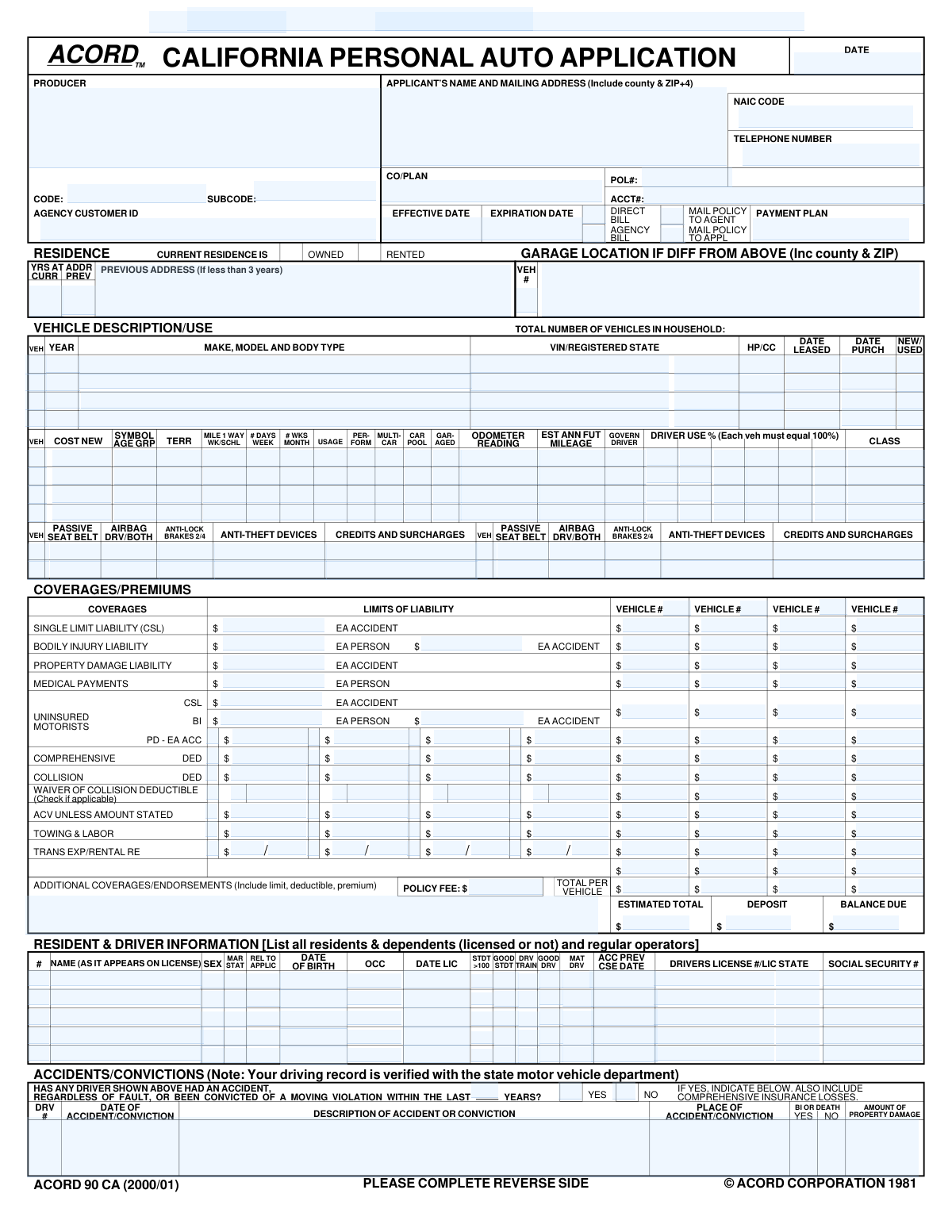
ACORD 90 CA, California Personal Auto Application, page 1
Complex · 77/100Form Complexity Index

The AI does the filling. You just check it.

No typing into boxes, nothing to install.

Tell the AI about youAnswer a few questions in plain words, or upload a document you already have. That is all the typing there is.
AI fills every field in secondsIt puts each answer in the right box on every page, tables and checkboxes included.
Check it and downloadReview every field, change anything, then download, print or sign the PDF.

What this form asks for

The AI fills all of it, from your answers or your documents.

The ACORD 90, Personal Auto Application, is a standardized document used by insurance agents and carriers to gather essential information for underwriting a personal vehicle insurance policy. It captures detailed data about the applicant, all household drivers, the vehicles to be insured, desired coverage limits, and driving history. Completing this form accurately is crucial for obtaining an appropriate and correctly priced insurance quote. Today, this form can be filled out quickly and accurately using AI-powered services like Instafill.ai, which can also convert non-fillable PDF versions into interactive fillable forms.
Fillable fields478
Pages2
Sections57
Tables and lists4
Questions that depend on earlier answers13
Form Complexity IndexComplex, 77/100

The AI checks your answers before you download

15 checks built for this form, so a wrong date or a missing answer is caught before anyone else sees it.

Validates Vehicle Identification Number (VIN) Format

This check ensures that the 'Vehicle Identification Number (VIN)' field contains exactly 17 alphanumeric characters, excluding 'I', 'O', and 'Q'. The VIN is a unique, standardized code used to identify individual motor vehicles, and its correctness is critical for accurate vehicle history reports, registration, and rating. If the VIN is invalid, the system cannot correctly identify the vehicle, leading to potential rating errors and coverage issues.

Ensures Logical Policy Period Dates

This validation confirms that the 'Effective Date' of the policy is on or before the 'Expiration Date'. This is a fundamental logical check to ensure the policy period is valid and makes chronological sense. A failed validation would indicate a data entry error that makes the policy term nonsensical and would prevent the policy from being issued correctly.

Verifies Driver's Age at Time of Licensing

This check compares a driver's 'Date of Birth' with their 'Date Licensed' to ensure they were of legal driving age (e.g., 15 years or older, depending on state law) when they first received their license. This is important for verifying driver history and eligibility, as an illogical date combination suggests a data entry error. A failure would require the user to correct the dates before the driver can be rated.

Confirms Driver Usage Percentages Total 100%

For each vehicle, this validation sums the values entered in all 'Driver Use %' fields to ensure they total exactly 100%. This is crucial for accurately assigning risk and calculating premiums based on which driver uses the vehicle most often. If the total is not 100%, it indicates an incomplete or incorrect allocation of usage, and the submission should be flagged for correction.

Enforces Mutually Exclusive Billing Method

This check ensures that only one of the 'Direct Bill' or 'Agency Bill' checkboxes is selected. A policy can only have one primary billing method, either billed to the insured or the agency. Allowing both to be selected would create ambiguity and errors in the billing and accounting systems, so the form should enforce a single choice.

Requires Remarks for 'Yes' Answers in General Information

This validation checks that if any 'Yes' option is selected in the 'General Information' section (e.g., 'Car Modified/Special Equipment - Yes'), the 'Remarks' field must not be empty. These questions often pertain to increased risk factors that require manual review and explanation from the applicant or producer. A missing explanation for a 'Yes' answer would result in an incomplete application and require follow-up.

And 9 more checks
  • Validates Vehicle Acquisition Date
  • Validates Social Security Number (SSN) Format
  • Verifies Registered State Abbreviation
  • Checks Multi-Car Discount Eligibility Logic
  • Verifies Age for Mature Driver Discount
  • Validates Conditional Binder Information
  • Cross-Validates Vehicle Status and Purchase Date
  • Enforces Loan Number for Additional Interest
  • Validates Liability Coverage Selection

Let AI fill out your ACORD 90

No typing. Every field filled in seconds, checked, ready to sign.

7 days free, then $19.99/month · Cancel anytime

How to Fill Out ACORD 90 Online for Free in 2026

What the AI walks you through.

  1. Navigate to Instafill.ai and upload or select the ACORD 90 Personal Auto Application form.
  2. Use the AI assistant to fill in the producer/agency information and the primary applicant's personal and contact details.
  3. Enter detailed information for each vehicle to be insured, including make, model, year, VIN, usage, garaging address, and safety features.
  4. Provide complete information for all drivers in the household, including their name, date of birth, driver's license number, driving history, and any qualifying discounts.
  5. Select the desired insurance coverages (e.g., liability, collision, comprehensive) and their limits for each vehicle, and add any additional interests like lienholders.
  6. Answer all questions in the General Information and Prior Coverage sections to provide a complete risk profile.
  7. Carefully review all entered information for accuracy, then use the platform to electronically sign and date the application to finalize it.

Common Mistakes in Completing ACORD 90

The ones the AI is built to catch.

Entering an Incorrect Vehicle Identification Number (VIN)
The 17-digit VIN is unique to each vehicle and prone to transcription errors. This mistake often happens due to misreading a character (e.g., 'O' for '0') or transposing numbers. An incorrect VIN leads to rating the wrong vehicle, potential denial of claims, and significant delays as the application must be corrected and resubmitted. To avoid this, carefully double-check the VIN against the vehicle's registration and the number plate on the dashboard. AI-powered tools like Instafill.ai can help by validating the VIN's format and checksum digit automatically.
Omitting Explanations for 'Yes' Answers in the Remarks Section
The form requires detailed explanations in the 'Remarks' section for any 'Yes' answers in the General Information section (e.g., vehicle modifications, prior cancellations). Applicants often check 'Yes' but forget to provide the mandatory context. This renders the application incomplete, forcing an underwriter to halt processing and request the missing information, which delays policy issuance. Always review the General Information questions and provide a clear, concise explanation for every 'Yes' response in the designated remarks area.
Confusing Mailing Address with Vehicle Garage Location
Applicants frequently assume their mailing address is the same as the vehicle's primary garage location and leave the 'Garage Location Address' field blank, even when it differs. Insurance premiums are heavily influenced by the territory where a vehicle is garaged, so this error can lead to incorrect rates or even policy cancellation for misrepresentation. If a vehicle is kept at a different location, such as a student's apartment or a second home, you must provide that full address. If the form is a non-fillable PDF, tools like Instafill.ai can make it interactive, reducing the chance of skipping such crucial fields.
Forgetting to List the Lienholder as a Loss Payee
When a vehicle is financed or leased, the financial institution must be listed as a 'Loss Payee' or 'Additional Interest'. People often forget this step, especially if they are filling out the form without their loan documents handy. Failing to list the lienholder can violate the terms of the auto loan and cause major issues if the vehicle is totaled, as the insurance payout may not go directly to the lender. Always have your loan or lease agreement available and accurately enter the financial institution's name, address, and loan number.
Driver Usage Percentages Not Totaling 100%
For each vehicle, the form asks for the percentage of use assigned to each driver, but users often estimate these figures without ensuring they add up to exactly 100%. This mathematical error makes it impossible for the insurer to accurately calculate the risk and premium associated with the vehicle. The application will be flagged and returned for correction, causing delays. To prevent this, calculate and then double-check that the sum of all 'Driver Use %' fields for a single vehicle equals 100%.
Providing Incomplete or Inaccurate Prior Insurance Information
Applicants often provide vague information for their 'Prior Carrier', 'Prior Policy Number', and 'Expiration Date', or they leave it blank. Insurers use this data to verify continuous coverage, which is a major factor for determining eligibility and discounts. Inaccurate information prevents this verification, potentially leading to significantly higher premiums or even rejection. To avoid this, refer directly to your previous policy's declarations page for the exact carrier name and policy details.
Inconsistent Vehicle Acquisition Details
The form has separate fields for 'Date Purchased' and 'Date Leased', as well as 'New or Used' status. A common error is to fill in conflicting information, such as entering both a purchase and a lease date for the same vehicle. This creates ambiguity for the underwriter and suggests a lack of attention to detail, requiring clarification and delaying the quoting process. Ensure you only enter the relevant date (purchase or lease) and that it logically aligns with the vehicle's 'New' or 'Used' status.
Entering Incorrect Driver's License or Date of Birth Information
Simple typos in a driver's license number, state, or date of birth are frequent yet critical errors. This information is used to pull a Motor Vehicle Report (MVR), which is essential for verifying driving history and calculating an accurate premium. An incorrect entry will result in a failed MVR lookup, halting the underwriting process until the applicant provides the correct data. Always transcribe this information directly from the physical driver's license to ensure accuracy. Using a tool like Instafill.ai can help by pre-filling this data from a saved profile, reducing manual entry errors.
Selecting Conflicting Billing and Policy Mailing Options
The policy details section contains checkboxes for billing ('Direct Bill' vs. 'Agency Bill') and policy delivery ('Mail Policy to Agent' vs. 'Mail Policy to Applicant'). Applicants sometimes mistakenly check both options in a category out of confusion. This creates an administrative conflict that must be resolved before the policy can be correctly set up and issued. To avoid this, carefully choose only one option for billing and one for policy delivery based on your preference.
Using Vague Descriptions for Anti-Theft Devices
When asked to list 'Anti-Theft Devices', many people simply write 'Alarm' or check a box without providing specifics. Insurers offer different discount amounts for different types of systems (e.g., passive disabling alarms, VIN etching, GPS tracking systems). Vague information prevents the underwriter from applying the maximum eligible discount, resulting in a higher premium. Be as specific as possible by listing the type of system installed on the vehicle to ensure you receive all applicable credits.

Frequently Asked Questions About ACORD 90


Is it really free for 7 days?
Yes. You pay $0 today. Cancel before Oct 31 and you are never charged. Keep it, and it is $19.99 a month for 5 fills of your ACORD 90.
Can I fill other forms too?
This plan is for your ACORD 90: your own AI agent fills it as often as 5 times a month. To fill other forms and upload your own, choose a Professional plan from your account.
How do I cancel?
From your account, in two clicks, any time. No email, no call.
How does the AI fill out ACORD 90?
You answer a few questions in plain words, or upload a document you already have. The AI reads what you give it and puts each answer into the right field of ACORD 90, on every page, in seconds. It checks the answers against the form's own rules, and you review and change anything before you download, print or sign.
What happens to my information?
It is encrypted in transit and at rest, and it is never used to train AI.
How complex is ACORD 90 to fill out?
ACORD 90 has a Form Complexity Index of 77 out of 100, in the complex tier: 478 fillable fields across 2 pages. Instafill.ai's AI fills it in under a minute, with every field there for you to review before you download.
What is the purpose of this form?
This form is a comprehensive application for personal automobile insurance. It is used to gather detailed information about the applicant, drivers, vehicles, and desired coverages to generate an insurance policy quote.
Who needs to complete this application?
This application should be completed by any individual seeking a new personal auto insurance policy. It is typically filled out by the applicant, often with the assistance of their insurance producer or agent.
What is the difference between 'Agency Bill' and 'Direct Bill'?
Choosing 'Direct Bill' means the insurance company will bill you directly for your premium. Selecting 'Agency Bill' means the bill is sent to your insurance agency, which then collects the payment from you.
What is a 'Loss Payee' or 'Additional Interest'?
A Loss Payee or Additional Interest is typically the bank or leasing company that financed your vehicle. They are listed on the policy to ensure they are notified of any claims or policy changes related to the vehicle they have a financial stake in.
My vehicle is garaged at my home address. Do I need to fill out the 'Garage Location' section?
You only need to complete the 'Garage Location Address' section if your vehicle is kept at a different address than your primary residence. If it's garaged at your home, you can leave this section blank.
How do I calculate the 'Driver Use %' for each vehicle?
For each vehicle, estimate the percentage of time each listed driver operates it. The total percentage for all drivers assigned to a single vehicle should add up to 100%.
What kind of information should I put in the 'Remarks' section?
The 'Remarks' section is used to provide more details for any 'YES' answers in the 'General Information' section. For example, if you answered 'Yes' to a vehicle having modifications, you would describe them here.
What documents might I need to attach to this application?
You may need to attach documents such as a Bill of Sale for new vehicles, certificates for anti-theft devices, or proof of a completed driver training course to qualify for certain discounts.
What happens after I submit this form?
After submission, the insurance company will review your information to determine eligibility and calculate your final premium. If approved, they will issue an insurance binder as temporary proof of coverage, followed by your official policy documents.
What if I have more than four vehicles or five drivers to insure?
This form has dedicated sections for up to four vehicles and five drivers. If you need to insure more, you will likely need to complete an additional application or an overflow sheet provided by your agent.
What qualifies for a 'Good Student' or 'Mature Driver' discount?
Discount qualifications vary by company, but a 'Good Student' discount usually requires a certain GPA, while a 'Mature Driver' discount may require being over a certain age and completing an approved defensive driving course. Ask your agent for the specific requirements.
Can AI tools help me fill out this form?
Yes, services like Instafill.ai use AI to auto-fill form fields accurately and save time. This is especially useful for long, detailed forms like this auto insurance application.
How can I fill this form out online if I only have a PDF?
You can use a service like Instafill.ai to easily complete your form online. Simply upload the PDF, and the platform will make it fillable so you can type your information, add signatures, and securely share it.
My PDF of this form is not fillable. What can I do?
If you have a non-fillable or 'flat' PDF, tools like Instafill.ai can help. They can convert flat PDFs into interactive, fillable forms that you can complete on your computer or mobile device.
Encrypted in transit and at restNever used to train AIDelete your forms any time

Get your ACORD 90 filled out by AI

$0 today. Cancel before Oct 31 and you pay nothing.

7 days free, then $19.99/month · Cancel anytime