
Instafill.ai
7 days free
AI form filling · 466 fields · 2 pages · done in seconds

Yes! You can use AI to fill out ACORD 90 TX, Texas Personal Auto Application

Don't type 466 fields by hand. Tell our AI about yourself, or upload a document you already have, and it fills every field in seconds. You check it, then download, print or sign.
7 days free, then $19.99/month · Cancel anytime
AI fills it, no typingEncrypted, never used to train AICancel in two clicks
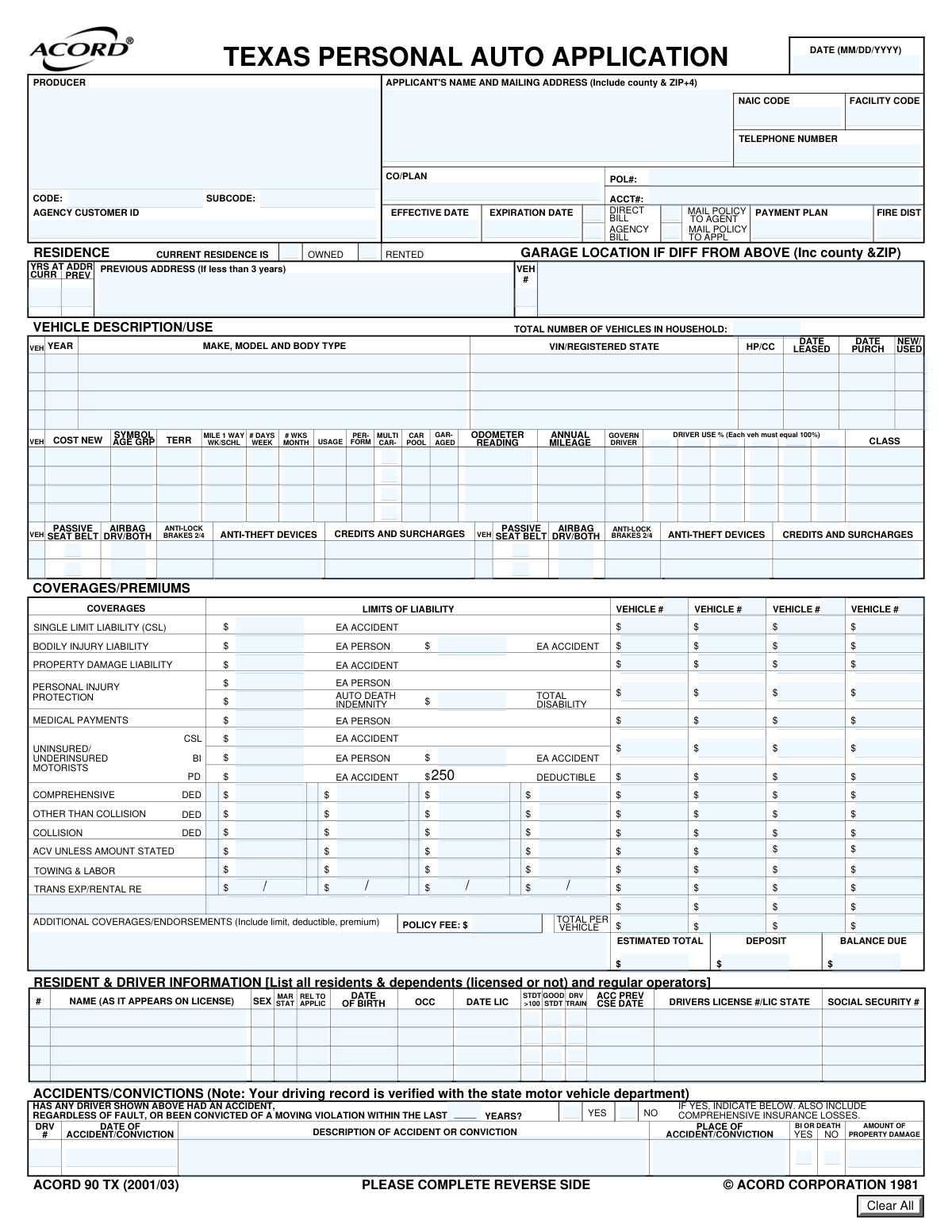
ACORD 90 TX, Texas Personal Auto Application, page 1
Complex · 78/100Form Complexity Index

The AI does the filling. You just check it.

No typing into boxes, nothing to install.

Tell the AI about youAnswer a few questions in plain words, or upload a document you already have. That is all the typing there is.
AI fills every field in secondsIt puts each answer in the right box on every page, tables and checkboxes included.
Check it and downloadReview every field, change anything, then download, print or sign the PDF.

What this form asks for

The AI fills all of it, from your answers or your documents.

The ACORD 90, Personal Auto Application, is a detailed form used to apply for personal automobile insurance, collecting essential data on the applicant, drivers, vehicles, and desired coverages. This information is crucial for insurance underwriters to assess risk, calculate premiums, and issue a policy. Today, this comprehensive form can be filled out quickly and accurately using AI-powered services like Instafill.ai, which can also convert non-fillable PDF versions into interactive fillable forms.
Fillable fields466
Pages2
Sections75
Tables and lists4
Questions that depend on earlier answers31
Form Complexity IndexComplex, 78/100

The AI checks your answers before you download

14 checks built for this form, so a wrong date or a missing answer is caught before anyone else sees it.

Policy Term Chronology

This check ensures that the 'Expiration Date' of the policy is chronologically after the 'Effective Date'. A policy cannot expire before it starts. This is critical for defining a valid coverage period and preventing logical errors in policy administration systems. If this validation fails, the user should be prompted to correct one or both of the dates before submission.

Driver Usage Percentage Summation

Validates that the sum of all 'Driver Use Percentage' fields for a single vehicle equals exactly 100%. This is crucial for accurately assigning risk and calculating premiums based on which driver uses the vehicle most often. If the total is not 100%, the form should display an error and require the user to adjust the percentages until they sum correctly.

Conditional Previous Address Requirement

This validation enforces the rule that the 'Previous Address' field must be completed if the value in 'Years at Current Address' is less than 3. This information is often required for underwriting and background checks to assess stability and risk. If the condition is met and the address is missing, the submission should be blocked until the previous address is provided.

Vehicle Identification Number (VIN) Format

This check verifies that the 'Vehicle identification number' (VIN) is in the standard 17-character alphanumeric format, excluding the letters I, O, and Q. A valid VIN is essential for correctly identifying the vehicle's make, model, year, and history for rating and coverage purposes. An invalid VIN will prevent the system from retrieving vehicle data and should halt the submission until a valid VIN is entered.

Accident History Detail Requirement

Ensures that if the 'Accident/Conviction History Question' is answered 'YES', then at least one 'Accident/Conviction' detail section is filled out. A 'YES' answer without a corresponding explanation is incomplete and prevents proper risk assessment. The system should flag this as a missing information error and require the user to provide details of the incident.

Mutually Exclusive Policy Directives

This check confirms that for each pair of mutually exclusive options, only one is selected. Specifically, the user can select either 'Direct Bill' or 'Agency Bill', but not both, and either 'Mail Policy to Agent' or 'Mail Policy to Applicant', but not both. This prevents ambiguity in billing and communication instructions. If both options in a pair are selected, an error should be shown, forcing the user to choose only one.

And 8 more checks
  • Driver Licensing Age Logic
  • Vehicle Count Consistency
  • Conditional Remarks Field Explanation
  • Total Premium Calculation Verification
  • Attachment Requirement for Discounts
  • Binder Information Dependency
  • Bodily Injury Limit Hierarchy
  • Applicant Address Format

Let AI fill out your ACORD 90

No typing. Every field filled in seconds, checked, ready to sign.

7 days free, then $19.99/month · Cancel anytime

How to Fill Out ACORD 90 Online for Free in 2026

What the AI walks you through.

  1. Navigate to Instafill.ai and upload or select the ACORD 90, Personal Auto Application form.
  2. Allow the AI to scan and identify all the fields on the form, including applicant details, vehicle information, and coverage sections.
  3. Provide your personal and producer information, including names, addresses, and contact details, by answering simple questions.
  4. Enter detailed information for each vehicle you wish to insure, such as make, model, VIN, and usage details.
  5. List all drivers in the household, providing their personal details, license information, and any accident or conviction history.
  6. Select the desired insurance coverages, limits, and deductibles for liability, collision, comprehensive, and other options.
  7. Review the auto-populated form for accuracy, make any necessary corrections, and then download or submit the completed ACORD 90 application.

Common Mistakes in Completing ACORD 90

The ones the AI is built to catch.

Using a Generic Insurance Group Name
The form specifically asks for the actual name of the underwriting company, not the group name (e.g., 'Progressive Casualty Insurance Company' instead of just 'Progressive'). Applicants often use the common brand name they know, which can cause the application to be routed incorrectly or delayed. To avoid this, applicants should verify the exact legal name of the insurance company they are applying to. This information is usually available on the quote or from the insurance agent.
Entering an Incorrect Vehicle Identification Number (VIN)
The 17-character VIN is unique to each vehicle, and even a single-digit typo will invalidate it, halting the application process. This mistake is common due to the length and complexity of the number. An incorrect VIN prevents the insurer from verifying the vehicle's history, specifications, and eligibility for coverage. To prevent this, double-check the VIN from the vehicle's registration or title certificate. AI-powered tools like Instafill.ai can automatically validate the VIN's format and checksum to catch errors instantly.
Misinterpreting Vehicle Usage Classification
Applicants frequently misclassify their vehicle's primary use, particularly confusing a daily commute with 'Business' use. The form clarifies that driving to and from a principal place of work is considered 'Pleasure' use, while 'Business' use involves using the vehicle as part of one's job. This error can lead to incorrect premium calculations and potential claim disputes. Carefully read the definitions provided and select the appropriate category (Pleasure, Business, or Farm).
Failing to Disclose All Accidents or Convictions
The form requires disclosure of all accidents, 'regardless of fault,' and moving violations within a specified period. Applicants may forget minor incidents or assume they don't need to report an accident where they weren't at fault. Omission of this information can be considered misrepresentation and may lead to policy cancellation or denial of a future claim. It is crucial to provide a complete and honest history for all listed drivers.
Incorrectly Calculating Driver Use Percentages
The form requires that the usage percentages for all drivers assigned to a single vehicle must total 100%. Applicants often make simple math errors, causing the sum to be over or under 100%, which leads to processing delays. This information is critical for rating the policy correctly. Before submitting, add up the percentages for each vehicle to ensure they equal exactly 100%.
Ignoring Conditional Field Requirements
This form contains many fields that are only required if a certain condition is met, such as providing a 'Previous Address' only if the applicant has lived at the current address for less than 3 years. People often miss these instructions, either by providing unnecessary information or, more critically, by omitting required details. This results in an incomplete application that requires follow-up. Reading each instruction carefully is key to avoiding this. If the form is a non-fillable PDF, a tool like Instafill.ai can convert it to a smart, fillable version that can help guide users through this conditional logic.
Confusing 'Date Licensed' with License Issue/Expiration Date
When asked for the 'Date Licensed,' applicants sometimes enter the issue date or expiration date of their current driver's license. The form is actually asking for the date the driver was first licensed to drive, as this is used to determine their years of driving experience for rating purposes. Providing the wrong date can negatively impact the premium calculation. Applicants should refer to their driving record or make their best estimate of the year they first received any type of driver's license.
Checking 'Yes' Without Providing an Explanation
Throughout the form, there are 'Yes/No' questions about topics like existing vehicle damage, license suspensions, or special equipment. A 'Yes' answer almost always requires a detailed explanation in the 'Remarks' section. A common mistake is to check 'Yes' but fail to provide the corresponding details. This leaves the application incomplete and requires the insurance company to contact the applicant for clarification, delaying the underwriting process.
Forgetting to Attach Required Documentation for Discounts
Applicants may indicate they are eligible for discounts like 'Good Student' or 'Anti-Theft Device' but forget to attach the required proof, such as a certificate or report card. Without the supporting documentation, the insurance company cannot apply the discount, resulting in a higher premium. To avoid this, create a checklist of all claimed discounts and ensure the corresponding certificates are included with the application. AI-powered form fillers like Instafill.ai can help by reminding users to attach necessary documents based on their answers.
Incomplete Applicant Address Information
The form requests the applicant's full mailing address, including the county and ZIP+4 code. It's common for applicants to omit the county or the extended ZIP+4, as this information is not always top-of-mind. While it may seem minor, this data is used for precise territory rating and ensuring mail deliverability. Incomplete addresses can cause rating errors or communication delays. Using an address validation tool or looking up the full ZIP+4 can help ensure accuracy.

Frequently Asked Questions About ACORD 90


Is it really free for 7 days?
Yes. You pay $0 today. Cancel before Oct 30 and you are never charged. Keep it, and it is $19.99 a month for 5 fills of your ACORD 90.
Can I fill other forms too?
This plan is for your ACORD 90: your own AI agent fills it as often as 5 times a month. To fill other forms and upload your own, choose a Professional plan from your account.
How do I cancel?
From your account, in two clicks, any time. No email, no call.
How does the AI fill out ACORD 90?
You answer a few questions in plain words, or upload a document you already have. The AI reads what you give it and puts each answer into the right field of ACORD 90, on every page, in seconds. It checks the answers against the form's own rules, and you review and change anything before you download, print or sign.
What happens to my information?
It is encrypted in transit and at rest, and it is never used to train AI.
How complex is ACORD 90 to fill out?
ACORD 90 has a Form Complexity Index of 78 out of 100, in the complex tier: 466 fillable fields across 2 pages. Instafill.ai's AI fills it in under a minute, with every field there for you to review before you download.
What is this form used for and who needs to fill it out?
This is a personal auto insurance application. It must be completed by individuals seeking to obtain a new auto insurance policy for their vehicles and household drivers.
What information should I have ready before I start filling out this form?
You will need personal information for all drivers, including full names, dates of birth, and driver's license numbers. You will also need detailed information for each vehicle, such as the Vehicle Identification Number (VIN), make, model, year, and current odometer reading.
What is the difference between an 'Additional Interest' and a 'Loss Payee'?
A 'Loss Payee' is the entity, typically a lender, that is entitled to insurance payments for a loss to the vehicle. An 'Additional Interest' is another party with a financial stake in the vehicle, but the 'Loss Payee' has primary rights to the claim payment.
How do I correctly fill out the 'Driver Use Percentage' for my vehicles?
For each vehicle, estimate the percentage of time each listed driver operates it. The total use percentages for a single vehicle must add up to 100%.
My car is garaged at a different address than my mailing address. Where do I put this information?
Use the 'Garage Location' section to provide the full address where your vehicle is primarily kept. This is important for calculating accurate insurance rates.
What does the form mean by 'Do not use group names' for the insurance company?
You must enter the specific legal name of the insurance company that will issue the policy, not the name of the parent corporation or group. Your agent can provide the exact company name to use.
What kind of documents might I need to attach to this application?
You may need to attach documents like a Driver Training Certificate, Good Student Certificate for discounts, an Anti-Theft Device Certificate, or a Bill of Sale for a new vehicle. The 'Attachments' section lists potential documents you may need to include.
When should I use the 'Remarks' section?
Use the 'Remarks' section to explain any 'Yes' answers in the 'General Information' section or to provide details for any unusual situations. For example, you can explain why a vehicle is registered in a different state than where it is garaged.
What happens after I submit my application?
After submission, the insurance company will review your application, verify your information, and calculate your premium. An agent will then contact you to finalize the policy and payment details.
I have a car loan. Do I need to provide my lender's information?
Yes, if you have a loan, you must list your lender in the 'Additional Interest Details' section as a 'Loss Payee'. You will need to provide their name, address, and your loan number.
Can I use an AI tool to help me fill out this application?
Yes, services like Instafill.ai use AI to auto-fill form fields accurately and save time. This can help you complete the application more efficiently and with fewer errors.
How can I fill out this auto insurance application online?
You can use a service like Instafill.ai to complete this form online. Simply upload the document, and the platform will make it interactive, allowing you to type your information directly into the fields.
The PDF version of this form I have isn't fillable. What can I do?
If you have a non-fillable or 'flat' PDF, you can use a tool like Instafill.ai to convert it into an interactive, fillable form. This allows you to easily type in your information without needing to print and fill it out by hand.
Encrypted in transit and at restNever used to train AIDelete your forms any time

Get your ACORD 90 filled out by AI

$0 today. Cancel before Oct 30 and you pay nothing.

7 days free, then $19.99/month · Cancel anytime