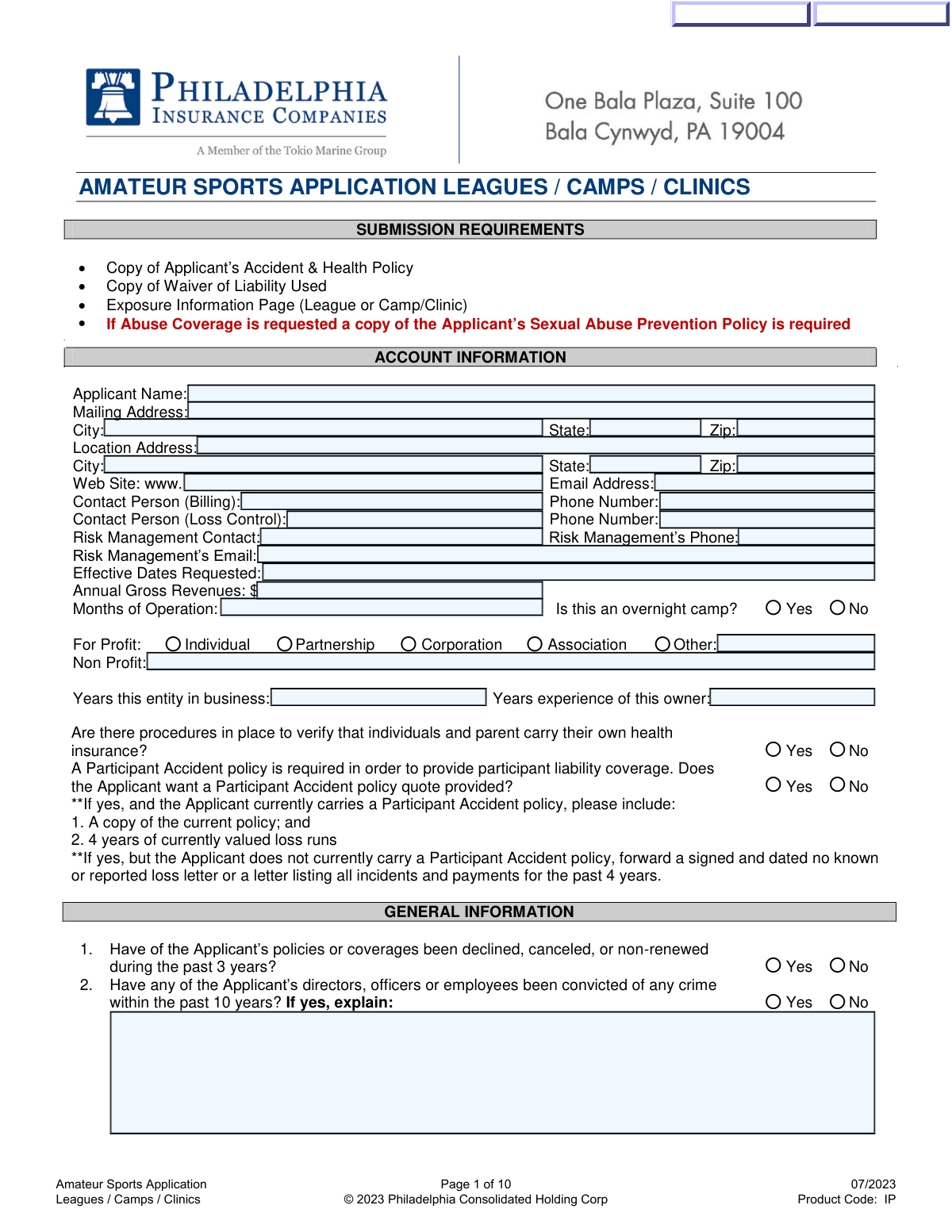
Yes! You can use AI to fill out Amateur Sports Application Leagues / Camps / Clinics

The Amateur Sports Application for Leagues / Camps / Clinics is a detailed insurance form used by providers to assess the risk of sports organizations before issuing coverage. It requires applicants to provide extensive information on their business structure, participant data, and safety protocols, including concussion management and abuse prevention policies. Today, this form can be filled out quickly and accurately using AI-powered services like Instafill.ai, which can also convert non-fillable PDF versions into interactive fillable forms.
Our AI automatically handles information lookup, data retrieval, formatting, and form filling.
It takes less than a minute to fill out Amateur Sports Application using our AI form filling.
Securely upload your data. Information is encrypted in transit and deleted immediately after the form is filled out.

Form specifications

Form name: Amateur Sports Application Leagues / Camps / Clinics
Number of fields: 446
Number of pages: 10
Language: English
main-image

Instafill Demo: How to fill out PDF forms in seconds with AI

How to Fill Out Amateur Sports Application Online for Free in 2026

Are you looking to fill out a AMATEUR SPORTS APPLICATION form online quickly and accurately? Instafill.ai offers the #1 AI-powered PDF filling software of 2026, allowing you to complete your AMATEUR SPORTS APPLICATION form in just 37 seconds or less.
Follow these steps to fill out your AMATEUR SPORTS APPLICATION form online using Instafill.ai:
  1. 1 Navigate to Instafill.ai and upload or select the Amateur Sports Application form.
  2. 2 Use the AI assistant to automatically populate your organization's account information, including name, address, contact details, and business structure.
  3. 3 Complete the General and Underwriting Information sections by answering questions about your operational history, staff certifications, and safety procedures.
  4. 4 Carefully fill out the detailed questionnaires for Concussions, Abuse & Molestation, and Winter Weather Freeze Protection, attaching required policy documents as prompted.
  5. 5 Provide specific exposure data by filling in the tables for your leagues, camps, or clinics with participant numbers, age groups, and season dates.
  6. 6 Review all entered information for accuracy, then proceed to the signature section to electronically sign and finalize the application for submission.

Our AI-powered system ensures each field is filled out correctly, reducing errors and saving you time.

Why Choose Instafill.ai for Your Fillable Amateur Sports Application Form?

Speed

Complete your Amateur Sports Application in as little as 37 seconds.

Up-to-Date

Always use the latest 2026 Amateur Sports Application form version.

Cost-effective

No need to hire expensive lawyers.

Accuracy

Our AI performs 10 compliance checks to ensure your form is error-free.

Security

Your personal information is protected with bank-level encryption.

Frequently Asked Questions About Form Amateur Sports Application

This form is used by amateur sports leagues, camps, and clinics to apply for insurance coverage. It gathers detailed information about your organization's operations, risk management policies, and participant exposure to underwrite and quote a policy.

This application should be completed by an authorized representative of the amateur sports organization seeking insurance. The signature section specifies that this must be the President, Board Chair, CEO, or Executive Director.

You must include a copy of your organization's Accident & Health Policy and the Waiver of Liability form you use. Depending on your operations, you may also need to provide a Sexual Abuse Prevention Policy, a concussion protocol, and other documents as requested.

If you request this coverage, you are required to submit a copy of your organization's written Sexual Abuse Prevention Policy. The form also asks for detailed information about your background check procedures, staff training, and policies on one-on-one interactions.

A Participant Accident policy provides medical coverage for participants injured during your activities. The application states this policy is required in order to provide participant liability coverage, and you can request a quote for it within this application.

You must indicate that you have a protocol and be prepared to provide a copy upon binding. The form asks for specifics, including whether it covers recognizing symptoms, return-to-play guidelines, and if you require staff to complete the CDC's concussion course.

In this section, you need to detail your activities by sport and age group. For leagues, list the number of participants and season dates; for camps or clinics, provide the number of participants per day, the number of days, and the event dates.

This section is mandatory for organizations located in states prone to freezing temperatures or those with a history of freeze-related property damage. It helps the insurer assess the risk of damage from frozen pipes and sprinkler systems.

This section asks if your organization collects or stores Personally Identifiable Information (PII) such as Social Security numbers, health data, or credit card details. You must also disclose any past privacy-related claims or regulatory investigations.

You must indicate on the form that you pay independent contractors for their services. You will also have the option to add them as additional insureds on your policy, which typically involves a 10% additional premium.

Yes, services like Instafill.ai use AI to accurately auto-fill form fields, which can save you a significant amount of time and help reduce errors on complex forms like this one.

To fill out this form online, you can upload the PDF to Instafill.ai. The platform will make the document interactive, allowing you to easily type in your information, save your progress, and download the completed form.

If you have a non-fillable or 'flat' PDF, you can use a service like Instafill.ai to convert it into an interactive, fillable form. The tool automatically detects the fields, so you can type your answers directly into the document.

Processing times can vary, but ensuring the application is complete and all required documents are attached will help expedite the process. Your insurance producer or agent can provide a more specific timeline for receiving your quote.

Compliance Amateur Sports Application
Validation Checks by Instafill.ai

1
Validates Phone Number Format
Checks that all phone number fields are entered in a standard US format, such as 10 digits, which may include parentheses, spaces, or hyphens. This ensures data consistency and that the contact information is usable for communication with billing, loss control, and risk management contacts. If the format is invalid, the user will be prompted to correct the entry before submission.
2
Validates Email Address Format
Ensures that all email address fields contain a valid format, including an '@' symbol and a domain name. This is critical for ensuring that communications, billing information, and policy documents can be delivered electronically to the correct contacts. An invalid email address will prevent form submission and require correction.
3
Requires Explanation for Criminal Convictions
This check ensures that if the applicant indicates 'Yes' that any directors, officers, or employees have been convicted of a crime in the past 10 years, the corresponding explanation field must be filled out. This information is material to the underwriting process for assessing moral hazard. Failure to provide an explanation will block the submission and prompt the user to provide the necessary details.
4
Enforces Response for Adding Independent Contractors as Insureds
Validates that if the applicant answers 'Yes' to using paid independent contractors, they must also answer the follow-up question about adding them as additional insureds. This is crucial for determining the scope of coverage and calculating the correct premium, which includes a 10% surcharge if 'Yes' is selected. The form cannot be submitted until this dependent question is answered.
5
Verifies Consistency of Annual Revenue and Itemized Receipts
This validation checks if the sum of all dollar amounts entered in the 'Itemized Receipts' section is equal to the 'Annual Gross Revenues' reported on page 1. This cross-references financial data for accuracy and helps prevent data entry errors or fraudulent reporting. A mismatch will trigger a warning, requiring the user to review and correct the financial figures.
6
Validates Camper Day Calculation
Automatically calculates and verifies that the 'Total Number of Camper Days' field is the correct product of 'Number of Participants Per Day (P)' and 'Number of Days (D)' for each entry in the Camp/Clinic exposure section. This ensures the accuracy of exposure data, which is fundamental for calculating liability risk and premium. If a manually entered total does not match the calculation, it will be auto-corrected or flagged as an error.
7
Ensures Logical League Season Dates
This check validates that for each league listed in the 'League Exposure Information' section, the 'Ends' date is chronologically after the 'Begins' date. This prevents illogical data entry and ensures the reported season duration is valid for risk assessment. An invalid date range will result in an error message, requiring the user to correct the dates before proceeding.
8
Requires Abuse Policy Documentation if Abuse Section is Completed
This validation checks if the 'Abuse & Molestation' section has been filled out (i.e., not marked N/A). If it has, the system flags that a copy of the applicant's Sexual Abuse Prevention Policy must be uploaded or attached as a submission requirement. This ensures that all necessary documentation for underwriting this high-risk coverage is received with the application.
9
Validates Months of Operation Range
This check ensures that the value entered for 'Months of Operation' is a whole number between 1 and 12. This is a logical constraint that maintains data integrity for a field representing months in a year. An entry outside this range would be invalid and would prompt the user for correction before submission.
10
Requires Details on Soccer Goal Anchoring
This validation ensures that if the applicant indicates 'Yes' to having soccer goals, they must answer the subsequent questions about whether the goals are anchored on the field and in storage. Unsecured soccer goals pose a significant safety and liability risk, so this information is critical for underwriting. The form will not be submittable until these dependent questions are answered.
11
Validates Signatory's Title
This check verifies that the 'Title' entered in the signature section matches one of the authorized roles: President, Board Chair, CEO, or Executive Director. This is a legal requirement to ensure the application is being signed by an individual with the proper authority to bind the organization. An invalid title will prevent final submission and prompt the user to enter an authorized title.
12
Cross-Validates Overnight Camp Status with Exposure Data
This check ensures consistency between the general information and the detailed exposure section. If the applicant answers 'Yes' to 'Is this an overnight camp?', the system verifies that at least one entry in the 'Camp / Clinic / Tournament Exposure Information' table is marked as 'Overnight'. This logical check prevents contradictory information that could impact risk assessment and coverage accuracy.
13
Requires Concussion Program Details if Program Exists
If an applicant answers 'Yes' to having a written concussion awareness program, this validation ensures that the subsequent sub-questions (a, b, c, d) about the program's contents are also answered. This provides underwriters with necessary details about the comprehensiveness of the safety protocols. The form will be considered incomplete if the primary question is 'Yes' but the details are missing.
14
Validates Washington State Zackery Lystedt Law Compliance
This check verifies that the question regarding compliance with the Zackery Lystedt Law is answered if the applicant's physical location state is entered as Washington (WA). This law has specific requirements for sports organizations regarding concussion management. Answering this question is mandatory for Washington-based applicants to assess legal and regulatory compliance.

Common Mistakes in Completing Amateur Sports Application

Forgetting Required Supporting Documents

Applicants often focus on filling out the form's fields and overlook the 'SUBMISSION REQUIREMENTS' checklist at the very beginning. This results in an incomplete application package missing crucial documents like the Accident & Health Policy, Waiver of Liability, or Sexual Abuse Prevention Policy. An incomplete submission cannot be processed, leading to significant delays as the underwriter must halt the review and request the missing items, pushing back the policy effective date.

Discrepancies Between Total and Itemized Revenues

This form asks for 'Annual Gross Revenues' on page one and a detailed 'Itemized Receipts' breakdown on page four. A frequent error is when the sum of the itemized amounts does not match the total gross revenue figure provided earlier. This discrepancy acts as a red flag for underwriters, suggesting poor bookkeeping or misrepresentation, which can trigger further scrutiny, delays, or even denial of the application.

Miscalculating 'Total Number of Camper Days'

The 'Camp / Clinic / Tournament Exposure' section requires a calculation for 'Total Number of Camper Days' using the formula (Participants Per Day) x (Number of Days). Many applicants misunderstand this and enter only the total number of unique participants, leading to an incorrect risk assessment. Since this metric is a key factor in determining the premium, a miscalculation can result in an inaccurate quote, causing the applicant to either overpay or be dangerously underinsured.

Failing to Provide Mandatory Explanations for 'Yes' Answers

Several questions, such as those regarding prior policy cancellations or criminal history, require a detailed explanation if 'Yes' is selected. Applicants often check the box but fail to provide the necessary context in the space provided, assuming it is optional. This omission forces the underwriter to either assume a worst-case scenario or stop the application process entirely to request the missing information, delaying the quote.

Overlooking Embedded Document Requests

Beyond the initial checklist, the form contains requests for documents embedded within specific questions, such as providing a copy of the concussion protocol or sexual abuse prevention policy. Applicants frequently answer the 'Yes/No' question but miss the fine print requiring an attachment. This is treated as an incomplete application and will halt the quoting and binding process until the required documentation is submitted.

Confusing Mailing and Physical Location Addresses

The form distinctly asks for both a 'Mailing Address' and a 'Location Address'. Applicants, especially those who use a P.O. Box or home address for mail, may incorrectly enter the same address in both fields. This is a critical error, as the physical location address is essential for risk assessment, determining coverage eligibility, and proper rating, while the mailing address is for billing and correspondence. An error here can lead to incorrect coverage or policy invalidation.

Providing Vague League or Camp Exposure Data

In the 'League Exposure' and 'Camp Exposure' grids, applicants sometimes enter vague details like 'Summer' for dates or '5-18' for age groups instead of using the specific breakdowns provided. Underwriters require precise data—exact dates and participant counts per age bracket—to accurately calculate risk and premium. Vague information leads to follow-up questions and delays, or an inaccurate quote based on incorrect assumptions.

Unauthorized Signature on Application

The signature page explicitly states that the application must be signed by the 'PRESIDENT, BOARD CHAIR, CEO OR EXECUTIVE DIRECTOR'. Out of convenience, a well-meaning coach, volunteer, or office manager might sign the form, but this renders the application invalid. This is a legal declaration, and an unauthorized signature will cause the application to be rejected, halting the entire insurance process until a proper signature from an authorized officer is obtained.

Skipping Conditional Follow-Up Questions

Many questions on the form are conditional; a follow-up question appears only if 'Yes' is answered to a primary question. For example, after indicating they use paid contractors, the applicant must then specify if they want to add them as additional insureds. Rushing through the form can cause applicants to miss these dependent questions, creating ambiguity that results in an incomplete policy or inadequate coverage.

Ignoring the Cyber Security Supplemental Questionnaire

Applicants may assume the 'Cyber Security' supplement on page 8 is optional or irrelevant, especially if they are a small sports organization. However, nearly every organization collects some Personally Identifiable Information (PII) through registration, making this section critical. Skipping it prevents the insurer from offering a quote for this essential coverage, leaving the organization financially vulnerable to the high costs of a data breach.

Incorrectly Handling a Non-Fillable PDF Format

This application is often distributed as a non-fillable PDF, forcing users to print it, fill it out by hand, and then scan it back. This manual process is prone to illegible handwriting, missed fields, and calculation errors, all of which cause delays and rejections. To avoid this, applicants can use tools like Instafill.ai, which can convert any flat PDF into a smart, fillable form, allowing for clean, typed entries and reducing the chance of manual errors.

Misidentifying the Legal Business Entity Type

The form requires selecting a specific business entity type, such as Corporation, Partnership, or Association. Applicants are often unsure of their exact legal structure (e.g., LLC, S-Corp, 501(c)(3)) and select the wrong option or check multiple boxes. This is a critical error because the policy must be issued to the correct legal entity to be valid, and a mistake can void coverage entirely in the event of a claim.
Saved over 80 hours a year

“I was never sure if my IRS forms like W-9 were filled correctly. Now, I can complete the forms accurately without any external help.”

Kevin Martin Green

Your data stays secure with advanced protection from Instafill and our subprocessors

Robust compliance program

Transparent business model

You’re not the product. You always know where your data is and what it is processed for.

ISO 27001, HIPAA, and GDPR

Our subprocesses adhere to multiple compliance standards, including but not limited to ISO 27001, HIPAA, and GDPR.

Security & privacy by design

We consider security and privacy from the initial design phase of any new service or functionality. It’s not an afterthought, it’s built-in, including support for two-factor authentication (2FA) to further protect your account.

Fill out Amateur Sports Application with Instafill.ai

Worried about filling PDFs wrong? Instafill securely fills amateur-sports-application-leagues-camps-clinics forms, ensuring each field is accurate.