Yes! You can use AI to fill out Application for Relief From Abuse, JD-FM-137

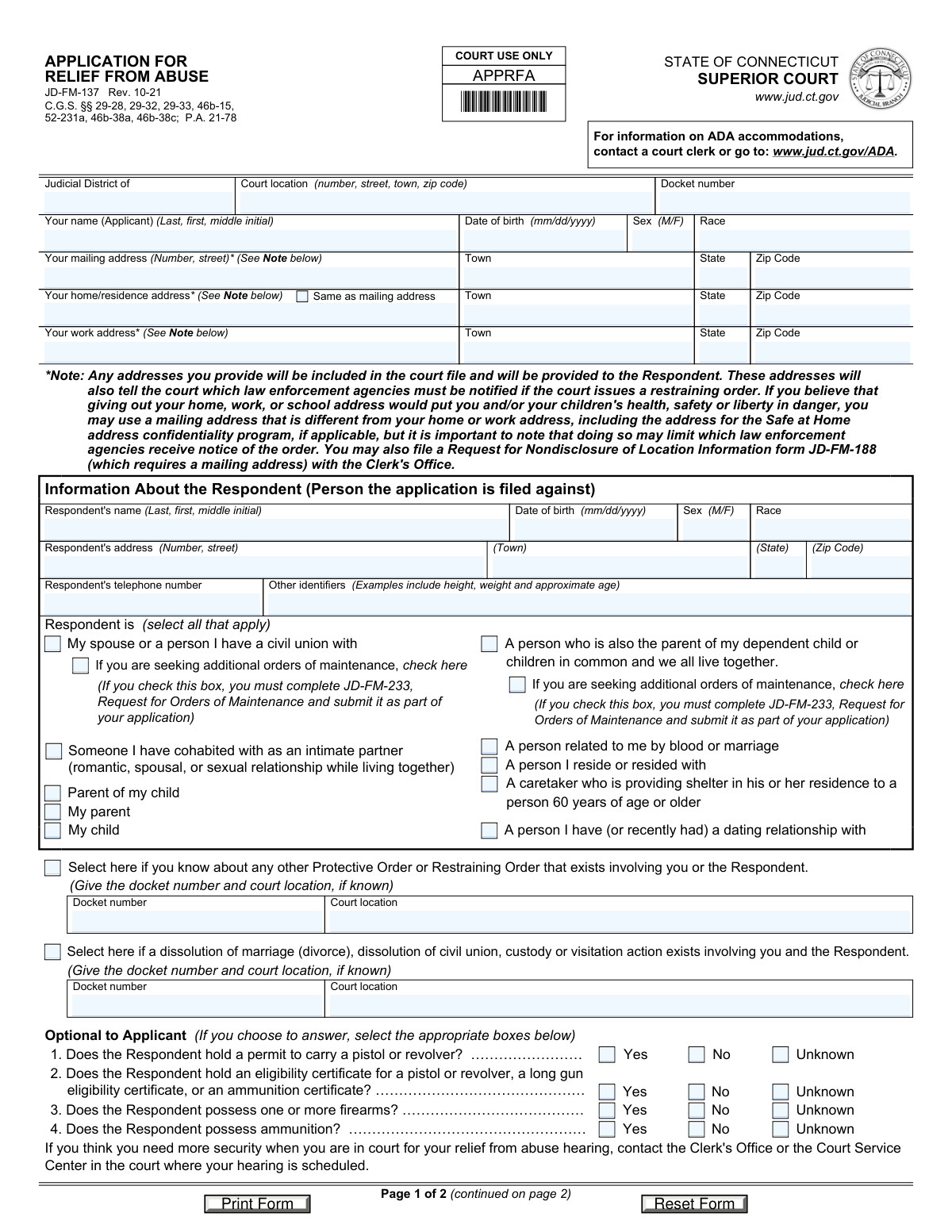
Form JD-FM-137, Application for Relief From Abuse, is a legal document filed with the Connecticut Superior Court by an individual (the applicant) seeking protection from another person (the respondent). It is used to request a restraining order to prevent harassment, threats, or physical harm, making it a critical tool for personal safety. Today, this form can be filled out quickly and accurately using AI-powered services like Instafill.ai, which can also convert non-fillable PDF versions into interactive fillable forms.
Our AI automatically handles information lookup, data retrieval, formatting, and form filling.
It takes less than a minute to fill out JD-FM-137 using our AI form filling.
Securely upload your data. Information is encrypted in transit and deleted immediately after the form is filled out.

Form specifications

Form name: Application for Relief From Abuse, JD-FM-137
Number of fields: 133
Number of pages: 2
Language: English
main-image

Instafill Demo: How to fill out PDF forms in seconds with AI

How to Fill Out JD-FM-137 Online for Free in 2026

Are you looking to fill out a JD-FM-137 form online quickly and accurately? Instafill.ai offers the #1 AI-powered PDF filling software of 2026, allowing you to complete your JD-FM-137 form in just 37 seconds or less.
Follow these steps to fill out your JD-FM-137 form online using Instafill.ai:
  1. 1 Navigate to Instafill.ai and upload or select the JD-FM-137 Application for Relief From Abuse form.
  2. 2 Provide your personal information, including your name, address, and date of birth, for the applicant section.
  3. 3 Enter all known details about the respondent, such as their name, address, and other identifiers.
  4. 4 Specify your relationship to the respondent and disclose any other existing protective orders or court cases involving both parties.
  5. 5 Select the specific protective conditions you are requesting, such as no-contact orders, stay-away orders, and protection for children or animals.
  6. 6 If requesting temporary custody or protection for children, provide their details and specify visitation requests.
  7. 7 Carefully review all the information populated by the AI, sign the application where required, and download it for filing with the appropriate Connecticut Superior Court.

Our AI-powered system ensures each field is filled out correctly, reducing errors and saving you time.

Why Choose Instafill.ai for Your Fillable JD-FM-137 Form?

Speed

Complete your JD-FM-137 in as little as 37 seconds.

Up-to-Date

Always use the latest 2026 JD-FM-137 form version.

Cost-effective

No need to hire expensive lawyers.

Accuracy

Our AI performs 10 compliance checks to ensure your form is error-free.

Security

Your personal information is protected with bank-level encryption.

Frequently Asked Questions About Form JD-FM-137

This form is used to ask a Connecticut Superior Court for a restraining order to protect you from someone who has subjected you to abuse, threats, stalking, or coercive control. It allows you to request protection for yourself, your children, and even your pets.

The 'Applicant' is you, the person seeking protection by filing the application. The 'Respondent' is the person you are filing the application against, from whom you need protection.

The form notes that you can use a different mailing address if you fear for your safety. You can also file a separate form, JD-FM-188 (Request for Nondisclosure of Location Information), with the Clerk's Office to help keep your address confidential.

This is a request for the court to grant a temporary restraining order immediately, without the Respondent being present, because you believe you are in immediate physical danger. If granted, a full hearing with both parties will be scheduled shortly thereafter.

Fill in as much information as you know to help the court and law enforcement identify and locate the Respondent. Providing a current address is crucial for serving the papers, but it is okay to leave fields blank if you do not know the information.

On page 2, you can check the box asking that the order protect your minor children and list their names and birthdates. You can also ask the court for temporary custody and request that a copy of the order be sent to your children's school.

This information is critical for the court and law enforcement to assess the level of risk and danger involved in the situation. Answering these questions helps ensure appropriate safety measures are considered if an order is granted.

You only need to complete and submit form JD-FM-233 if you are seeking financial support (maintenance) from the Respondent. This typically applies if the Respondent is your spouse, civil union partner, or the parent of your dependent child with whom you live.

You must sign the application and have it sworn to before an authorized person like a court clerk or notary public. Then, you must file it with the Clerk's Office at the appropriate Superior Court.

Yes, the form advises that if you feel you need more security when you are in court, you should contact the Clerk's Office or the Court Service Center where your hearing is scheduled to make arrangements.

Yes, services like Instafill.ai use AI to help you accurately auto-fill form fields, which can save time and reduce errors. This is especially helpful for complex forms with many fields.

You can upload the JD-FM-137 form to the Instafill.ai platform. The AI will identify the fields, allowing you to enter your information online quickly and conveniently before printing the completed form for submission.

You can use a service like Instafill.ai, which can convert flat, non-fillable PDFs into interactive, fillable forms. This allows you to type your information directly into the fields on your computer.

This information helps the court understand the full context of your relationship and any existing legal orders. It ensures that any new orders do not conflict with existing ones and allows the judge to make a more informed decision.

Compliance JD-FM-137
Validation Checks by Instafill.ai

1
Applicant Name Presence
This check ensures the 'Your name (Applicant)' field is not empty. The applicant's full name is a fundamental requirement for legal filings to identify the party seeking relief. If this field is left blank, the application is invalid and cannot be processed, so the user must be prompted to enter their name before submission.
2
Date of Birth Format and Plausibility
Validates that all date of birth fields (for Applicant, Respondent, and Children) are in a valid 'mm/dd/yyyy' format and represent a date in the past. This is crucial for identity verification and for determining eligibility (e.g., ensuring children are minors). An error should be shown for invalid formats or future dates, preventing nonsensical or incorrect data entry.
3
At Least One Relationship Selected
This check verifies that the applicant has selected at least one checkbox under 'Respondent is (select all that apply)'. This information is legally required to establish the court's jurisdiction to issue a restraining order under the relevant statutes. If no relationship is selected, the form cannot be filed, and the user must be prompted to define their relationship to the respondent.
4
Conditional Fields for Existing Court Cases
Ensures that if the applicant checks the box for an 'existing Protective Order' or an 'existing dissolution... or custody action', the corresponding 'Docket number' and 'Court location' fields are filled out. This information is vital for the court to understand the case history and avoid conflicting orders. If the box is checked but the details are missing, the user should be prompted to provide them or uncheck the box.
5
Conditional Child Protection Details
This validation checks that if the box 'That the order protect my minor children' is selected, the details (Name, Sex, Date of Birth) for at least one child are entered. The order cannot protect unspecified children. If the box is checked without child details, the submission should be blocked until the information is provided.
6
Conditional Child Custody Details
Verifies that if the applicant checks 'Award me temporary custody of the following minor child(ren)', the details for at least one child are provided in that specific section. A request for custody must specify the child or children involved. Failure to provide this information would make the request unenforceable and requires a user prompt to add child details.
7
Mutually Exclusive Visitation Choices
This check ensures that the user does not select both 'With visitation as follows' and 'Without visitation rights to the Respondent' simultaneously. These two options are logically contradictory. If both are selected, the system should display an error and require the user to choose only one option to clarify their request to the court.
8
Child Age Verification
Calculates the age of each child listed for protection or custody based on their 'Date of birth' to ensure they are under 18. The form specifically refers to 'minor children', so this check confirms their legal status as minors. If a date of birth results in an age of 18 or older, a warning should be displayed to the user to correct the entry.
9
Respondent Information Completeness
Validates that the 'Respondent's name' and 'Respondent's address' fields are completed. This information is critical for the court to properly identify the respondent and for law enforcement to serve the legal documents. While some details may be unknown, the name and an address are the minimum required for the legal process to begin, and their absence should halt submission.
10
Home Address Population Logic
This check enforces logic for the applicant's home address section. If the 'Same as mailing address' checkbox is selected, the system should validate that the home address fields are either disabled, hidden, or automatically populated with the mailing address data. If the box is unchecked, the home address fields become required, ensuring a complete address is always captured.
11
Conditional School Information Requirement
Ensures that if the box to send the order to the applicant's school or a child's school is checked, the corresponding school name and address fields are filled. This action cannot be completed without the school's contact information. If the box is checked but the details are missing, the user must be prompted to either provide the school's information or uncheck the box.
12
Firearm Questions Completeness
Verifies that for each of the four questions regarding firearms and ammunition, one and only one option ('Yes', 'No', or 'Unknown') is selected. This information is critical for assessing immediate risk and for potential orders to surrender firearms. An incomplete section should trigger an error, forcing the user to provide an answer for each question.
13
Maintenance Request Dependency Check
This validation checks if either of the 'Seeking additional orders of maintenance' boxes are checked. If so, it should trigger a notification or alert for the user, reminding them that they 'must complete JD-FM-233, Request for Orders of Maintenance and submit it as part of your application'. This serves as a crucial cross-form dependency check to ensure the application package is complete.
14
Signature Date Validation
This check ensures the 'Date signed' field is completed and contains a valid date that is not in the future. The signature date authenticates when the applicant certified the information as true. A missing or future date would invalidate the signature, so the system must require a valid, present or past date for submission.

Common Mistakes in Completing JD-FM-137

Mishandling of Confidential Address Information

Applicants, often under stress, may automatically write their current home address without fully reading or understanding the note about safety risks. Disclosing a home address makes it part of the public court file and available to the respondent, potentially compromising the applicant's safety. To avoid this, carefully read the note and consider using a secure mailing address, like the Safe at Home program, or filing form JD-FM-188 for nondisclosure.

Providing Incomplete Respondent Information

Applicants may leave the respondent's address, date of birth, or other identifiers blank because they don't have the exact information. However, this information is critical for law enforcement to legally serve the respondent with the court papers, a necessary step for the order to become effective. Without a valid address for service, the application can be significantly delayed or dismissed. It is crucial to provide as much detail as possible, even if it's a last known address or approximate age.

Failing to Request Immediate (Ex Parte) Relief

In situations of immediate danger, an applicant may overlook or not understand the importance of checking box #6 on page 2 for 'Ex Parte (immediate) relief'. Failing to check this box means the court will not consider granting a temporary order before the formal hearing, leaving the applicant unprotected during the waiting period. If you believe you are in immediate danger, it is essential to check this box to ask the court for protection right away.

Forgetting to Attach Required Supplemental Forms

The form contains checkboxes, such as 'seeking additional orders of maintenance,' that explicitly require the submission of an additional form (JD-FM-233). Applicants often check the box to make the request but forget to obtain, complete, and attach the separate document. This results in the court being unable to consider the request, which could involve crucial financial support. Always double-check if any of your selections require an accompanying form.

Incomplete or Inaccurate Child Protection Details

An applicant may check the box 'That the order protect my minor children' but then fail to list all the children's full names, dates of birth, and sex in the designated spaces. This omission can lead to a child being left off the final protective order, leaving them legally unprotected. It is vital to fill out the information for each child completely and accurately to ensure they are all covered by the court's order.

Failing to Disclose Other Relevant Court Cases

Applicants sometimes forget or choose not to disclose existing divorce, custody, or other protective orders involving the respondent. This information is legally required and helps the court understand the full history and context, preventing conflicting orders and ensuring a comprehensive legal strategy. Omitting this can cause procedural delays and may negatively impact the applicant's credibility.

Incorrectly Selecting the Relationship to the Respondent

The legal basis for a restraining order depends on the specific relationship between the applicant and respondent. Applicants may be confused by the options and select an incorrect relationship, or fail to select all that apply. This mistake can lead to the application being denied on technical grounds. Carefully review each option and select the one(s) that most accurately describe your relationship.

Submitting an Unsigned or Improperly Executed Form

The bottom of page 2 requires a signature, printed name, and date under a statement certifying the information is true, and it must be 'Subscribed and sworn to before me' by a clerk or notary. Applicants may sign it at home and submit it without this required attestation, which invalidates the application as a sworn statement. The form must be signed in the presence of a court clerk or a Notary Public to be legally valid.

Using Incorrect Date or Name Formats

The form specifies formats like 'mm/dd/yyyy' for dates and 'Last, first, middle initial' for names. People often use different formats out of habit, such as 'dd/mm/yyyy' or writing a first name first, which can cause data entry errors in the court's system. These small mistakes can lead to processing delays or issues with identifying the correct individuals. AI-powered tools like Instafill.ai can help prevent these errors by automatically formatting data correctly as you fill out the form.

Vague or Incomplete Relief Requests

On page 2, applicants must check specific boxes for the protections they are seeking (e.g., 'stay away from my home,' 'no contact'). Some may not check enough boxes, resulting in a less protective order, or they may not understand what each request entails. It is crucial to carefully select all conditions that apply to your situation to ensure the final order provides the comprehensive safety you need.

Leaving Court Information Blank

The top of the first page requires the Judicial District, Court Location, and Docket Number. While the applicant may not know the docket number initially, they must know which court they are filing in. Submitting the form to the wrong court location will cause it to be rejected, creating significant delays in a time-sensitive process. Applicants should confirm the correct Judicial District and court address for their jurisdiction before filing.
Saved over 80 hours a year

“I was never sure if my IRS forms like W-9 were filled correctly. Now, I can complete the forms accurately without any external help.”

Kevin Martin Green

Your data stays secure with advanced protection from Instafill and our subprocessors

Robust compliance program

Transparent business model

You’re not the product. You always know where your data is and what it is processed for.

ISO 27001, HIPAA, and GDPR

Our subprocesses adhere to multiple compliance standards, including but not limited to ISO 27001, HIPAA, and GDPR.

Security & privacy by design

We consider security and privacy from the initial design phase of any new service or functionality. It’s not an afterthought, it’s built-in, including support for two-factor authentication (2FA) to further protect your account.

Fill out JD-FM-137 with Instafill.ai

Worried about filling PDFs wrong? Instafill securely fills application-for-relief-from-abuse-jd-fm-137 forms, ensuring each field is accurate.