
Yes! You can use AI to fill out Authorization for Presence of an Individual at an Interview
Don't type 1 fields by hand. Tell our AI about yourself, or upload a document you already have, and it fills every field in seconds. You check it, then download, print or sign.
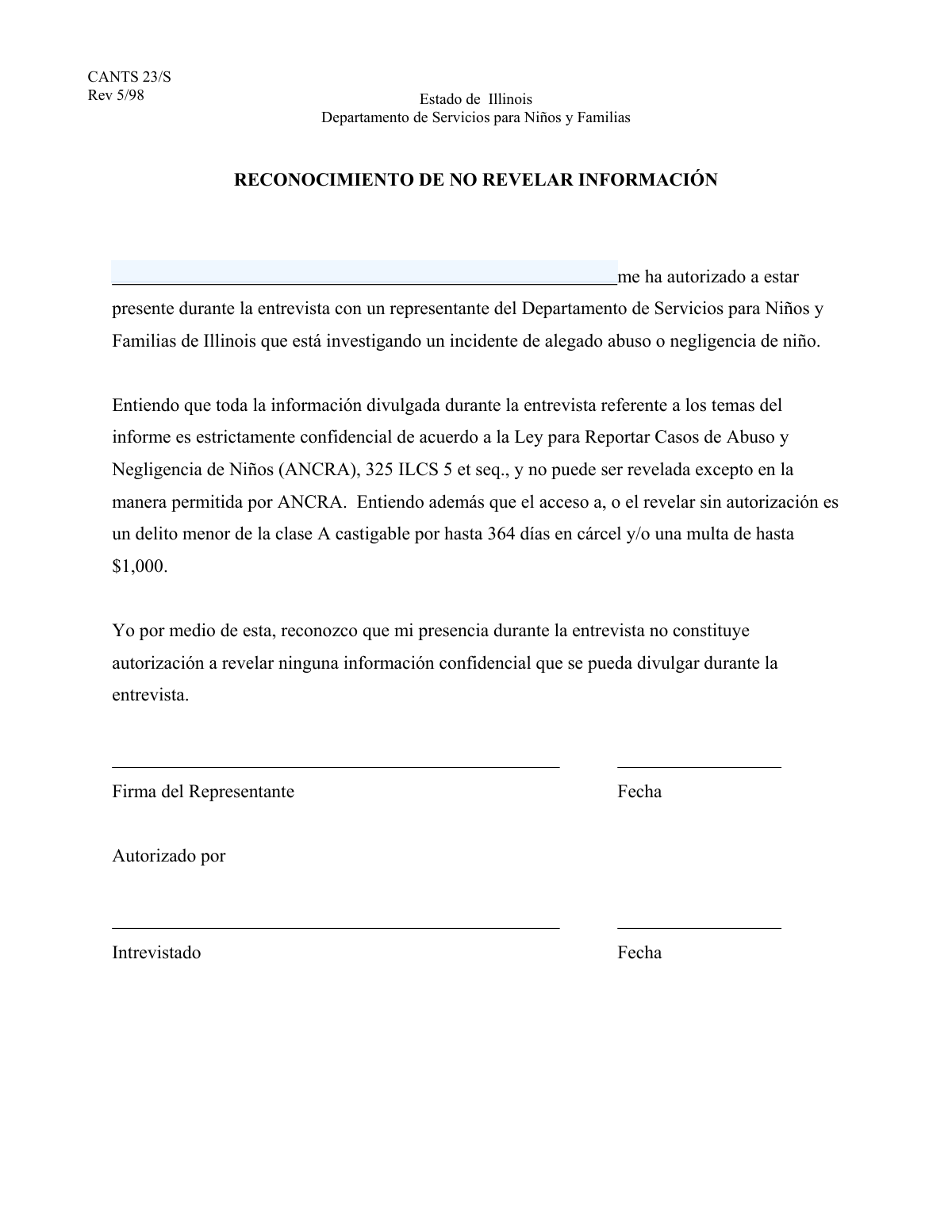
The AI does the filling. You just check it.
No typing into boxes, nothing to install.
What this form asks for
The AI fills all of it, from your answers or your documents.
The AI checks your answers before you download
12 checks built for this form, so a wrong date or a missing answer is caught before anyone else sees it.
This validation confirms that the 'Name of Authorized Person' field is not left blank. It is a mandatory field to ensure the identity of the person authorized for the interview is captured. A failed validation would prevent form submission and display a message prompting the user to provide the full name.
This check ensures the submitted name meets a minimum character length, for example, 3 characters. This helps prevent submissions of single initials or nonsensical short entries like 'X'. If the name is too short, the system will prompt the user to enter a valid full name.
This validation checks that the name does not exceed a predefined character limit, such as 100 characters. This is important for maintaining data integrity and preventing buffer overflow issues in backend systems. Submissions exceeding the limit will be rejected, and the user will be asked to shorten the name.
This rule validates that the name field contains no numeric digits (0-9). Since a person's legal name does not include numbers, this check helps ensure the data entered is a valid name. If numbers are detected, the submission will be flagged as invalid with an error message.
This validation ensures the name does not contain prohibited special characters like `!@#$%^&*()_+=[]{}|;:",.<>?/`. It may allow for common characters in names, such as hyphens or apostrophes, but blocks others to ensure data cleanliness and prevent potential injection attacks. A failed check will result in an error message listing the invalid characters.
This check verifies that the input likely represents a full name by looking for at least one space, suggesting the presence of both a first and last name. It helps enforce the instruction 'Please provide the full name'. While not foolproof, it prevents single-word entries and encourages more complete data entry.
And 6 more checks
- Placeholder Text Detection
- Leading and Trailing Whitespace Check
- Internal Excessive Whitespace Check
- Prohibition of URLs and Email Addresses
- Security Sanitization for Script Injection
- Valid Use of Hyphens and Apostrophes
Let AI fill out your Interview Presence Authorization
No typing. Every field filled in seconds, checked, ready to sign.
How to Fill Out Interview Presence Authorization Online for Free in 2026
What the AI walks you through.
- Navigate to Instafill.ai and upload or select the Authorization for Presence at an Interview form.
- Allow the AI to scan the document and identify all the required fields, such as the name of the authorized person.
- Enter the full name and any other required details of the person you are authorizing to be present.
- Provide your own information as the person granting the authorization, including your name and relationship to the proceedings.
- Review all the information auto-filled by the AI to ensure it is correct and complete.
- Electronically sign and date the form in the designated signature fields to certify the authorization.
- Download, print, or securely share the completed authorization form with the relevant parties or organization.
Common Mistakes in Completing Interview Presence Authorization
The ones the AI is built to catch.
Entering the Applicant's Name by Mistake
Using a Nickname or Abbreviated Name
Using Initials Instead of Full Names
Misspelling the Authorized Person's Name
Leaving the Field Blank When No One is Authorized
Illegible Handwriting on Printed Forms
Transposing the First and Last Name
Adding Unnecessary Titles or Suffixes
Listing Multiple Names in a Single Field
Frequently Asked Questions About Interview Presence Authorization
Is it really free for 7 days?
Can I fill other forms too?
How do I cancel?
How does the AI fill out Interview Presence Authorization?
What happens to my information?
How complex is Interview Presence Authorization to fill out?
What is the purpose of this form?
Who needs to fill out this form?
Is filling out this form mandatory?
Who can be an 'authorized person'?
How should I fill out the 'Name of Authorized Person' field?
What happens if I bring someone to the interview without submitting this form?
When is the deadline to submit this form?
What if I need to change the authorized person after I've already submitted the form?
Do I need to attach any other documents to this form?
Can I authorize more than one person to attend the interview?
Can AI tools help me fill out this form?
How can I fill this form out online using Instafill.ai?
The PDF I have is not fillable. What can I do?
Get your Interview Presence Authorization filled out by AI
$0 today. Cancel before Nov 10 and you pay nothing.
Other forms like this one
authorization forms: Form I-765, Application for Employment Authorization, Form CMS-588, EFT Authorization Agreement, Form 8821, Tax Information Authorization, Form 8879, IRS e-file Signature Authorization, Form SSA-827, Authorization to Disclose Information, Form I-905, Application for Authorization to Issue Certification for Health Care Workers, Form G-1650, Authorization for ACH Transactions, Arizona Form 285, General Disclosure/Representation Authorization Form, Arizona Form 285-I, Individual Income Tax Disclosure/Representation Authorization Form, The Department of Medical Assistance Services Applied Behavior Analysis Preservice Service Authorization Request Form (Effective Dates of Service 09/01/2025 and after), Form CH-006: PA-BH-Res-PCS, Oregon Behavioral Health Support Program Plan of Care Authorization (Plan of Care Request for Behavioral Health Residential or Personal Care Services), Continental American Insurance Company (CAIC) / Aflac Group Critical Illness Claim Form (with Attending Physician’s Statement, HIPAA Authorization to Obtain Information, and Electronic Funds Transaction Authorization), HIPAA Authorization Form, Authorization for the Release of Protected Health Information, Form G-1450, Authorization for Credit Card Transactions, Prior Authorization (PA) Request Form – Adult Palliative Care (Alameda Alliance for Health), Alameda Alliance for Health Prior Authorization (PA) Request Form – Adult Palliative Care, Manulife Group Benefits Drug Prior Authorization Form – Mounjaro (Tirzepatide) (GL5197E), Manulife Group Benefits Drug Prior Authorization Form (Ozempic/Semaglutide) – GL5197E, Out-of-Network Pre-Authorization and Exception Request Form, Form SSA-827 (06-2024), Authorization to Disclose Information to the Social Security Administration (SSA)
Let AI fill out your Interview Presence Authorization
Your trial starts once a card is added. You pay nothing before Nov 10.
Our AI already knows this form, all 1 fields of it. Skip the typing: tell it about yourself, or upload what you have, and it fills the whole form in seconds.
- AI fills every field on the form, checkboxes included
- No typing into boxes: answer a few questions, or upload a document you already have, an old copy of this form, a photo of a document
- The AI checks the answers; you review and change anything before you download
- Download the finished PDF, print it, or sign it online
- Encrypted, and never used to train AI
Cancel before Nov 10 and you pay nothing.
A card is needed to start the trial. Cancel in two clicks from your account.
Terms · Privacy