Yes! You can use AI to fill out Bill of Lading

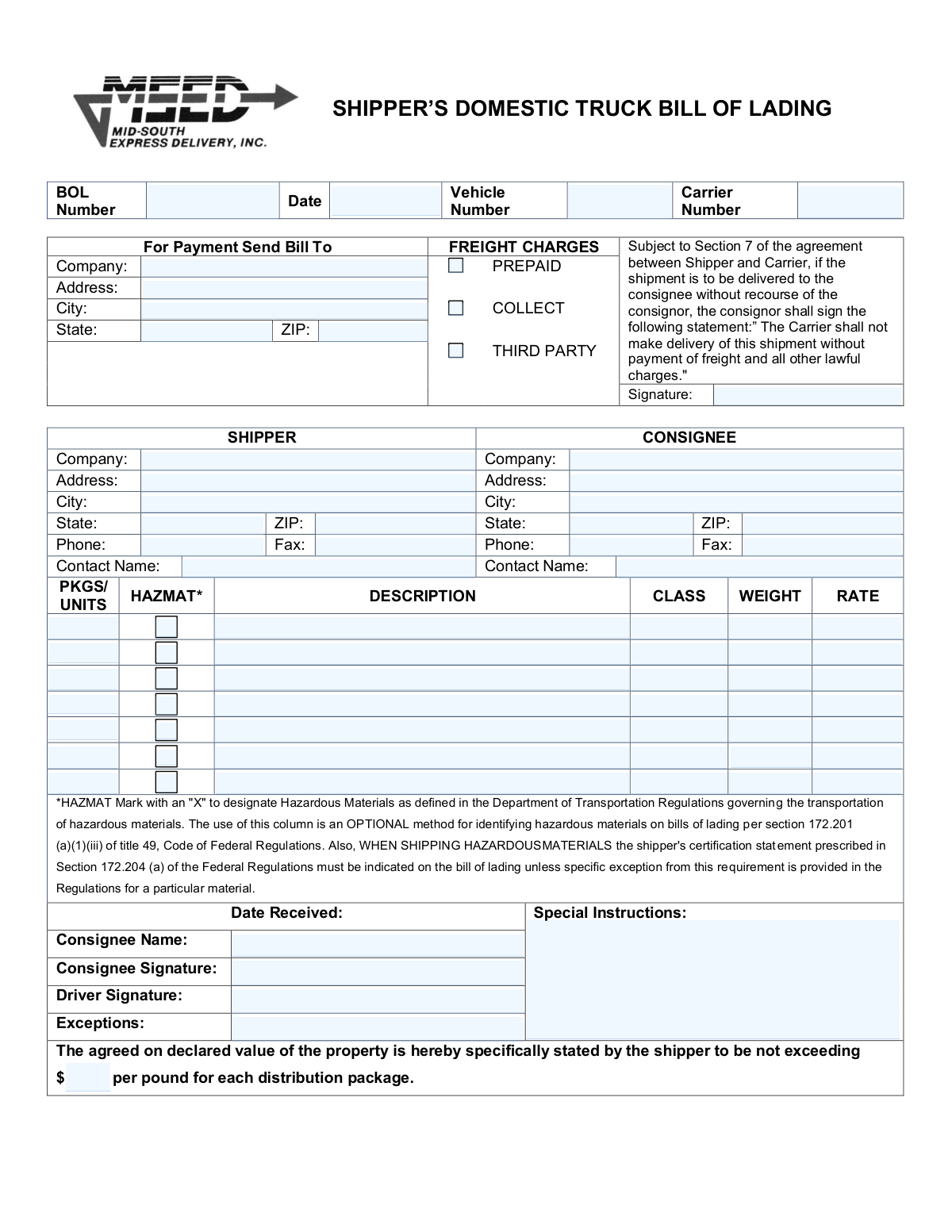
A Bill of Lading (BOL) is a legally binding document issued by a carrier to a shipper that details the type, quantity, and destination of the goods being carried. It serves as a receipt of freight services, a contract between a freight carrier and shipper, and a document of title. The BOL is a critical document in the shipping process, ensuring that shippers are paid and consignees receive their goods. Today, this form can be filled out quickly and accurately using AI-powered services like Instafill.ai, which can also convert non-fillable PDF versions into interactive fillable forms.
Our AI automatically handles information lookup, data retrieval, formatting, and form filling.
It takes less than a minute to fill out BOL using our AI form filling.
Securely upload your data. Information is encrypted in transit and deleted immediately after the form is filled out.

Form specifications

Form name: Bill of Lading
Number of fields: 78
Number of pages: 1
Filled form examples: Form BOL Examples
Language: English
main-image

Instafill Demo: How to fill out PDF forms in seconds with AI

How to Fill Out BOL Online for Free in 2026

Are you looking to fill out a BOL form online quickly and accurately? Instafill.ai offers the #1 AI-powered PDF filling software of 2026, allowing you to complete your BOL form in just 37 seconds or less.
Follow these steps to fill out your BOL form online using Instafill.ai:
  1. 1 Navigate to Instafill.ai and upload your Bill of Lading PDF or select a BOL template.
  2. 2 Allow the AI to scan and identify all the necessary fields, such as Shipper/Consignee Information, Item Details, and Freight Charges.
  3. 3 Provide your shipment details by answering simple questions. The AI will ask for information like company names, addresses, item descriptions, weights, and freight classes.
  4. 4 Watch as Instafill.ai's assistant accurately populates the corresponding fields on the Bill of Lading form with the information you provided.
  5. 5 Review the completed document for accuracy. You can easily click on any field to make edits or add special instructions.
  6. 6 Electronically sign the document where required to authorize the shipment and payment terms.
  7. 7 Download, print, or securely share the completed Bill of Lading with the carrier, shipper, and consignee directly from the platform.

Our AI-powered system ensures each field is filled out correctly, reducing errors and saving you time.

Why Choose Instafill.ai for Your Fillable BOL Form?

Speed

Complete your BOL in as little as 37 seconds.

Up-to-Date

Always use the latest 2026 BOL form version.

Cost-effective

No need to hire expensive lawyers.

Accuracy

Our AI performs 10 compliance checks to ensure your form is error-free.

Security

Your personal information is protected with bank-level encryption.

Frequently Asked Questions About Form BOL

This is a Bill of Lading (BOL), a legal contract between a shipper and a carrier for the transportation of goods. The shipper is responsible for filling out this form before the freight is picked up by the carrier.

'Prepaid' means the shipper pays for shipping in advance, while 'Collect' means the receiver (consignee) pays upon delivery. 'Third Party' indicates that another company, neither the shipper nor the consignee, is responsible for the payment.

You must provide the full company name, street address, city, state, ZIP code, and a contact person's name and phone number for both the sender (Shipper) and the receiver (Consignee).

The form has separate sections for up to seven different items. For each item, you must enter its quantity, a detailed description, freight class, weight, and shipping rate.

Freight Class is a standardized number used by carriers to classify shipments, which helps determine the shipping cost. It is based on the item's density, stowability, handling requirements, and liability.

If an item is considered a hazardous material, you must check the 'HAZMAT' box next to that item's description. Ensure you are also following all specific Department of Transportation regulations for labeling and packaging.

This field specifies the monetary value of your shipment per pound, which sets the carrier's maximum liability in case of loss or damage. Declaring a higher value may increase your shipping rate but provides more coverage.

The consignor (shipper) signs to confirm the freight payment terms. The consignee (receiver) signs upon delivery to acknowledge receipt of the goods.

The consignee should use the 'Exceptions' field to note any visible damage to the packages, shortages in quantity, or other issues with the shipment upon arrival. This is critical for filing a freight claim.

Yes, services like Instafill.ai use AI to auto-fill form fields accurately and save time. This can help reduce manual data entry and minimize errors.

Simply upload the Bill of Lading PDF to the Instafill.ai platform. The AI will make the form fillable online, and you can either type in the information or use the AI to auto-fill it from your saved profile.

You can use a service like Instafill.ai to solve this problem. It can convert flat, non-fillable PDFs into interactive forms that you can easily complete on your computer.

The Bill of Lading (BOL) Number is a unique number that identifies your shipment. It is typically assigned by the freight carrier when you book the shipment.

Use this section to communicate any specific needs for the shipment to the carrier. This can include delivery appointment times, a request for a liftgate service, or specific handling instructions.

Compliance BOL
Validation Checks by Instafill.ai

1
BOL Number Requirement
This check ensures that the 'BOL Number' field is not empty. The Bill of Lading number is a critical, unique identifier for the shipment, used for tracking, billing, and reference. A missing BOL number makes the document invalid and can cause significant delays in processing and logistics.
2
BOL Date Validity and Format
Validates that the 'Date' field contains a properly formatted date (e.g., MM/DD/YYYY) and that the date is not in the future or unreasonably far in the past. This is important for establishing the legal start of the shipping contract and for accurate record-keeping. An invalid date can lead to disputes over timing and liability.
3
Exclusive Freight Charge Selection
This validation ensures that only one of the freight charge options ('Prepaid', 'Collect', 'Third Party') is selected. A shipment can only have one primary payment method. Selecting multiple options creates ambiguity in billing, which will halt the invoicing process until it is manually corrected.
4
Third-Party Billing Information Completeness
If the 'Third Party' checkbox is selected for freight charges, this check verifies that the associated third-party billing information fields are filled out. Without this information, the carrier cannot invoice the correct party, leading to payment delays and potential disputes. The submission should be rejected until the billing details are provided.
5
Shipper Information Completeness
Verifies that the essential shipper fields, including 'Shipper Company', 'Shipper Address', 'Shipper City', 'Shipper State', and 'Shipper ZIP Code', are all populated. This information is legally required to identify the origin of the shipment and the responsible party. Incomplete shipper details can result in pickup failures and legal compliance issues.
6
Consignee Information Completeness
Verifies that the essential consignee fields, including 'Consignee Company', 'Consignee Address', 'Consignee City', 'Consignee State', and 'Consignee ZIP Code', are all populated. This information is critical for ensuring the shipment can be successfully delivered to the correct recipient. Missing information will prevent delivery and may cause the shipment to be returned or stored at the shipper's expense.
7
ZIP Code Format Validation
This check ensures that both the 'Shipper ZIP Code' and 'Consignee ZIP Code' fields adhere to a valid 5-digit or 9-digit (XXXXX-XXXX) format. Correct ZIP codes are essential for automated sorting, routing, and rate calculation by carriers. An invalid format can lead to misrouting, delivery delays, and incorrect freight charges.
8
Phone Number Format Validation
Validates that the 'Shipper Phone' and 'Consignee Phone Number' fields are in a recognizable phone number format (e.g., XXX-XXX-XXXX). A valid phone number is crucial for the carrier to contact the shipper or consignee regarding pickup, delivery, or any issues with the shipment. An invalid number can impede communication and problem resolution.
9
Item Line Integrity
For any item line where a 'Packages or Units Quantity' is entered, this check ensures that the corresponding 'Item Description', 'Freight Class', and 'Item Weight' are also provided. All these details are required to correctly classify, handle, and bill for an item. An incomplete item line makes the BOL invalid and requires manual correction before the shipment can be processed.
10
Positive Numeric Item Values
Ensures that all entered values for 'Packages or Units Quantity' and 'Item Weight' are positive numbers. It is not possible to ship zero or a negative quantity or weight of an item. This check prevents data entry errors that would lead to incorrect billing and load planning.
11
At Least One Shipment Item Requirement
This validation confirms that at least one complete item line has been filled out on the Bill of Lading. A BOL must describe goods being shipped; a form with no items listed is fundamentally incomplete and serves no purpose. The form should be rejected if no items are specified, as there is nothing to ship.
12
Carrier Number Requirement
This check ensures that the 'Carrier Number' field is populated with the carrier's identification number. This number is essential for identifying the transport company responsible for the shipment and is used in all subsequent tracking and communication. A missing carrier number makes it impossible to assign or track the load within logistics systems.
13
State Abbreviation Validation
Validates that the 'Shipper State' and 'Consignee State' fields contain a valid two-letter postal abbreviation. Using standardized state codes is critical for address validation, tax calculation, and automated routing systems. An incorrect or misspelled state can cause delivery failures and billing errors.
14
Declared Value Format
This check verifies that the 'Declared Value Per Pound' field, if filled, contains a valid positive numeric or currency value. This value is used to determine the carrier's liability limit and for insurance purposes. An invalid format would prevent correct liability assessment and could lead to claim disputes.

Common Mistakes in Completing BOL

Using an Incorrect Freight Class

Users often guess or use an outdated freight class, which is determined by an item's density, stowability, handling, and liability. An incorrect class can lead to carrier re-classification, resulting in significant billing adjustments and unexpected fees. Always consult the National Motor Freight Classification (NMFC) guide or use a trusted freight broker to determine the correct class for each item.

Providing Vague Item Descriptions

Entering generic descriptions like "parts" or "general merchandise" is a common error that can cause problems. Carriers and customs officials require specific details to assess liability, verify contents, and apply the correct freight class. Vague descriptions can lead to shipment inspections, delays, and claim denials; always be specific about the item, its material, and how it is packaged.

Neglecting to Mark Hazardous Materials (HAZMAT)

Forgetting to check the HAZMAT box for regulated items is a critical mistake with severe legal and safety consequences, including massive fines and liability for any resulting damages. Shippers may not realize that common items like batteries, aerosols, or certain cleaning supplies are considered hazardous. Always verify your items against Department of Transportation (DOT) regulations and clearly mark the BOL if any are classified as HAZMAT.

Conflicting Freight Charge Selections

Users frequently make errors in the freight charges section, such as checking both "Prepaid" and "Collect" or failing to select any option at all. This ambiguity creates confusion about who is responsible for payment, leading to billing disputes and delays in processing the shipment. Ensure that only one box (Prepaid, Collect, or Third Party) is checked to clearly define payment responsibility.

Swapping Shipper and Consignee Information

It is surprisingly common for users to accidentally transpose the shipper (origin) and consignee (destination) information. This simple data entry error can cause a shipment to be routed incorrectly, potentially sending it back to the origin and incurring substantial delays and additional shipping costs. Carefully double-check that all address and contact fields for both parties are in their correct respective sections.

Listing Inaccurate Weight or Package Count

Estimating weight or miscounting packages can lead to significant issues, as carriers almost always re-weigh and re-count shipments at their terminal. Discrepancies result in costly re-weigh fees and billing adjustments, and an understated weight can create a serious safety hazard if it makes a truck legally overweight. Use a certified scale for accurate weights and physically count the units to match the BOL.

Signing for Delivery Without Noting Exceptions

A consignee who signs the Bill of Lading upon delivery without noting damage or shortages is providing a "clear delivery receipt." This legally confirms the shipment was received in good condition and makes it nearly impossible to file a successful freight claim later. The receiving party must always inspect the freight for any damage or missing pieces and note all exceptions on the BOL before signing.

Omitting the Shipment's Declared Value

If the "Declared Value" field is left blank, the carrier's liability for loss or damage automatically defaults to a minimum, pre-defined amount per pound, which is often far less than the goods' actual worth. This can result in a major financial loss for the shipper in the event of a problem. To ensure adequate protection, always declare the shipment's value or ensure you have separate cargo insurance.

Providing Incomplete or Incorrect Addresses

A frequent error is the omission of crucial address details like suite numbers, building names, or the use of an incorrect ZIP code. Such mistakes can lead to failed delivery attempts, costly re-delivery fees, and significant delays. It is essential to verify and enter the complete, accurate physical street address for both the shipper and the consignee. AI-powered form-filling tools like Instafill.ai can help prevent these errors by validating addresses.

Forgetting the Consignor Signature for Freight Terms

The "Consignor Freight Payment Signature" is a legally binding acknowledgment of the payment terms, especially when a third party is involved. Forgetting this signature can create contractual loopholes, leading to payment disputes where the shipper may be held liable if the third party fails to pay. This signature is a critical step that should not be overlooked. If the form is a non-fillable PDF, tools like Instafill.ai can convert it to a fillable version to ensure no signature fields are missed.
Saved over 80 hours a year

“I was never sure if my IRS forms like W-9 were filled correctly. Now, I can complete the forms accurately without any external help.”

Kevin Martin Green

Your data stays secure with advanced protection from Instafill and our subprocessors

Robust compliance program

Transparent business model

You’re not the product. You always know where your data is and what it is processed for.

ISO 27001, HIPAA, and GDPR

Our subprocesses adhere to multiple compliance standards, including but not limited to ISO 27001, HIPAA, and GDPR.

Security & privacy by design

We consider security and privacy from the initial design phase of any new service or functionality. It’s not an afterthought, it’s built-in, including support for two-factor authentication (2FA) to further protect your account.

Fill out BOL with Instafill.ai

Worried about filling PDFs wrong? Instafill securely fills bill-of-lading-1 forms, ensuring each field is accurate.