Yes! You can use AI to fill out Bill of Sale (Form REG 135)

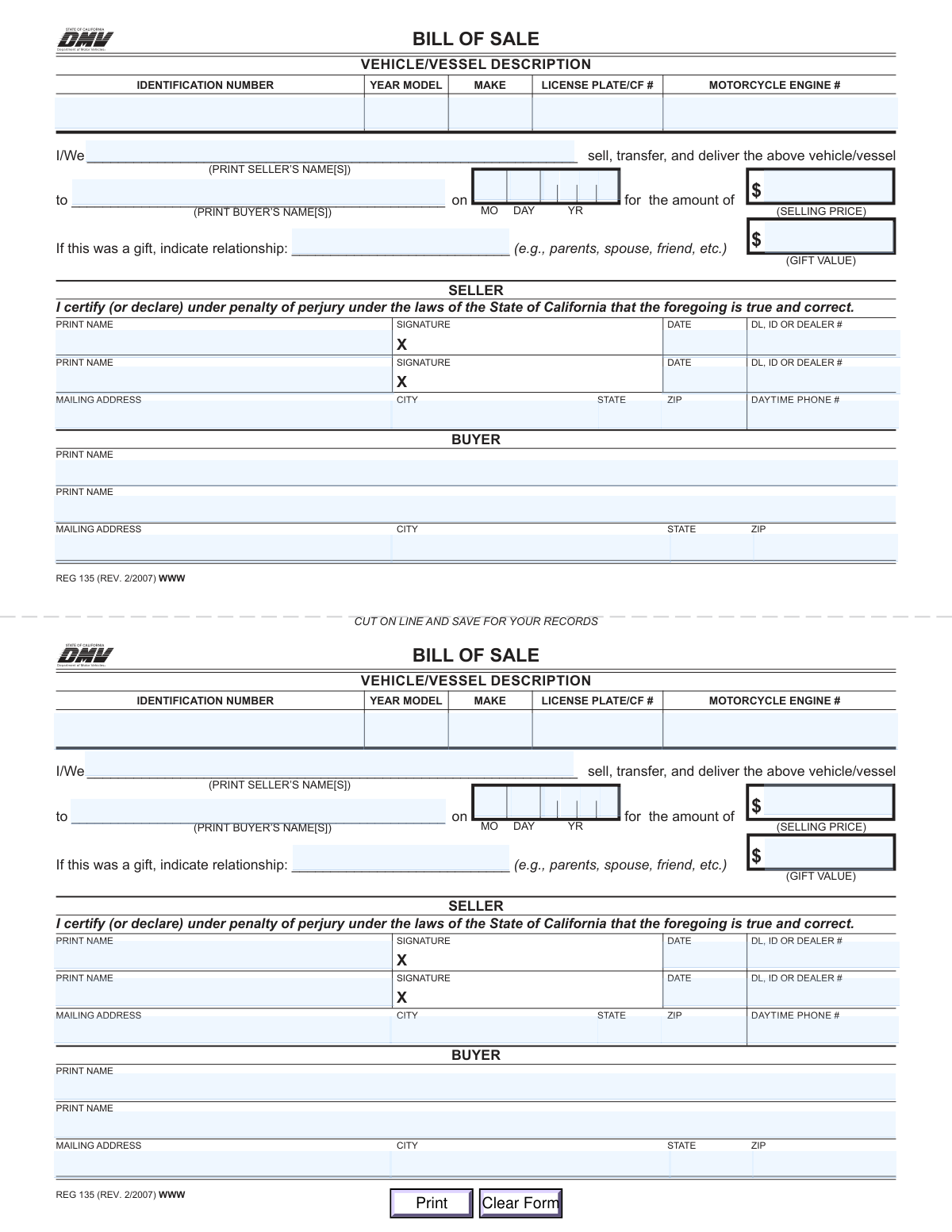
The California DMV Form REG 135, Bill of Sale, is a legal document that records the details of a private sale or gift of a vehicle or vessel. It serves as proof of transfer for both the buyer and seller, protecting the seller from future liability and allowing the buyer to register the vehicle. Today, this form can be filled out quickly and accurately using AI-powered services like Instafill.ai, which can also convert non-fillable PDF versions into interactive fillable forms.
Our AI automatically handles information lookup, data retrieval, formatting, and form filling.
It takes less than a minute to fill out REG 135 using our AI form filling.
Securely upload your data. Information is encrypted in transit and deleted immediately after the form is filled out.

Form specifications

Form name: Bill of Sale (Form REG 135)
Number of fields: 35
Number of pages: 1
Language: English
main-image

Instafill Demo: How to fill out PDF forms in seconds with AI

How to Fill Out REG 135 Online for Free in 2026

Are you looking to fill out a REG 135 form online quickly and accurately? Instafill.ai offers the #1 AI-powered PDF filling software of 2026, allowing you to complete your REG 135 form in just 37 seconds or less.
Follow these steps to fill out your REG 135 form online using Instafill.ai:
  1. 1 Navigate to Instafill.ai and upload or select the California Bill of Sale (Form REG 135).
  2. 2 Use the AI assistant to input the vehicle or vessel's description, including the VIN/HIN, year, make, and license plate/CF number.
  3. 3 Enter the full legal names of all sellers and buyers involved in the transaction.
  4. 4 Provide the sale details, such as the date of sale and the final selling price. If it's a gift, specify the relationship and estimated value.
  5. 5 Fill in the seller's personal information, including their mailing address, phone number, and driver's license or ID number.
  6. 6 Review all entered information for accuracy before the seller(s) sign and date the form to certify the transfer.
  7. 7 Download, print, and share the completed and signed Bill of Sale for both the buyer's and seller's records.

Our AI-powered system ensures each field is filled out correctly, reducing errors and saving you time.

Why Choose Instafill.ai for Your Fillable REG 135 Form?

Speed

Complete your REG 135 in as little as 37 seconds.

Up-to-Date

Always use the latest 2026 REG 135 form version.

Cost-effective

No need to hire expensive lawyers.

Accuracy

Our AI performs 10 compliance checks to ensure your form is error-free.

Security

Your personal information is protected with bank-level encryption.

Frequently Asked Questions About Form REG 135

This form is a legal document used to record the transfer of ownership of a vehicle or vessel from a seller to a buyer. It serves as proof of the transaction for both parties and is often required by the DMV for title transfer.

Both the seller and the buyer must complete and sign the Bill of Sale. The seller provides details about the vehicle and the terms of the sale, and the buyer provides their information to complete the transfer.

You will need the vehicle's identification number (VIN), year, make, and license plate number. Both the seller and buyer must provide their full names, addresses, and driver's license or ID numbers.

Do not enter a selling price. Instead, write the estimated value of the vehicle in the 'GIFT VALUE' field and specify your relationship to the recipient (e.g., parent, spouse, friend) on the line provided.

The form includes space for two sellers and two buyers. Ensure all parties involved print their names in the appropriate sections and that all sellers sign the document to make the sale valid.

The VIN is typically located on the driver's side of the dashboard, visible through the windshield, or on a sticker inside the driver's side door jamb. It should also be listed on the vehicle's title and registration documents.

The buyer will need to submit the Bill of Sale to the DMV to register the vehicle in their name. Both the buyer and seller should keep a completed copy for their personal records as proof of the transaction.

The form is designed with a duplicate section so that both the buyer and the seller can have a complete, signed record of the transaction. After signing, you can cut the form along the line and each party can keep a copy.

Yes, the form requires the seller to provide their Driver's License (DL), ID, or Dealer number. This information is used for verification purposes during the title transfer process at the DMV.

No, you should only fill out one of these fields. If money was exchanged, enter the amount in the 'SELLING PRICE' field; if it was a gift, enter the estimated value in the 'GIFT VALUE' field.

Yes, services like Instafill.ai use AI to accurately auto-fill form fields, which can save you time and help prevent common errors. This ensures all required information is entered correctly before you print and sign.

You can upload the REG 135 PDF to the Instafill.ai platform. Their service will make the form interactive, allowing you to easily type your information into the correct fields before downloading the completed document.

If you have a non-fillable or 'flat' PDF, you can use a service like Instafill.ai. It can convert the static document into an interactive, fillable form that you can complete on your computer.

Compliance REG 135
Validation Checks by Instafill.ai

1
Validate Identification Number Format
This check ensures the Vehicle Identification Number (VIN) or Hull Identification Number (HIN) in the 'Identification Number' field adheres to standard formats, such as a 17-character alphanumeric string for a VIN. It is critical because this number uniquely identifies the vehicle/vessel for legal and registration purposes. A failure in this validation would prevent the form from being processed as the primary subject of the sale cannot be accurately identified.
2
Exclusive Transaction Type (Sale vs. Gift)
This validation checks for logical consistency between the 'Selling Price' and the 'Gift' fields. The form should only have a value greater than zero in 'Selling Price' OR have the 'Gift Relationship' and 'Gift Value' fields completed, not both. This is important for determining the nature of the transfer for tax and title purposes. If both are filled, or neither for a non-zero transaction, the submission is ambiguous and should be rejected for clarification.
3
Validate Model Year Range
This check ensures the 'Year Model' is a four-digit number that falls within a reasonable range (e.g., between 1900 and the current year + 1). This prevents data entry errors such as typos or entering a two-digit year. An invalid year could lead to incorrect vehicle records and registration problems, so the form will be rejected if the year is outside the plausible range.
4
Composite Sale Date Validity
This check combines the individual month, day, and year fields to form a complete date and validates that it is a legitimate calendar date (e.g., not February 30th). It also ensures the date is not in the future. An accurate sale date is legally required to establish the precise time of transfer of ownership, and an invalid or future date would render the document void.
5
Seller Name Consistency Check
This validation compares the name(s) entered in the 'PRINT SELLER’S NAME(S)' field in the main transfer statement with the 'PRINT NAME' field in the seller's signature block. The names must match to ensure the person legally declaring the sale is the same person identified as the owner. A mismatch would raise questions about the legitimacy of the signature and could invalidate the sale.
6
Buyer Name Consistency Check
This validation compares the name(s) entered in the 'PRINT BUYER’S NAME(S)' field in the main transfer statement with the 'PRINT NAME' field(s) in the buyer's information section. This ensures consistency in identifying the new owner throughout the document. Inconsistent buyer names can cause significant delays and complications in titling and registering the vehicle/vessel.
7
Seller Signature Date Logic
This check verifies that the seller's 'SIGNATURE DATE' is on or after the 'Sale Date' entered in the main statement. It is legally and logically impossible for a seller to certify the details of a sale before the sale has occurred. A signature date preceding the sale date would invalidate the perjury statement and require correction.
8
Seller Information Completeness
This validation ensures that the seller has provided all required information, including a printed name, signature date, DL/ID/Dealer number, and a complete mailing address (address, city, state, ZIP). This information is essential for state agencies to verify the seller's identity and contact them if issues arise with the title transfer. An incomplete seller section will result in form rejection.
9
Buyer Address Completeness
This check confirms that the buyer's full mailing address, including street, city, state, and ZIP code, is completely filled out. The state DMV will use this address to mail the new title and registration documents to the new owner. Failure to provide a complete and accurate address will halt the title transfer process until the information is corrected.
10
ZIP Code Format Validation
This check ensures that both the seller's and buyer's 'ZIP' code fields contain a valid 5-digit numeric string. Correctly formatted ZIP codes are essential for mail delivery of legal documents related to the sale. An invalid format will cause an error and require the user to correct the entry before submission.
11
State Abbreviation Validation
This validation confirms that the 'STATE' fields for both the seller and buyer contain a valid two-letter US state or territory abbreviation. Using standardized abbreviations prevents ambiguity and ensures data integrity in the address records. An entry that does not match a valid abbreviation will be flagged as an error.
12
Seller Phone Number Format
This check validates that the 'DAYTIME PHONE #' for the seller follows a standard format (e.g., 10 digits, possibly with optional formatting like parentheses or dashes). A valid phone number is crucial in case the processing agency needs to contact the seller to resolve any discrepancies or issues with the bill of sale. An improperly formatted number could prevent this necessary communication and will be rejected.

Common Mistakes in Completing REG 135

Incorrect Vehicle Identification Number (VIN)

The VIN is a unique 17-character code that is prone to transcription errors, such as swapping numbers or misreading letters (e.g., 'O' for '0', 'I' for '1'). An incorrect VIN is a critical error because it fails to uniquely identify the vehicle, leading to immediate rejection by the DMV and significant delays in title transfer. To avoid this, meticulously double-check the VIN against both the vehicle itself (usually on the dashboard or door jamb) and the official title document. AI-powered tools like Instafill.ai can help by validating the VIN's format and checksum to catch errors instantly.

Confusing Selling Price with Gift Value

Users often get confused and fill out both the 'Selling Price' and the 'Gift Value' fields, or they enter a nominal amount like '$1' for a gift. This creates ambiguity and can trigger scrutiny from the DMV regarding sales tax obligations. The consequence is a rejected form or a request for more information. To prevent this, fill out only one section: if it's a sale, enter the price; if it's a gift, leave the price blank and fill in the gift value and relationship.

Swapping Signature and Printed Name Lines

A very frequent mistake is signing on the line designated for the printed name and printing the name on the signature line marked with an 'X'. This happens due to haste or not reading the labels carefully. This error can invalidate the document, as a legal signature is required in a specific spot, forcing the parties to fill out the form all over again. Always pause and read the instructions for each line before writing.

Using Nicknames Instead of Full Legal Names

Sellers and buyers may write their common nickname or an initial instead of their full legal name as it appears on their government-issued ID and the vehicle's title. The DMV's systems require an exact match to process a title transfer. A name mismatch will result in the form being rejected, requiring correction and resubmission. Always use the complete, official name listed on your driver's license or state ID.

Incomplete or Illegible Seller Information

The seller section requires multiple pieces of information: printed name, signature, date, address, phone number, and a DL/ID/Dealer number. It is common for sellers to forget one of these fields, especially the DL/ID number or the date next to the signature. If the form is handwritten, illegible entries can also be a major problem. An incomplete or unreadable form will be rejected, halting the transfer process. Using a tool like Instafill.ai to convert the non-fillable PDF into a fillable version ensures all entries are typed, legible, and complete.

Incorrect Date of Sale Format

The form specifies separate boxes for the month, day, and year (MO, DAY, YR), which can lead to errors if not filled precisely. People may enter the date they are filling out the form rather than the actual date of sale, or they might use a different format like MM/DD/YYYY which doesn't fit the boxes. An incorrect sale date can create issues with liability for tickets, tolls, or accidents that occur after the vehicle has been sold but before the date on the form. Ensure the exact date of the transaction is entered in the specified format.

Forgetting to List All Owners/Buyers

If a vehicle is co-owned, all individuals listed on the title must be included as sellers on the Bill of Sale and provide their signatures. Forgetting to include a co-owner invalidates the sale from a legal standpoint, as not all parties have relinquished their ownership. This will cause the DMV to reject the title transfer application. Before filling out the form, confirm all legal owners by checking the vehicle's title document.

Omitting the Seller's Driver's License Number

The 'DL, ID OR DEALER #' field is mandatory for the seller but is frequently left blank. Sellers may not have their ID handy or may not realize it's a required field for verification purposes. The DMV uses this number to verify the seller's identity, and its absence will result in an incomplete application and rejection. The seller must provide this number for the transaction to be processed successfully.

Providing an Incomplete or Inaccurate Buyer Address

The buyer's full mailing address is required, but people often provide partial information, such as omitting the apartment number, city, or ZIP code. An incorrect address means the buyer will not receive the new title and registration documents from the DMV, leading to legal issues if they are pulled over. To avoid this, the buyer should provide their complete, accurate mailing address. AI form-filling tools like Instafill.ai can help by auto-completing and validating addresses to ensure they are correct and deliverable.
Saved over 80 hours a year

“I was never sure if my IRS forms like W-9 were filled correctly. Now, I can complete the forms accurately without any external help.”

Kevin Martin Green

Your data stays secure with advanced protection from Instafill and our subprocessors

Robust compliance program

Transparent business model

You’re not the product. You always know where your data is and what it is processed for.

ISO 27001, HIPAA, and GDPR

Our subprocesses adhere to multiple compliance standards, including but not limited to ISO 27001, HIPAA, and GDPR.

Security & privacy by design

We consider security and privacy from the initial design phase of any new service or functionality. It’s not an afterthought, it’s built-in, including support for two-factor authentication (2FA) to further protect your account.

Fill out REG 135 with Instafill.ai

Worried about filling PDFs wrong? Instafill securely fills bill-of-sale-form-reg-135 forms, ensuring each field is accurate.