Yes! You can use AI to fill out CFS 1800-U, 60+ Subsidy Checklist
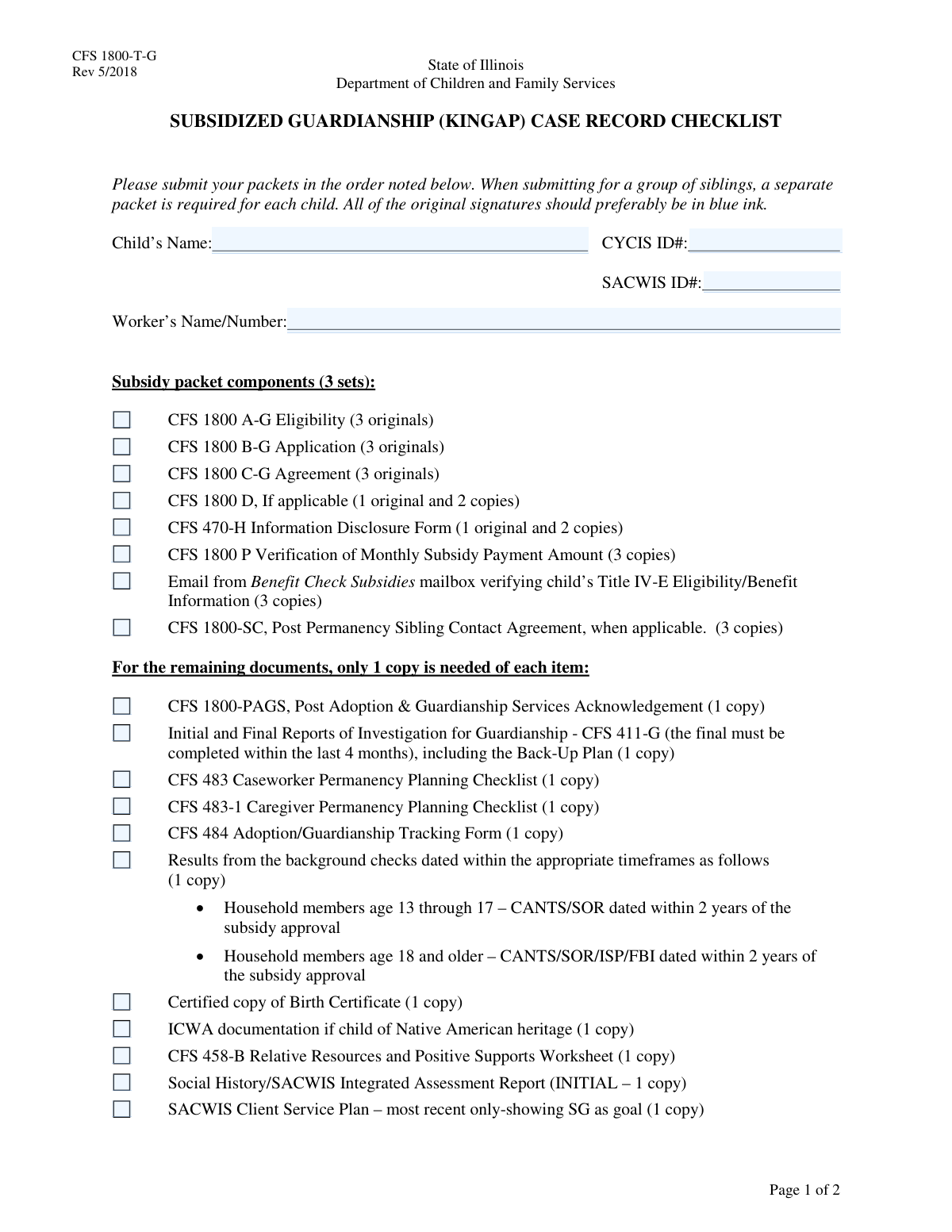
The CFS 1800-U is an administrative checklist used by child welfare agencies to ensure the completeness of a subsidy packet for adoption or guardianship. It serves as a master list to confirm that all necessary forms, reports, court orders, and background checks are compiled, preventing delays in securing financial support for families. Today, this form can be filled out quickly and accurately using AI-powered services like Instafill.ai, which can also convert non-fillable PDF versions into interactive fillable forms.
Our AI automatically handles information lookup, data retrieval, formatting, and form filling.
It takes less than a minute to fill out CFS 1800-U using our AI form filling.
Securely upload your data. Information is encrypted in transit and deleted immediately after the form is filled out.
Form specifications
| Form name: | CFS 1800-U, 60+ Subsidy Checklist |
| Number of fields: | 42 |
| Number of pages: | 2 |
| Filled form examples: | Form CFS 1800-U Examples |
| Language: | English |
Instafill Demo: How to fill out PDF forms in seconds with AI
How to Fill Out CFS 1800-U Online for Free in 2026
Are you looking to fill out a CFS 1800-U form online quickly and accurately? Instafill.ai offers the #1 AI-powered PDF filling software of 2026, allowing you to complete your CFS 1800-U form in just 37 seconds or less.
Follow these steps to fill out your CFS 1800-U form online using Instafill.ai:
- 1 Navigate to Instafill.ai and upload or select the CFS 1800-U form to begin.
- 2 Use the AI assistant to populate the Child Information and Worker Information sections with the child's name, IDs, and worker details.
- 3 Go through the 'Subsidy Packet Components' checklist, ticking the box for each included document, such as the various CFS 1800 forms and Title IV-E verification.
- 4 Complete the 'Remaining Documents Checklist' and 'Required Documents Checklist' by confirming the presence of items like background checks, birth certificates, and court orders.
- 5 Address any applicable special conditions, such as checking the box for ICWA documentation or the Day Care Application if relevant.
- 6 Enter the Caseworker Supervisor and Adoption Coordinator information, including names, agency details, and review dates.
- 7 Review the entire completed checklist for accuracy, then download, print, or securely share the finalized CFS 1800-U form as part of the official subsidy packet.
Our AI-powered system ensures each field is filled out correctly, reducing errors and saving you time.
Why Choose Instafill.ai for Your Fillable CFS 1800-U Form?
Speed
Complete your CFS 1800-U in as little as 37 seconds.
Up-to-Date
Always use the latest 2026 CFS 1800-U form version.
Cost-effective
No need to hire expensive lawyers.
Accuracy
Our AI performs 10 compliance checks to ensure your form is error-free.
Security
Your personal information is protected with bank-level encryption.
Frequently Asked Questions About Form CFS 1800-U
This form is a checklist used by caseworkers to ensure that a child's subsidy packet for adoption or guardianship is complete before submission. It helps verify that all required documents, from applications to court orders, are included.
A caseworker or a designated worker handling the child's subsidy case is responsible for completing this checklist. The packet is then reviewed by a caseworker supervisor and an Adoption Coordinator.
The CYCIS and SACWIS IDs are unique identification numbers used within the child welfare information system to track a child's case. These numbers can be found in the child's official case file or system record.
Multiple originals are often required for legal and administrative purposes, ensuring that all relevant parties and departments receive an official, signed copy of the agreement. This facilitates simultaneous processing and record-keeping.
You must include Indian Child Welfare Act (ICWA) documentation only if the child involved is of Native American heritage. This is a specific legal requirement to protect the child's cultural interests.
You must include copies of background checks for all relevant household members, dated within two years of the subsidy approval. This includes CANTS/SOR checks for teens (13-17) and CANTS/SOR/ISP/FBI checks for adults (18+).
If a document, such as the 'CFS 1800-SC, Post Permanency Sibling Contact Agreement,' is marked as 'if applicable' and does not apply to your case, you should leave the checkbox blank and not include the form.
If you are requesting employment-related daycare for a child under three, you must complete and include the 'New CFS 2000 Part 1 and II, Day Care Application.' Ensure it is signed and dated by all required parties.
This checklist is a specific requirement for cases involving caregivers who are aged 60 or older. It ensures that additional considerations and plans, such as the CFS 604 form, are in place.
Processing times can vary depending on the agency's workload and the specifics of the case. Ensuring your packet is complete by using this checklist can help prevent delays in the review and approval process.
Yes, services like Instafill.ai use AI to help you accurately auto-fill form fields like names, ID numbers, and dates. This can save significant time and reduce the chance of manual entry errors.
If you have a non-fillable or 'flat' PDF, you can use a service like Instafill.ai. It can convert the non-fillable PDF into an interactive, fillable form that you can complete easily on your computer.
To fill this form online, simply upload the PDF to the Instafill.ai platform. It will make the document interactive, allowing you to type directly into fields, check boxes, and add signatures before downloading the completed form.
Compliance CFS 1800-U
Validation Checks by Instafill.ai
1
Child Identifier Presence
This check ensures that at least one of the child identification numbers, either the CYCIS ID or the SACWIS ID, has been entered. These IDs are critical for uniquely identifying the child within the state's welfare information systems and linking the subsidy packet to the correct case file. If neither ID is provided, the form submission will be rejected, as the application cannot be processed without a valid system identifier.
2
Required Legal Orders Completeness
This validation verifies that the checkboxes for 'Temporary Custody Order', 'Adjudicatory Order', and 'Dispositional Order' are all selected. These legal documents are foundational for establishing the state's authority and the child's eligibility for guardianship or adoption subsidies. Failure to include all three required orders will result in an incomplete packet and will halt the subsidy approval process until they are provided.
3
Supervisor Phone Number Format
This check validates that the 'Phone Number' in the Caseworker Supervisor Information section is in a recognizable US phone number format (e.g., XXX-XXX-XXXX or (XXX) XXX-XXXX). Proper formatting is essential for ensuring the contact information is valid and usable for any necessary follow-up or verification. An invalid format will trigger an error, prompting the user to correct the entry before submission.
4
Adoption Coordinator Review Date Logic
This validation enforces the rule that the 'Adoption Coordinator Review Date' can only be filled out if the 'Adoption Coordinator Name' field is also completed. It also checks that the date provided is a valid date and is not in the future. This maintains logical consistency and ensures that a review date is not erroneously recorded without an associated reviewer, which is crucial for accountability. An error will be shown if the date is present without a name or is a future date.
5
Core Subsidy Packet Completeness
This check ensures that the checkboxes for the three core subsidy forms, 'CFS 1800 A-G Eligibility', 'CFS 1800 B-G Application', and 'CFS 1800 C-G Agreement', are all marked as included. These forms constitute the fundamental application for the subsidy and are non-negotiable components. If any of these boxes are unchecked, the submission is considered incomplete and will be rejected, as the packet lacks the essential paperwork for consideration.
6
Supervisor Information Completeness
This validation verifies that all fields within the 'Caseworker Supervisor Information' section—specifically 'Supervisor's Printed Name', 'Agency Name and Address', and 'Phone Number'—are filled. Complete supervisor information is mandatory for accountability and provides a necessary point of contact for escalation or verification. If any of these fields are left blank, the form cannot be submitted, ensuring a complete contact record is always provided.
7
Child's Name Is Required
This check ensures the 'Child's Name' field is not empty. The child's full name is the most basic and essential identifier for the application and is required on all associated documentation. Submitting a form without the child's name would make the packet unusable, so this validation prevents submission until the name is provided.
8
Investigation Report Timeliness Acknowledgment
This validation confirms that the user has checked the box for 'Initial and Final Reports of Investigation for Guardianship - CFS 411-G'. The form explicitly states this report must be completed within the last 4 months. By checking the box, the user attests that the included document meets this recency requirement, which is critical for ensuring the information used for decision-making is current. The system flags this as a required acknowledgment for a complete submission.
9
Background Check Timeliness Acknowledgment
This check verifies that the 'Results from background checks' checkbox is selected, acknowledging the inclusion of checks with appropriate dates. The form specifies timeframes (e.g., within 2 years of subsidy approval) for various household members. This validation ensures the submitter formally attests that the provided documents adhere to these critical safety and compliance timelines. An unchecked box would indicate an incomplete and non-compliant packet.
10
Conditional Day Care Form Logic
This validation checks the dependency for the 'New CFS 2000 Part 1 and II, Day Care Application'. The form states this document is required 'when requesting for Employment Related Day Care for Children Under Age 3'. The system will validate that if a day care request is indicated elsewhere on the form or in the system, this checkbox must be checked. This prevents incomplete applications for users who are requesting a specific, conditional benefit.
11
Worker Identifier Is Required
This check ensures the 'Worker's Name or Number' field is filled out. This information is crucial for identifying the caseworker responsible for the subsidy packet, enabling communication, and ensuring accountability throughout the review process. If this field is empty, the submission is blocked to prevent 'orphaned' packets that cannot be assigned or tracked back to a specific worker.
12
Agency Address Completeness
This validation examines the 'Agency Name and Address' field to ensure it contains more than just a name, checking for common address components like a street number or city. A full, valid address is necessary for official correspondence and for verifying the legitimacy and location of the agency. A simple name or incomplete address will trigger an error, prompting the user to provide a complete mailing address.
Common Mistakes in Completing CFS 1800-U
Users frequently mistype or transpose digits when entering the CYCIS or SACWIS ID numbers. These long, unique identifiers are critical for locating the child's case file, and even a small error can lead to a system mismatch. This results in significant processing delays as the agency must manually search for the correct file or request a correction. To prevent this, carefully double-check the numbers against the source document before submission.
The form specifies the exact number of originals and copies required for each document (e.g., '3 originals', '1 original and 2 copies'). A common mistake is to submit only a single copy of each document, assuming it's sufficient. This leads to the entire subsidy packet being marked as incomplete and returned, delaying critical support for the child. Always use the form as a final physical checklist, counting the documents to ensure the correct number of copies for each item is included.
People often fill out the checklist before the packet is finalized, leading to discrepancies where a box is checked for a document that isn't actually included, or vice-versa. This defeats the purpose of the checklist, forcing the reviewer to manually inventory the entire packet and causing delays when items are missing. To avoid this, assemble the complete physical packet first, then use the final stack of documents to accurately fill out the checklist as the very last step before submission.
The form requires certain documents, like the 'Reports of Investigation for Guardianship' and background checks, to be dated within specific timeframes (e.g., 'within the last 4 months' or 'within 2 years'). Applicants may inadvertently submit older documents they have on hand, not realizing they have expired for the purpose of this application. This results in an automatic rejection of the packet, forcing the applicant to restart the time-consuming and sometimes costly process of obtaining new reports. Always verify the date on every time-sensitive document against the form's requirements.
Several items, such as the 'CFS 1800-SC, Post Permanency Sibling Contact Agreement' or 'ICWA documentation', are required only if 'applicable' to the case. A frequent error is either failing to include these documents when they are necessary or including them when they are not, creating confusion. This can halt the process while the agency seeks clarification. Carefully read the conditions for each document to determine if it applies to the specific child's situation before including it in the packet.
The checklist explicitly requires key court documents like the Temporary Custody, Adjudicatory, and Dispositional Orders. In the rush to compile a large packet of paperwork, one of these crucial legal documents can be accidentally omitted. Since these orders form the legal basis for the subsidy, their absence leads to an immediate rejection of the application until the complete legal file is provided. It is best to gather all required court orders first before assembling the rest of the packet.
The 'New CFS 2000 Part 1 and II, Day Care Application' is required only when requesting day care for children under 3. A common error is either forgetting to include this form when it is needed or including it when it is not. Forgetting the form means the day care subsidy will not be processed, while including it unnecessarily can create confusion and slow down the review of the primary subsidy application. Always confirm if the conditional request applies to your case before adding the associated forms.
The form requires the caseworker supervisor's printed name, full agency name and address, and phone number. Applicants sometimes provide only a name, assuming the other details are known or can be easily found. This is a mistake, as it prevents the reviewing agency from contacting the supervisor for necessary verification, stalling the entire approval process. Ensure all fields in this section are filled out completely and accurately.
The 'Child's Name' field requires the full, legal name. Errors include using a nickname, omitting a middle name, or misspelling the name. This creates a mismatch with other official documents like the birth certificate and court orders, causing identity verification failures and processing holds. To avoid this, copy the child's full legal name exactly as it appears on the certified birth certificate.
The checklist asks for 'Professional Documentation' such as psychological reports, medical reports, or other records. This documentation is often the basis for determining the subsidy level and eligibility. A common mistake is failing to include these reports or providing incomplete records, which can lead to the application being denied or approved at a lower-than-appropriate subsidy level. Ensure all relevant professional assessments are gathered and included to fully support the application.
Saved over 80 hours a year
“I was never sure if my IRS forms like W-9 were filled correctly. Now, I can complete the forms accurately without any external help.”
Kevin Martin Green
Your data stays secure with advanced protection from Instafill and our subprocessors
Robust compliance program
Transparent business model
You’re not the product. You always know where your data is and what it is processed for.
ISO 27001, HIPAA, and GDPR
Our subprocesses adhere to multiple compliance standards, including but not limited to ISO 27001, HIPAA, and GDPR.
Security & privacy by design
We consider security and privacy from the initial design phase of any new service or functionality. It’s not an afterthought, it’s built-in, including support for two-factor authentication (2FA) to further protect your account.
Fill out CFS 1800-U with Instafill.ai
Worried about filling PDFs wrong? Instafill securely fills cfs-1800-u-60-subsidy-checklist forms, ensuring each field is accurate.