Yes! You can use AI to fill out CFS 1800-U, 60+ Subsidy Checklist

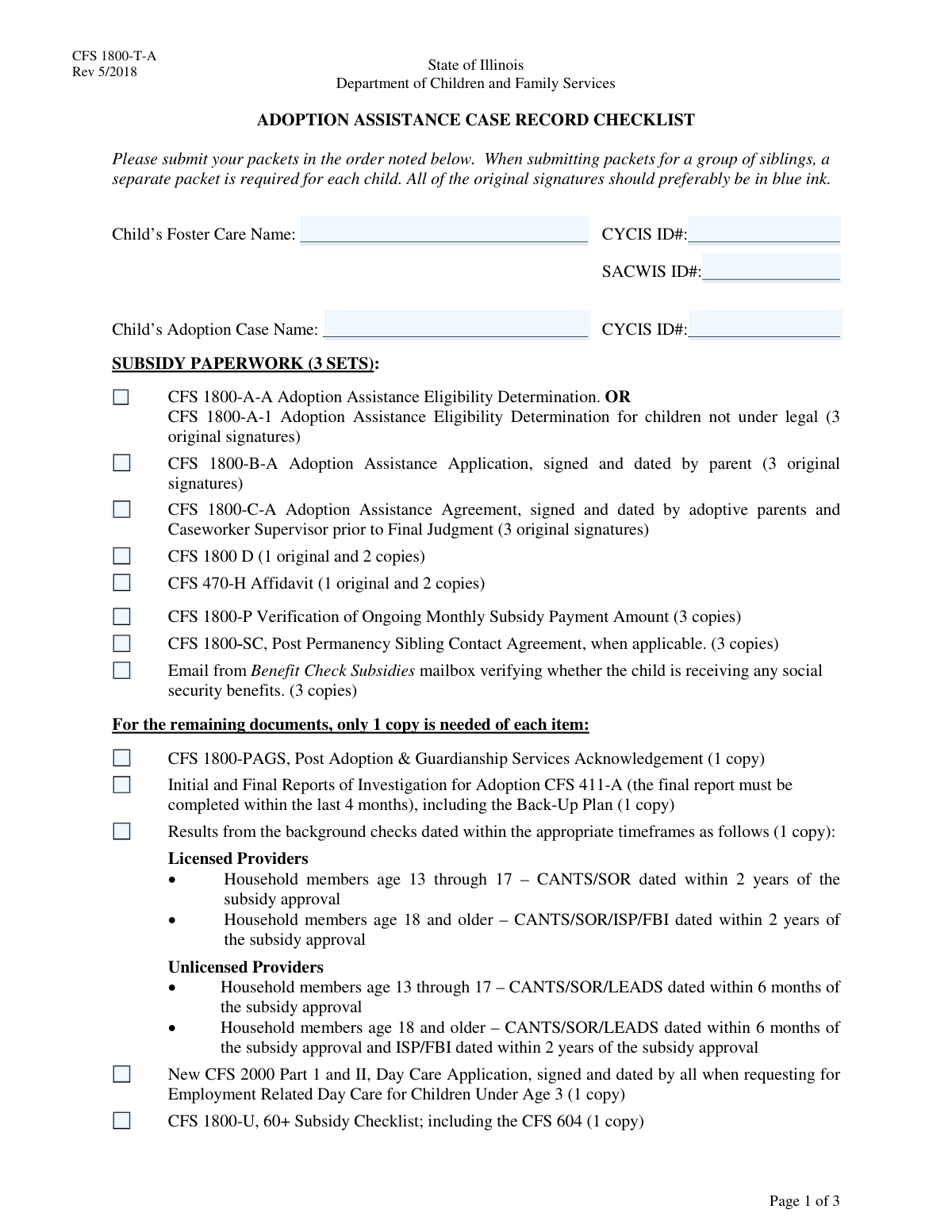
The CFS 1800-U, 60+ Subsidy Checklist, is a crucial organizational tool for caseworkers and prospective adoptive parents navigating the adoption assistance process. It serves as a master list to track the collection and submission of numerous required documents, including eligibility determinations, legal orders, and financial verifications, ensuring the subsidy packet is complete and accurate. This meticulous process helps prevent delays in securing vital financial support for the adopted child. Today, this form can be filled out quickly and accurately using AI-powered services like Instafill.ai, which can also convert non-fillable PDF versions into interactive fillable forms.
Our AI automatically handles information lookup, data retrieval, formatting, and form filling.
It takes less than a minute to fill out CFS 1800-U using our AI form filling.
Securely upload your data. Information is encrypted in transit and deleted immediately after the form is filled out.

Form specifications

Form name: CFS 1800-U, 60+ Subsidy Checklist
Number of fields: 54
Number of pages: 3
Filled form examples: Form CFS 1800-U Examples
Language: English
main-image

Instafill Demo: How to fill out PDF forms in seconds with AI

How to Fill Out CFS 1800-U Online for Free in 2026

Are you looking to fill out a CFS 1800-U form online quickly and accurately? Instafill.ai offers the #1 AI-powered PDF filling software of 2026, allowing you to complete your CFS 1800-U form in just 37 seconds or less.
Follow these steps to fill out your CFS 1800-U form online using Instafill.ai:
  1. 1 Navigate to Instafill.ai and upload or select the CFS 1800-U checklist for processing.
  2. 2 Gather all supporting documents referenced in the checklist, such as other CFS forms, legal orders, and financial records.
  3. 3 Use the AI-powered interface to fill in the child's information, case IDs, and caseworker details in the appropriate sections.
  4. 4 Systematically go through the checklist sections (Subsidy Paperwork, Remaining Documents, etc.) and check the box for each document you have included in your packet.
  5. 5 Enter the details for the Adoption Coordinator's review, including their name and the date of review.
  6. 6 Carefully review the entire completed checklist and all entered information to ensure accuracy and that no items have been missed.
  7. 7 Download the completed CFS 1800-U form to include with your final adoption subsidy packet for submission.

Our AI-powered system ensures each field is filled out correctly, reducing errors and saving you time.

Why Choose Instafill.ai for Your Fillable CFS 1800-U Form?

Speed

Complete your CFS 1800-U in as little as 37 seconds.

Up-to-Date

Always use the latest 2026 CFS 1800-U form version.

Cost-effective

No need to hire expensive lawyers.

Accuracy

Our AI performs 10 compliance checks to ensure your form is error-free.

Security

Your personal information is protected with bank-level encryption.

Frequently Asked Questions About Form CFS 1800-U

This form is a comprehensive checklist used by caseworkers to ensure all required documents for an adoption subsidy packet are correctly compiled and submitted for review and approval.

This checklist is typically completed by the caseworker or adoption agency staff member who is responsible for preparing the child's adoption subsidy and finalization packet.

These are unique identification numbers from the Child and Youth Centered Information System (CYCIS) and the Statewide Automated Child Welfare Information System (SACWIS). They are used to track the child's case information within the child welfare system.

Requiring multiple original signed copies, such as for the CFS 1800-C-A Adoption Assistance Agreement, ensures that the agency, the state, and the adoptive family each have a legally valid document for their records.

The 'Subsidy Paperwork Checklist' covers the core financial and eligibility forms for the adoption assistance itself. The 'Remaining Documents Checklist' includes other essential items like background checks, investigation reports, and day care applications.

If the child is of Native American heritage, you must include specific documentation related to the Indian Child Welfare Act (ICWA) and check the corresponding box on the form to confirm its inclusion.

If you are requesting employment-related day care for a child under age 3, you must include a completed and signed copy of the CFS 2000 Part 1 and II, Day Care Application.

The CFS 1800-SC is the Post Permanency Sibling Contact Agreement. It is required if there is a formal plan for ongoing contact between the adopted child and their siblings after the adoption is finalized.

This section ensures all necessary steps are taken to formally close the child's foster care case in the system. This is required before the new Post Adoption assistance case can be opened.

If your PDF is not interactive, you can use a service like Instafill.ai to convert it into a fillable form. This allows you to easily type information and check boxes directly on the document from your computer.

Yes, AI-powered services like Instafill.ai can help you fill out this form more efficiently. These tools can auto-fill recurring information like names and ID numbers, reducing manual data entry and saving time.

To fill this form out online, you can upload it to a platform like Instafill.ai. The service will make the form interactive, allowing you to type in all the required information and check the boxes digitally.

Professional documentation refers to expert evaluations that support the child's special needs, such as psychological reports, medical records, or therapy assessments. This is critical for determining eligibility for adoption assistance.

This checklist is a required document for cases where the adoptive parents are age 60 or older. It likely involves additional planning and verification to ensure long-term stability for the child.

Compliance CFS 1800-U
Validation Checks by Instafill.ai

1
Conditional Requirement for Termination Orders
This validation ensures that if the 'CFS 1800-A-A Adoption Assistance Eligibility Determination' box is checked, the 'Copy of all relevant termination order(s)' box must also be checked. This is critical because eligibility determination triggers the need for legal proof of parental rights termination. If this validation fails, the user is prompted to either uncheck the eligibility box or provide the required termination order documentation.
2
Conditional Requirement for Special Needs Documentation
This check verifies that if 'CFS 1800-A-A Adoption Assistance Eligibility Determination' is selected, then the 'Special Needs Documentation Item 2' checkbox must also be selected. The eligibility for adoption assistance is often predicated on the child having documented special needs. A failure indicates a mismatch in the application's logic, and the submission is blocked until the special needs documentation is confirmed.
3
Nested Conditional Requirement for Special Needs Certification
This validation enforces a dependency where the 'Special Needs Certification (CFS 482-B)' checkbox can only be selected if the 'Professional Documentation' checkbox is also selected. The certification relies on underlying professional assessments like psychological reports. If this rule is violated, it suggests a procedural error, and the user will be required to provide professional documentation before they can certify the child's special needs.
4
Supervisor Information Completeness
This check ensures that the 'Supervisor's Printed Name', 'Agency Name and Address', and 'Phone Number' fields are all filled out. This information is mandatory for accountability and contact purposes. If any of these fields are left blank, the form submission will be rejected with an error message highlighting the missing information.
5
Supervisor Phone Number Format
This validation verifies that the 'Phone Number' provided for the Caseworker Supervisor follows a standard format (e.g., (XXX) XXX-XXXX or XXXXXXXXXX). Correct formatting is essential for ensuring the contact information is usable and can be integrated into other systems. An invalid format will trigger an error message asking the user to correct the entry before proceeding.
6
Adoption Coordinator Review Date Validity
This check ensures the 'Adoption Coordinator Review Date' is a valid, properly formatted date and is not set in the future. This date is a critical audit point for tracking the case timeline. An invalid or future date would compromise the integrity of the record, so the system will prevent submission until a valid, past or present date is entered.
7
CFS 411-A Report Timeliness
This validation checks the date associated with the 'CFS 411-A Initial and Final Reports of Investigation for Adoption' to ensure the final report was completed within the last four months. This rule ensures that the information used for the adoption decision is current and relevant. If the report is older than four months, the submission will be flagged as non-compliant, requiring a more recent report.
8
Child Name Consistency
This validation compares the 'Child's Foster Care Name' with the 'Child's Adoption Case Name' to check for consistency. While slight variations may be acceptable, significant discrepancies could indicate a data entry error or a more serious issue with the case file. A mismatch would trigger a warning, prompting the user to review and confirm the names are correct for the child in question.
9
CYCIS/SACWIS ID Format
This check validates that the 'CYCIS ID' and 'SACWIS ID' fields contain values that match the expected format, which is likely a specific sequence of numbers or alphanumeric characters. These IDs are crucial for linking records across state-wide child welfare information systems. An incorrectly formatted ID would prevent proper record linkage, so the system will reject entries that do not conform to the standard.
10
Day Care Application Logic
This validation ensures the 'CFS 2000 Part 1 and II, Day Care Application' checkbox is only checked when the conditions are met, specifically for children under age 3 for whom employment-related day care is being requested. This prevents the unnecessary submission of day care forms. The system would cross-reference the child's age (from another field) and potentially a field indicating a day care request to validate this selection.
11
Subsidy Paperwork Checklist Completeness
This validation ensures that all mandatory items in the 'Subsidy Paperwork Checklist' section are checked before the form can be submitted. These documents are the core of the subsidy application and are non-negotiable for processing. If any required box (e.g., CFS 1800-B-A, CFS 1800-C-A) is not checked, the submission is blocked with a clear message indicating which documents are missing.
12
Foster Care Case Closing Prerequisite
This check verifies that at least one of the 'Foster Care Case Closing Documentation' items (e.g., 'CFS 1425 Change of Status') is checked before any of the 'Adoption Case Opening Forms' are checked. This enforces the correct procedural workflow, ensuring the foster care case is properly closed before the adoption case is formally opened. A violation of this order would trigger an error, preventing the user from prematurely documenting the adoption case opening.

Common Mistakes in Completing CFS 1800-U

Confusing Foster Care and Adoption Case Information

Applicants often mix up or use the same information for both the 'Child's Foster Care Information' and 'Child's Adoption Case Information' sections. This mistake occurs because the fields seem similar, but they reference distinct legal and administrative cases with different identifiers. The consequence is incorrect record linkage, leading to processing delays and potential rejection of the packet while the agency sorts out the correct case files. To avoid this, carefully verify and enter the specific name and ID (CYCIS/SACWIS) that corresponds to each section as labeled.

Prematurely Checking Off Checklist Items

A frequent error is checking boxes on the form before the corresponding document is actually complete, properly signed, and ready for submission. This often happens when filers use the checklist as a to-do list rather than a final verification tool. Submitting an incomplete packet because of premature checking is a primary cause for rejection, leading to significant delays in receiving adoption assistance. To prevent this, only check a box when the physical document is in your hand and you have personally verified it meets all stated requirements, such as signatures and number of copies.

Failing to Meet Signature and Copy Requirements

The form specifies exact requirements for many documents, such as '3 original signatures' or '1 original and 2 copies'. People frequently overlook these parenthetical instructions, providing photocopied signatures instead of originals or submitting an incorrect number of copies. This mistake renders the submission administratively incomplete and can invalidate legal documents, causing immediate rejection of the entire packet. Always double-check the instructions for each line item and count the originals and copies before sealing the envelope.

Ignoring Conditional Logic for Required Documents

Many checklist items include conditional logic, such as 'Fill only if CFS 1800-A-A Adoption Assistance Eligibility Determination is Yes'. Users often miss these conditions, either by providing unnecessary documents or, more critically, by failing to include documents that are required based on their specific case eligibility. This leads to cluttered, confusing submissions or incomplete applications that must be returned. To avoid this, carefully read the instructions for each section and use the conditional logic to determine exactly which documents are necessary for your specific situation.

Submitting Outdated or Expired Documents

Several documents, like the 'CFS 411-A Initial and Final Reports of Investigation' and 'Background Check Results', have strict time-sensitivity requirements (e.g., 'completed within the last four months'). Applicants may inadvertently submit older documents they have on file, not realizing they have expired for the purpose of this application. This results in a non-compliant packet and automatic rejection, forcing the applicant to obtain new documents and restart the submission process. Always verify the date of each time-sensitive report against the form's requirements before including it.

Incomplete Termination of Parental Rights (TPR) Documentation

The section for 'Termination Order Documentation' requires a comprehensive set of legal documents for both parents, including orders, surrenders, consents, or death certificates. Due to the complexity of gathering these legal records, applicants often miss a required document for one parent or fail to include necessary case notes for special circumstances. An incomplete TPR package is a critical error that can halt the adoption process, as it directly impacts the legal finality of the adoption. To avoid this, create a separate sub-checklist for all TPR requirements and consider having a legal professional review the documents for completeness.

Transposing Digits in CYCIS/SACWIS Case IDs

The CYCIS and SACWIS IDs are critical for identifying the child's case in the system, but they are often long and prone to data entry errors like transposed numbers. This simple typo prevents the system from locating the record, bringing the review process to a complete stop until the applicant can be contacted to correct the error. To prevent this, carefully proofread the numbers digit by digit against an official source document. Using an AI-powered form-filling tool like Instafill.ai can also help by securely storing and accurately auto-filling these complex IDs on future forms, minimizing the risk of manual error.

Misinterpreting 'If Applicable' Clauses

Documents like the 'CFS 1800-SC Post Permanency Sibling Contact Agreement' are marked as 'if applicable,' which requires the applicant to make a judgment call. Users may wrongly assume a document is not needed when it is, or vice versa, due to a misunderstanding of their specific case circumstances. This can lead to an incomplete application or unnecessary delays while the agency requests the missing form. To avoid this, proactively discuss any 'if applicable' items with your caseworker to confirm whether they are required for your specific adoption case before finalizing the packet.

Omitting or Providing Incorrect Agency Contact Information

The form requires the printed name, agency, and phone number for the Caseworker Supervisor and Adoption Coordinator. Applicants may leave this information blank if they don't have it handy, or they might enter outdated details. This mistake prevents the reviewing agency from contacting the necessary parties to verify information or ask clarifying questions, putting the entire application on hold. Before filling out the form, gather the current and correct contact information for all required personnel to ensure smooth communication.

Misunderstanding the Purpose of Procedural Checkboxes

Sections like 'Foster Care Case Closing Documentation' and 'Adoption Case Opening Forms' list procedural steps such as 'Close Juvenile Court Case'. Applicants might mistakenly check these boxes, thinking they are requesting an action to be taken. In reality, these are verification checkboxes for caseworkers to confirm that a step has already been completed. This creates confusion and a mismatch between the checklist and the actual case status, delaying the process. It's crucial to understand that this form is a final verification tool, and these items should only be checked after the action is officially complete and documented.
Saved over 80 hours a year

“I was never sure if my IRS forms like W-9 were filled correctly. Now, I can complete the forms accurately without any external help.”

Kevin Martin Green

Your data stays secure with advanced protection from Instafill and our subprocessors

Robust compliance program

Transparent business model

You’re not the product. You always know where your data is and what it is processed for.

ISO 27001, HIPAA, and GDPR

Our subprocesses adhere to multiple compliance standards, including but not limited to ISO 27001, HIPAA, and GDPR.

Security & privacy by design

We consider security and privacy from the initial design phase of any new service or functionality. It’s not an afterthought, it’s built-in, including support for two-factor authentication (2FA) to further protect your account.

Fill out CFS 1800-U with Instafill.ai

Worried about filling PDFs wrong? Instafill securely fills cfs-1800-u-60-subsidy-checklist-1 forms, ensuring each field is accurate.