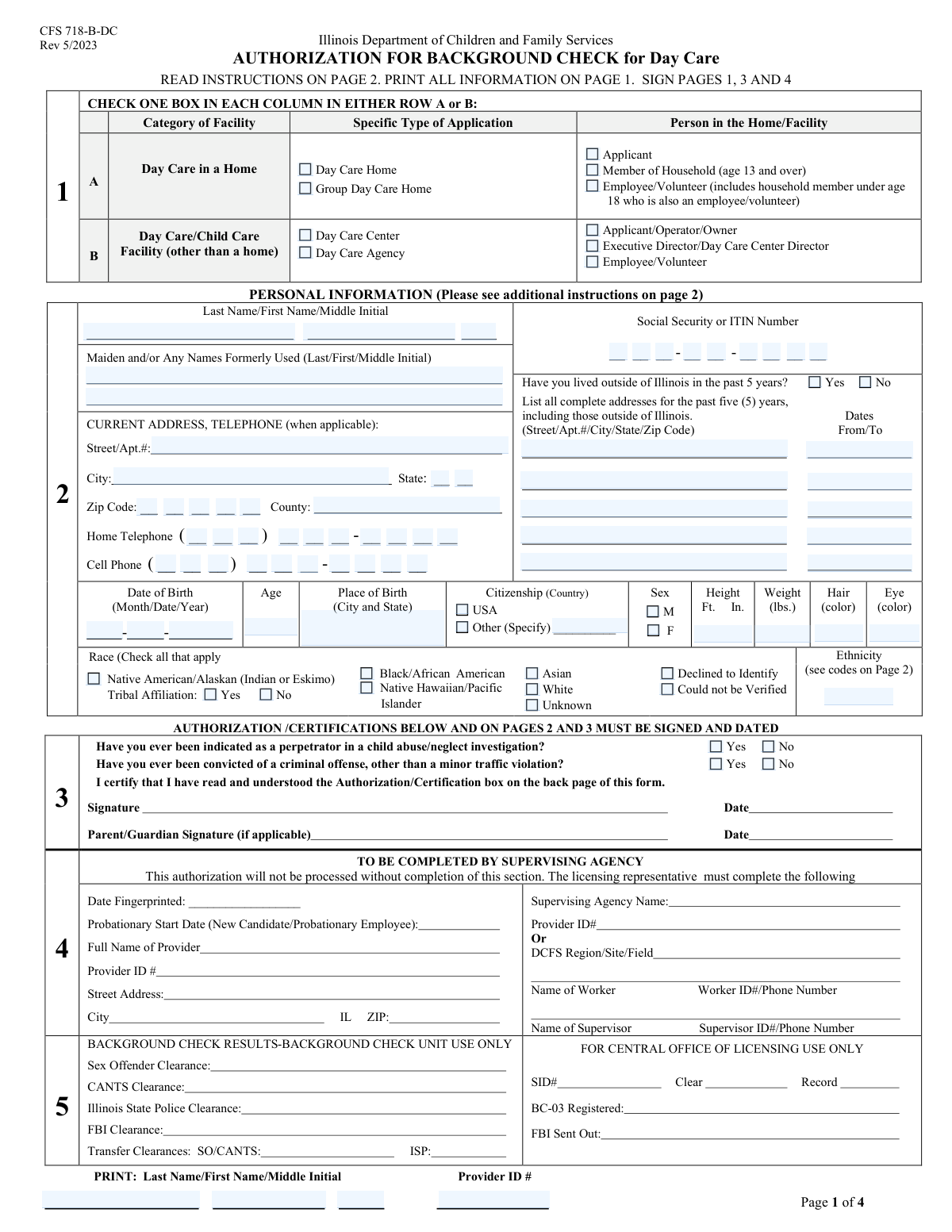
Yes! You can use AI to fill out CFS 718-1, Authorization for Background Check

The CFS 718-1, Authorization for Background Check, is a form required by the Illinois Department of Children and Family Services (DCFS) for all applicants, employees, and certain household members associated with child care facilities. This authorization allows DCFS to conduct a comprehensive background check, including criminal history and child abuse/neglect records, to ensure the safety and well-being of children in care. Today, this form can be filled out quickly and accurately using AI-powered services like Instafill.ai, which can also convert non-fillable PDF versions into interactive fillable forms.
CFS 718-1 is part of the authorization forms category on Instafill.
Our AI automatically handles information lookup, data retrieval, formatting, and form filling.
It takes less than a minute to fill out CFS 718-1 using our AI form filling.
Securely upload your data. Information is encrypted in transit and deleted immediately after the form is filled out.

Form specifications

Form name: CFS 718-1, Authorization for Background Check
Number of fields: 121
Number of pages: 4
Filled form examples: Form CFS 718-1 Examples
Language: English
main-image

Instafill Demo: How to fill out PDF forms in seconds with AI

How to Fill Out CFS 718-1 Online for Free in 2026

Are you looking to fill out a CFS 718-1 form online quickly and accurately? Instafill.ai offers the #1 AI-powered PDF filling software of 2026, allowing you to complete your CFS 718-1 form in just 37 seconds or less.
Follow these steps to fill out your CFS 718-1 form online using Instafill.ai:
  1. 1 Navigate to Instafill.ai and upload or select the CFS 718-1 form.
  2. 2 Indicate the facility type (e.g., Day Care Home, Day Care Center) and your specific role (e.g., Applicant, Employee, Household Member).
  3. 3 Provide your complete personal information, including full name, any former names, current address, Social Security Number, and date of birth.
  4. 4 Detail your physical description, race, and ethnicity as requested on the form.
  5. 5 Disclose your address history for the past five years, especially if you have lived outside of Illinois.
  6. 6 Answer the mandatory questions regarding any history of child abuse/neglect investigations or criminal convictions.
  7. 7 Review all the information populated by the AI for accuracy, then print, sign, and submit the form to the appropriate authority.

Our AI-powered system ensures each field is filled out correctly, reducing errors and saving you time.

Why Choose Instafill.ai for Your Fillable CFS 718-1 Form?

Speed

Complete your CFS 718-1 in as little as 37 seconds.

Up-to-Date

Always use the latest 2026 CFS 718-1 form version.

Cost-effective

No need to hire expensive lawyers.

Accuracy

Our AI performs 10 compliance checks to ensure your form is error-free.

Security

Your personal information is protected with bank-level encryption.

Frequently Asked Questions About Form CFS 718-1

This form is used to collect personal information for a background check required for individuals associated with licensed day care facilities. This includes applicants, staff, volunteers, and certain household members.

You must complete this form if you are an applicant, owner, director, employee, or volunteer at a day care facility. It is also required for household members aged 13 and over in a Day Care Home or Group Day Care Home.

You will need your full legal name, any former names, Social Security or ITIN number, and date of birth. You will also need your complete addresses for the past five years if you have lived outside of Illinois during that time.

First, check the box for your facility type, such as 'Day Care Home' or 'Day Care Center'. Then, in the same row, check the box that describes your role, like 'Applicant', 'Employee/Volunteer', or 'Member of Household'.

You must check 'Yes' for the Illinois Residence Question and provide a complete list of your previous addresses from the last five years. The form has space to list up to five past addresses and the dates you lived there.

Yes, if you are a household member aged 13 or over living in a Day Care Home or Group Day Care Home, you are required to complete this form for a background check.

The Provider ID is a unique identification number assigned to the day care facility. You should obtain this number from the day care operator, director, or your employer.

Yes, the form requires you to enter your full Social Security Number (SSN) or Individual Taxpayer Identification Number (ITIN). This information is necessary for identification and to conduct the required background check.

You must report any criminal conviction other than a minor traffic violation. If you are unsure whether an offense qualifies, it is best to disclose it to ensure your form is completed accurately.

The form provides space for two maiden or formerly used names. If you have more, list the two most recent ones and contact the agency that provided the form for further instructions.

After submission, the information you provided will be used to conduct a comprehensive background check, including checks of criminal history and child abuse registries. The results will determine your eligibility for association with the day care facility.

Yes, services like Instafill.ai use AI to accurately auto-fill form fields from your saved profile. This can save you time and help prevent errors when completing the form.

Simply upload the form to the Instafill.ai platform. The AI will identify the fields, allowing you to fill them out interactively or use the auto-fill feature to complete it with your saved information.

You can use a service like Instafill.ai, which can convert flat, non-fillable PDFs into interactive, fillable forms online. This allows you to type your information directly into the fields before printing.

Compliance CFS 718-1
Validation Checks by Instafill.ai

1
Mutually Exclusive Facility Type Selection
This validation ensures that an applicant selects a facility type from either Row A (Day Care Home, Group Day Care Home) or Row B (Day Care Center, Day Care Agency), but not from both. This is critical for routing the application to the correct processing queue and applying the appropriate regulations. If a user selects types from both rows, an error message will prompt them to choose only one category.
2
Conditional Person Role Selection
This check verifies that if a facility type is selected, a corresponding person role in the same row is also selected. For example, selecting 'Day Care Center' requires also selecting 'Applicant/Operator/Owner', 'Director', or 'Employee/Volunteer' from Row B. This ensures the application clearly defines both the facility type and the individual's role, which is essential for determining the scope of the background check.
3
Date of Birth and Age Consistency
This validation calculates the age based on the 'Birth Month', 'Birth Day', and 'Birth Year' fields and compares it to the user-entered 'Age'. This cross-referencing helps catch data entry errors in either the date of birth or the age field. If the calculated age and entered age do not match, the system will flag the discrepancy and require the user to correct the information before submission.
4
Conditional Past Address Requirement
This check enforces that if a user selects 'Yes' for the 'Illinois Residence Question', they must provide details for at least the 'First Past Address' and its 'Dates of Occupancy'. This information is mandatory for conducting a thorough background check that includes jurisdictions outside of Illinois. The form cannot be submitted if 'Yes' is checked but no past address information is provided.
5
SSN/ITIN Format and Completeness
This validation ensures that the Social Security or ITIN number fields (prefix and suffix) contain only numeric characters and meet the required length (3 digits and 6 digits, respectively). A valid, complete number is non-negotiable for identity verification and federal background checks. The system will prevent submission if the number is incomplete, contains non-numeric characters, or is the wrong length.
6
Complete Phone Number Entry
This check verifies that if any part of a phone number (Area Code, Prefix, or Line Number) is entered, all three parts for that number are completed and are numeric. It ensures that a complete, usable phone number is captured for contact purposes. An incomplete number is useless, so this validation prevents the submission of partial data and prompts the user to complete the entry.
7
Past Address Date Chronology and Range
This validation checks that for any past address provided, the 'To' date is chronologically after the 'From' date. It also verifies that the dates fall within the last five years, as stipulated by the residence question. This prevents illogical data entry and ensures the residency history is accurate and relevant for the required background screening period.
8
Conditional Citizenship Specification
This rule validates that if the 'Other (Specify)' checkbox for Citizenship is selected, the corresponding 'Other Citizenship Country' text field is not left empty. This is important for collecting complete demographic and identity information required for certain checks. An error will be displayed if 'Other' is checked without specifying the country, ensuring complete data capture.
9
Mutually Exclusive Yes/No Question Logic
This check ensures that for each question with a 'Yes' and 'No' option (e.g., Illinois Residence, Child Abuse Investigation), only one of the two checkboxes is selected. This prevents ambiguous or contradictory answers that would halt the application review process. The user will be required to make a single, definitive choice for each question before proceeding.
10
Conditional Tribal Affiliation Selection
This validation is triggered if the 'Native American/Alaskan' race box is checked. It ensures the user must also select either 'Tribal Affiliation Yes' or 'Tribal Affiliation No' to provide complete information. This conditional requirement ensures that necessary follow-up data is collected when a specific primary option is chosen, preventing incomplete records.
11
Name Consistency Between Sections
This check compares the 'Last Name' and 'First Name' entered at the top of the form with the 'Printed Last Name' and 'Printed First Name' fields near the signature area. This ensures the applicant's name is consistent throughout the document, reducing the risk of clerical errors or ambiguity. If the names do not match, a warning is displayed to prompt the user for review and correction.
12
Required Full Name
This validation confirms that the 'Last Name' and 'First Name' fields are not empty. A full name is the most basic and critical piece of identifying information on the form, necessary for all subsequent processing. If either of these fields is left blank, the form submission will be rejected with an error message.
13
Valid Zip Code Format
This check ensures the 'Zip Code' field contains exactly five numeric digits. A valid zip code is crucial for address verification, mail correspondence, and determining geographic jurisdiction for regulatory purposes. The system will reject entries with non-numeric characters, or an incorrect number of digits, to maintain data quality.
14
Age Verification for Household Member Role
If the 'Member of Household (age 13 and over)' checkbox is selected, this validation verifies that the applicant's age, calculated from their date of birth, is 13 or greater. This enforces the specific eligibility rule defined for this role on the form. An application will be flagged if the person's age does not meet the minimum requirement for the selected role.

Common Mistakes in Completing CFS 718-1

Mismatched Facility and Person Type Selection

The form separates facility types into Row A (Homes) and Row B (Centers/Agencies), with specific roles for each. Applicants often mistakenly select a facility type from one row and a role from the other, leading to an invalid submission. This causes immediate processing delays as the application must be returned for correction. To avoid this, carefully read the headings for each row and ensure you only check boxes within the single, correct category that applies to you. AI-powered tools like Instafill.ai can help by highlighting dependent fields and validating that selections are logically consistent.

Incorrectly Segmenting Phone and SSN/ITIN Numbers

The form requires phone numbers and Social Security/ITINs to be split across multiple, separate fields (e.g., Area Code, Prefix, Suffix). This non-standard format causes users to either enter the full number in the first box or incorrectly distribute the digits. Such errors can make it impossible to contact the applicant or run a background check, leading to rejection. AI form-filling tools like Instafill.ai can automatically parse and correctly place segmented data, preventing these formatting errors.

Incomplete or Missing Past Address History

When an applicant indicates they have lived outside Illinois in the past five years, they must provide a complete list of previous addresses. Common mistakes include forgetting addresses, providing incomplete details like a missing zip code, or having gaps in the dates of residency. This omission can halt the background check process. To prevent this, gather all address information for the last five years before starting; using a tool like Instafill.ai can help by prompting for all required fields for each address entry.

Omitting Full Details for Formerly Used Names

The form requires the full maiden or formerly used name, including first name and middle initial, not just the last name. Applicants often provide only the last name or leave this section blank, assuming it's optional. This is critical information for a comprehensive background check, and its absence can lead to significant delays. Ensure you list any prior full names exactly as they were used; saving this information in a profile with a tool like Instafill.ai ensures it's never forgotten on future forms.

Leaving the Ethnicity Code Blank

The 'Ethnicity Code' field requires the applicant to find the correct code on a separate page (Page 2) of the document. Many people miss this instruction and either leave the field blank or guess the code. An incorrect or missing code can result in incomplete demographic data and may require the form to be sent back for completion. If the form is a non-fillable PDF, a tool like Instafill.ai can convert it into a fillable version, making it easier to navigate and complete all fields accurately.

Ignoring Conditional Sub-Questions

Several sections contain questions that only appear based on a previous answer, such as specifying a country after selecting 'Other' for citizenship or answering the 'Tribal Affiliation' question. Applicants frequently check the primary box but overlook the required follow-up field, resulting in an incomplete application. To avoid this, review your selections and ensure any triggered follow-up questions are answered. Advanced tools like Instafill.ai can automatically enforce these rules, ensuring you don't miss required information based on your answers.

Inconsistent Date of Birth and Age

The form asks for both the full date of birth and the current age. Applicants sometimes make a typo in the birth year or miscalculate their current age, creating a discrepancy that flags the application for manual review. Carefully enter your birth date and then calculate your age, double-checking that the two pieces of information align. AI form-fillers like Instafill.ai can auto-calculate the age based on the date of birth, eliminating this potential error.

Forgetting to Specify the County

While applicants are diligent about entering their street address, city, state, and zip code, the separate 'County' field is often forgotten. This information is frequently required for jurisdictional purposes in background checks and licensing, and leaving it blank can cause processing delays. To avoid this, always verify and enter the county for your current address. Tools like Instafill.ai can often auto-populate the county based on the rest of the address, preventing this common oversight.

Confusing the Printed Name Fields

The form presents multiple, overlapping fields for the applicant's printed name, such as 'Printed Full Name Line 1/2/3' and separate 'Printed Last Name' fields. This confusing layout leads people to fill in the wrong information or leave some fields blank, which can cause issues with how the name is recorded. A best practice is to use the line-by-line fields for very long names and the separate fields for clarity. Using a tool like Instafill.ai can help map your saved name correctly to the most appropriate fields.

Incorrectly Answering Yes/No History Questions

Applicants may rush through the critical questions about child abuse/neglect history and criminal offenses, accidentally checking the wrong box. An incorrect 'Yes' can trigger unnecessary investigations, while an incorrect 'No' can be seen as falsification, leading to automatic denial. Read these questions twice and answer with absolute certainty. If the form is a flat PDF, using a tool like Instafill.ai to make it fillable can improve readability and reduce the chance of checking the wrong box by mistake.
Saved over 80 hours a year

“I was never sure if my IRS forms like W-9 were filled correctly. Now, I can complete the forms accurately without any external help.”

Kevin Martin Green

Your data stays secure with advanced protection from Instafill and our subprocessors

Robust compliance program

Transparent business model

You’re not the product. You always know where your data is and what it is processed for.

ISO 27001, HIPAA, and GDPR

Our subprocesses adhere to multiple compliance standards, including but not limited to ISO 27001, HIPAA, and GDPR.

Security & privacy by design

We consider security and privacy from the initial design phase of any new service or functionality. It’s not an afterthought, it’s built-in, including support for two-factor authentication (2FA) to further protect your account.

Fill out CFS 718-1 with Instafill.ai

Worried about filling PDFs wrong? Instafill securely fills cfs-718-1-authorization-for-background-check forms, ensuring each field is accurate.