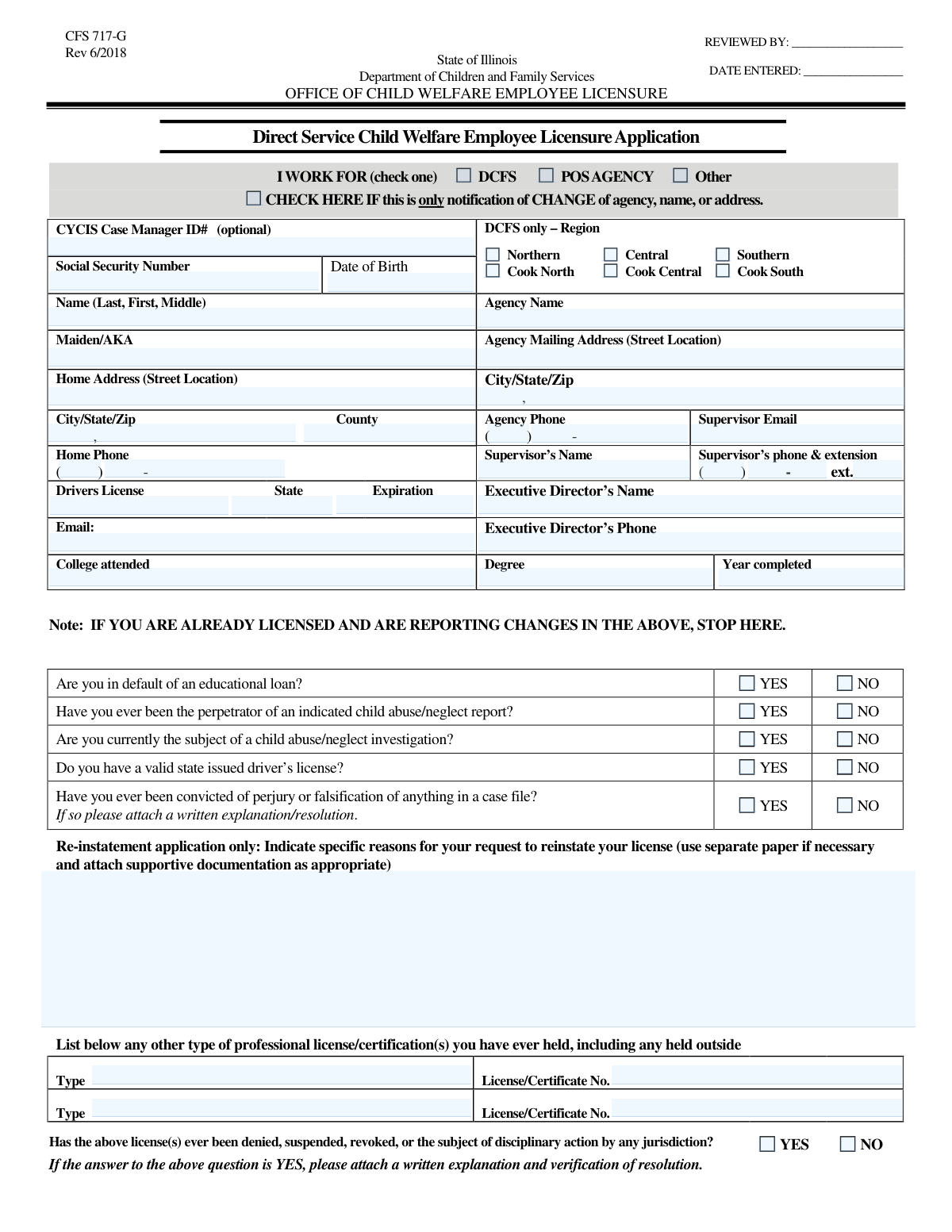
Yes! You can use AI to fill out CFS 718, Application for Child Welfare Employee Licensure
Form CFS 718, Application for Child Welfare Employee Licensure, is a document required by the Illinois Department of Children and Family Services (DCFS) for individuals seeking to become licensed child welfare employees. It gathers essential personal, educational, and professional background information to determine an applicant's eligibility and suitability for working with children and families in the state's welfare system. Today, this form can be filled out quickly and accurately using AI-powered services like Instafill.ai, which can also convert non-fillable PDF versions into interactive fillable forms.
Our AI automatically handles information lookup, data retrieval, formatting, and form filling.
It takes less than a minute to fill out CFS 718 using our AI form filling.
Securely upload your data. Information is encrypted in transit and deleted immediately after the form is filled out.
Form specifications
| Form name: | CFS 718, Application for Child Welfare Employee Licensure |
| Number of fields: | 68 |
| Number of pages: | 3 |
| Filled form examples: | Form CFS 718 Examples |
| Language: | English |
Instafill Demo: How to fill out PDF forms in seconds with AI
How to Fill Out CFS 718 Online for Free in 2026
Are you looking to fill out a CFS 718 form online quickly and accurately? Instafill.ai offers the #1 AI-powered PDF filling software of 2026, allowing you to complete your CFS 718 form in just 37 seconds or less.
Follow these steps to fill out your CFS 718 form online using Instafill.ai:
- 1 Navigate to Instafill.ai and upload or select the CFS 718 form.
- 2 Use the AI-powered tool to automatically fill in your personal identification, including your full name, Social Security Number, date of birth, and contact information.
- 3 Specify your work affiliation (DCFS or POS Agency) and provide details about your agency, supervisor, and executive director.
- 4 Enter your educational background, including college attended and degree information, as well as details about any professional licenses you hold.
- 5 Carefully answer the series of yes/no questions regarding your background, such as educational loan status, child abuse history, and criminal convictions.
- 6 Review all the information entered by the AI and yourself to ensure complete accuracy and make any necessary corrections.
- 7 Electronically sign and date the application, then download the completed form to submit to the Illinois DCFS as required.
Our AI-powered system ensures each field is filled out correctly, reducing errors and saving you time.
Why Choose Instafill.ai for Your Fillable CFS 718 Form?
Speed
Complete your CFS 718 in as little as 37 seconds.
Up-to-Date
Always use the latest 2026 CFS 718 form version.
Cost-effective
No need to hire expensive lawyers.
Accuracy
Our AI performs 10 compliance checks to ensure your form is error-free.
Security
Your personal information is protected with bank-level encryption.
Frequently Asked Questions About Form CFS 718
This form appears to be an application or information update form for individuals working with the Department of Children and Family Services (DCFS) or a Purchase of Service (POS) agency. It gathers personal, professional, and background information required for employment or licensing.
Check the 'Notification of Change' box if you are only updating your information, such as a new agency, name, or address. When this box is checked, many of the background and history questions on the form do not need to be answered.
You may be required to attach a copy of your valid driver's license, college transcripts showing your degree, and written explanations for any 'Yes' answers to the background questions. The form includes checkboxes to confirm these attachments.
No, the DCFS Region section is only for applicants who work directly for DCFS. If you work for a POS agency or another organization, you should leave this section blank.
This field is for any other names you have used. This includes your maiden name if you are married, or any other 'also known as' (AKA) names you have legally used.
If you answer 'Yes' to questions regarding criminal history or child abuse reports, you will likely need to attach a separate document with a detailed explanation. Failing to provide the required explanation can delay the processing of your application.
If you do not have a valid driver's license, you should check the 'NO' box for the corresponding question. You can then leave the fields for the license number, issuing state, and expiration date empty.
The CFS 718-B is a form that new employees of a Purchase of Service (POS) agency must complete with their employer. If this applies to you, you must indicate on this application whether or not you have completed it.
This section only needs to be completed if you are applying to have a previously held license reinstated. If you are a new applicant or are simply updating your information, you can leave this section blank.
Yes, services like Instafill.ai use AI to help you accurately fill out forms. This can save you time and help prevent common errors by auto-filling your information into the correct fields.
To fill out this form online, upload the PDF document to the Instafill.ai website. The platform will make the form interactive, allowing you to type your answers directly into the fields before downloading the completed file.
If you have a non-fillable or 'flat' PDF, you can use a tool like Instafill.ai to make it interactive. Simply upload your file, and the service will convert it into a fillable form that you can complete on your computer.
Compliance CFS 718
Validation Checks by Instafill.ai
1
Exclusive Work Affiliation Selection
This validation ensures that the user selects exactly one work affiliation from the 'DCFS', 'POS AGENCY', and 'Other' checkboxes. It is critical to uniquely categorize the applicant's employment type for correct processing and routing. If more than one or none are selected, the form submission should be blocked with an error message prompting the user to choose only one option.
2
Social Security Number Format
This check verifies that the 'Social Security Number' field is entered in a valid format, such as XXX-XX-XXXX or XXXXXXXXX. Proper formatting is essential for data integrity and successful integration with government and internal databases. A failed validation would prevent submission and ask the user to correct the entry to match the required format.
3
Conditional DCFS Region Requirement
This validation rule is triggered if the 'DCFS' work affiliation box is checked. It ensures that the user then selects exactly one region from the available 'DCFS Region' options (e.g., Northern, Cook North). This is crucial for assigning the applicant to the correct administrative unit within the department. If the DCFS box is checked but no region is selected, an error should be displayed.
4
Conditional POS Agency Form Status
This check ensures that if the 'POS AGENCY' work affiliation box is selected, the user must also indicate the status of their 'CFS 718-B' form by selecting either 'Completed' or 'Not Completed'. This is a mandatory step for new Purchase of Service (POS) employees. The validation prevents incomplete submissions from POS employees, ensuring all required procedural information is captured.
5
Mutually Exclusive Yes/No Selections
This validation applies to all pairs of Yes/No checkboxes, such as the 'Educational Loan Question' or 'Child Abuse/Neglect Report History Question'. It verifies that for each question, only one option ('Yes' or 'No') is selected, but not both or neither. This prevents contradictory or incomplete data, which is vital for questions with legal or procedural implications.
6
Full Phone Number Validation
This check combines the separate area code and local number fields (e.g., 'Home Phone Area Code' and 'Home Phone Local Number') into a single 10-digit number. It then validates that the combined string consists only of digits and is exactly 10 digits long. This ensures a complete and correctly formatted phone number is captured for reliable contact.
7
Driver's License Expiration Date Validity
This validation verifies that the 'Expiration Date' provided for the driver's license is a valid calendar date and is not in the past. Submitting an expired license is not acceptable for identification or proof of driving eligibility. If the date is invalid or has already passed, the system should reject it and prompt the user for a valid, current expiration date.
8
Conditional Logic for 'Notification of Change'
This rule checks if the 'Notification of Change' box is checked. If it is, the system should hide or disable the extensive block of questions from 'Educational Loan Question' through 'License Disciplinary Action Question'. This logic streamlines the user experience for those simply updating their information, preventing them from having to re-answer questions that are not relevant to a simple change notification.
9
Driver's License Information Completeness
This validation ensures that if the user checks 'YES' for the 'Valid Driver's License Question', they must also provide data in the 'Driver's License Number', 'Issuing State', and 'Expiration Date' fields. It prevents a user from affirming they have a license without providing the necessary details to verify it. A failure would prompt the user to fill in the missing license information.
10
Date of Birth Age Verification
This check validates that the 'Date of Birth' is a real, valid date and that the calculated age of the applicant meets a minimum requirement, such as 18 or 21 years old. This is a standard check for employment and licensing to ensure the applicant is legally an adult. If the applicant is underage, the submission should be flagged or blocked.
11
Conditional Explanation for Criminal History
This rule is triggered if the user answers 'YES' to the question about past convictions or pending charges ('Page 2'). The validation then checks that the 'Required Explanations Attached Status' is marked as 'Yes'. This ensures that any affirmative answer to a critical background question is accompanied by the mandatory supporting documentation for review.
12
Conditional Driver's License Copy Attachment
This validation ensures that if the user answers 'YES' to 'Do you have a valid state issued driver's license?', they must also confirm they have attached a copy by selecting 'Yes' for the 'Valid Driver's License Copy Attached Status'. This links the declaration of having a license to the action of providing proof. A mismatch would trigger an error, reminding the user to attach the required document.
13
Email Address Format Validation
This check verifies that the value entered in the 'Email' and 'Supervisor Email' fields conforms to a standard email address format (e.g., [email protected]). A valid email is essential for all official communication with the applicant and their supervisor. If the format is incorrect, the user should be prompted to correct it before submission.
14
Zip Code Format Validation
This check ensures that the 'Zip Code' fields for both the home and agency addresses contain a valid 5-digit or 9-digit (ZIP+4) numeric code. Correct zip codes are essential for verifying addresses, determining jurisdiction, and ensuring mail delivery. An invalid format would trigger an error requiring the user to enter a valid US zip code.
Common Mistakes in Completing CFS 718
Applicants often mistakenly fill out a DCFS region even when they don't work for DCFS, or they select 'DCFS' as their affiliation but forget to specify their region. This error occurs due to not reading the field instructions carefully. It can lead to the application being misrouted, delayed, or returned for correction, as the processing office cannot determine the correct administrative path. To avoid this, carefully follow the on-screen instructions that specify this section is only for DCFS employees.
A frequent error is either checking the 'Notification of Change' box for a new application or failing to check it when only submitting an update. This leads to applicants either skipping required background questions or filling out many unnecessary sections. An incomplete new application will be rejected, while providing unnecessary information for a simple update creates confusion and processing delays. Always confirm the purpose of your submission before you begin filling out the form.
The form separates phone numbers into 'Area Code' and 'Local Number' fields, but many users enter the full 10-digit number into a single field out of habit. This data entry error can make the phone number invalid in the system and prevent the agency from being able to contact the applicant or their supervisor. To prevent this, pay close attention to field labels and enter only the requested digits. AI-powered tools like Instafill.ai can automatically parse and correctly format phone numbers into separate fields.
Applicants sometimes use informal nicknames instead of their full legal name or forget to list a relevant maiden or 'Also Known As' (AKA) name. This creates discrepancies with official documents like Social Security cards and driver's licenses, which can cause background checks to fail or be significantly delayed. Always use your full legal name as it appears on government-issued ID and list all other names used in the 'Maiden or AKA Name' field to ensure a smooth verification process.
The form requires attachments based on answers to certain questions, such as providing a copy of a driver's license if you answer 'YES' to having one. People often answer the question but forget to include the corresponding document with their submission. This renders the application incomplete and guarantees a delay, as the processing office will have to halt the review and request the missing items. Create a checklist of required documents as you fill out the form to ensure everything is included.
A critical error is providing information that contradicts itself, such as entering a date of birth that does not match the one on the attached driver's license. These inconsistencies occur due to typos or lack of careful review and can raise red flags about the applicant's identity or truthfulness. Such discrepancies can lead to application rejection or an investigation. Always double-check all personal data for accuracy and consistency across the form and all attached documents.
While most people remember their street address, city, and zip code, the separate 'County' field is often left blank. This information can be crucial for determining jurisdiction, assigning caseworkers, or statistical tracking. An incomplete address may delay processing or cause mail to be misdirected. To avoid this, use a postal service lookup tool to confirm your county before filling out the form.
The form asks about sensitive topics like being the 'perpetrator of an indicated child abuse or neglect report,' which has a specific legal meaning. Applicants may misunderstand this terminology, leading them to either over-disclose unfounded reports or fail to disclose an 'indicated' one. An incorrect answer, especially a failure to disclose, can be discovered during a background check and lead to immediate disqualification and potential legal consequences for falsification. If unsure about legal terminology, seek clarification before answering.
When asked for the 'Agency Name', applicants often use a common acronym or abbreviation instead of the full legal name of their employer. This can cause confusion and make it difficult for the reviewing body to officially verify employment, especially if multiple agencies share a similar acronym. Always use the complete and official name of the agency as it appears on legal documents or paystubs to prevent verification delays.
This is a long and complex form, and it's easy to accidentally skip a question or an entire section, especially the binary Yes/No questions towards the end. An application with any missing required information is considered incomplete and will be returned, forcing the applicant to correct and resubmit, thereby losing their place in the processing queue. To prevent this, review the form page by page before submitting, or use an AI-powered form-filling tool like Instafill.ai, which can validate that all required fields are completed. If the form is a non-fillable PDF, Instafill.ai can also convert it into an interactive, fillable version to make the process easier.
Saved over 80 hours a year
“I was never sure if my IRS forms like W-9 were filled correctly. Now, I can complete the forms accurately without any external help.”
Kevin Martin Green
Your data stays secure with advanced protection from Instafill and our subprocessors
Robust compliance program
Transparent business model
You’re not the product. You always know where your data is and what it is processed for.
ISO 27001, HIPAA, and GDPR
Our subprocesses adhere to multiple compliance standards, including but not limited to ISO 27001, HIPAA, and GDPR.
Security & privacy by design
We consider security and privacy from the initial design phase of any new service or functionality. It’s not an afterthought, it’s built-in, including support for two-factor authentication (2FA) to further protect your account.
Fill out CFS 718 with Instafill.ai
Worried about filling PDFs wrong? Instafill securely fills cfs-718-application-for-child-welfare-employee-licensure forms, ensuring each field is accurate.