Yes! You can use AI to fill out Child Action Plan

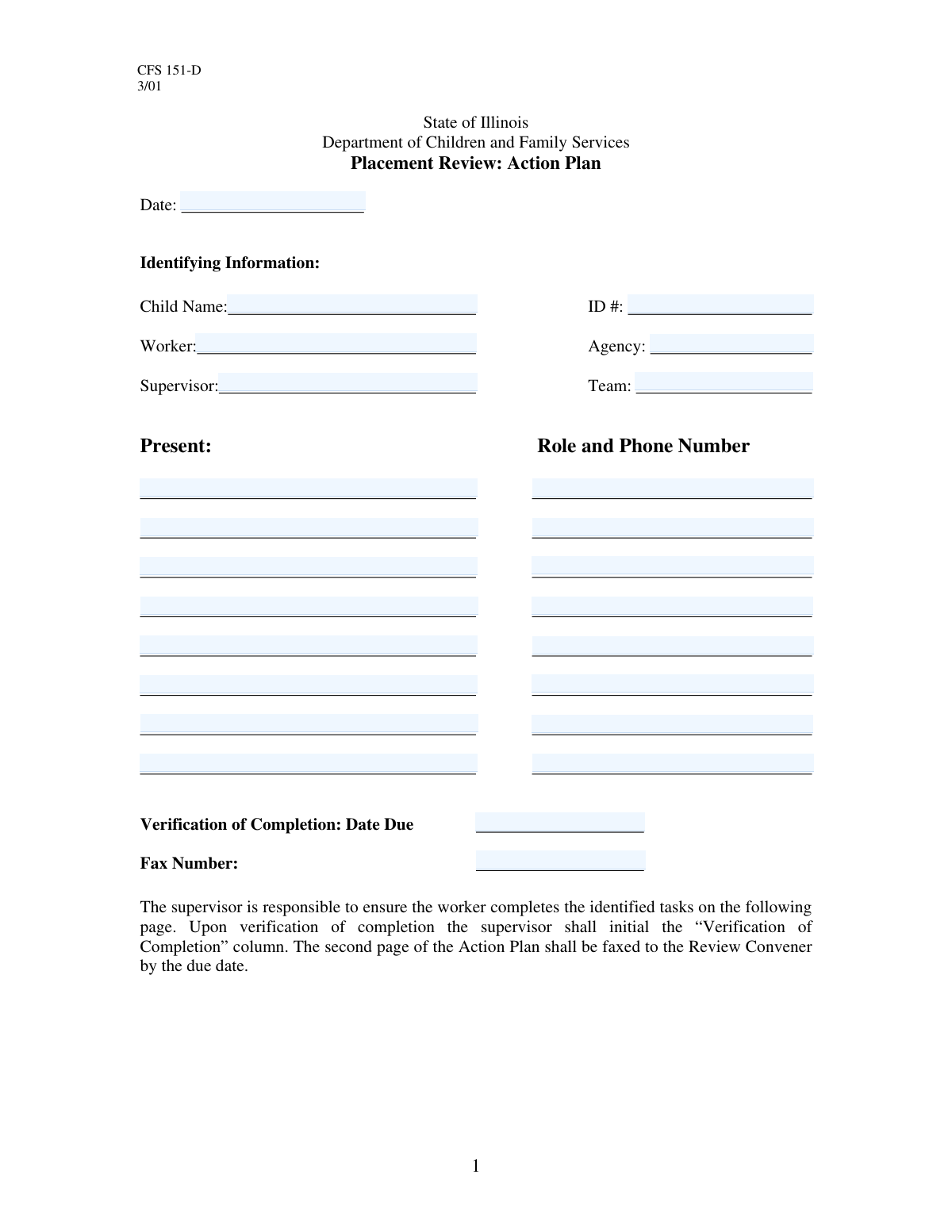
The Child Action Plan is a critical document in social work and child welfare for outlining the specific steps, goals, and timelines agreed upon to support a child's safety and well-being. It serves as a formal record of a case meeting, detailing tasks for caregivers or agency staff and ensuring accountability through defined verification methods. Today this form can be filled out quickly and accurately using AI-powered services like Instafill.ai, which can also convert non-fillable PDF versions into interactive fillable forms.
Our AI automatically handles information lookup, data retrieval, formatting, and form filling.
It takes less than a minute to fill out Child Action Plan using our AI form filling.
Securely upload your data. Information is encrypted in transit and deleted immediately after the form is filled out.

Form specifications

Form name: Child Action Plan
Number of fields: 30
Number of pages: 2
Filled form examples: Form Child Action Plan Examples
Language: English
main-image

Instafill Demo: How to fill out PDF forms in seconds with AI

How to Fill Out Child Action Plan Online for Free in 2026

Are you looking to fill out a CHILD ACTION PLAN form online quickly and accurately? Instafill.ai offers the #1 AI-powered PDF filling software of 2026, allowing you to complete your CHILD ACTION PLAN form in just 37 seconds or less.
Follow these steps to fill out your CHILD ACTION PLAN form online using Instafill.ai:
  1. 1 Navigate to Instafill.ai and upload or select the Child Action Plan form.
  2. 2 Provide the primary case information, including the child's name, ID number, case worker, and agency details.
  3. 3 List all individuals who attended the planning meeting, along with their roles and contact information.
  4. 4 Detail each specific task in the action plan, clearly describing what needs to be done.
  5. 5 For each task, assign a timeframe or deadline for completion and specify how completion will be verified.
  6. 6 Review all entered information for accuracy, ensuring all names, dates, and task descriptions are correct.
  7. 7 Finalize the document and share it with the supervisor, team members, and other relevant attendees as required.

Our AI-powered system ensures each field is filled out correctly, reducing errors and saving you time.

Why Choose Instafill.ai for Your Fillable Child Action Plan Form?

Speed

Complete your Child Action Plan in as little as 37 seconds.

Up-to-Date

Always use the latest 2026 Child Action Plan form version.

Cost-effective

No need to hire expensive lawyers.

Accuracy

Our AI performs 10 compliance checks to ensure your form is error-free.

Security

Your personal information is protected with bank-level encryption.

Frequently Asked Questions About Form Child Action Plan

This form is an action plan used to document specific tasks, timelines, and verification methods related to a child's case. It helps ensure all parties are clear on the required actions and responsibilities.

The assigned case worker typically completes this form, often following a meeting or review with supervisors, the child's family, and other relevant parties.

The 'Child ID Number' is a unique identifier assigned specifically to the child. The 'Case ID' may refer to the broader family case file or a specific incident, which could involve multiple individuals.

You should list all individuals who were present at the meeting where this action plan was created or reviewed. This includes agency staff, family members, and any other professionals involved in the child's care.

The form has space for eight attendees; prioritize listing the key decision-makers. You can attach a separate sheet with a full attendee list if necessary for your records.

The task description should be specific and actionable, clearly stating what needs to be done, by whom, and for what purpose. For example, instead of 'Arrange services,' write 'Worker to schedule initial therapy assessment for child with ABC Counseling.'

This field describes the proof or evidence that will be used to confirm a task has been finished. Examples include a signed document, a confirmation email, or a detailed case note.

This is the deadline by which proof of task completion must be submitted or documented. It is separate from the deadline for the task itself.

The 'Fax Number' field indicates that faxing is one method of submission, but your agency may have other preferred methods like email or an internal system. Always confirm the correct submission procedure with your supervisor.

Yes, services like Instafill.ai use AI to auto-fill form fields accurately from your existing case files, which can save you time and help prevent data entry errors.

You can use a service like Instafill.ai to upload a scan or photo of the form. The service can convert it into a digital, fillable format that you can complete on your computer.

If you have a non-fillable or 'flat' PDF, you can use a tool like Instafill.ai to make it interactive. Simply upload the file, and the tool will automatically detect the fields so you can type your information directly into them.

Compliance Child Action Plan
Validation Checks by Instafill.ai

1
Valid Date Format for Form Submission
This check ensures the 'Date' field is entered in a valid and recognizable format, such as MM/DD/YYYY. Proper date formatting is crucial for accurate record-keeping, auditing, and establishing a correct timeline for the action plan. If the date is invalid, the system will reject the submission and prompt the user to correct the format to ensure data integrity.
2
Logical Verification Due Date
This validation confirms that the 'Verification Due Date' is on or after the main 'Date' of the form submission. It is illogical for a task's verification to be due before the plan is even created, so this check prevents critical data entry errors. A failure would require the user to enter a future date, ensuring the timeline for the action plan is feasible and logical.
3
Completeness of Critical Identifying Information
This check verifies that the 'Child Name', 'Child ID Number', and 'Worker Name' fields are not empty. These fields are essential for uniquely identifying the child and the responsible case worker, forming the primary link for the entire record. Without this information, the action plan is un-attributable and cannot be correctly filed or acted upon.
4
Attendee Information Dependency
This rule ensures that for every attendee name entered (from First to Eighth), the corresponding 'Role and Phone Number' field is also filled as required by the form's instructions. This is important for maintaining a complete record of all meeting participants and their contact details for any necessary follow-up. If an attendee's name is present but their role and phone are missing, the form will be flagged as incomplete.
5
Standard Phone Number Formatting
This validation examines all phone numbers entered in the 'Role and Phone Number' fields to ensure they conform to a standard format (e.g., 10 digits, possibly with parentheses or hyphens). Correctly formatted phone numbers are essential for successful communication and integration with other systems like auto-dialers or contact managers. An invalid format would trigger an error, asking the user to re-enter the number correctly.
6
Child ID Number Format and System Existence
This check validates that the 'Child ID Number' follows the agency's prescribed format (e.g., a specific number of digits or an alphanumeric pattern). It may also perform a real-time lookup to confirm that the ID exists within the central database, preventing the creation of plans for non-existent or incorrect child records. A failed validation would indicate either a typo or the need to create a new child record first.
7
Required Core Task Details
This validation ensures that the 'Task Description' and 'Time Frame' fields for the first task are both completed. These fields represent the fundamental purpose of the action plan, defining what needs to be done and by when. A form submitted without these details is functionally useless, so the system will prevent submission until they are provided.
8
Case ID and Case Name Consistency Check
This check cross-references the 'Case ID' with the 'Case Name' against the agency's database. It helps prevent clerical errors where a correct ID might be entered with the wrong name, or vice-versa, which could lead to the action plan being filed in the wrong case. If a mismatch is found, the user is prompted to review and correct the case information.
9
Full Name Requirement for Personnel
This validation inspects name fields like 'Worker Name', 'Supervisor Name', and 'Child Name' to ensure they likely contain a full name, for example by checking for a space between at least two words. The form specifies 'full name,' and this check enforces that rule to improve data quality and clarity in official records. An entry like 'John' would be flagged, prompting the user to provide a last name.
10
Valid Fax Number Format
This check ensures the 'Fax Number' field contains a number in a valid, recognizable format. Although less common, faxes are still used for official document transmission, and an incorrect number would lead to communication failure. The system will reject improperly formatted numbers to ensure documents can be sent successfully.
11
Agency and Team Association
This validation verifies that the 'Team Name/Number' entered is a valid team associated with the specified 'Agency Name' in the system. This ensures correct internal routing, assignment, and reporting for the case. An invalid team entry would result in an error, preventing the case from being assigned to a non-existent or incorrect team.
12
Character Validation for Name Fields
This rule ensures that all name fields (e.g., 'Child Name', 'Worker Name', 'Attendee Name') only contain alphabetic characters, spaces, hyphens, or apostrophes. It prevents the accidental entry of numbers or special symbols into a name field, which can cause issues with reporting and data integrity. If invalid characters are detected, the user will be prompted to correct the entry.

Common Mistakes in Completing Child Action Plan

Confusing Child ID with Case ID

Users often mistakenly enter the Child ID Number into the Case ID field, or vice versa. This happens because both are numeric identifiers on the same form, leading to confusion. This error can cause the action plan to be misfiled, leading to significant delays and difficulty in tracking a child's progress and services. Double-check that the number entered corresponds exactly to the field's label to ensure correct record association.

Incomplete Attendee Contact Information

The form requires both a role and a phone number for each attendee in a single field, but users frequently provide only one. This often occurs due to haste or not having all the information on hand during the meeting. Missing contact details make it difficult to follow up with attendees for clarification or future scheduling, hindering collaborative efforts. To avoid this, gather all attendee information before filling out the form or leave a placeholder to indicate missing data needs to be found.

Vague or Unactionable Task Descriptions

Entries in the 'Task Description' field are often too general, such as 'Follow up with school' or 'Check on placement.' This lack of detail makes it impossible to measure completion or hold parties accountable. A proper task description should be specific, detailing the who, what, and where of the action. For example, instead of 'Follow up with school,' use 'Contact Ms. Davis at Lincoln Elementary to request the child's attendance records for the last 30 days.'

Using Ambiguous Time Frames

In the 'Time Frame' field, users often enter vague terms like 'ASAP,' 'Ongoing,' or 'Soon.' These subjective terms create confusion and make it impossible to track deadlines or determine if a task is overdue. An effective time frame must be a specific, measurable date or duration, such as 'Within 14 days' or 'By October 31, 2024,' to ensure clear expectations and accountability.

Unclear Verification of Completion Methods

The 'Verification of Completion' field is frequently filled with unhelpful statements like 'Done' or 'Worker will verify.' This fails to describe the actual proof of completion, undermining the plan's integrity. A strong verification method specifies the evidence required, such as 'A signed copy of the enrollment form will be uploaded to the case file' or 'Email confirmation from the therapist received and documented.' This ensures that task completion is objective and auditable.

Using Informal Names or Nicknames

For fields like 'Child Name,' 'Worker Name,' and 'Supervisor Name,' users may enter informal names (e.g., 'Jenny' for Jennifer) or partial names (e.g., 'Mr. Peterson'). This happens out of habit but can cause serious issues with database lookups and record matching, potentially disconnecting this plan from the official case file. Always use the full, legal name as it appears on official documents to ensure data integrity. AI-powered tools like Instafill.ai can help by storing and auto-filling correct, complete names to prevent these errors.

Incorrect or Inconsistent Date Formatting

Users often enter dates in various formats (e.g., MM-DD-YY, DD/MM/YYYY, Month Day, Year), especially for the 'Date' and 'Verification Due Date' fields. This inconsistency complicates data processing, sorting, and reporting, and can lead to missed deadlines if dates are misinterpreted. To prevent this, always use a consistent, unambiguous format like MM/DD/YYYY. AI form-filling tools can automatically format dates correctly, ensuring uniformity across all submissions.

Using Unofficial Agency or Team Abbreviations

When filling in the 'Agency Name' or 'Team Name/Number' fields, employees may use internal jargon or acronyms that are not universally understood (e.g., 'FCS' instead of 'Family and Children's Services'). This creates ambiguity for external reviewers, auditors, or staff from other departments who may not be familiar with the terminology. Always write out the full name of the agency or team to ensure the document is clear to any reader. If the form is a non-fillable PDF, a tool like Instafill.ai can convert it into a fillable version where you can easily type out the full names.

Leaving Orphaned Attendee Data

The form instructs to fill the 'Role and Phone Number' field only if the corresponding 'Attendee Name' is filled. However, users sometimes erase a name but forget to erase the associated role and phone number, or vice versa. This 'orphaned' data creates confusion about who was actually present at the meeting and can lead to inaccurate attendance records. To avoid this, always review the attendee list as a whole, ensuring every name has corresponding details and that there are no details without a name.
Saved over 80 hours a year

“I was never sure if my IRS forms like W-9 were filled correctly. Now, I can complete the forms accurately without any external help.”

Kevin Martin Green

Your data stays secure with advanced protection from Instafill and our subprocessors

Robust compliance program

Transparent business model

You’re not the product. You always know where your data is and what it is processed for.

ISO 27001, HIPAA, and GDPR

Our subprocesses adhere to multiple compliance standards, including but not limited to ISO 27001, HIPAA, and GDPR.

Security & privacy by design

We consider security and privacy from the initial design phase of any new service or functionality. It’s not an afterthought, it’s built-in, including support for two-factor authentication (2FA) to further protect your account.

Fill out Child Action Plan with Instafill.ai

Worried about filling PDFs wrong? Instafill securely fills child-action-plan forms, ensuring each field is accurate.