Yes! You can use AI to fill out Children's Special Fund Request

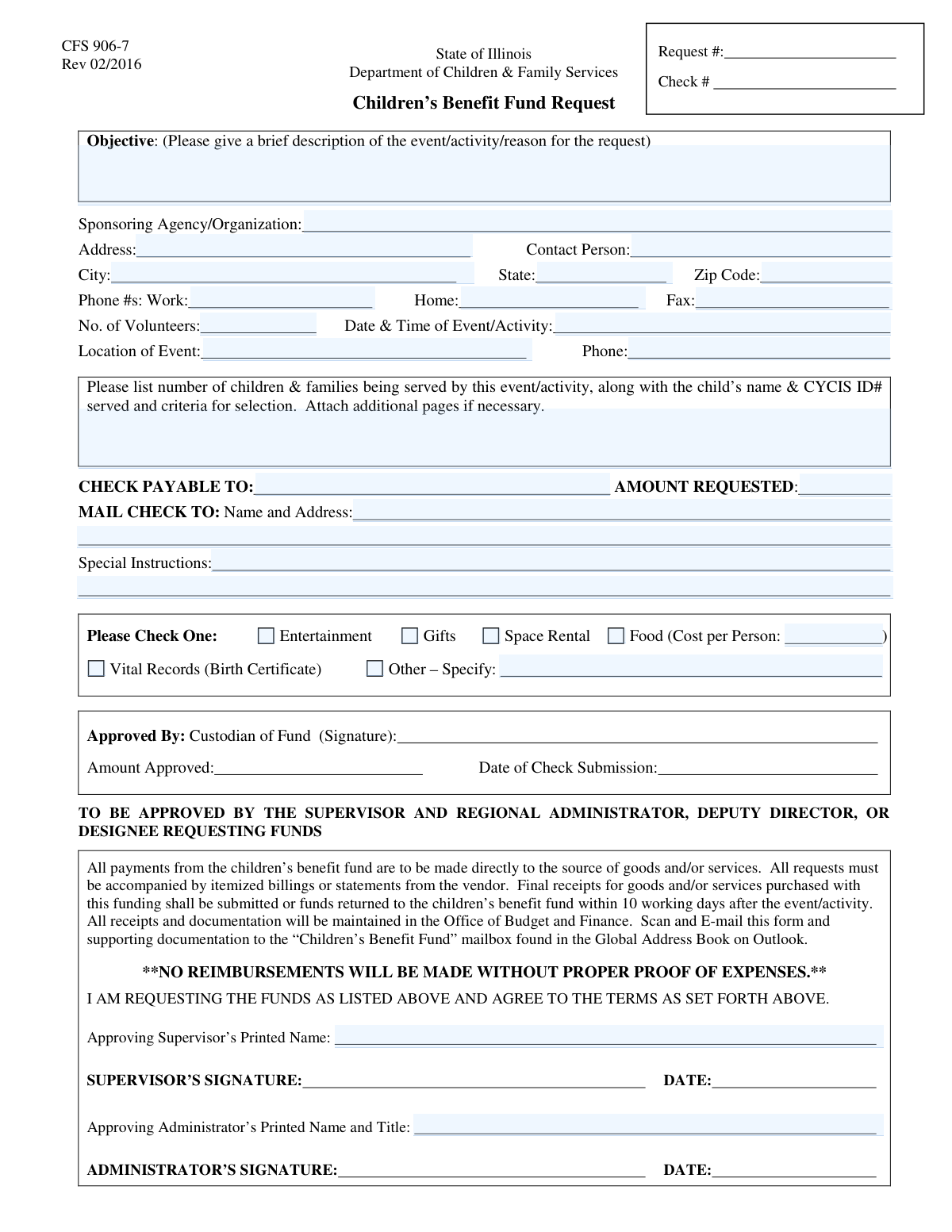
This form is a formal application used by sponsoring organizations, typically in the social services or child welfare sector, to request funds for specific needs of the children and families they serve. It documents the purpose of the request, details of the event or need, participant information, and the total amount required, ensuring a transparent approval process. Today, this form can be filled out quickly and accurately using AI-powered services like Instafill.ai, which can also convert non-fillable PDF versions into interactive fillable forms.
Our AI automatically handles information lookup, data retrieval, formatting, and form filling.
It takes less than a minute to fill out Special Fund Request using our AI form filling.
Securely upload your data. Information is encrypted in transit and deleted immediately after the form is filled out.

Form specifications

Form name: Children's Special Fund Request
Number of fields: 33
Number of pages: 1
Filled form examples: Form Special Fund Request Examples
Language: English
main-image

Instafill Demo: How to fill out PDF forms in seconds with AI

How to Fill Out Special Fund Request Online for Free in 2026

Are you looking to fill out a SPECIAL FUND REQUEST form online quickly and accurately? Instafill.ai offers the #1 AI-powered PDF filling software of 2026, allowing you to complete your SPECIAL FUND REQUEST form in just 37 seconds or less.
Follow these steps to fill out your SPECIAL FUND REQUEST form online using Instafill.ai:
  1. 1 Navigate to Instafill.ai and upload or select the Children's Special Fund Request form to begin.
  2. 2 Use the AI assistant to accurately fill in the sponsoring agency's information, including name, address, and contact person.
  3. 3 Provide detailed information about the event or activity, such as the objective, date, location, and number of volunteers.
  4. 4 Specify the reason for the request by checking the appropriate boxes (e.g., Food, Gifts, Entertainment) and enter the total monetary amount being requested.
  5. 5 List the participant information, including the names of children and families served and their CYCIS ID numbers as required.
  6. 6 Enter the payment details, specifying who the check should be payable to and the correct mailing address.
  7. 7 Review all entered information for accuracy before printing the form to obtain the necessary signatures from the approving supervisor and administrator.

Our AI-powered system ensures each field is filled out correctly, reducing errors and saving you time.

Why Choose Instafill.ai for Your Fillable Special Fund Request Form?

Speed

Complete your Special Fund Request in as little as 37 seconds.

Up-to-Date

Always use the latest 2026 Special Fund Request form version.

Cost-effective

No need to hire expensive lawyers.

Accuracy

Our AI performs 10 compliance checks to ensure your form is error-free.

Security

Your personal information is protected with bank-level encryption.

Frequently Asked Questions About Form Special Fund Request

This form is used by sponsoring agencies or organizations to request funds for events, activities, or specific needs like gifts, food, or vital records for the children and families they serve.

This form should be completed by a representative of the sponsoring agency or organization that is organizing the event or activity and requesting the funds.

The CYCIS ID# is likely a unique identifier for children within a specific system, such as the Child and Youth Centered Information System. It is required to verify participant eligibility and track the services provided.

You will need complete details for the sponsoring organization, the event (date, time, location), a list of participating children with their CYCIS ID#, and the specific payment and mailing information for the requested funds.

If your reason for the request is not for entertainment, gifts, space rental, food, or vital records, check the "Other" box. You must then provide a detailed explanation in the "Other Reason for Request" field.

You only need to complete the 'Cost Per Person for Food' field if you have checked the "Food" box as a reason for your request.

You must provide a comprehensive list that includes the full name and CYCIS ID# for each child being served. You also need to explain the criteria used to select these participants for the event or activity.

The form requires the printed names of both an approving supervisor and an approving administrator to be considered complete. Ensure you have secured these internal approvals before submitting the form.

In the 'Check Mailing Address' section, you must provide the complete and accurate mailing name and address where the check should be sent.

Submission instructions and processing times are typically provided by the funding entity. Please refer to the guidelines provided with this form or contact the approving administrator's office for this information.

Yes, services like Instafill.ai use AI to accurately auto-fill form fields, which can save you significant time and reduce errors, especially for recurring requests.

Simply upload the form to the Instafill.ai platform. Their AI will identify the fields, allowing you to fill them out directly on your screen, save your progress, and even store your information for future use.

If you have a flat, non-fillable PDF, you can upload it to a service like Instafill.ai. Their technology can convert it into an interactive, fillable form that you can easily complete online.

Compliance Special Fund Request
Validation Checks by Instafill.ai

1
Future Event Date Validation
This check ensures the 'Event Date and Time' provided is in the future. Submitting requests for events that have already passed is invalid and wastes processing time. If the date is in the past, the form submission should be blocked and the user prompted to enter a valid future date.
2
Reason for Request Completeness
Validates that at least one checkbox ('Entertainment', 'Gifts', 'Space Rental', 'Food', 'Vital Records', 'Other') is selected in the 'Reason for Request' section. This is a mandatory choice to categorize the request and determine which subsequent fields may be required. A failure to select a reason would result in an incomplete and un-actionable request.
3
Conditional Food Cost Entry
This validation enforces a conditional rule on the 'Cost Per Person for Food' field. If the 'Food' checkbox is selected, this field becomes mandatory and must contain a positive numeric value. Conversely, if the 'Food' checkbox is not selected, this field should be empty or disabled, preventing inconsistent or extraneous data entry.
4
Conditional 'Other' Reason Specificity
This check ensures that if the 'Other' checkbox is selected as the reason for the request, the corresponding 'Other Reason for Request' text field is not empty. This is critical for understanding the nature of the request when it doesn't fit standard categories. If 'Other' is checked without a description, the submission should be rejected for being incomplete.
5
Valid Monetary Amount Requested
This validation verifies that the 'Amount Requested' field contains a valid, positive number, potentially with up to two decimal places. It prevents non-numeric text, negative values, or improperly formatted currency from being submitted. Correct formatting is essential for the financial system to process the payment request accurately.
6
Standard Phone Number Format
This check ensures that all phone number fields ('Work Phone Number', 'Home Phone Number', 'Fax Number', 'Event Phone Number') adhere to a standard format, such as (XXX) XXX-XXXX or XXXXXXXXXX. Consistent formatting improves data quality and ensures that contact numbers are valid and usable. An invalid format would trigger an error, asking the user to correct the entry.
7
Sponsor Address Completeness
Verifies that all components of the sponsor's address ('Address', 'City', 'State', 'Zip Code') are filled out. A complete and accurate address is crucial for correspondence and record-keeping. If any part of the address is missing, the form cannot be successfully submitted, preventing incomplete location data.
8
Valid Zip Code Format
This check validates that the 'Zip Code' field contains a 5-digit or 9-digit (ZIP+4) numeric value. This is important for verifying the address and ensuring any potential mailings are deliverable. An invalid format would cause a validation error, prompting the user to enter a correct US ZIP code.
9
Positive Integer for Volunteer Count
Ensures that the 'Number of Volunteers' field contains a non-negative integer (0 or greater). The number of participants cannot be a fraction, a negative number, or text. This validation maintains data integrity and ensures the count is a realistic and usable number for event planning.
10
Payment Details Completeness
This check confirms that all fields critical for payment processing ('Check Payable To', 'Amount Requested', and 'Mailing Name and Address') are filled. Missing any of this information would make it impossible to issue and mail the check correctly. The validation ensures all necessary financial details are captured before submission.
11
Required Approver Names
Validates that both the 'Approving Supervisor's Printed Name' and 'Approving Administrator's Printed Name and Title' fields are completed. These fields are essential for accountability and confirming that the request has gone through the proper chain of command. The request is considered invalid without the necessary approval information.
12
At Least One Sponsor Contact Number
This validation ensures that at least one phone number ('Work Phone Number' or 'Home Phone Number') is provided for the sponsor. While multiple fields are available, having at least one primary contact number is essential for follow-up questions or communication regarding the request. If no phone number is provided, the form will prompt the user to add one.

Common Mistakes in Completing Special Fund Request

Entering an Incorrect 'Check Payable To' Name

A frequent and critical error is misspelling the payee's name or entering a personal name instead of the official organization name. This mistake guarantees a delay, as the check will be rejected by the bank or sent to the wrong entity, requiring it to be voided and reissued. Always double-check the exact legal name of the entity receiving the funds before submitting the form to ensure payment is processed correctly.

Mishandling Conditional 'Reason for Request' Fields

The form requires extra information if 'Food' or 'Other' is selected. A common mistake is checking 'Food' but forgetting to enter the 'Cost Per Person,' or checking 'Other' without describing the reason in the corresponding text field. This incomplete information halts the review process until the missing data is provided, causing significant delays. To prevent this, carefully review your selections and ensure you provide all corresponding details required by your choices.

Omitting Required Participant Identifiers like CYCIS ID#

The form specifically asks for the child's name, CYCIS ID#, and selection criteria. Applicants often forget to include the ID or provide a vague explanation for selection due to oversight or difficulty gathering the information. Missing this data is a major compliance issue that will stop the request from being processed until the information is fully and accurately provided.

Providing a Vague or Incomplete 'Request Objective'

Applicants often provide overly brief or general descriptions like 'community event' instead of a detailed summary, assuming the reviewer has context. This lack of detail forces reviewers to follow up, delaying the approval process. To avoid this, clearly state the event's purpose, target audience, and desired outcome, such as 'Annual back-to-school supply drive for 50 local children to provide essential learning tools.'

Using an Acronym Instead of the Full Sponsoring Organization Name

Applicants familiar with their organization often use an acronym (e.g., 'FCS') instead of the full legal name ('Family and Children's Services'). The reviewer may not know the acronym, causing confusion and requiring them to search for the information, which delays the process. Always write out the full, official name of the sponsoring agency to ensure clarity and professionalism.

Using Ambiguous Formats for Event Date and Time

People often write informal dates and times like 'next Friday at 6pm' or '10/12,' which can be misinterpreted by the reviewer. This ambiguity can lead to scheduling conflicts or missed deadlines, especially if the year isn't specified. Always use a complete and clear format, such as 'Friday, October 27, 2024, from 6:00 PM to 8:00 PM,' to ensure there is no confusion.

Providing Incomplete or Inconsistent Address Information

Errors include forgetting a suite or apartment number, using a PO Box when a physical address is needed, or providing different addresses for the sponsor and check mailing without clarification. An incomplete address can result in returned mail and significant delays, especially for time-sensitive checks. Carefully verify all address fields for completeness and accuracy before submission.

Mismatch Between 'Amount Requested' and Supporting Details

An applicant might request a total amount that doesn't match the breakdown provided, such as the 'Cost Per Person for Food' multiplied by the number of participants. This discrepancy raises questions about the budget's accuracy and requires the reviewer to seek clarification, delaying approval. Ensure the total 'Amount Requested' is clearly supported by the detailed costs outlined elsewhere in the form.

Leaving Supervisor/Administrator Approval Fields Blank

Applicants may submit the form without securing the necessary printed names for the 'Approving Supervisor' or 'Approving Administrator,' assuming it will be filled out later. This renders the submission incomplete and unauthorized, causing it to be immediately rejected or stalled. AI-powered tools like Instafill.ai can help prevent this by flagging empty required fields, and if the form is a non-fillable PDF, Instafill.ai can convert it to a fillable version to make this process easier.

Inconsistent or Incorrect Phone Number Formatting

Applicants often enter phone numbers in various formats (e.g., with/without dashes, parentheses, or country codes) or forget the area code entirely. This lack of standardization can cause issues with database entry and automated dialing systems, making it harder for reviewers to contact the applicant. Using an AI-powered form filling tool like Instafill.ai can help prevent these errors by automatically formatting phone numbers into a consistent, required format.
Saved over 80 hours a year

“I was never sure if my IRS forms like W-9 were filled correctly. Now, I can complete the forms accurately without any external help.”

Kevin Martin Green

Your data stays secure with advanced protection from Instafill and our subprocessors

Robust compliance program

Transparent business model

You’re not the product. You always know where your data is and what it is processed for.

ISO 27001, HIPAA, and GDPR

Our subprocesses adhere to multiple compliance standards, including but not limited to ISO 27001, HIPAA, and GDPR.

Security & privacy by design

We consider security and privacy from the initial design phase of any new service or functionality. It’s not an afterthought, it’s built-in, including support for two-factor authentication (2FA) to further protect your account.

Fill out Special Fund Request with Instafill.ai

Worried about filling PDFs wrong? Instafill securely fills childrens-special-fund-request forms, ensuring each field is accurate.