
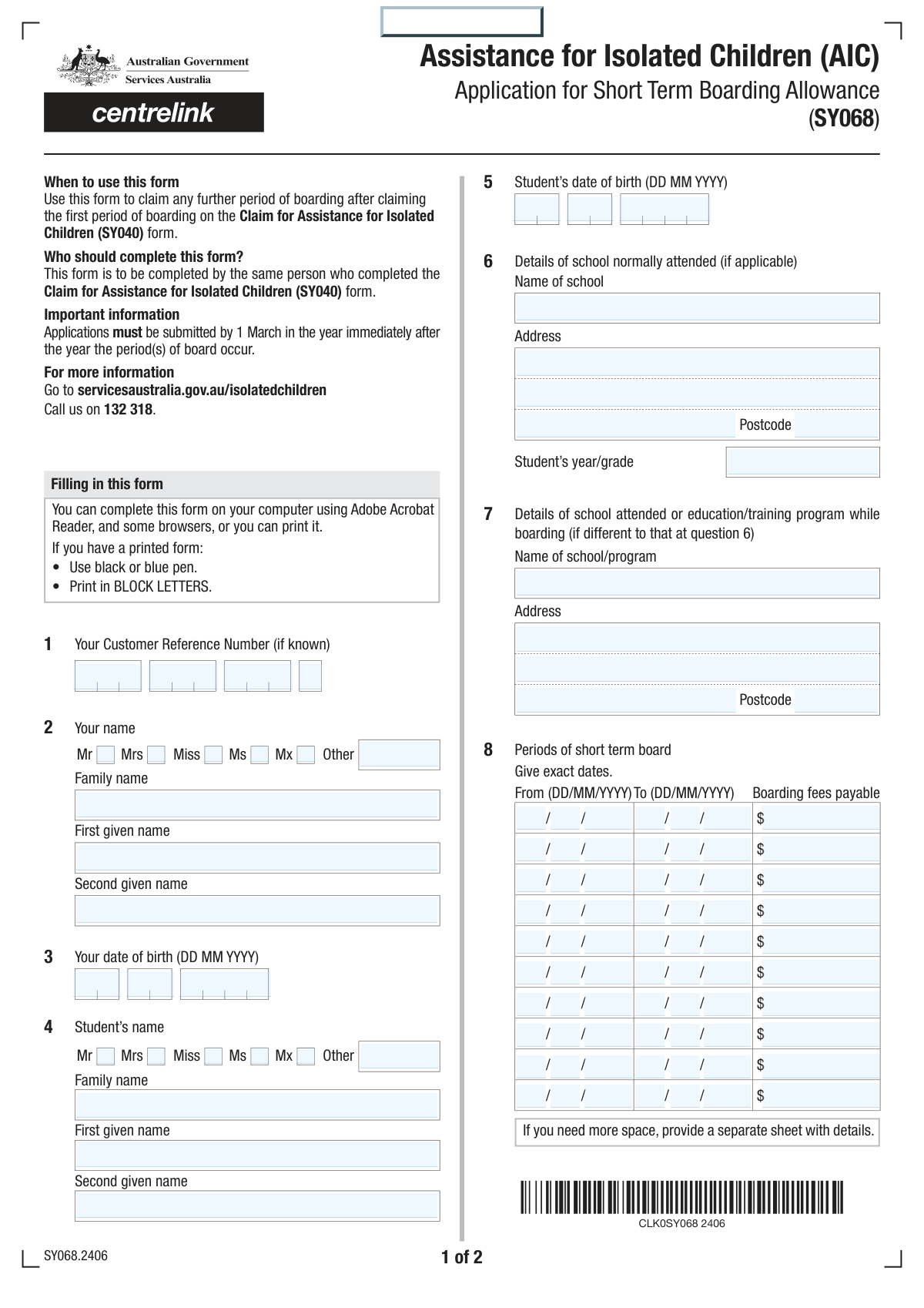
Yes! You can use AI to fill out Claim for Short Term Boarding Allowance
Don't type 132 fields by hand. Tell our AI about yourself, or upload a document you already have, and it fills every field in seconds. You check it, then download, print or sign.
The AI does the filling. You just check it.
No typing into boxes, nothing to install.
What this form asks for
The AI fills all of it, from your answers or your documents.
The AI checks your answers before you download
12 checks built for this form, so a wrong date or a missing answer is caught before anyone else sees it.
This check ensures that all four parts of the Customer Reference Number are filled in. The number is likely a primary identifier for the customer's account, and all segments are required to reconstruct the full value. If any part is missing, the system cannot perform a lookup, leading to processing failures or delays.
Validates that for both the applicant and the student, only one title checkbox (e.g., Mr, Mrs, Miss) is selected. This prevents data ambiguity and ensures proper formatting for official communications. If a user selects multiple titles, the form should display an error and require them to choose only one before proceeding.
Ensures the applicant's 'Date of Birth' fields combine to form a valid calendar date and that the resulting age is plausible for an applicant (e.g., over 18). This check prevents data entry errors such as future dates or typos that would make the applicant's record invalid. A failure would require the user to correct the date before submission.
This logical check verifies that the student's date of birth is after the applicant's date of birth, confirming the student is younger than the applicant. This helps catch common data entry mistakes where the two individuals' details might be accidentally swapped. A validation failure would prompt the user to review and correct the entered dates.
For each individual boarding period entered, this validation confirms that the End Date is on or after the Start Date. It is logically impossible for a period of time to end before it begins, so this check is crucial for data sanity. An error here would prevent the system from correctly calculating the duration and cost of the boarding period.
This validation ensures that the multiple boarding periods are entered in chronological order and without overlaps. The start date of a subsequent period (e.g., Period 2) must be after the end date of the preceding period (Period 1). This is essential for correctly calculating total boarding duration and ensuring accurate financial records.
And 6 more checks
- Boarding Fees Numeric Format
- Conditional Board Provider Details
- Agent Payment Logic
- BSB Number Format Validation
- Conditional Payment Details Requirement
- Declaration Check and Date Validity
Let AI fill out your Short Term Boarding Claim
No typing. Every field filled in seconds, checked, ready to sign.
How to Fill Out Short Term Boarding Claim Online for Free in 2026
What the AI walks you through.
- Navigate to Instafill.ai and upload the Claim for Short Term Boarding Allowance form or select it from the available templates.
- Provide your personal details as the claimant and the student's information, including their full name and date of birth. Instafill.ai's AI can help pre-fill this from your saved profile.
- Enter the details of the student's normally attended school, including its name and address.
- Carefully fill in the sections for each period of short-term boarding. For each period, you will need to provide the start date, end date, and the total boarding fees payable.
- Input the details of the board provider and specify the bank account information where the allowance should be paid.
- Review the entire form. Use Instafill.ai's validation checks to ensure all required fields, especially the financial figures and dates, are correct and complete.
- Read the declaration, check the confirmation box, provide the date, and sign the form electronically before submitting it as instructed.
Common Mistakes in Completing Short Term Boarding Claim
The ones the AI is built to catch.
Incorrect Customer Reference Number Entry
Confusing Applicant and Student Details
Inconsistent or Incomplete Name Fields
Misinterpreting Conditional Boarding School Fields
Data Entry Errors in Repetitive Boarding Periods
Incorrect Date Entry in Split Fields
Incorrect or Incomplete Bank Account Details
Forgetting Subsequent Conditional Sections
Missing Signature or Incomplete Declaration
Submitting a Partially Filled Form
Frequently Asked Questions About Short Term Boarding Claim
Is it really free for 7 days?
Can I fill other forms too?
How do I cancel?
How does the AI fill out Short Term Boarding Claim?
What happens to my information?
How complex is Short Term Boarding Claim to fill out?
What is the purpose of this form?
Where can I find my Customer Reference Number?
Who is considered the 'customer' and who is the 'student'?
What is the difference between 'School Normally Attended' and 'Boarding School Details'?
What should I do if I have more than ten boarding periods to claim?
Who is the 'Board Provider'?
What does it mean to have payments made to an agent?
Do I need to provide my bank account details?
Is a signature required to submit this form?
Can I use an AI tool to help fill out this form?
How can I fill this form out online using Instafill.ai?
The PDF I have is not fillable. What can I do?
Where do I enter a middle name on the form?
Get your Short Term Boarding Claim filled out by AI
$0 today. Cancel before Nov 10 and you pay nothing.
Other forms like this one
VA claim forms: Form OWCP-915, Claim for Medical Reimbursement, Form 8862, Information To Claim Certain Credits, Form CA-7, Claim for Compensation, Form CA-5, Claim for Compensation, Form SC-100, Plaintiff's Claim and ORDER to Go to Small Claims Court, Form 20-0995, Decision Review Request: Supplemental Claim, Form 104, List of Creditors 20 Largest Unsecured Claims, Form 941-X (Rev. April 2023), Adjusted Employer’s QUARTERLY Federal Tax Return or Claim for Refund, Judicial Council of California Form SC-104, Proof of Service (Small Claims), Immigration and Refugee Board of Canada (IRB) – Refugee Protection Division (RPD) Basis of Claim Form (for persons claiming refugee protection in Canada) (RPD.02.01), SC-108, Request to Correct or Cancel Judgment and Answer (Small Claims), Judicial Council of California Form SC-105, Request for Court Order and Answer (Small Claims), SC-120, Defendant’s Claim and ORDER to Go to Small Claims Court (Small Claims), Judicial Council of California Form SC-104, Proof of Service (Small Claims), Continental American Insurance Company (CAIC) / Aflac Group Critical Illness Claim Form (with Attending Physician’s Statement, HIPAA Authorization to Obtain Information, and Electronic Funds Transaction Authorization), Judicial Council of California Form SC-108, Request to Correct or Cancel Judgment and Answer (Small Claims), SC-105, Request for Court Order and Answer (Small Claims), Judicial Council of California Form SC-120, Defendant’s Claim and ORDER to Go to Small Claims Court (Small Claims), Small Claim and Notice of Small Claim (ORS 46.425) (OJD Official) (Jan 2026), VA Form 21-4138, Statement in Support of Claim
ERM forms: REQUEST FOR OWNERSHIP INFORMATION—ERM-14 FORM, Form I-90, Application to Replace Permanent Resident Card, Form I-485, Application to Register Permanent Residence, Form SS-8, Determination of Worker Status, Form CMS-1763, Request for Termination of Medicare Coverage, Form I-212, Application for Permission to Reapply, Form I-192, Application for Advance Permission to Enter as a Nonimmigrant, Form W-8IMY (Rev. October 2021), Certificate of Foreign Intermediary, Foreign Flow-Through Entity, or Certain U.S. Branches for United States Tax Withholding and Reporting, County of Louisa Department of Community Development – New Non-Residential Building Permit Package, Application Schedule 1: Designer Information (City of Toronto Building Permit Application), HR-Pol-Rec&Res-04 Employment Application Form (Recruitment of Permanent Employees), Fauquier County Department of Community Development – Building Trades Permit or Amendment to Existing Permit Application (Residential or Commercial), Belastingdienst VPB 075 – Verzoek fiscale eenheid Vennootschapsbelasting (Deel A – Gegevens moedermaatschappij), ROTC Cadet Academic Plan / Degree and Credit Hour Worksheet (Student Identification, Term-by-Term Courses, GPA Summary, and Completion Certification), Health Assessment – Ontario Health atHome (Fixing Long-Term Care Act, 2021) (Form 4768-69E), Health Assessment - Ontario Health atHome (Fixing Long-Term Care Act, 2021) — Form 4768-69E, Washington Single-Family Property Term Lease & Security Deposit Receipt (WA Single-Family Lease) | Revised 10/08/2025, Application for Mechanical Permit, Pennsylvania Department of State — Certificate of Termination (Domestic Limited Liability Company) (15 Pa.C.S. § 8872(f)) (DSCB:15-8872(f)), Document Checklist for a Study Permit (IMM 5483)
Let AI fill out your Short Term Boarding Claim
Your trial starts once a card is added. You pay nothing before Nov 10.
Our AI already knows this form, all 132 fields of it. Skip the typing: tell it about yourself, or upload what you have, and it fills the whole form in seconds.
- AI fills every field on both pages, tables and checkboxes included
- No typing into boxes: answer a few questions, or upload a document you already have, an old copy of this form, a photo of a document
- The AI checks the answers; you review and change anything before you download
- Download the finished PDF, print it, or sign it online
- Encrypted, and never used to train AI
Cancel before Nov 10 and you pay nothing.
A card is needed to start the trial. Cancel in two clicks from your account.
Terms · Privacy