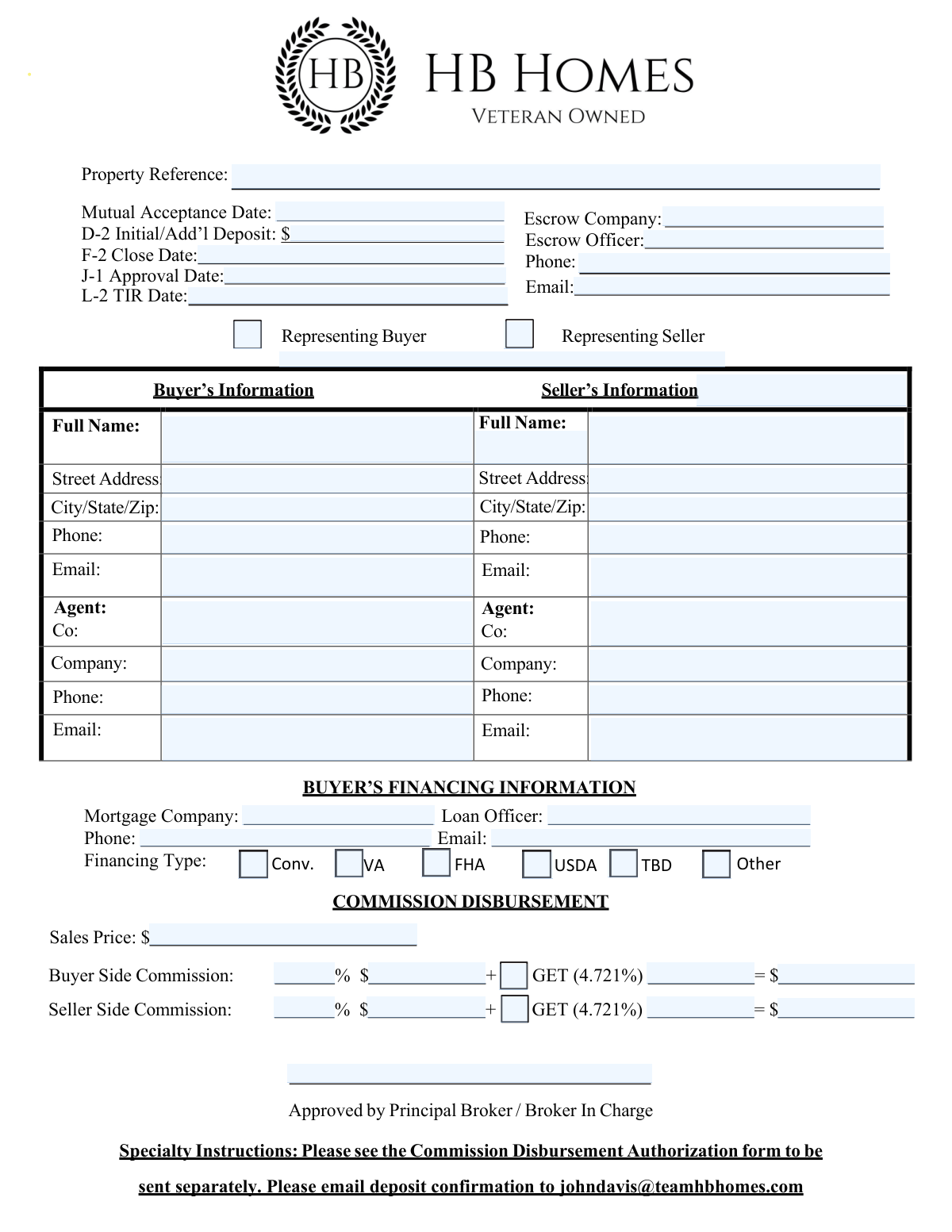
Yes! You can use AI to fill out Commission Disbursement Authorization Form

The Commission Disbursement Authorization form is a crucial document in real estate transactions that specifies how the sales commission will be divided between the buyer's and seller's agents. It ensures clarity and agreement on financial distributions. Today, this form can be filled out quickly and accurately using AI-powered services like Instafill.ai, which can also convert non-fillable PDF versions into interactive fillable forms.

Form specifications

Form name: Commission Disbursement Authorization Form
Number of fields: 55
Number of pages: 1
Filled form examples: Commission Disbursement Authorization Examples
Language: English
Our AI automatically handles information lookup, data retrieval, formatting, and form filling.
It takes less than a minute to fill out Commission Disbursement Authorization using our AI form filling.
Securely upload your data. Information is encrypted in transit and deleted immediately after the form is filled out.
Preview of Commission Disbursement Authorization Form

Instafill Demo: How to fill out PDF forms in seconds with AI

How to Fill Out Commission Disbursement Authorization Online for Free in 2026

Are you looking to fill out a COMMISSION DISBURSEMENT AUTHORIZATION form online quickly and accurately? Instafill.ai offers the #1 AI-powered PDF filling software of 2026, allowing you to complete your COMMISSION DISBURSEMENT AUTHORIZATION form in just 37 seconds or less.
Follow these steps to fill out your COMMISSION DISBURSEMENT AUTHORIZATION form online using Instafill.ai:
  1. 1 Navigate to Instafill.ai and upload or select the Commission Disbursement Authorization form.
  2. 2 Allow the AI to automatically identify and extract all fields, including property details, dates, buyer/seller information, and commission percentages.
  3. 3 Review the extracted information for accuracy and make any necessary corrections directly within the Instafill.ai interface.
  4. 4 Input any missing details, such as escrow company information, agent contacts, or financing specifics, as prompted by the AI.
  5. 5 Confirm the commission calculations for both the buyer and seller sides, ensuring they align with the agreement.
  6. 6 Electronically sign the form if required, or prepare it for signature by the relevant parties.
  7. 7 Download the completed, fillable form or have Instafill.ai securely store it for future reference.

Our AI-powered system ensures each field is filled out correctly, reducing errors and saving you time.

Why Choose Instafill.ai for Your Fillable Commission Disbursement Authorization Form?

Speed

Complete your Commission Disbursement Authorization in as little as 37 seconds.

Up-to-Date

Always use the latest 2026 Commission Disbursement Authorization form version.

Cost-effective

No need to hire expensive lawyers.

Accuracy

Our AI performs 10 compliance checks to ensure your form is error-free.

Security

Your personal information is protected with bank-level encryption.

Frequently Asked Questions About Commission Disbursement Authorization

This form appears to be a real estate transaction summary, likely used to track key dates, parties involved, financial details, and commission disbursements for a property sale.

This form is typically filled out by real estate agents, brokers, escrow officers, or other parties involved in a property transaction to document essential details.

You will need details such as the property reference, mutual acceptance date, deposit amounts, closing date, escrow company information, buyer and seller details, financing information, and commission breakdown.

You need to provide the full name, street address, city/state/zip, phone number, and email for both the buyer and the seller. You also need to include their respective agents' and companies' contact information.

The financing types include Conventional (Conv.), VA, FHA, USDA, To Be Determined (TBD), and Other. You should select the appropriate type for the buyer's mortgage.

The form requires the sales price, buyer side commission percentage, and seller side commission percentage. It then calculates the dollar amounts for each side, including a GET (likely a tax or fee) of 4.721%.

The Mutual Acceptance Date is the date when both the buyer and seller have agreed to and signed the purchase agreement, making the offer legally binding.

The Close Date is the final date when the property ownership officially transfers from the seller to the buyer, and all transaction documents are signed.

This refers to the earnest money deposit made by the buyer when the offer is accepted, which may include an initial deposit and any additional deposits made later.

These likely refer to specific dates related to loan approvals or other contingencies within the transaction process, such as 'Joint Tenancy' approval or 'Third-Party Inspection Report' dates, though their exact meaning may depend on local real estate practices.

The form specifies to email the deposit confirmation to [email protected].

This is a separate form that needs to be sent to authorize how the real estate commissions are distributed between the involved parties. Please refer to that document for details.

Yes, AI services like Instafill.ai can help you fill out this form by automatically populating fields accurately, saving you time and reducing errors.

If the PDF is not fillable, you can use a service like Instafill.ai to convert the flat PDF into an interactive, fillable form, making it easier to complete digitally.

You can upload the form to Instafill.ai, and its AI will identify the fields. You can then input your information, and Instafill.ai will generate a completed, fillable PDF for you.

Compliance Commission Disbursement Authorization
Validation Checks by Instafill.ai

1
Validates Property Reference Format
Ensures the Property Reference field contains a valid format, such as alphanumeric characters or a specific pattern if defined. This prevents errors in referencing properties and ensures data integrity for record-keeping. Failure to validate may lead to unsearchable or incorrectly linked property records.
2
Validates Mutual Acceptance Date Format
Checks if the Mutual Acceptance Date is entered in a valid date format (e.g., MM/DD/YYYY). This is crucial for tracking contract timelines and ensuring that all parties are aware of key dates. An invalid date format could lead to misinterpretations of contract deadlines.
3
Validates D-2 Initial/Add’l Deposit is Numeric
Confirms that the D-2 Initial/Additional Deposit amount is a valid number, potentially with a currency symbol. This ensures accurate financial tracking and prevents non-numeric entries that could disrupt calculations. Incorrect entries might lead to financial discrepancies.
4
Validates F-2 Close Date Format
Ensures the F-2 Close Date is entered in a valid date format (e.g., MM/DD/YYYY). This date is critical for transaction completion and legal compliance. An invalid date format could cause issues with scheduling and adherence to contractual obligations.
5
Validates J-1 Approval Date Format
Verifies that the J-1 Approval Date is in a correct date format (e.g., MM/DD/YYYY). This date is important for tracking the approval process and ensuring timely progression of the transaction. Incorrect formats can lead to confusion about approval status.
6
Validates L-2 TIR Date Format
Checks if the L-2 TIR Date is entered in a valid date format (e.g., MM/DD/YYYY). This date is likely a critical milestone in the transaction process. An invalid date format could lead to missed deadlines or incorrect tracking of the transaction's progress.
7
Validates Escrow Company Name Completeness
Ensures that the Escrow Company field is not left blank if it is a required field for the transaction. Accurate escrow company information is vital for communication and financial handling. An empty field could halt the transaction process or lead to misdirected communications.
8
Validates Escrow Officer Name Completeness
Confirms that the Escrow Officer's name is provided if the Escrow Company is specified. This ensures a point of contact within the escrow company. Missing this information can delay communication and problem resolution.
9
Validates Escrow Officer Phone Format
Checks if the Escrow Officer's Phone number is entered in a standard phone number format (e.g., (XXX) XXX-XXXX or XXXXXXXXXX). This ensures that the contact information is usable for direct communication. An invalid format might make it impossible to reach the escrow officer.
10
Validates Escrow Officer Email Format
Ensures the Escrow Officer's Email address follows a valid email format (e.g., [email protected]). This is essential for electronic communication and document exchange. An invalid email format will prevent successful delivery of important correspondence.
11
Validates Buyer/Seller Representation Selection
Confirms that the user has selected whether they are representing the Buyer or the Seller. This is a critical piece of information for understanding the context of the submission. Failure to select can lead to misinterpretation of roles and responsibilities.
12
Validates Buyer Full Name Completeness
Ensures that the Buyer's Full Name field is completed. This is a fundamental piece of information for identifying the party involved in the transaction. An empty field prevents proper identification of the buyer.
13
Validates Buyer Street Address Completeness
Checks that the Buyer's Street Address is provided. This is necessary for official correspondence and legal documentation. Missing address information can lead to delays or errors in official mailings.
14
Validates Buyer City/State/Zip Completeness
Ensures that the Buyer's City, State, and Zip Code are all provided. This is essential for accurate mailing and geographical identification. Incomplete address details can cause delivery issues and administrative errors.
15
Validates Buyer Phone Format
Verifies that the Buyer's Phone number is entered in a valid phone number format. This ensures that the buyer can be easily contacted. An invalid format may render the contact information unusable.
16
Validates Buyer Email Format
Checks that the Buyer's Email address is in a valid email format. This is crucial for electronic communication regarding the transaction. An invalid email address will prevent the buyer from receiving important updates.

Common Mistakes in Completing Commission Disbursement Authorization

Incorrect or Incomplete Property Reference

The Property Reference is a crucial identifier for the transaction. If it's entered incorrectly or omitted, it can lead to significant confusion, delays, and misallocation of documents or funds. Always double-check the property address or reference number against official documents before entering it. Using an AI-powered form filling tool can help ensure accuracy by pre-populating or validating this information.

Ambiguous or Missing Mutual Acceptance Date

The Mutual Acceptance Date signifies the official start of the contract. If this date is entered incorrectly, formatted improperly (e.g., MM/DD/YYYY vs. DD/MM/YYYY), or left blank, it can create disputes regarding deadlines for contingencies, inspections, and closing. Ensure the date is clearly and accurately entered in the expected format. AI tools can help standardize date formats.

Formatting Errors in Monetary Fields

Fields like 'D-2 Initial/Add’l Deposit', 'Sales Price', and commission amounts require precise numerical entry. Mistakes such as including currency symbols where not expected, using commas incorrectly, or entering decimals in the wrong place can cause miscalculations and financial discrepancies. Always enter numbers without currency symbols and use decimal points correctly. AI form fillers can automatically format these fields.

Unclear or Missing Closing Date

The Close Date is a critical deadline for the transaction. If it's entered incorrectly, ambiguously, or omitted, it can lead to missed deadlines, potential contract breaches, and financial penalties. Verify the closing date from the purchase agreement and enter it clearly. AI tools can help ensure consistent date formatting.

Incomplete Escrow Company Information

Providing incomplete or incorrect details for the Escrow Company, Escrow Officer, Phone, or Email can hinder communication and the smooth transfer of funds and documents. This can cause delays in closing and create confusion about who is managing the escrow. Ensure all contact details are accurate and complete. AI tools can help manage and validate contact information.

Incorrectly Identifying Representation (Buyer/Seller)

Failing to clearly select or incorrectly marking whether the form is for the 'Representing Buyer' or 'Representing Seller' can lead to misinterpretation of roles and responsibilities. This could impact how the information is processed and who it is directed to. Always ensure the correct box is checked to accurately reflect the party being represented.

Incomplete Buyer/Seller Contact Information

Missing or incorrect Full Name, Street Address, City/State/Zip, Phone, or Email for either the Buyer or Seller can impede communication, prevent important notifications from being received, and delay the transaction. Ensure all fields are filled out accurately for both parties. AI tools can assist in validating and completing contact details.

Errors in Agent/Company Information

Similar to buyer/seller information, incomplete or incorrect details for the Buyer's or Seller's Agent (Name, Co., Company, Phone, Email) can disrupt communication channels between parties and their representatives. This can lead to misunderstandings and delays. Double-check all agent and company contact information for accuracy.

Incorrect Financing Type Selection

When selecting the 'Financing Type' (Conventional, VA, FHA, USDA, TBD, Other), selecting the wrong option or failing to select one when known can affect loan processing and underwriting. If 'Other' is selected, the specific type should be clearly indicated. Ensure the correct financing type is marked. AI tools can help standardize selections.

Ambiguity in Commission Calculations

The commission section requires percentages and dollar amounts for both Buyer and Seller sides. Errors in calculation, incorrect percentage entry, or missing dollar amounts can lead to disputes over commission payouts. Carefully review and calculate all commission figures, ensuring both percentage and dollar amounts are accurate. AI tools can automate these calculations.

Missing or Incorrect Loan Officer/Mortgage Company Details

Incomplete or inaccurate information for the Mortgage Company, Loan Officer, Phone, or Email can hinder communication between the lender and other parties involved in the transaction. This can delay loan approval and closing. Ensure all lender contact details are accurate and complete.

Failure to Follow Specialty Instructions

The form includes a note about a separate 'Commission Disbursement Authorization form' and an email address for deposit confirmation. Overlooking these instructions, such as not sending the separate form or not emailing the confirmation, can lead to processing errors and delays. Always read and adhere to all special instructions and notes provided within the form.
Saved over 80 hours a year

“I was never sure if my IRS forms like W-9 were filled correctly. Now, I can complete the forms accurately without any external help.”

Kevin Martin Green

Your data stays secure with advanced protection from Instafill and our subprocessors

Robust compliance program

Transparent business model

You’re not the product. You always know where your data is and what it is processed for.

ISO 27001, HIPAA, and GDPR

Our subprocesses adhere to multiple compliance standards, including but not limited to ISO 27001, HIPAA, and GDPR.

Security & privacy by design

We consider security and privacy from the initial design phase of any new service or functionality. It’s not an afterthought, it’s built-in, including support for two-factor authentication (2FA) to further protect your account.

Fill out Commission Disbursement Authorization with Instafill.ai

Worried about filling PDFs wrong? Instafill securely fills commission-disbursement-authorization-form forms, ensuring each field is accurate.