Yes! You can use AI to fill out Confirmation Of Closing – Rental Property

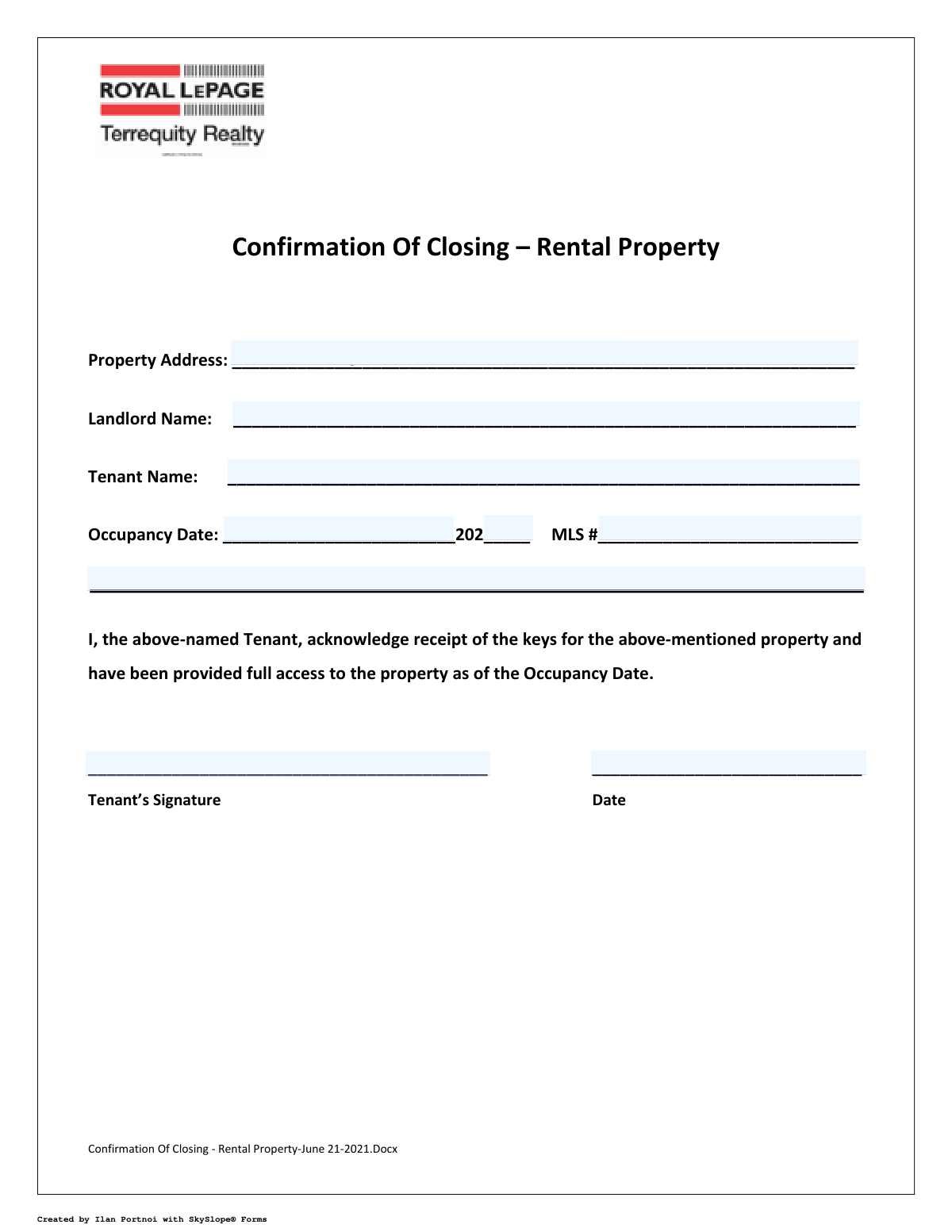
This form serves as a formal acknowledgment between a landlord and tenant, confirming that the tenant has received the keys and been granted full access to the rental property as of the agreed-upon occupancy date. It is a crucial document for record-keeping, providing clear proof that the handover process is complete. Today, this form can be filled out quickly and accurately using AI-powered services like Instafill.ai, which can also convert non-fillable PDF versions into interactive fillable forms.
Confirmation of Closing - Rental Property is part of the property forms, property rental forms and rental forms categories on Instafill.
Our AI automatically handles information lookup, data retrieval, formatting, and form filling.
It takes less than a minute to fill out Confirmation of Closing - Rental Property using our AI form filling.
Securely upload your data. Information is encrypted in transit and deleted immediately after the form is filled out.

Form specifications

Form name: Confirmation Of Closing – Rental Property
Number of fields: 9
Number of pages: 1
Filled form examples: Form Confirmation of Closing - Rental Property Examples
Language: English
main-image

Instafill Demo: How to fill out PDF forms in seconds with AI

How to Fill Out Confirmation of Closing - Rental Property Online for Free in 2026

Are you looking to fill out a CONFIRMATION OF CLOSING - RENTAL PROPERTY form online quickly and accurately? Instafill.ai offers the #1 AI-powered PDF filling software of 2026, allowing you to complete your CONFIRMATION OF CLOSING - RENTAL PROPERTY form in just 37 seconds or less.
Follow these steps to fill out your CONFIRMATION OF CLOSING - RENTAL PROPERTY form online using Instafill.ai:
  1. 1 Navigate to Instafill.ai and upload or select the 'Confirmation Of Closing – Rental Property' form.
  2. 2 Allow the AI to process the document and identify all the necessary fields, such as Property Address, Landlord Name, and Tenant Name.
  3. 3 Enter the required details into the interactive fields, including the full property address, names of the landlord and tenant, and the MLS number if applicable.
  4. 4 Input the Occupancy Date, ensuring the month, day, and year are correct.
  5. 5 The tenant should digitally sign in the designated signature field and date the document to finalize the acknowledgment.
  6. 6 Review all the information you've entered for accuracy to ensure there are no errors.
  7. 7 Download, print, or securely share the completed and signed confirmation form for both the landlord's and tenant's records.

Our AI-powered system ensures each field is filled out correctly, reducing errors and saving you time.

Why Choose Instafill.ai for Your Fillable Confirmation of Closing - Rental Property Form?

Speed

Complete your Confirmation of Closing - Rental Property in as little as 37 seconds.

Up-to-Date

Always use the latest 2026 Confirmation of Closing - Rental Property form version.

Cost-effective

No need to hire expensive lawyers.

Accuracy

Our AI performs 10 compliance checks to ensure your form is error-free.

Security

Your personal information is protected with bank-level encryption.

Frequently Asked Questions About Form Confirmation of Closing - Rental Property

This form serves as official proof that the tenant has received the keys and been granted full access to the rental property on the specified occupancy date. It confirms the successful handover of the property from the landlord to the tenant.

The tenant is the only person required to sign this form. The signature acknowledges that they have taken possession of the property as agreed.

You should sign this form on your occupancy date, but only after you have physically received all necessary keys and verified you have full access to the property. Do not sign it in advance.

You will need the full property address, the landlord's name, your full name as the tenant, the occupancy date, and the property's MLS number if applicable. The tenant must also provide a signature and the date of signing.

The MLS (Multiple Listing Service) number is a unique code for the property listing, used by real estate agents. If you worked with an agent, they can provide it; if not, you may be able to leave this field blank, but check with your landlord.

Do not sign the form until you have received all keys and access devices (for mailboxes, amenities, etc.) as specified in your lease. Signing the form confirms you have 'full access,' so ensure this is true before you sign.

After signing, you should provide the completed form to your landlord, property manager, or the real estate agent who handled the lease. Always keep a copy for your own records.

Yes, services like Instafill.ai use AI to accurately auto-fill form fields with your information, which can save you time and help prevent errors. This is especially useful for filling out multiple move-in documents.

You can use a service like Instafill.ai, which instantly converts flat, non-fillable PDFs into interactive, fillable forms. This allows you to easily type your information into the fields and add a digital signature.

Simply upload the 'Confirmation of Closing' PDF to the Instafill.ai platform. The AI will make the document fillable, allowing you to click and type in the required details and add your electronic signature in minutes.

Full access means you can enter and use the entire rented premises as outlined in your lease. This includes the main unit and any associated amenities like parking spots, storage lockers, or mailboxes that are part of your agreement.

Yes, the Occupancy Date should be the same as the official start date of your lease agreement. This is the day your tenancy legally begins and you are entitled to take possession of the property.

You should immediately document any issues (e.g., cleanliness, damages) with photos and notify your landlord in writing. You may still need to sign this form to receive the keys, but be sure your concerns are reported separately to ensure they are addressed.

Compliance Confirmation of Closing - Rental Property
Validation Checks by Instafill.ai

1
Tenant Name and Acknowledgment Consistency
This check verifies that the 'Tenant Name' field at the top of the form matches the 'Tenant Acknowledgment Name' field in the main body. It is crucial for ensuring the same individual is being referenced throughout the document, preventing ambiguity about who is acknowledging receipt of the keys. A mismatch would trigger an error, requiring the user to correct the name in one of the fields to ensure consistency.
2
Signature Date Chronology vs. Occupancy Date
This validation ensures the 'Signature Date' is on or after the 'Occupancy Date'. A tenant cannot logically acknowledge receipt of keys and property access before the official occupancy begins. This check prevents paradoxical or fraudulent date entries that could lead to legal disputes about when access was actually granted.
3
Full Occupancy Date Completeness
This check confirms that all parts of the Occupancy Date ('Occupancy Date (Month & Day)' and 'Occupancy Year (YY)') have been filled out. A partial date is ambiguous and legally insufficient for defining the start of the tenancy agreement. If any part is missing, the form submission should be blocked until a complete date is provided.
4
Occupancy Date Validity
This validation combines the month, day, and year fields for the Occupancy Date and verifies that they form a valid calendar date (e.g., it would flag 'February 30'). This is important for data integrity and prevents the recording of a nonsensical date that would invalidate the timeline of the agreement. An invalid date entry would require correction before submission.
5
Tenant Signature Presence
This check ensures that the 'Tenant Signature' field has been signed. The signature is the most critical part of this form, as it serves as the tenant's legal acknowledgment. Without a signature, the document has no binding effect, so a missing signature must prevent the form from being processed.
6
Property Address Completeness
This validation verifies that the 'Property Address' field is not empty. The address is the primary identifier for the subject of the agreement, and its absence makes the entire document ambiguous and unenforceable. This is a mandatory field, and the form cannot be submitted without it.
7
Signature Date Presence
This check confirms that the 'Signature Date' field is filled in. The date of the signature is legally significant as it establishes when the acknowledgment was made. A missing signature date creates ambiguity and weakens the document's value as evidence, so it must be required.
8
Occupancy Year Two-Digit Format
This validation ensures the 'Occupancy Year (YY)' field contains exactly two numerical digits as specified by the field label. This enforces the requested data format, preventing users from entering a four-digit year or non-numeric characters. Maintaining this format ensures data consistency and proper date reconstruction by the system.
9
Landlord Name Completeness
This check ensures the 'Landlord Name' field is not left blank. Identifying the landlord is essential for the legal validity of the document, as it clarifies who is granting access to the property. The form should be considered incomplete and un-submittable without this information.
10
Tenant Name Completeness
This validation verifies that the primary 'Tenant Name' field at the top of the form is filled out. This is a fundamental requirement for identifying the party who is acknowledging receipt of the keys. Failure to provide the tenant's name would make the document legally meaningless.
11
MLS Number Format
This check validates that the 'MLS #' field entry conforms to a standard format, such as being alphanumeric and within a certain length range. While the form doesn't specify the format, systems often expect a particular structure for database lookups. This validation ensures data quality and successful integration with real estate listing systems.

Common Mistakes in Completing Confirmation of Closing - Rental Property

Incomplete Property Address

Tenants often forget to include the unit or apartment number (e.g., '1411') when filling out the property address. This mistake happens because they focus on the main building address and see the unit number as secondary information. An incomplete address can create legal ambiguity in the agreement and cause issues with mail or future property management communications. Always enter the full address, including the specific unit number, exactly as it appears on the lease agreement.

Incorrect Occupancy Date Formatting

The form splits the Occupancy Date into two separate fields: 'Month & Day' and 'Occupancy Year (YY)'. This is a common source of error, with users often trying to write the full date in the first field or entering the full four-digit year in the 'YY' field. This can lead to data entry rejection or an incorrect date being recorded on a legally binding document. To avoid this, carefully enter only the month and day in the first field and only the last two digits of the year in the second.

Confusing Occupancy Date with Signature Date

Users frequently enter the same date for both the 'Occupancy Date' and the 'Signature Date'. While these dates can be the same, the Occupancy Date is the official start of tenancy, whereas the Signature Date is the day this specific form is signed. This confusion can create discrepancies in legal records, especially if the form is signed before the move-in day. It's crucial to verify and enter the correct, distinct date for each field as required.

Using Informal or Incomplete Names

Tenants or landlords may enter nicknames, initials, or an incomplete version of their name instead of their full legal name. This is a critical error as this document serves as a legal confirmation, and names must match other legal documents like the lease agreement. Using an incorrect name can compromise the document's validity. Always use the full legal names for all parties as they appear on government-issued ID and the official lease.

Omitting the MLS Number

The MLS (Multiple Listing Service) number is often left blank because tenants are typically unaware of this number or its significance. This number is used by real estate professionals to track the transaction and property history. Leaving it blank can cause administrative delays for the landlord or property manager. If the MLS number is not readily available, the tenant should ask the landlord or their real estate agent for the correct number before signing.

Missing or Invalid Signature

In the rush to complete paperwork, a tenant might forget to sign the document, rendering it invalid. Another common issue is confusion over the required signature type; the field description specifies a 'handwritten signature', which might conflict with digital submission processes. An unsigned or improperly signed form fails to provide legal proof of key receipt and property access. Ensure the form is signed in the required format before submission.

Mismatched Tenant Name Entries

The form asks for the 'Tenant Name' at the top and a 'Tenant Acknowledgment Name' in the body of the text, which can be confusing. Users might accidentally enter different variations of their name, create a typo in one field, or leave the second field blank. This inconsistency can raise questions about the document's integrity. To prevent this, carefully enter the identical, full legal name in both fields. AI-powered form fillers like Instafill.ai can prevent this by auto-populating related fields consistently.

Incorrectly Dating the Signature

A common mistake is to put the Occupancy Date in the Signature Date field out of habit. The Signature Date must be the actual date the tenant is signing the document. An incorrect date can create legal and administrative problems, misrepresenting when the acknowledgment actually took place. Always enter the current date when you sign any document.

Illegible Handwriting on Printed Forms

If the form is printed and filled out by hand, poor or illegible handwriting can make critical information like names, dates, and addresses unreadable. This leads to data entry errors by the landlord or property manager, potentially causing legal or communication issues down the line. If a form is only available as a non-fillable PDF or Word document, tools like Instafill.ai can convert it into a fillable version, allowing you to type directly into the fields for perfect clarity.

Forgetting to List All Tenants

When multiple tenants are on the lease, they may mistakenly believe only one needs to be listed on this form. However, all tenants listed on the lease agreement should typically be included and may need to sign. Omitting co-tenants can create ambiguity about who has officially taken possession of the property. Ensure all official tenants are listed by name to create a clear and complete record.
Saved over 80 hours a year

“I was never sure if my IRS forms like W-9 were filled correctly. Now, I can complete the forms accurately without any external help.”

Kevin Martin Green

Your data stays secure with advanced protection from Instafill and our subprocessors

Robust compliance program

Transparent business model

You’re not the product. You always know where your data is and what it is processed for.

ISO 27001, HIPAA, and GDPR

Our subprocesses adhere to multiple compliance standards, including but not limited to ISO 27001, HIPAA, and GDPR.

Security & privacy by design

We consider security and privacy from the initial design phase of any new service or functionality. It’s not an afterthought, it’s built-in, including support for two-factor authentication (2FA) to further protect your account.

Fill out Confirmation of Closing - Rental Property with Instafill.ai

Worried about filling PDFs wrong? Instafill securely fills confirmation-of-closing-rental-property forms, ensuring each field is accurate.