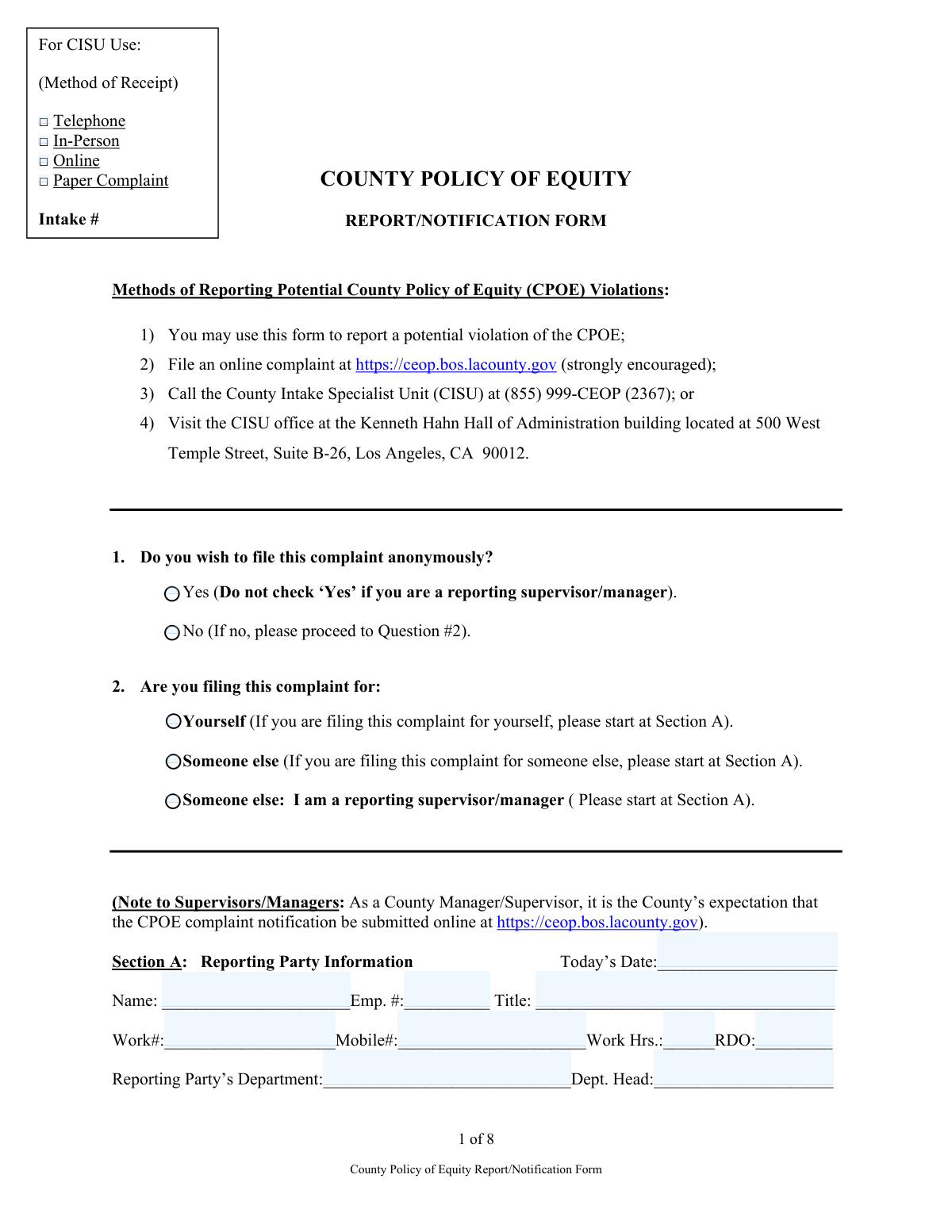
Yes! You can use AI to fill out County Policy of Equity Report/Notification Form
This form serves as an official document for reporting potential violations of the County Policy of Equity (CPOE), allowing individuals to detail incidents of alleged misconduct, discrimination, or inequitable treatment. It is a critical tool for initiating an investigation and ensuring accountability and fairness within the county's jurisdiction. Today, this form can be filled out quickly and accurately using AI-powered services like Instafill.ai, which can also convert non-fillable PDF versions into interactive fillable forms.
Our AI automatically handles information lookup, data retrieval, formatting, and form filling.
It takes less than a minute to fill out CPOE Report/Notification Form using our AI form filling.
Securely upload your data. Information is encrypted in transit and deleted immediately after the form is filled out.
Form specifications
| Form name: | County Policy of Equity Report/Notification Form |
| Number of fields: | 185 |
| Number of pages: | 8 |
| Language: | English |
Instafill Demo: How to fill out PDF forms in seconds with AI
How to Fill Out CPOE Report/Notification Form Online for Free in 2026
Are you looking to fill out a CPOE REPORT/NOTIFICATION FORM form online quickly and accurately? Instafill.ai offers the #1 AI-powered PDF filling software of 2026, allowing you to complete your CPOE REPORT/NOTIFICATION FORM form in just 37 seconds or less.
Follow these steps to fill out your CPOE REPORT/NOTIFICATION FORM form online using Instafill.ai:
- 1 Navigate to Instafill.ai and upload or select the County Policy of Equity Report/Notification Form.
- 2 Indicate if the complaint is anonymous and who you are filing for (yourself, someone else, or as a supervisor).
- 3 Use the AI assistant to populate Section A with the Reporting Party's information, including name, employee number, and department.
- 4 Complete Sections B, C, and D by providing detailed information about the complainant(s), the alleged involved party(ies), and any witnesses.
- 5 In Section E, provide a detailed summary of the alleged violation, including the date and a description of the events.
- 6 If you are a supervisor or manager, complete all required fields in Section F regarding your knowledge and actions taken.
- 7 Review all entered information for accuracy, then use the platform's tools to sign and submit the form according to the specified methods.
Our AI-powered system ensures each field is filled out correctly, reducing errors and saving you time.
Why Choose Instafill.ai for Your Fillable CPOE Report/Notification Form Form?
Speed
Complete your CPOE Report/Notification Form in as little as 37 seconds.
Up-to-Date
Always use the latest 2026 CPOE Report/Notification Form form version.
Cost-effective
No need to hire expensive lawyers.
Accuracy
Our AI performs 10 compliance checks to ensure your form is error-free.
Security
Your personal information is protected with bank-level encryption.
Frequently Asked Questions About Form CPOE Report/Notification Form
This form is used to report potential violations of the County Policy of Equity, such as discrimination, harassment, or other unfair treatment. It allows employees to formally document their concerns for review by the County's Intake Specialist Unit (CISU).
Any County employee can use this form to file a complaint for themselves or on behalf of another person. Supervisors and managers are also required to use this form to report potential CPOE violations they observe or are notified of.
Yes, you can file anonymously by checking the 'Yes' box in question #1. However, if you are a supervisor or manager reporting an incident, you cannot file anonymously.
You can submit a complaint by filling out this paper form, filing online at https://ceop.bos.lacounty.gov (which is strongly encouraged), calling the CISU at (855) 999-2367, or visiting the CISU office in person.
The 'Reporting Party' is the individual who is filling out and submitting the form. The 'Complainant' is the person who allegedly experienced the policy violation. These can be the same person if you are filing the complaint for yourself.
You should provide as much identifying information as possible for the complainant, the alleged involved party, and any witnesses. This includes their name, employee number, title, department, and supervisor, if known.
In this section, provide a detailed summary of the incident(s), including the date(s) they occurred. Clearly explain what happened and why you believe the actions constitute a violation of the County Policy of Equity.
Supervisors must complete Section F, detailing when and how they became aware of the violation, what actions they took, and whether they assessed the complainant's need for medical attention, protection, or other assistance.
No, providing your race or ethnicity is completely optional and voluntary. This information is collected for statistical purposes only and will not affect your complaint.
You should fill out the form to the best of your ability. Provide as much information as you know to help the intake unit identify the individuals involved, even if some details are missing.
Yes, services like Instafill.ai use AI to help you accurately auto-fill form fields, which can save you time and reduce errors. This is especially helpful for forms with repetitive information sections.
To fill this form using Instafill.ai, you would upload the PDF to their platform. The AI will make the document interactive, allowing you to type your information directly into the fields before downloading the completed form.
If you have a non-fillable or 'flat' PDF, you can use a service like Instafill.ai to instantly convert it into an interactive, fillable form. Simply upload the file, and the platform will automatically detect the fields for you to complete online.
Compliance CPOE Report/Notification Form
Validation Checks by Instafill.ai
1
Conditional Anonymous Filing for Supervisors
This validation checks if the user has selected both 'Yes' for anonymous filing (Question 1) and identified as a 'reporting supervisor/manager' (Question 2). Since the form explicitly states supervisors cannot file anonymously, this combination is invalid. If this condition occurs, the system should display an error message forcing the user to either de-select anonymous filing or change their role, ensuring compliance with reporting protocols.
2
Non-Anonymous Reporting Party Completeness
This check ensures that if a user selects 'No' to anonymous filing (Question 1), then the essential fields in Section A (Reporting Party Information), such as 'Name', 'Emp. #', and a contact number ('Work#' or 'Mobile#'), are mandatory. This is critical for follow-up and investigation. A failure would prevent form submission until the required contact information is provided.
3
Complainant Information Requirement
This validation verifies that if the user is filing for 'Someone else' (Question 2), at least the first block of Complainant Information in Section B is filled out. The complaint cannot proceed without identifying who the aggrieved party is. If the user is filing for 'Yourself', this check ensures the system correctly identifies the Reporting Party from Section A as the Complainant, potentially by auto-populating or linking the sections.
4
Date Format and Chronology
This check validates that all date fields ('Today’s Date', 'Date & Time Form Completed', 'Date of alleged potential violation(s)') are entered in a valid format (e.g., MM/DD/YYYY) and are not future dates. It also ensures logical consistency, for example, the 'Date of alleged potential violation(s)' must be on or before 'Today's Date'. This prevents data entry errors and ensures the timeline of events is logical.
5
Conditional Supervisor Notification Details
This validation rule is triggered if the user checks 'Yes' to the question 'Did the complainant notify a supervisor/manager of this complaint prior to now?'. It then makes the 'Name of Supervisor/Manager Notified', 'Date', and 'How' fields mandatory. This ensures that when prior notification is claimed, all necessary details are captured for a complete record, preventing incomplete submissions.
6
Employee Number Format
This check validates that the 'Emp. #' field in Sections A, B, C, and D follows a predefined format, which is likely numeric and of a specific length. This is important for accurately identifying county employees within internal systems and linking the report to the correct personnel records. An invalid format would trigger an error, asking the user to correct the entry.
7
Phone Number Format Validation
This validation ensures that all phone number fields ('Work#', 'Mobile#', 'Mobile/Home#') are entered in a recognizable format, such as a 10-digit number. This is crucial for ensuring that contact information is valid and usable by the intake unit for communication. The system should flag entries that do not conform to a standard phone number pattern.
8
Required Alleged Involved Party
This check mandates that at least the 'Name' of one individual must be entered in Section C (Alleged Involved Party(ies) Information). A complaint cannot be investigated without knowing who is being accused of the violation. If Section C is left blank, the form submission should be blocked with a message explaining that an involved party must be identified.
9
Required Complaint Summary
This validation ensures that the text area for 'Please provide a detailed summary of the alleged potential violation(s)' in Section E is not empty. It may also enforce a minimum character count to encourage a thorough description. This is the core of the complaint, and a blank or insufficient summary makes the report impossible to evaluate or investigate.
10
Supervisor-Only Section Logic
This rule ensures that Section F ('TO BE COMPLETED BY SUPERVISORS/MANAGERS ONLY') is only enabled and required if the user has identified as a 'reporting supervisor/manager' in Question 2. For all other users, this section should be disabled or hidden to prevent confusion and incorrect data entry. If a supervisor is filling the form, the key fields within Section F become mandatory.
11
Violation Date Must Be in the Past
This validation specifically targets the 'date of the alleged potential violation(s)' field in Section E. It ensures the date provided is on or before the current date. A violation cannot have occurred in the future, so this check prevents logical impossibilities and simple data entry mistakes. An error would prompt the user to enter a valid past or present date.
12
Final Submission Declaration Completeness
This check verifies that before final submission, the 'Printed Name', 'Signature' (or digital equivalent), and 'Date' fields on the 'COMPLAINT SUBMISSION' page are all completed. This declaration is a legal attestation, and its completeness is required for the form to be considered officially filed. The submission button would remain disabled until these fields are filled.
Common Mistakes in Completing CPOE Report/Notification Form
Saved over 80 hours a year
“I was never sure if my IRS forms like W-9 were filled correctly. Now, I can complete the forms accurately without any external help.”
Kevin Martin Green
Your data stays secure with advanced protection from Instafill and our subprocessors

Robust compliance program
Transparent business model
You’re not the product. You always know where your data is and what it is processed for.
ISO 27001, HIPAA, and GDPR
Our subprocesses adhere to multiple compliance standards, including but not limited to ISO 27001, HIPAA, and GDPR.
Security & privacy by design
We consider security and privacy from the initial design phase of any new service or functionality. It’s not an afterthought, it’s built-in, including support for two-factor authentication (2FA) to further protect your account.
Fill out CPOE Report/Notification Form with Instafill.ai
Worried about filling PDFs wrong? Instafill securely fills county-policy-of-equity-reportnotification-form forms, ensuring each field is accurate.