Yes! You can use AI to fill out CW 2200, Welfare To Work Notice Of Appointment

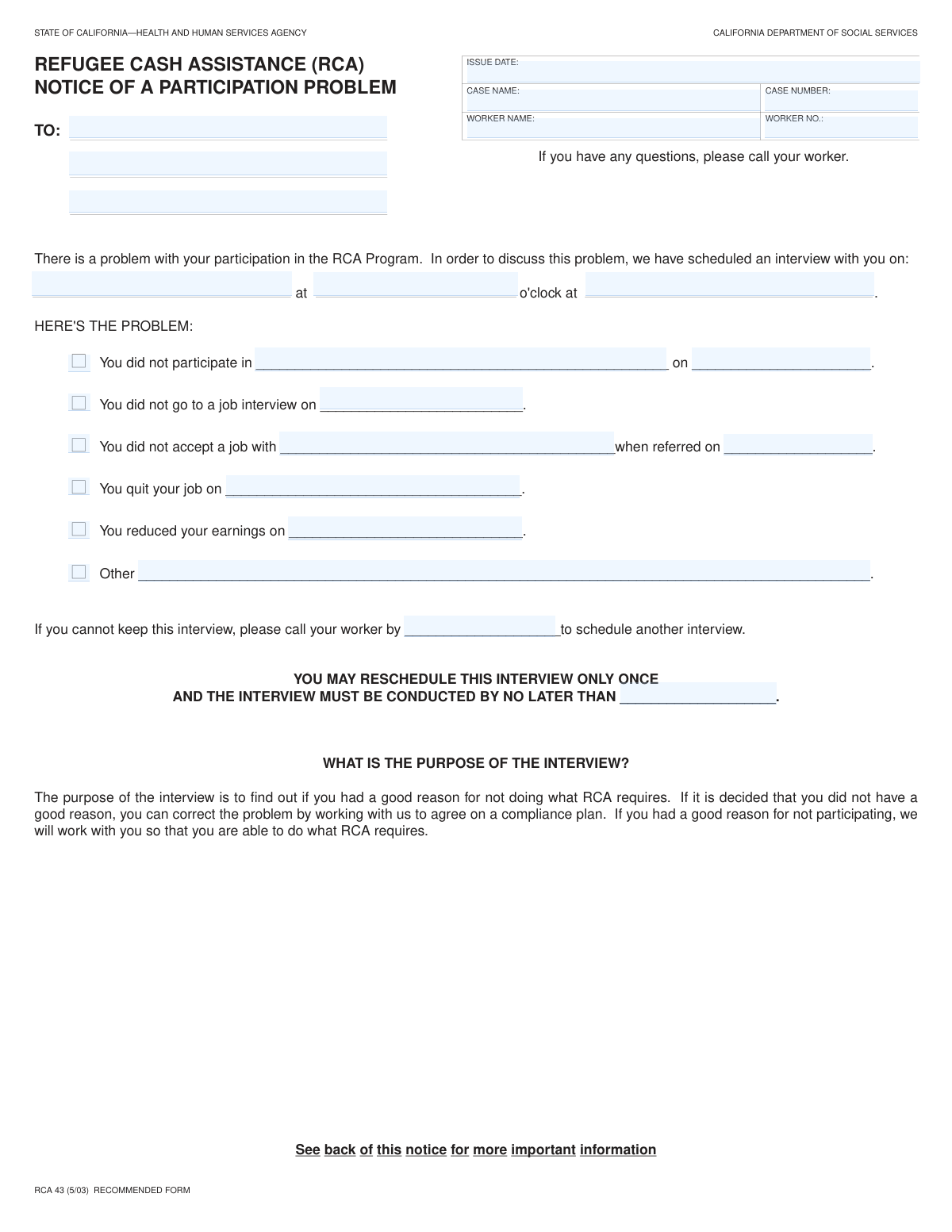
Form CW 2200, the Welfare To Work Notice Of Appointment, is a critical document issued by social services to schedule a meeting with a program participant. Its purpose is to address potential non-compliance issues that could affect the recipient's benefits, such as failing to participate, quitting a job, or missing a required interview. This notice outlines the problem and provides details for the scheduled appointment to resolve the matter. Today, this form can be filled out quickly and accurately using AI-powered services like Instafill.ai, which can also convert non-fillable PDF versions into interactive fillable forms.
Our AI automatically handles information lookup, data retrieval, formatting, and form filling.
It takes less than a minute to fill out CW 2200 using our AI form filling.
Securely upload your data. Information is encrypted in transit and deleted immediately after the form is filled out.

Form specifications

Form name: CW 2200, Welfare To Work Notice Of Appointment
Number of fields: 28
Number of pages: 2
Language: English
main-image

Instafill Demo: How to fill out PDF forms in seconds with AI

How to Fill Out CW 2200 Online for Free in 2026

Are you looking to fill out a CW 2200 form online quickly and accurately? Instafill.ai offers the #1 AI-powered PDF filling software of 2026, allowing you to complete your CW 2200 form in just 37 seconds or less.
Follow these steps to fill out your CW 2200 form online using Instafill.ai:
  1. 1 Navigate to Instafill.ai and upload your CW 2200 form or select it from our library of templates.
  2. 2 Instafill's AI will scan the form and identify all the required fields, including case information, recipient details, and appointment schedules.
  3. 3 Provide your personal and case information, such as your name, address, case number, and worker name.
  4. 4 Review the reason for the appointment indicated on the form, such as a missed interview or job rejection, and prepare any necessary explanations or documentation.
  5. 5 Confirm the scheduled interview date, time, and location. Note the deadlines for rescheduling if you are unable to attend.
  6. 6 Carefully review all the information you've entered for accuracy and completeness before finalizing the document.
  7. 7 Download, print, or securely submit your completed CW 2200 form as instructed by the issuing agency.

Our AI-powered system ensures each field is filled out correctly, reducing errors and saving you time.

Why Choose Instafill.ai for Your Fillable CW 2200 Form?

Speed

Complete your CW 2200 in as little as 37 seconds.

Up-to-Date

Always use the latest 2026 CW 2200 form version.

Cost-effective

No need to hire expensive lawyers.

Accuracy

Our AI performs 10 compliance checks to ensure your form is error-free.

Security

Your personal information is protected with bank-level encryption.

Frequently Asked Questions About Form CW 2200

This form is a notice to inform you of a potential issue with your program participation and to schedule an interview to discuss it. It specifies the date, time, and location of the interview, as well as the reason it is being held.

You received this notice because your case worker needs to discuss a specific event related to your case, such as quitting a job, reducing your earnings, or missing a scheduled job interview. The exact reason should be checked off on the form.

No, this is a notice for your information and does not need to be filled out by you. Your required action is to attend the scheduled interview or contact your worker to reschedule.

You must attend the interview at the scheduled date and time. If you are unable to attend, you must call your worker by the 'Reschedule Deadline' to set up a new appointment.

Failing to attend the interview or reschedule by the deadline could negatively affect your case and any associated benefits. It is very important to communicate with your worker.

Your case worker's name and number are listed in the 'Document Information' section at the top of the form. You should use this information to contact them if you have questions or need to reschedule.

The 'Reschedule Deadline' is the last day you can call to change your appointment. The 'Final Interview Deadline' is the absolute last day the interview can take place, even if rescheduled.

This indicates that your case worker has a record showing you were referred to and offered a job that you did not take. The interview is your opportunity to explain the circumstances of this decision.

This section specifies why the interview is being scheduled. It contains checkboxes for common issues like quitting a job, reducing work hours, or missing a required program event.

You should bring this notice with you, along with any documents that could help explain your situation. For example, if you missed a job interview due to a medical reason, bring a doctor's note.

Yes, services like Instafill.ai use AI to auto-fill repetitive fields like your name, case number, and address on various forms, which saves time and helps prevent errors.

Simply upload your form to the Instafill.ai platform. The AI will automatically detect and fill in the fields with your saved information, allowing you to complete your paperwork quickly and accurately.

You can use a service like Instafill.ai to handle this. It can convert flat, non-fillable PDFs into interactive forms that you can easily complete and save on your computer.

Compliance CW 2200
Validation Checks by Instafill.ai

1
Valid Date Format
This check ensures that all date fields, including 'issue date', 'Interview Date', and various reason-specific dates, are entered in a valid and consistent format (e.g., MM/DD/YYYY). Proper date formatting is crucial for accurate record-keeping, scheduling, and triggering time-sensitive actions. If a date is invalid, the system cannot process it, leading to scheduling conflicts or incorrect case timelines.
2
Required Case and Worker Identification
This validation verifies that 'case name', 'case number', 'worker name', and 'worker number' are all filled out. These fields are essential for uniquely identifying the case and the responsible caseworker within the system. A failure to provide this information would make it impossible to file the document correctly or assign it to the appropriate personnel for follow-up.
3
Complete Recipient Information
This check ensures that the 'Recipient Name' and 'Recipient Address' fields are not empty. This information is fundamentally required for the notice to be successfully delivered to the correct individual. If this information is missing or incomplete, the notice will not reach its intended recipient, rendering the entire process ineffective.
4
Complete Interview Schedule Details
This validation confirms that 'Interview Date', 'Interview Time', and 'Interview Location' are all provided. These three pieces of information are the core components of the appointment being scheduled. Missing any of this information would leave the recipient unable to attend the interview, defeating the purpose of the notice.
5
Conditional Requirement for Non-participation Date
This check enforces that if the 'Did not participate' box is checked, the 'Non-participation Date' field must be filled. This is important for creating a complete record of the non-compliance event. Without a date, it is difficult to assess the situation, apply rules correctly, or determine subsequent actions.
6
Conditional Requirement for Missed Job Interview Reason
This validation ensures that if the 'Did Not Go To Job Interview' box is checked, the 'Reason for Missed Job Interview' text field must be completed. The reason is critical context for the caseworker to understand the circumstances and make an informed decision. A missing reason leaves the non-compliance event unexplained and may lead to an incorrect penalty.
7
Conditional Requirement for Job Rejection Details
This check verifies that if the 'You did not accept a job' box is checked, both the 'Employer Name' and 'Referral Date' fields must be filled. This information is necessary to verify the job referral and the circumstances of the rejection. Failure to provide these details prevents the caseworker from investigating the claim and making a proper determination.
8
Conditional Requirement for Job Quit Date
This validation ensures that if the 'You quit your job on' box is checked, the 'Job Quit Date' field must be provided. The exact date of job separation is a critical data point for determining benefit eligibility and timelines. An empty date field makes it impossible to process the case accurately.
9
Conditional Requirement for Earnings Reduction Date
This check enforces that if the 'Reduced Earnings' box is checked, the 'Date of Earnings Reduction' field must be completed. This date is essential for calculating benefits and understanding the timeline of events leading to the reduction. Without this date, the financial impact cannot be correctly assessed.
10
Conditional Requirement for Other Problem Description
This validation confirms that if the 'Other' box is checked, the 'Other Problem Description' field must contain text. This ensures that when a standard reason is not applicable, a specific, custom reason is documented for review. An empty description for an 'Other' selection provides no useful information and makes the submission incomplete.
11
Exclusive Selection of Non-Compliance Reason
This check ensures that only one of the non-compliance reason checkboxes (e.g., 'Did not participate', 'Did Not Go To Job Interview', 'You quit your job on', etc.) is selected. The form is designed to address a single issue at a time, and selecting multiple reasons would create ambiguity and processing errors. The system should enforce that one, and only one, primary reason is chosen.
12
Logical Date Sequence for Interview
This validation verifies that the 'Interview Date' is on or after the 'issue date'. It is logically impossible to schedule an interview for a date that has already passed or is before the notice was generated. This check prevents data entry errors and ensures the recipient is given a valid, future appointment date.
13
Logical Date Sequence for Deadlines
This check ensures the 'Reschedule Deadline' is before the 'Interview Date', and the 'Final Interview Deadline Date' is after the 'Interview Date'. This maintains a logical flow of deadlines, giving the recipient a clear and actionable timeframe to respond. Incorrect deadline sequencing would confuse the recipient and make compliance impossible.
14
Logical Date Sequence for Past Events
This validation checks that any date related to a past event (e.g., 'Non-participation Date', 'Job Quit Date', 'Referral Date') occurs on or before the 'issue date'. The event that triggers the creation of a notice must have happened before the notice itself is issued. This check maintains the chronological integrity of the case file.
15
Valid Case Number Format
This check validates that the 'case number' field adheres to a specific, predefined format (e.g., a certain number of digits, specific prefixes, or alphanumeric structure). This is critical for data integrity and ensuring the case can be correctly looked up and processed by backend systems. An incorrectly formatted case number could result in the form being rejected or associated with the wrong file.

Common Mistakes in Completing CW 2200

Failing to Complete Required Follow-Up Fields

A user checks a box, such as 'Did Not Go To Job Interview', but then fails to fill in the corresponding 'Reason for Missed Job Interview' field. This happens because people often focus on the checkboxes and overlook the dependent text fields. This omission leads to an incomplete record, requiring follow-up from the case worker and delaying case processing. To avoid this, carefully review the form and ensure that for every box you check, you also provide the required additional information. AI-powered form fillers like Instafill.ai can help prevent this by highlighting required fields that are dependent on a checkbox selection, ensuring you don't miss them.

Providing Details Without Checking the Corresponding Box

A user might write in an 'Employer Name' under the 'Job Rejection Reason' section but fail to check the 'You did not accept a job' box. This creates confusion for the processor, who cannot be certain if the information was entered intentionally or by mistake, which can lead to the information being disregarded. Always ensure the primary checkbox for a section is ticked if you are providing details within that section to make the context clear.

Entering Incorrect Case or Worker Numbers

Transposing digits or misreading the 'case number' or 'worker number' is a frequent error, often due to manual data entry from other documents. An incorrect number can cause the form to be misfiled, assigned to the wrong case, or rejected entirely, leading to significant delays in processing benefits or actions. To prevent this, double-check these numbers against your official correspondence before submitting. Using an AI form-filling tool like Instafill.ai can also help by saving and accurately auto-filling recurring information, preventing manual entry errors.

Using Ambiguous Date and Time Formats

People often enter dates like 'June 5' without a year in the 'Interview Date' field, or times like '4:00' without specifying 'AM' or 'PM' in the 'Interview Time' field. This ambiguity can lead to missed appointments and compliance failures if the case worker interprets the time or date incorrectly. Always use a full date format (e.g., MM/DD/YYYY) and clearly specify AM/PM for all times. Advanced tools like Instafill.ai can automatically format dates and times correctly, reducing the chance of error.

Providing a Vague 'Other Problem' Description

When the provided options don't fit, users check 'Other' but then write a brief, unhelpful explanation like 'family issue' or 'transportation problems' in the 'Other Problem Description' field. This lacks the necessary detail for the case worker to make an informed decision, often resulting in a required follow-up call or denial of an exception. If you use the 'Other' field, provide a specific, concise, and complete explanation of the situation (e.g., 'My car broke down on the highway and I had no alternative transportation').

Submitting an Incomplete Recipient Address

Forgetting to include an apartment number, suite, or a correct ZIP code in the 'Recipient Address' fields is a common oversight. An incomplete address will cause critical notices and correspondence to be returned as undeliverable, leading to missed deadlines and potential negative consequences for the case. Always provide your full, unabbreviated mailing address as recognized by the postal service. AI tools like Instafill.ai can help by validating addresses against postal service databases to ensure they are complete and accurate before submission.

Confusing the 'Reschedule' and 'Final' Deadlines

The form includes a 'Reschedule Deadline' and a 'Final Interview Deadline Date'. Users may confuse these two dates or misunderstand their purpose, leading them to miss the window to take action. This can result in a loss of opportunity to reschedule and a finding of non-compliance. Carefully read the description for each deadline and mark them on a calendar to ensure you act within the specified timeframe.

Using a Nickname Instead of a Full Legal Name

In the 'Recipient Name' or 'worker name' fields, individuals sometimes enter a nickname or a shortened version of their name (e.g., 'Mike' instead of 'Michael'). This can cause a mismatch with official records, making it difficult to process the form and link it to the correct file. Always use the full legal name as it appears on official documents like a driver's license or social security card to ensure accurate record-keeping.

Submitting a Form with Illegible Handwriting

When a form is only available as a non-fillable PDF, users must print and fill it out by hand. Poor or rushed handwriting can make critical information like names, numbers, and dates impossible to read, rendering the submission invalid. This forces the agency to request a new form, causing delays. To prevent this, write slowly and clearly in block letters. Alternatively, a service like Instafill.ai can convert flat PDFs into digitally fillable forms, eliminating handwriting issues entirely.

Checking Multiple, Potentially Contradictory Reasons

A user might check both 'You quit your job' and 'Did Not Go To Job Interview,' which could relate to different events and confuse the issue being addressed by the form. This happens when multiple issues have occurred and the user is unsure which one is most relevant. This can muddy the report and delay processing, as the case worker may need to seek clarification. It is best to select the single, most accurate reason for the specific event this form is addressing.
Saved over 80 hours a year

“I was never sure if my IRS forms like W-9 were filled correctly. Now, I can complete the forms accurately without any external help.”

Kevin Martin Green

Your data stays secure with advanced protection from Instafill and our subprocessors

Robust compliance program

Transparent business model

You’re not the product. You always know where your data is and what it is processed for.

ISO 27001, HIPAA, and GDPR

Our subprocesses adhere to multiple compliance standards, including but not limited to ISO 27001, HIPAA, and GDPR.

Security & privacy by design

We consider security and privacy from the initial design phase of any new service or functionality. It’s not an afterthought, it’s built-in, including support for two-factor authentication (2FA) to further protect your account.

Fill out CW 2200 with Instafill.ai

Worried about filling PDFs wrong? Instafill securely fills cw-2200-welfare-to-work-notice-of-appointment forms, ensuring each field is accurate.