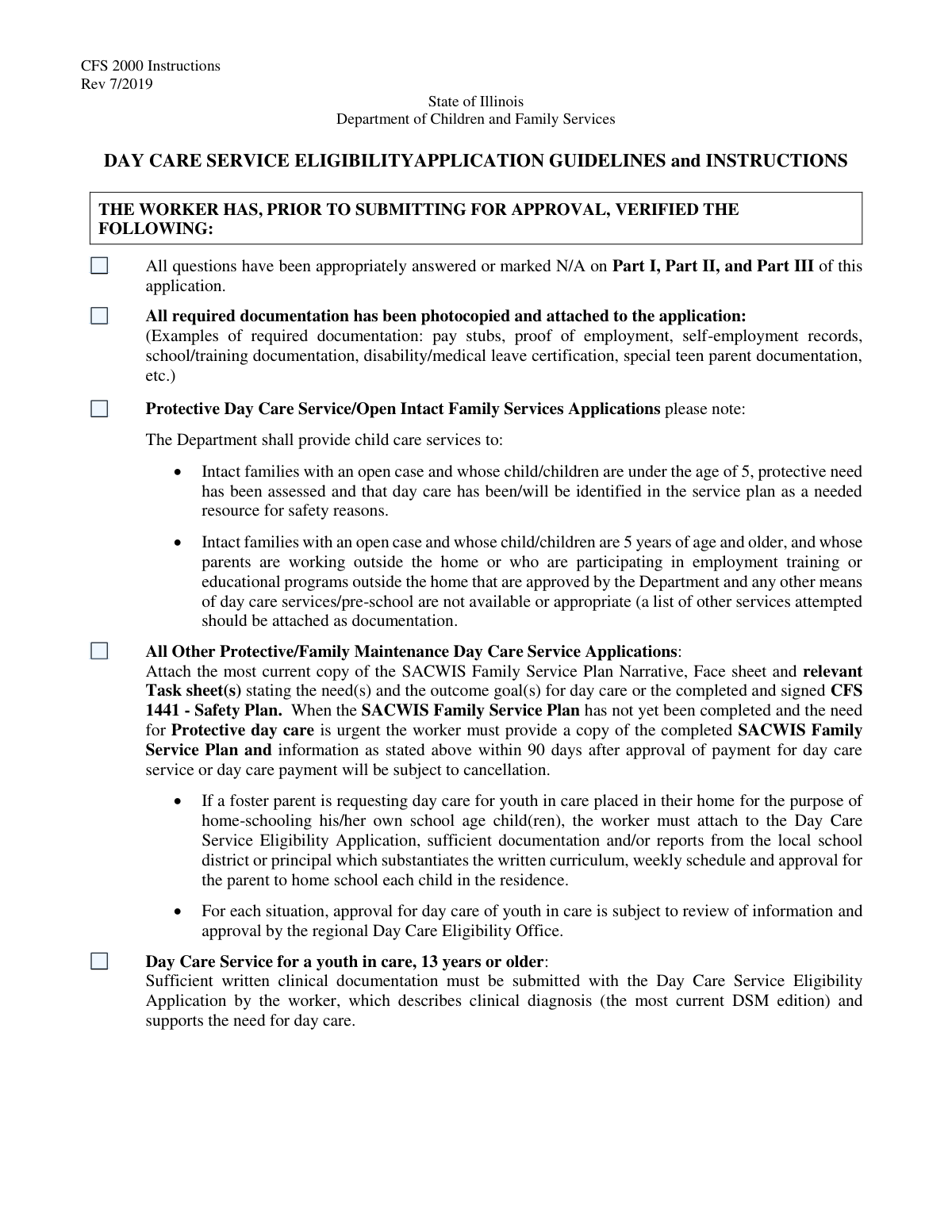
Yes! You can use AI to fill out Day Care Service Application Worker Verification Checklist

The Day Care Service Application Worker Verification Checklist is an administrative tool used by social service workers to ensure compliance and completeness when processing applications for day care services, especially in cases involving protective services or unlicensed providers. It serves as a critical safeguard, verifying that all necessary background checks, on-site visits, and supporting documents have been properly handled and submitted. Today, this form can be filled out quickly and accurately using AI-powered services like Instafill.ai, which can also convert non-fillable PDF versions into interactive fillable forms.
Day Care Worker Checklist is part of the CAR forms, L.A. Care forms and verification forms categories on Instafill.
Our AI automatically handles information lookup, data retrieval, formatting, and form filling.
It takes less than a minute to fill out Day Care Worker Checklist using our AI form filling.
Securely upload your data. Information is encrypted in transit and deleted immediately after the form is filled out.

Form specifications

Form name: Day Care Service Application Worker Verification Checklist
Number of fields: 22
Number of pages: 5
Filled form examples: Form Day Care Worker Checklist Examples
Language: English
main-image

Instafill Demo: How to fill out PDF forms in seconds with AI

How to Fill Out Day Care Worker Checklist Online for Free in 2026

Are you looking to fill out a DAY CARE WORKER CHECKLIST form online quickly and accurately? Instafill.ai offers the #1 AI-powered PDF filling software of 2026, allowing you to complete your DAY CARE WORKER CHECKLIST form in just 37 seconds or less.
Follow these steps to fill out your DAY CARE WORKER CHECKLIST form online using Instafill.ai:
  1. 1 Navigate to Instafill.ai and upload or select the Day Care Service Application Worker Verification Checklist.
  2. 2 Use the AI assistant to review the applicant's case file and automatically check off items like 'All questions answered' and 'All required documentation attached'.
  3. 3 For specific application types, such as 'Protective Day Care Service', let the AI verify that the necessary SACWIS or CFS 1441 documents are linked or noted.
  4. 4 When dealing with license-exempt or unlicensed providers, instruct the AI to confirm the completion of on-site visits (CFS 2003), background checks (CFS 718-D), and fingerprinting records.
  5. 5 The system will cross-reference requirements for different provider types, ensuring a W-9 is on file for new providers or a Current Rate Certification form is completed for licensed facilities.
  6. 6 Once all checklist items are verified and checked, digitally sign and date the form within the Instafill.ai platform.
  7. 7 Securely download the completed checklist and all attached documentation, or share it directly with the appropriate regional Day Care Office.

Our AI-powered system ensures each field is filled out correctly, reducing errors and saving you time.

Why Choose Instafill.ai for Your Fillable Day Care Worker Checklist Form?

Speed

Complete your Day Care Worker Checklist in as little as 37 seconds.

Up-to-Date

Always use the latest 2026 Day Care Worker Checklist form version.

Cost-effective

No need to hire expensive lawyers.

Accuracy

Our AI performs 10 compliance checks to ensure your form is error-free.

Security

Your personal information is protected with bank-level encryption.

Frequently Asked Questions About Form Day Care Worker Checklist

This form is a checklist for case workers to verify that all required documentation, background checks, and procedural steps have been completed for a day care service application before submission.

A case worker or another designated agency employee completes this checklist to ensure the day care service application package is complete and accurate.

You must ensure all questions on the application are answered or marked N/A, and that photocopies of all required documentation are attached.

For a youth in care aged 13 or older, you must submit sufficient written clinical documentation that includes a diagnosis and supports the need for day care services.

While both require an on-site visit, an unrelated/unlicensed provider has stricter requirements, including mandatory fingerprinting and a CFS 718-D Authorization for Background Check.

A signed IRS W-9 form must be completed and attached to the application for any new day care service provider.

The CFS 2003 is the 'On-Site Visit' form that must be completed after visiting a license-exempt or unlicensed day care provider's location.

For urgent cases, you can proceed with the application as long as you verify that the plan documents will be provided as specified once they are completed.

You must complete the CFS 2000 application and perform a check of the provider and all household members in the DCFS Fingerprint Search System database.

This form is required for licensed centers, licensed day care homes, and license-exempt facilities if a current version is not already on file with the regional Day Care Office.

Yes, services like Instafill.ai use AI to accurately auto-fill form fields from your saved information, which can save time and help prevent errors.

You can use a service like Instafill.ai to upload the PDF forms, which makes them instantly fillable online from any device, and you can save your progress as you go.

Tools like Instafill.ai can convert flat, non-fillable PDFs into interactive, fillable forms, allowing you to easily type your information directly into the fields.

Compliance Day Care Worker Checklist
Validation Checks by Instafill.ai

1
Worker Verification Checklist Completion
This check ensures that the 'All questions answered' and 'All required documentation attached' checkboxes in the Worker Verification Checklist section are both selected. This is a critical final review step for the worker submitting the form, confirming the application's completeness. If either box is unchecked, the submission should be blocked to prevent incomplete or unverified applications from being processed.
2
Protective Services Documentation Verification
Validates that if the 'All Other Protective/Family Maintenance Day Care Service Applications' box is checked, the necessary SACWIS Family Service Plan or CFS 1441 Safety Plan documents have been attached. This is crucial for ensuring child safety protocols are followed in protective service cases. A failure in this validation should flag the application for immediate review to ensure required safety plans are not missing.
3
Clinical Documentation for Older Youth in Care
This check confirms that if the 'Day Care Service for a youth in care, 13 years or older' box is selected, a corresponding file marked as 'clinical documentation' has been uploaded. This documentation is required to justify the need for day care for an older child. If the box is checked but no document is attached, the system should prevent submission and prompt the user to upload the required clinical diagnosis and support.
4
License-Exempt/Unlicensed Provider Action Completion
Ensures that if 'Check Box6' (indicating a license-exempt or unlicensed provider) is selected, then all three subordinate action items are also checked: 'Conduct On-Site Visit', 'Complete CFS 2000 Application', and 'Ensure Fingerprinting and CFS 718-D Authorization'. This validation enforces that all mandatory safety and administrative tasks for this provider category have been completed. An error should be raised if the main category is selected but any of the required actions are not confirmed.
5
Unrelated/Unlicensed Provider Background Check Completeness
This validation triggers if the provider is identified as 'Unrelated/Unlicensed'. It verifies that the 'Fingerprinting', 'CFS 718-D Authorization', and 'CFS 2000 Part III/Section (B) Documentation' checkboxes are all selected. These steps are non-negotiable for ensuring child safety with providers who have no prior relationship to the family. The application should be halted if any of these background check confirmation steps are missing.
6
Related/Unlicensed Provider On-Site Visit Confirmation
If the provider is identified as a 'Related/Unlicensed Day Care Provider', this check ensures the 'Conduct on-site visit and complete CFS 2003-On-Site Visit form' box is checked. Even for related providers, an on-site visit is a key safety measure to assess the environment. Failure to confirm the visit should prevent the application from proceeding until the requirement is met and documented.
7
New Provider W-9 Form Attachment
Verifies that when the 'For New Day Care Service providers' checkbox is selected, a file identified as an 'IRS W-9 form' has been successfully attached to the application. This is a mandatory requirement for financial processing and tax compliance for any new provider being set up for payment. The system should block submission if the box is checked without a corresponding document upload.
8
Final Applicant Eligibility Confirmation
This check ensures the 'Applicant Eligibility Criteria' checkbox is selected before the form can be submitted. This box represents the caseworker's official attestation that the applicant meets all program requirements. If this box is not checked, it implies the final eligibility review is incomplete, and the system must prevent submission to avoid processing ineligible applicants.
9
Mutually Exclusive Provider Type Selection
This validation ensures that a provider cannot be classified as both 'Related/Unlicensed' and 'Unrelated/Unlicensed' simultaneously. It checks that only one of the primary checkboxes for these distinct categories (e.g., 'Check Box17' and 'Check Box21') is selected. This prevents logical conflicts and ensures clear and accurate data for processing the application based on the correct provider type.
10
Rate Certification Form for Licensed Providers
This check applies to providers identified as licensed centers, licensed day care homes, or licensed-exempt centers. It verifies that if a current rate certification is not already on file, the 'Current Rate Certification form' checkbox is selected and the form is attached. This ensures that the provider's payment rates are current and correctly documented, preventing payment delays or errors.
11
Background Check Authorization Consistency
Cross-validates that if a provider is designated as 'Unrelated/Unlicensed', the specific requirements under that section are consistent with the general worker actions. It ensures that if the 'Unrelated/Unlicensed' provider type is chosen, the 'Ensure Fingerprinting and CFS 718-D Authorization' checkbox in the 'License-Exempt/Unlicensed Provider Worker Actions' section is also checked. This maintains logical consistency across different sections of the form.
12
Logical Link Between Provider Category and Actions
Ensures that if 'Check Box6' (License-Exempt/Unlicensed Provider Worker Actions) is checked, then at least one of the specific provider type sections (e.g., 'Unrelated/Unlicensed' or 'Related/Unlicensed') is also completed. This prevents a situation where a general category is indicated but the specific details that define the provider type are missing. An error should prompt the user to specify the exact type of unlicensed provider.

Common Mistakes in Completing Day Care Worker Checklist

Prematurely Checking Final Verification Boxes

Workers may check the initial boxes, 'All questions answered' and 'All required documentation attached,' at the beginning of their review, assuming they will complete everything. This often leads to an incomplete application being submitted as complete when a subsequent step is missed. To avoid this, these boxes should only be checked as the final step after verifying every other item on the checklist.

Ignoring or Misinterpreting Conditional Field Requirements

Many checklist items are conditional, such as the actions for 'License-Exempt/Unlicensed Providers.' A common error is checking these boxes when the condition isn't met or, conversely, failing to check them when it is. This creates confusion, requires clarification, and delays the application. Using an AI-powered tool like Instafill.ai can help by creating interactive, fillable versions of flat PDFs, with logic that can show or hide fields based on initial selections.

Misclassifying the Day Care Provider Type

The form has distinct requirements for 'Related/Unlicensed' versus 'Unrelated/Unlicensed' providers. Misclassifying the provider leads to filling out the wrong section of the checklist and performing incorrect verification steps, such as skipping a required fingerprint search. This is a critical error that can result in major compliance violations and processing rejections. Always confirm the provider's exact classification before starting the form.

Failing to Verify Background Check Completion

The checklist requires verifying that fingerprinting and background check authorizations (CFS 718-D) are completed and submitted to the Background Check Unit (BCU). A frequent mistake is checking this box without confirming receipt or documenting the submission date on the CFS 2000 form. This can lead to non-compliant providers being approved, posing a safety risk and causing audit failures. Always obtain and verify the submission receipt before checking the box.

Attaching Incomplete or Incorrect Documentation

The form requires attaching numerous specific documents, such as the CFS 1441 Safety Plan or clinical diagnoses. A critical error is checking the box confirming attachment without including the correct, complete, and most recent version of the document. This is a primary reason for application rejection and requires the worker to track down the correct paperwork, causing significant delays.

Overlooking the W-9 Requirement for New Providers

When processing a new day care provider, the focus is often on safety and eligibility, causing workers to overlook administrative requirements. Forgetting to ensure the new provider has completed and attached a signed IRS W-9 form is a common oversight. This prevents the provider from being set up for payment, leading to financial hardship and frustration.

Incomplete On-Site Visit Verification

The checklist requires both conducting an on-site visit and completing the specific CFS 2003 form. A frequent mistake is performing the visit but failing to fill out the form meticulously or forgetting to submit it with the application packet. This lack of formal documentation invalidates the visit for official purposes and will cause the application to be returned as incomplete.

Submitting Insufficient Clinical Justification for Older Youth

For youth in care aged 13 or older, the form requires 'sufficient written clinical documentation.' Workers may misinterpret 'sufficient' and attach a brief doctor's note instead of the required detailed clinical diagnosis that explicitly supports the need for day care. This leads to rejection and requires the worker to go back to the clinician for more detailed reports, delaying services for the youth.

Inappropriate Use of 'N/A'

The form allows items to be marked 'N/A,' but this must be done based on specific case criteria. A common error is marking a required field as 'N/A' out of confusion or to save time, such as marking the fingerprinting section N/A for a provider who actually requires it. This can lead to the approval of an unvetted provider, creating serious safety and compliance risks.

Neglecting the Current Rate Certification Form

For licensed centers and homes, a current Rate Certification form is required if one isn't already on file. Workers may incorrectly assume a form on file is current or fail to check with the regional Day Care Office, leading them to skip this step. This results in payment processing errors or delays once the application is approved, as the provider's payment rate is not officially confirmed.
Saved over 80 hours a year

“I was never sure if my IRS forms like W-9 were filled correctly. Now, I can complete the forms accurately without any external help.”

Kevin Martin Green

Your data stays secure with advanced protection from Instafill and our subprocessors

Robust compliance program

Transparent business model

You’re not the product. You always know where your data is and what it is processed for.

ISO 27001, HIPAA, and GDPR

Our subprocesses adhere to multiple compliance standards, including but not limited to ISO 27001, HIPAA, and GDPR.

Security & privacy by design

We consider security and privacy from the initial design phase of any new service or functionality. It’s not an afterthought, it’s built-in, including support for two-factor authentication (2FA) to further protect your account.

Fill out Day Care Worker Checklist with Instafill.ai

Worried about filling PDFs wrong? Instafill securely fills day-care-service-application-worker-verification-checklist forms, ensuring each field is accurate.