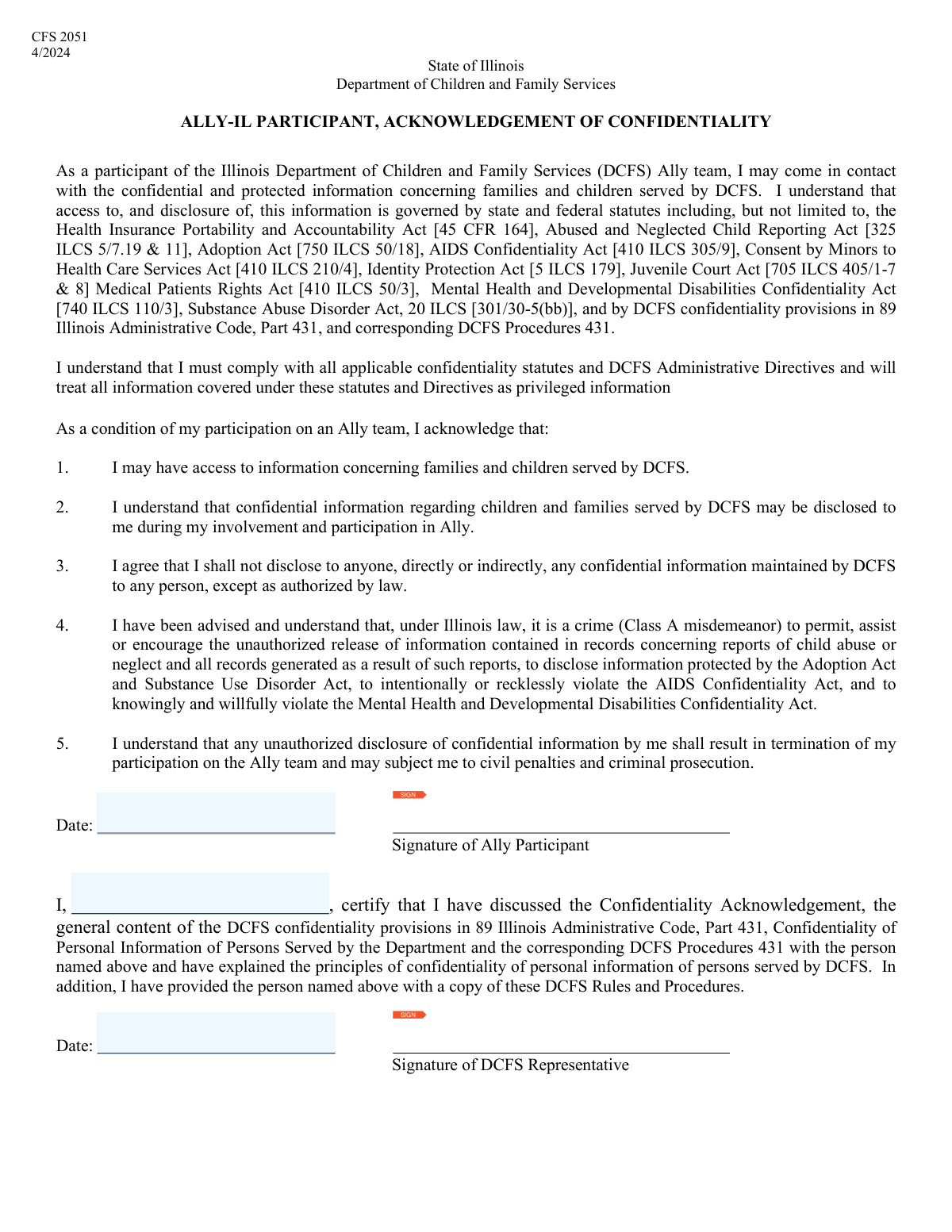
Yes! You can use AI to fill out DCFS Ally Participant Signature Form

The DCFS Ally Participant Signature Form serves as a formal record of an individual's participation and agreement within a program managed by the Department of Children and Family Services (DCFS). It requires signatures from both the 'Ally Participant' and a DCFS representative to validate the commitment or acknowledgment. Today, this form can be filled out quickly and accurately using AI-powered services like Instafill.ai, which can also convert non-fillable PDF versions into interactive fillable forms.
Our AI automatically handles information lookup, data retrieval, formatting, and form filling.
It takes less than a minute to fill out DCFS Ally Signature Form using our AI form filling.
Securely upload your data. Information is encrypted in transit and deleted immediately after the form is filled out.

Form specifications

Form name: DCFS Ally Participant Signature Form
Number of fields: 5
Number of pages: 1
Filled form examples: Form DCFS Ally Signature Form Examples
Language: English
main-image

Instafill Demo: How to fill out PDF forms in seconds with AI

How to Fill Out DCFS Ally Signature Form Online for Free in 2026

Are you looking to fill out a DCFS ALLY SIGNATURE FORM form online quickly and accurately? Instafill.ai offers the #1 AI-powered PDF filling software of 2026, allowing you to complete your DCFS ALLY SIGNATURE FORM form in just 37 seconds or less.
Follow these steps to fill out your DCFS ALLY SIGNATURE FORM form online using Instafill.ai:
  1. 1 Navigate to Instafill.ai and upload or select the DCFS Ally Participant Signature Form.
  2. 2 Use the AI assistant to identify and label the fields for 'Ally Participant Name', 'Signature', and 'Date'.
  3. 3 Enter your full name as the Ally Participant in the designated field.
  4. 4 Review the information for accuracy, ensuring your name is spelled correctly.
  5. 5 Electronically sign the form in the 'Signature of Ally Participant' field.
  6. 6 Enter the current date in the 'Ally Participant Signature Date' field.
  7. 7 Download, save, or share the completed form for the DCFS Representative's signature.

Our AI-powered system ensures each field is filled out correctly, reducing errors and saving you time.

Why Choose Instafill.ai for Your Fillable DCFS Ally Signature Form Form?

Speed

Complete your DCFS Ally Signature Form in as little as 37 seconds.

Up-to-Date

Always use the latest 2026 DCFS Ally Signature Form form version.

Cost-effective

No need to hire expensive lawyers.

Accuracy

Our AI performs 10 compliance checks to ensure your form is error-free.

Security

Your personal information is protected with bank-level encryption.

Frequently Asked Questions About Form DCFS Ally Signature Form

This form is used to document an agreement or acknowledgment between an individual, referred to as the 'Ally Participant', and a representative from the Department of Children and Family Services (DCFS).

An 'Ally Participant' is typically an individual involved with DCFS, such as a parent, guardian, or other party, who is participating in a specific program, service, or agreement.

You will need to provide your full name, your signature, and the date you signed the form. A DCFS Representative will also sign and date the document.

You should enter your full legal name as it appears on official documents. This ensures proper identification and record-keeping.

Enter the current date on which you are actually signing the form. Do not backdate or postdate your signature.

Typically, you can sign the form when it is presented to you. The DCFS Representative will either sign at the same time or after you, depending on their internal procedures.

After signing, you should return the form to the DCFS Representative. Be sure to ask for a copy for your own records.

Whether an electronic signature is acceptable depends on DCFS policy. Please confirm with your DCFS Representative if you can sign digitally or if a physical 'wet' signature is required.

Once signed by both the Ally Participant and the DCFS Representative, the form becomes an official record of the agreement or acknowledgment. It will be filed in your case record by DCFS.

Yes, services like Instafill.ai can use AI to help you accurately auto-fill form fields, saving you time and reducing errors. This is especially useful for longer or more complex forms.

Simply upload the form to the Instafill.ai platform. The service will make the document interactive, allowing you to type your information directly into the fields before printing for signature.

If you have a non-fillable PDF, you can use a service like Instafill.ai to convert it into an interactive, fillable form. This allows you to easily type your information instead of printing and writing by hand.

This form appears to be a standalone signature document. However, you should always ask your DCFS Representative if any supporting documentation is required.

Compliance DCFS Ally Signature Form
Validation Checks by Instafill.ai

1
Ensures Ally Participant Signature is Present
This validation confirms that the 'Signature of Ally Participant' field is not empty. A signature is crucial for establishing the participant's agreement and the document's legal validity. If the signature is missing, the form is incomplete and cannot be processed, requiring it to be returned to the sender for completion.
2
Verifies Ally Participant Name is Provided
This check ensures that the 'Ally Participant Name' field has been filled out. The name is a critical identifier linking the signature to a specific individual. A missing name makes the document ambiguous and legally unenforceable, so the form would be flagged as incomplete.
3
Validates Ally Participant Name is a Full Name
This validation inspects the 'Ally Participant Name' to ensure it appears to be a full name, typically containing at least two words (first and last name). It prevents entries like single initials, numbers, or nonsensical text. This is important for accurate record-keeping and legal identification; a failure would trigger a manual review.
4
Confirms Ally Participant Signature Date is Present
This check verifies that the 'Ally Participant Signature Date' field is filled in. The date is essential for establishing the timeline of the agreement and its effective date. A missing signature date can create legal ambiguity, so the form would be rejected as incomplete until the date is provided.
5
Validates Ally Participant Signature Date Format
This validation ensures the 'Ally Participant Signature Date' is entered in a recognizable and valid date format (e.g., MM/DD/YYYY). Incorrect formats can lead to data entry errors and system rejection. This check standardizes data for reliable record-keeping and prevents processing delays caused by ambiguous or unparseable dates.
6
Ensures Ally Participant Signature Date is not in the Future
This logical check confirms that the 'Ally Participant Signature Date' is not a date in the future. A document cannot be legally signed on a future date, as it attests to an action that has already occurred. A future date would invalidate the signature's timestamp and cause the form to be flagged for correction.
7
Ensures DCFS Representative Signature is Present
This validation confirms that the 'Signature of DCFS Representative' field is not empty. The representative's signature is required to show official acknowledgment and countersign the agreement. Without this signature, the form is not fully executed and would be considered incomplete and invalid from the department's side.
8
Confirms DCFS Representative Signature Date is Present
This check verifies that the 'DCFS Representative Signature Date' field is filled in. The date is essential for establishing when the department officially acknowledged and executed the document. A missing date makes the representative's signature incomplete and can cause issues with compliance and auditing, so the form would be rejected.
9
Validates DCFS Representative Signature Date Format
This validation ensures the 'DCFS Representative Signature Date' is entered in a standard, valid date format. Consistent date formatting is crucial for accurate data processing and creating a reliable audit trail. A form with an invalid date format would be flagged for manual correction to prevent downstream system errors.
10
Ensures DCFS Representative Signature Date is not in the Future
This check verifies that the 'DCFS Representative Signature Date' is not set to a future date. Like the participant's signature, the representative's signature attests to an action that has happened. A future date is logically impossible and would render the signature's timing invalid, requiring correction.
11
Verifies Ally Participant Signature and Date are Paired
This check ensures that if the 'Signature of Ally Participant' is present, the 'Ally Participant Signature Date' is also present, and vice-versa. A signature and its corresponding date are a logical pair that must exist together to be valid. If one is missing, the form is considered incomplete and must be corrected to ensure the signature is properly timestamped.
12
Verifies DCFS Representative Signature and Date are Paired
This validation confirms that the 'Signature of DCFS Representative' and the 'DCFS Representative Signature Date' are both present if either one is filled out. The signature authenticates the action, and the date provides the context of when it occurred. A missing counterpart would be flagged, as both are required for a complete and valid official signature block.
13
Validates Chronological Order of Signature Dates
This logical check verifies that the 'DCFS Representative Signature Date' is on or after the 'Ally Participant Signature Date'. Typically, the primary party (Ally Participant) signs first, and the representative countersigns later. A representative's signature dated before the participant's would be illogical and could indicate an error, triggering a review.
14
Ensures Signature Field Contains a Signature Mark
This validation checks that the signature field contains an actual signature mark (e.g., an image from a signature pad or an uploaded image) rather than just typed text. Using typed text in a signature field can compromise the legal non-repudiation of the document. If the field contains simple text, it should be flagged for correction to obtain a proper, legally binding signature.

Common Mistakes in Completing DCFS Ally Signature Form

Providing an Incomplete or Nickname for Ally Participant

Applicants often use a shortened name, nickname, or initials instead of their full legal name. This occurs due to habit or misunderstanding the requirement for official documentation. This mistake can cause significant processing delays as the name will not match other official records, potentially leading to the form's rejection until a corrected version is submitted. Always use your full legal name as it appears on government-issued identification like a driver's license or passport.

Printing Name on the Signature Line

A frequent error is printing the name in block letters where a cursive signature is required. This often happens when people are rushing or are unsure what constitutes a legal signature. A printed name is not a valid signature, and any form submitted this way will be considered unsigned and legally non-binding, leading to immediate rejection. To avoid this, provide your unique, handwritten mark or cursive signature on the designated line.

Incorrectly Filling Out DCFS Representative Sections

The Ally Participant may mistakenly fill in the signature and date fields reserved for the DCFS Representative. This usually happens when a person tries to complete the entire form at once without carefully reading the labels for each section. This error invalidates the form because it prevents the official representative from completing their part, requiring a new form to be filled out and causing delays. Participants should only complete the sections explicitly designated for them.

Using an Incorrect Date Format

Entering the signature date in a format different from the one required (e.g., using DD/MM/YYYY instead of MM/DD/YYYY) is a common data entry error. This is often due to regional differences in date notation or simple oversight. Incorrect formatting can lead to confusion, data entry errors in the system, and may require clarification, slowing down the processing of the document. AI-powered form filling tools like Instafill.ai can help prevent this by automatically formatting dates according to the form's specific requirements.

Back-dating or Post-dating the Signature Date

Participants sometimes enter a date that is not the actual day they signed the form, either to align with a past event or a future deadline. This is a serious error that can raise legal questions about the document's authenticity and when the agreement legally took effect. The signature date must always be the current date on which the form is being signed to ensure its validity.

Submitting a Form with Illegible Handwriting

When a form is filled out by hand, poor or rushed handwriting can make names and dates unreadable. This forces the processing agent to guess the information, leading to data entry errors, or to return the form as illegible. To prevent this, print all information clearly in capital letters. If the form is a non-fillable PDF, a tool like Instafill.ai can convert it into a fillable version, allowing you to type your information for perfect clarity.

Forgetting to Sign or Date the Form

It is surprisingly common for individuals to complete all fields but forget the final step of signing and dating the document. An unsigned or undated form is incomplete and has no legal standing. This oversight will always result in the form being returned for completion, causing unnecessary delays. Always perform a final review of the entire document before submission, paying special attention to the signature and date fields.

Using Unprofessional Correction Methods

When a mistake is made, people may use correction fluid, tape, or scribble heavily over the error. On official or legal documents, such corrections are often prohibited as they can obscure the original entry and raise questions about tampering. This can lead to the form being rejected. The proper way to correct a minor error is a single, clean strikethrough with the author's initials; for major errors, it is best to start over with a new, clean form.

Signature Mismatch

The signature provided on the form may not closely match the person's established legal signature on file or on their identification documents. This can happen if someone signs in a hurry or their signature has changed over time. A significant mismatch can trigger fraud alerts and require additional steps for identity verification, delaying the approval process. It is crucial to use your consistent, official signature to avoid such complications.
Saved over 80 hours a year

“I was never sure if my IRS forms like W-9 were filled correctly. Now, I can complete the forms accurately without any external help.”

Kevin Martin Green

Your data stays secure with advanced protection from Instafill and our subprocessors

Robust compliance program

Transparent business model

You’re not the product. You always know where your data is and what it is processed for.

ISO 27001, HIPAA, and GDPR

Our subprocesses adhere to multiple compliance standards, including but not limited to ISO 27001, HIPAA, and GDPR.

Security & privacy by design

We consider security and privacy from the initial design phase of any new service or functionality. It’s not an afterthought, it’s built-in, including support for two-factor authentication (2FA) to further protect your account.

Fill out DCFS Ally Signature Form with Instafill.ai

Worried about filling PDFs wrong? Instafill securely fills dcfs-ally-participant-signature-form forms, ensuring each field is accurate.