Yes! You can use AI to fill out DCFS D-CIPP Quarterly/Annual Progress Report
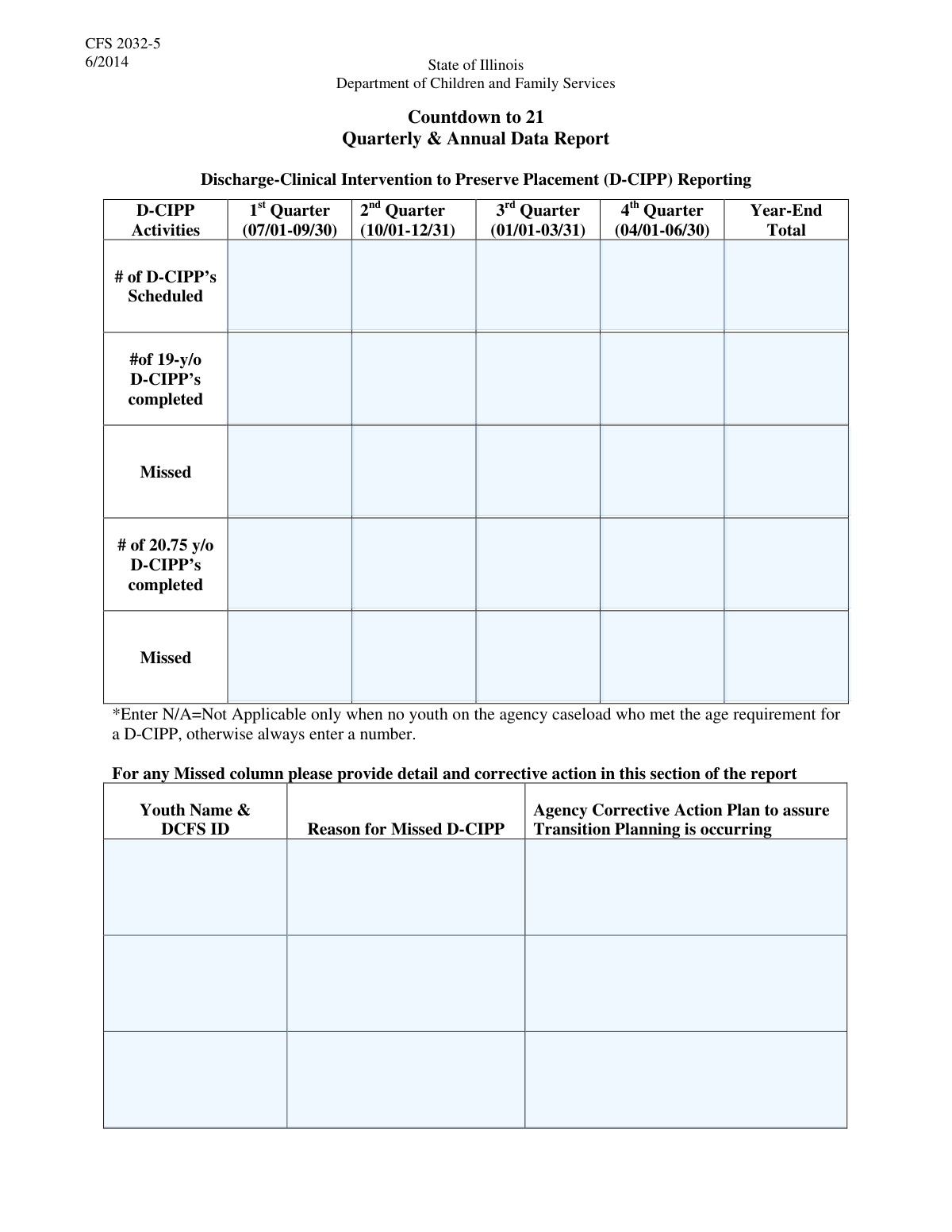
The DCFS D-CIPP Quarterly/Annual Progress Report is a crucial document for agencies to report on the status of transition planning for youth under the care of the Department of Children and Family Services. It tracks key metrics like the scheduling and completion of D-CIPPs (Daniel-Comprehensive Independent Living Plans) for specific age groups, reasons for any missed plans, and staff training certifications. This reporting is vital for ensuring that older youth in care receive the necessary support to transition successfully to adulthood. Today, this form can be filled out quickly and accurately using AI-powered services like Instafill.ai, which can also convert non-fillable PDF versions into interactive fillable forms.
Our AI automatically handles information lookup, data retrieval, formatting, and form filling.
It takes less than a minute to fill out DCFS D-CIPP Report using our AI form filling.
Securely upload your data. Information is encrypted in transit and deleted immediately after the form is filled out.
Form specifications
| Form name: | DCFS D-CIPP Quarterly/Annual Progress Report |
| Number of fields: | 52 |
| Number of pages: | 2 |
| Filled form examples: | Form DCFS D-CIPP Report Examples |
| Language: | English |
Instafill Demo: How to fill out PDF forms in seconds with AI
How to Fill Out DCFS D-CIPP Report Online for Free in 2026
Are you looking to fill out a DCFS D-CIPP REPORT form online quickly and accurately? Instafill.ai offers the #1 AI-powered PDF filling software of 2026, allowing you to complete your DCFS D-CIPP REPORT form in just 37 seconds or less.
Follow these steps to fill out your DCFS D-CIPP REPORT form online using Instafill.ai:
- 1 Navigate to Instafill.ai and upload or select the DCFS D-CIPP Quarterly/Annual Progress Report.
- 2 Provide your agency's information and the details of the person submitting the report in the designated fields.
- 3 Enter the statistical data for each quarter and the year-end totals for scheduled, completed, and missed D-CIPPs.
- 4 Detail any missed D-CIPPs by providing the youth's information, the reason for the miss, and the agency's corrective action plan.
- 5 Complete the sections for certified staff training and youth financial literacy completion status.
- 6 Review all entered information for accuracy and completeness, then electronically sign and date the form.
- 7 Submit the completed report to the appropriate DCFS office and save a digital copy for your records.
Our AI-powered system ensures each field is filled out correctly, reducing errors and saving you time.
Why Choose Instafill.ai for Your Fillable DCFS D-CIPP Report Form?
Speed
Complete your DCFS D-CIPP Report in as little as 37 seconds.
Up-to-Date
Always use the latest 2026 DCFS D-CIPP Report form version.
Cost-effective
No need to hire expensive lawyers.
Accuracy
Our AI performs 10 compliance checks to ensure your form is error-free.
Security
Your personal information is protected with bank-level encryption.
Frequently Asked Questions About Form DCFS D-CIPP Report
This form is used by agencies to report quarterly and annual statistics to DCFS regarding scheduled, completed, and missed D-CIPPs for youth aged 19 and 20.75. It also tracks staff certifications and youth financial literacy completion.
This form must be completed by authorized personnel at agencies that provide services to youth under DCFS supervision and are required to report on transition planning activities.
The reporting quarters are: 1st Quarter (July 1 - September 30), 2nd Quarter (October 1 - December 31), 3rd Quarter (January 1 - March 31), and 4th Quarter (April 1 - June 30).
The form does not define the acronym, but it refers to a required planning process for youth in the DCFS system. Please consult your agency or DCFS guidelines for the specific definition of a D-CIPP.
Yes, you are required to manually sum the numbers from the four quarters and enter the result into the corresponding 'Year-End Total' field.
For each missed D-CIPP, you must provide the youth's name and DCFS ID, the specific reason it was missed, and the agency's corrective action plan to ensure future compliance.
The form has space to detail three missed D-CIPPs. If you have more to report, you should contact your DCFS representative for guidance on how to submit the additional information.
Enter the youth's name and DCFS ID, then indicate their completion status for the financial literacy program within the specific quarter the milestone was achieved.
This section is used to list the names of staff members who are certified by the DCFS Office of Training to perform these duties, along with the date they completed their certification.
The person submitting the report should enter their full printed name and official job title, along with the agency's name, phone number, and address.
Yes, services like Instafill.ai use AI to accurately auto-fill form fields, which can save time and reduce errors, especially for reports with extensive data entry.
You can use a service like Instafill.ai, which can convert flat, non-fillable PDFs or even scanned paper copies into interactive, fillable forms that you can complete and save digitally.
To fill this form online, you can upload it to Instafill.ai. The platform provides an intuitive interface to navigate and complete all the required fields, making the submission process faster and more efficient.
Compliance DCFS D-CIPP Report
Validation Checks by Instafill.ai
1
Scheduled D-CIPPs Year-End Total Consistency
This check verifies that the sum of the four quarterly 'Number of D-CIPPs Scheduled' fields equals the 'Number of D-CIPPs Scheduled - Year-End Total'. This ensures mathematical accuracy in the summary data and prevents clerical errors in aggregation. If the totals do not match, an error is flagged, requiring the user to correct the quarterly or total values before submission.
2
19-y/o Completed D-CIPPs Year-End Total Consistency
This validation ensures that the sum of the four quarterly 'D-CIPPs Completed' for 19-year-olds equals the 'Year-End Total D-CIPPs Completed' for that same group. This is crucial for accurate annual reporting and trend analysis. A mismatch will prevent submission and prompt the user to review and correct the figures for data integrity.
3
20.75 y/o Completed D-CIPPs Year-End Total Consistency
This check validates that the sum of the four quarterly '20.75 y/o D-CIPPs Completed' fields is equal to the 'Year-End Total 20.75 y/o D-CIPPs' field. This is essential for the accurate aggregation of performance metrics related to this specific age cohort. An error will highlight the inconsistent fields for user correction, ensuring the annual total is a correct reflection of the quarterly data.
4
Total Missed D-CIPPs Year-End Consistency
This validation ensures the sum of the four quarterly 'Missed D-CIPPs' fields for each age group (19-y/o and 20.75 y/o) correctly adds up to their respective annual total fields. This maintains data integrity for tracking missed appointments over the year. If a calculation is incorrect, the user must fix the discrepancy to proceed, ensuring accurate reporting.
5
Quarterly D-CIPP Logical Coherence
For each quarter, this check verifies that the number of 'D-CIPPs Scheduled' is greater than or equal to the sum of all 'Completed' and 'Missed' D-CIPPs for that same quarter across all age groups. It is logically impossible for the outcomes to exceed the number of scheduled events. A failure indicates a fundamental data entry error that must be resolved to ensure the report is plausible.
6
Completed D-CIPPs Cannot Exceed Scheduled
For each quarter, this validation ensures that the number of 'D-CIPPs Completed' for a specific age group is not greater than the total 'Number of D-CIPPs Scheduled'. It is logically impossible to complete more appointments than were scheduled. This check prevents data entry errors and ensures the reported data is plausible, flagging any inconsistencies for correction.
7
Missed D-CIPP Detail Requirement
This validation checks if the total number of missed D-CIPPs (sum of 'Total Missed 19-y/o D-CIPPs' and 'Missed D-CIPPs 20.75 y/o - Year-End Total') is greater than zero. If it is, the system verifies that at least one 'Missed D-CIPP Detail' section is filled out. This ensures that every missed appointment is accounted for with a detailed explanation, which is critical for compliance and corrective action.
8
Missed D-CIPP Detail Field Dependency
This check enforces the conditional logic within the 'Missed D-CIPP Detail' sections. It verifies that if a 'Youth Name and DCFS ID' is entered, the 'Reason for Missed D-CIPP' field must also be filled. Furthermore, if the 'Reason' field is filled, the 'Agency Corrective Action Plan' must be completed, ensuring each reported incident is fully documented.
9
Staff Training Date Format and Validity
This validation checks that all 'Training Completion Date' fields are entered in a valid date format (e.g., MM/DD/YYYY) and that the date is not in the future. This is important for ensuring that staff certification records are accurate and reflect past events. An invalid format or a future date will trigger an error message requiring the user to correct the entry.
10
Staff Certification Conditional Requirement
This check ensures that if a 'Certified Staff Name' is provided in any of the staff certification sections, the corresponding 'Training Completion Date' field must also be filled. It is crucial to have both the name and the date to have a complete and useful certification record. An incomplete entry will be flagged, preventing the user from submitting the form until the missing date is provided.
11
Agency Telephone Number Format
This validation ensures that the 'Agency Telephone Number' field conforms to a standard phone number format, such as (XXX) XXX-XXXX or XXX-XXX-XXXX. This is important for data standardization and ensures the contact information is usable and can be correctly parsed by other systems. If the entry does not match the expected format, the user will be prompted to correct it.
12
Required Submitter and Agency Information
This check verifies that the 'Submitter's Printed Name', 'Agency Name', and 'Agency Street Address' fields are not empty. This information is essential for identifying who submitted the report and from which agency, which is fundamental for accountability and follow-up. The form cannot be submitted until these critical identification fields are completed.
13
Numeric Fields Must Be Non-Negative Integers
This validation applies to all numeric count fields in the form, such as 'Number of D-CIPPs Scheduled'. It ensures that all entered values are non-negative integers (0, 1, 2, ...). This prevents the entry of text, decimals, or negative numbers, which would be invalid for counting events, thereby maintaining data quality.
14
Submitter Title Conditional Requirement
This check ensures that if the 'Submitter's Printed Name' field is filled, the 'Submitter's Title' field must also be completed. Providing a title gives context to the submitter's role and authority within the agency. This rule ensures that when a submitter is identified, their position is also recorded, making the submission record more complete and official.
Common Mistakes in Completing DCFS D-CIPP Report
This form uses a non-standard fiscal year where the 1st Quarter begins on July 1st. Users often mistakenly enter data based on a standard calendar year (starting January 1st), leading to data being reported in the wrong period. This skews all quarterly metrics and requires significant effort to correct. To avoid this, carefully read the date ranges specified for each quarter (e.g., '1st Quarter (July 1st - September 30th)') before entering any data.
The form requires manually calculating and entering year-end totals for scheduled, completed, and missed D-CIPPs. It's common for users to make simple addition errors, causing the sum of the four quarters not to match the provided total. These discrepancies can trigger audits and delay report acceptance. To prevent this, double-check all calculations or use a calculator; AI-powered tools like Instafill.ai can automate these calculations to ensure accuracy.
The first set of fields asks for the total number of D-CIPPs 'Scheduled,' which includes all age groups. Subsequent sections ask for the number 'Completed' by specific age groups (19 and 20.75). A frequent error is entering the total completed number into the 'Scheduled' field, or vice-versa, which misrepresents planning efforts versus actual outcomes. Always ensure you are entering the correct metric (scheduled vs. completed) in the corresponding section.
Users often report a total number of missed D-CIPPs in the quarterly data fields but fail to provide a corresponding detailed entry for each missed instance. For example, the form might show '5' total missed D-CIPPs but only provide detailed explanations for three youths. This creates an incomplete record and fails to meet compliance requirements for explaining every missed service. Ensure that the numerical total of missed D-CIPPs matches the number of individual 'Missed D-CIPP Detail' sections filled out.
For every missed D-CIPP, the form requires not only a reason but also an 'Agency Corrective Action Plan.' A common oversight is to explain why the meeting was missed but leave the corrective action plan field blank. This is a critical compliance failure, as it shows a lack of follow-through on service gaps. Always complete the corrective action plan to demonstrate how the agency will prevent future misses for that youth.
The sections for '19-y/o D-CIPPs' and '20.75 y/o D-CIPPs' have identical layouts, making it easy to enter data for one age group into the other's fields. This error completely invalidates the age-specific tracking and reporting for both groups. To avoid this, carefully verify the section header's age requirement (19 vs. 20.75) before entering numbers for completed or missed D-CIPPs.
The 'Training Completion Date' fields are often filled with inconsistent or invalid formats, such as 'Last Tuesday,' 'June 2023,' or '06-05-23' instead of a required MM/DD/YYYY format. This creates data processing errors and requires manual cleanup. If the form is a non-fillable PDF, tools like Instafill.ai can convert it into a fillable version, and its AI-powered features can help by automatically formatting dates correctly upon entry.
The form explicitly asks for the 'full legal name of the agency,' but submitters frequently use internal acronyms or shortened names. This can lead to confusion and problems with identifying the correct entity in a database, potentially delaying processing or payment. Always write out the complete, official agency name as it appears on legal documents to ensure clarity and proper record-keeping.
The '20.75 y/o' age category is highly specific and easily misinterpreted. Users may incorrectly include any youth who is 20 years old, rather than only those who are between 20 years and 9 months and 21 years old. This leads to inaccurate reporting for this critical transition period. It is crucial to have a clear internal definition and query your records precisely for youth who fall within this specific age window during the reporting quarter.
At the end of this long and detailed form, it is common for the submitter to forget to fill in their own name and title. This information is essential for accountability and allows reviewers to contact the correct person if there are questions or discrepancies in the report. Always complete the 'Person Submitting Report' section before finalizing the form to ensure a point of contact is available.
Saved over 80 hours a year
“I was never sure if my IRS forms like W-9 were filled correctly. Now, I can complete the forms accurately without any external help.”
Kevin Martin Green
Your data stays secure with advanced protection from Instafill and our subprocessors
Robust compliance program
Transparent business model
You’re not the product. You always know where your data is and what it is processed for.
ISO 27001, HIPAA, and GDPR
Our subprocesses adhere to multiple compliance standards, including but not limited to ISO 27001, HIPAA, and GDPR.
Security & privacy by design
We consider security and privacy from the initial design phase of any new service or functionality. It’s not an afterthought, it’s built-in, including support for two-factor authentication (2FA) to further protect your account.
Fill out DCFS D-CIPP Report with Instafill.ai
Worried about filling PDFs wrong? Instafill securely fills dcfs-d-cipp-quarterlyannual-progress-report forms, ensuring each field is accurate.