Yes! You can use AI to fill out DCFS Foster and Relative Home Placement Checklist
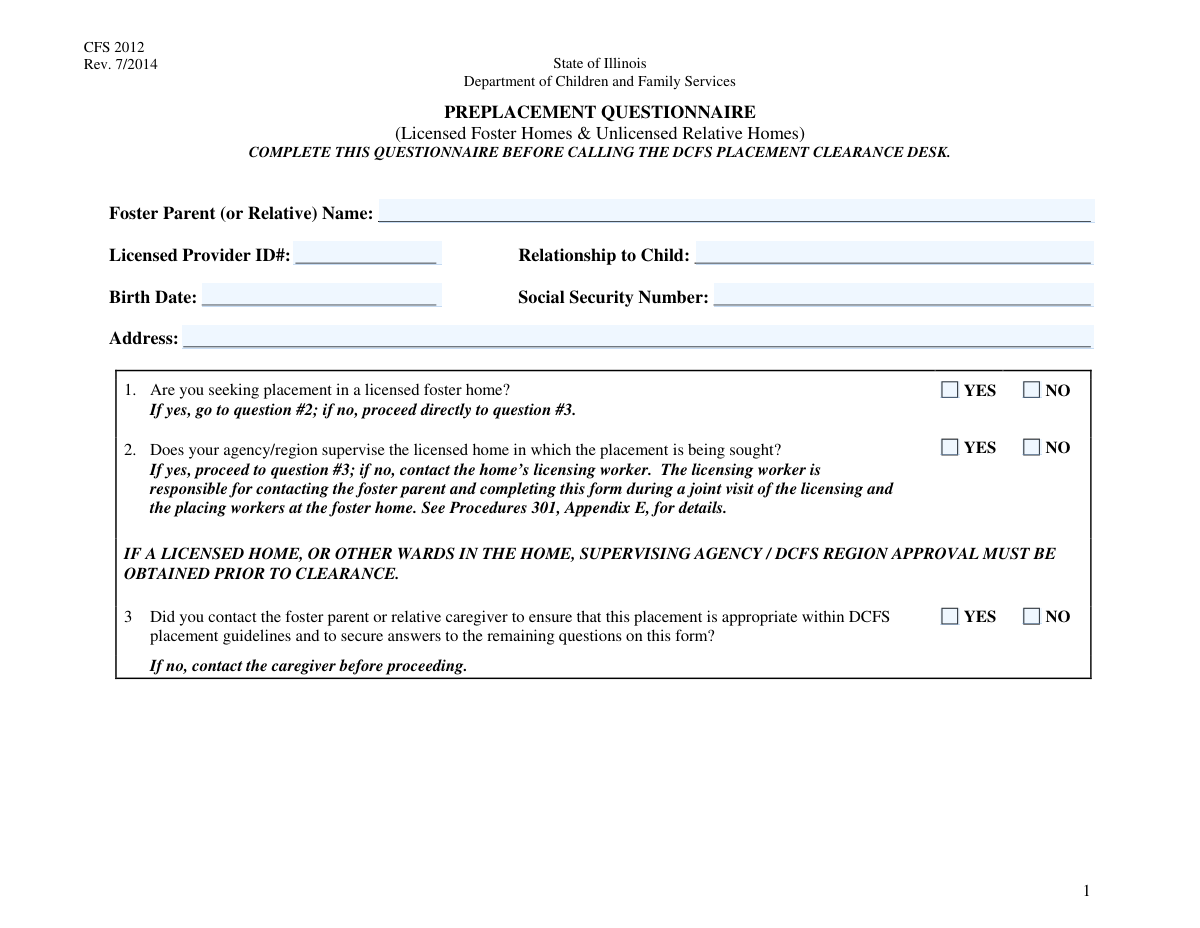
This form is a detailed worksheet used by the Department of Children and Family Services (DCFS) to gather and assess critical information about a potential foster or relative caregiver's home before a child is placed. It is crucial for ensuring the placement is safe, appropriate, and compliant with all agency regulations, covering everything from home capacity and other residents to the caregiver's ability to meet a child's needs. Today, this form can be filled out quickly and accurately using AI-powered services like Instafill.ai, which can also convert non-fillable PDF versions into interactive fillable forms.
Our AI automatically handles information lookup, data retrieval, formatting, and form filling.
It takes less than a minute to fill out DCFS Placement Checklist using our AI form filling.
Securely upload your data. Information is encrypted in transit and deleted immediately after the form is filled out.
Form specifications
| Form name: | DCFS Foster and Relative Home Placement Checklist |
| Number of fields: | 230 |
| Number of pages: | 6 |
| Filled form examples: | Form DCFS Placement Checklist Examples |
| Language: | English |
Instafill Demo: How to fill out PDF forms in seconds with AI
How to Fill Out DCFS Placement Checklist Online for Free in 2026
Are you looking to fill out a DCFS PLACEMENT CHECKLIST form online quickly and accurately? Instafill.ai offers the #1 AI-powered PDF filling software of 2026, allowing you to complete your DCFS PLACEMENT CHECKLIST form in just 37 seconds or less.
Follow these steps to fill out your DCFS PLACEMENT CHECKLIST form online using Instafill.ai:
- 1 Navigate to Instafill.ai and upload or select the DCFS Foster and Relative Home Placement Checklist.
- 2 Use the AI assistant to populate the Foster Parent Information section, including their name, address, and licensed provider ID.
- 3 Answer the initial screening questions about the placement type, agency supervision, and contact with the caregiver, allowing the AI to guide you to the correct subsequent sections.
- 4 Systematically enter the details for each child being placed, as well as information for all other children and adults currently residing in the home.
- 5 Complete the sections regarding the home's license status, capacity, existing supervision plans, and caregiver awareness of any placement restrictions.
- 6 Review all the information entered across the form for accuracy and completeness, making any necessary corrections directly on the Instafill.ai platform.
- 7 Enter the final authorization details, then securely save, print, or submit the completed checklist as required by your agency.
Our AI-powered system ensures each field is filled out correctly, reducing errors and saving you time.
Why Choose Instafill.ai for Your Fillable DCFS Placement Checklist Form?
Speed
Complete your DCFS Placement Checklist in as little as 37 seconds.
Up-to-Date
Always use the latest 2026 DCFS Placement Checklist form version.
Cost-effective
No need to hire expensive lawyers.
Accuracy
Our AI performs 10 compliance checks to ensure your form is error-free.
Security
Your personal information is protected with bank-level encryption.
Frequently Asked Questions About Form DCFS Placement Checklist
This form is used to document and assess the suitability of a foster or relative caregiver's home for the placement of one or more children, ensuring compliance with DCFS guidelines.
A caseworker or agency staff member is responsible for completing this form. The information is gathered by contacting and interviewing the prospective foster parent or relative caregiver.
You must contact the foster parent or relative caregiver to ensure the placement is appropriate and to gather the necessary information. The form requires you to confirm this contact before you can enter details about the children to be placed.
A CYCIS ID is a unique identifier for a child within the child welfare system's database. This ID should be available in the child's official case file or the agency's information system.
An SSN is only required for children who are 13 years of age or older. This applies to children being placed, as well as any other children currently residing in the home.
If any child being placed or currently in the home requires a supervision plan, you must check the corresponding 'Yes' box and provide a detailed explanation in the 'Supervision Plan Description' section.
For licensed homes, you'll provide the license capacity and supervising agency. For unlicensed homes, you must confirm that the Placement Safety Checklist (CFS 454) and Relative Caregiver Placement Agreement (CFS 458) have been completed.
This section is for any children living in the home who are not part of the current placement request, such as the caregiver's biological children, adopted children, or children under their guardianship.
Yes, the form requires you to list the full name, date of birth, and SSN for every individual aged 18 or older who resides in the home, not just the primary caregiver.
For licensed homes, it's the licensed capacity minus the current number of foster children. For unlicensed homes, it's the maximum capacity determined by a capacity chart minus the total number of children under 18 currently in the home.
Yes, services like Instafill.ai use AI to accurately auto-fill form fields from your case files, which can save significant time and help prevent data entry errors.
You can use a platform like Instafill.ai to easily fill out this form online. Simply upload the document, and the service will make the fields interactive for you to complete, save, and manage digitally.
If you have a flat, non-fillable PDF, you can use a service like Instafill.ai to instantly convert it into an interactive, fillable form that you can complete on your computer.
Compliance DCFS Placement Checklist
Validation Checks by Instafill.ai
1
Validates Social Security Number Format
This check ensures that all Social Security Number (SSN) fields are entered in the correct format, either as a 9-digit number without separators (XXXXXXXXX) or with hyphens (XXX-XX-XXXX). Proper formatting is crucial for data integrity and successful integration with federal and state databases. If the format is incorrect, the submission will be rejected, and the user will be prompted to correct the entry.
2
Ensures Consistency Between Date of Birth and Age
This validation cross-references the 'Date of Birth' field with the 'Age' field for every individual listed on the form (foster parent, children to be placed, other children, etc.). The system calculates the age based on the birth date and flags any discrepancy with the entered age. This prevents simple data entry errors and ensures the accuracy of records used for eligibility and placement decisions. A mismatch will require the user to review and correct the information before proceeding.
3
Conditional SSN Requirement for Children Aged 13 and Older
This rule verifies that the SSN field for a child is only filled if their specified age is 13 years or older, as stated in the field instructions. It also flags an entry as incomplete if a child is 13 or older but the SSN is missing. This check enforces privacy rules for younger children while ensuring compliance for older children where an SSN may be required. Failure to comply will trigger a warning or error, guiding the user to either remove the SSN for a younger child or provide it for an older one.
4
Enforces Foster Parent Contact Prerequisite
This check confirms that the 'YES' box for the 'Foster Parent Contact Question' is selected before allowing data entry in the subsequent sections about children and home details. This is a critical gating condition to ensure the caseworker has performed the necessary due diligence before attempting to complete the placement paperwork. If 'NO' is selected, the rest of the form should be disabled or a validation error should prevent submission.
5
Requires Supervision Plan Description When Applicable
This validation ensures that the 'Supervision Plan Description' text field is not empty if any of the 'Supervision Plan (Yes)' checkboxes for any child to be placed are checked. A checkbox indicating a plan exists is meaningless without the corresponding details. If a plan is marked as 'Yes' but the description is missing, the form submission will fail until the user provides the required detailed explanation.
6
Validates Licensed Capacity Against Total Children
This check calculates the total number of children who will be in the home after the new placement (current foster children + other children under 18 + new children being placed) and compares it against the 'Licensed Capacity' field. This is a critical safety and regulatory compliance check to prevent overcrowding in foster homes. If the total number of children exceeds the licensed capacity, the submission will be blocked with an error message explaining the capacity violation.
7
Verifies Consistency of Child Counts
This rule checks that the number entered in summary fields like 'Number of Foster Children' and 'Other Children Under 18 Count' matches the actual number of individual child records filled out in the corresponding detailed sections. This ensures that the summary count is not just a number but is backed by complete data for each child. A mismatch would trigger an error, forcing the user to reconcile the count with the detailed entries.
8
Enforces Mutually Exclusive Checkbox Selections
For all question pairs presented as 'Yes'/'No' checkboxes (e.g., 'Special Needs', 'Supervision Plan', 'Agency Supervises Home'), this validation ensures that only one of the two options is selected. Allowing both to be checked would create ambiguous and unusable data. If a user checks both 'Yes' and 'No' for the same question, the system will flag an error and require them to make a single, definitive choice.
9
Requires Supervising Agency for Licensed Homes
This check makes the 'Supervising Agency' field mandatory if the 'Caretaker holds DCFS foster care home license - Yes' box is checked. For a licensed home, identifying the supervising agency is essential for communication, oversight, and verification. If the home is marked as licensed but the agency name is missing, the form cannot be submitted.
10
Verifies Age for Individuals in '18+ Information' Section
This validation confirms that any person listed in the 'Individual (18+) Information' sections is actually 18 years of age or older, based on their provided 'Date of Birth'. This ensures that minors are not incorrectly listed as adults, which has significant legal and background check implications. If an individual's calculated age is under 18, an error will be generated, prompting the user to move the data to the correct section for children.
11
Validates Placement Age Against Licensed Age Range
This rule checks if the age of each child proposed for placement falls within the 'Licensed Age Range' specified for the foster home. This is a crucial compliance check to ensure the placement aligns with the home's certified capabilities and limitations. A placement attempt for a child outside the licensed age range will result in a validation failure, preventing an inappropriate placement.
12
Validates Conditional Logic for Agency Supervision Question
This check ensures that the 'Agency Supervises Home' question can only be answered if the 'Seeking placement in licensed foster home: Yes' option is selected. This enforces the dependency outlined in the form instructions, preventing irrelevant data from being collected. If a user attempts to answer the supervision question for a non-licensed home search, the fields will be disabled or an error will be shown upon submission.
13
Ensures Completeness of Child Placement Information
This validation rule verifies that if a child's name is entered in one of the placement slots (e.g., 'First Child's Name'), then all other associated required fields for that child, such as 'CYCIS ID', 'Date of Birth', and 'Age', are also completed. This prevents incomplete records for children being placed, which is critical for tracking and case management. The submission will be blocked if any child's record is partially filled.
14
Validates Space Availability Calculation for Licensed Homes
This check verifies the accuracy of the 'Space Available' field within the 'Space Availability Calculation' section. It confirms that the entered value is equal to the 'Licensed Capacity' minus the 'Number of Foster Children in Home'. This ensures the calculation is correct and reflects the true availability, preventing errors in placement decisions. A discrepancy will result in an error, prompting the user to correct the calculated value.
Common Mistakes in Completing DCFS Placement Checklist
Users often begin filling out child and home details before confirming they have contacted the foster parent by checking 'YES' on the 'Foster Parent Contact Question'. Since the majority of the form's fields are conditional upon this answer, failing to check 'YES' first can render the entire submission invalid. To avoid this, always complete the form sequentially and ensure this prerequisite question is answered affirmatively before proceeding to dependent sections.
A frequent error is entering a child's date of birth that does not correspond to the age entered in the adjacent field. This often happens due to manual miscalculation or typos and creates data conflicts that must be resolved, delaying the placement process. To prevent this, double-check the calculated age against the date of birth before submission. AI-powered tools like Instafill.ai can automatically calculate the age based on the birth date, eliminating this type of error.
The form specifies that a Social Security Number (SSN) should only be provided for children aged 13 or older. People commonly miss this instruction, either by providing an SSN for a younger child or omitting it for a teenager. This can lead to compliance issues and incomplete records for older children. Carefully read the field instructions and only provide the SSN when the child meets the age requirement.
This form has separate sections for children to be placed, foster children already in the home, and 'other' children (e.g., biological, adopted). A common mistake is entering a child's information in the wrong section, which skews the household composition and capacity calculations. This can lead to incorrect placement decisions based on flawed data. To avoid this, carefully distinguish between the children being placed and all other children currently residing in the home.
Users may correctly indicate that a supervision plan is required for a child by checking 'Yes', but then forget to fill out the corresponding 'Supervision Plan Description' text box. This omission leaves a critical information gap, making it impossible for the agency to assess the plan's adequacy. An incomplete plan description will halt the approval process until the details are provided.
Many questions on this form, such as 'Caretaker holds DCFS foster care home license - Yes', unlock subsequent required fields. A frequent error is answering 'Yes' but then failing to provide the newly revealed information, like the 'Supervising Agency' or 'Licensed Capacity'. This leaves the application incomplete and causes processing delays. Smart form-filling tools like Instafill.ai can help by highlighting required fields that become active based on your answers.
The form requires users to manually calculate 'Space Available' based on the home's licensed capacity and the number of children currently present. Mathematical errors are common and have serious consequences, potentially leading to a placement that exceeds the home's legal limit. To prevent this, double-check your calculations. Using an intelligent form filler like Instafill.ai can prevent this mistake by performing the calculation automatically.
The form has distinct sections and logic for licensed and unlicensed homes, triggered by the 'Foster Care License YES/NO' question. Users sometimes get confused and fill out sections that contradict their initial answer, such as stating the home is licensed but then completing the 'Placement Safety Checklist' section for unlicensed homes. This creates a conflicting record that must be corrected. Ensure you follow only the path relevant to the home's license status.
Fields like 'Licensed Provider ID' and 'CYCIS ID' are critical for linking the form to the correct records in the system. Typos, transpositions, or missing digits in these unique identifiers are common data entry errors. An incorrect ID can result in a complete failure to process the form or link it to the wrong case, causing significant delays. Always verify these numbers against the source document before entering them.
Throughout the form, there are numerous mandatory Yes/No checkbox pairs for questions about special needs, supervision plans, and license details. Applicants often overlook these, leaving both boxes unchecked, which creates ambiguity and is treated as an incomplete answer. This requires the agency to follow up for clarification, slowing down the entire process. Ensure that for every pair of Yes/No options, one is explicitly selected. If the form is a non-fillable PDF, a tool like Instafill.ai can convert it to a fillable version where such fields can be made mandatory.
Saved over 80 hours a year
“I was never sure if my IRS forms like W-9 were filled correctly. Now, I can complete the forms accurately without any external help.”
Kevin Martin Green
Your data stays secure with advanced protection from Instafill and our subprocessors
Robust compliance program
Transparent business model
You’re not the product. You always know where your data is and what it is processed for.
ISO 27001, HIPAA, and GDPR
Our subprocesses adhere to multiple compliance standards, including but not limited to ISO 27001, HIPAA, and GDPR.
Security & privacy by design
We consider security and privacy from the initial design phase of any new service or functionality. It’s not an afterthought, it’s built-in, including support for two-factor authentication (2FA) to further protect your account.
Fill out DCFS Placement Checklist with Instafill.ai
Worried about filling PDFs wrong? Instafill securely fills dcfs-foster-and-relative-home-placement-checklist forms, ensuring each field is accurate.