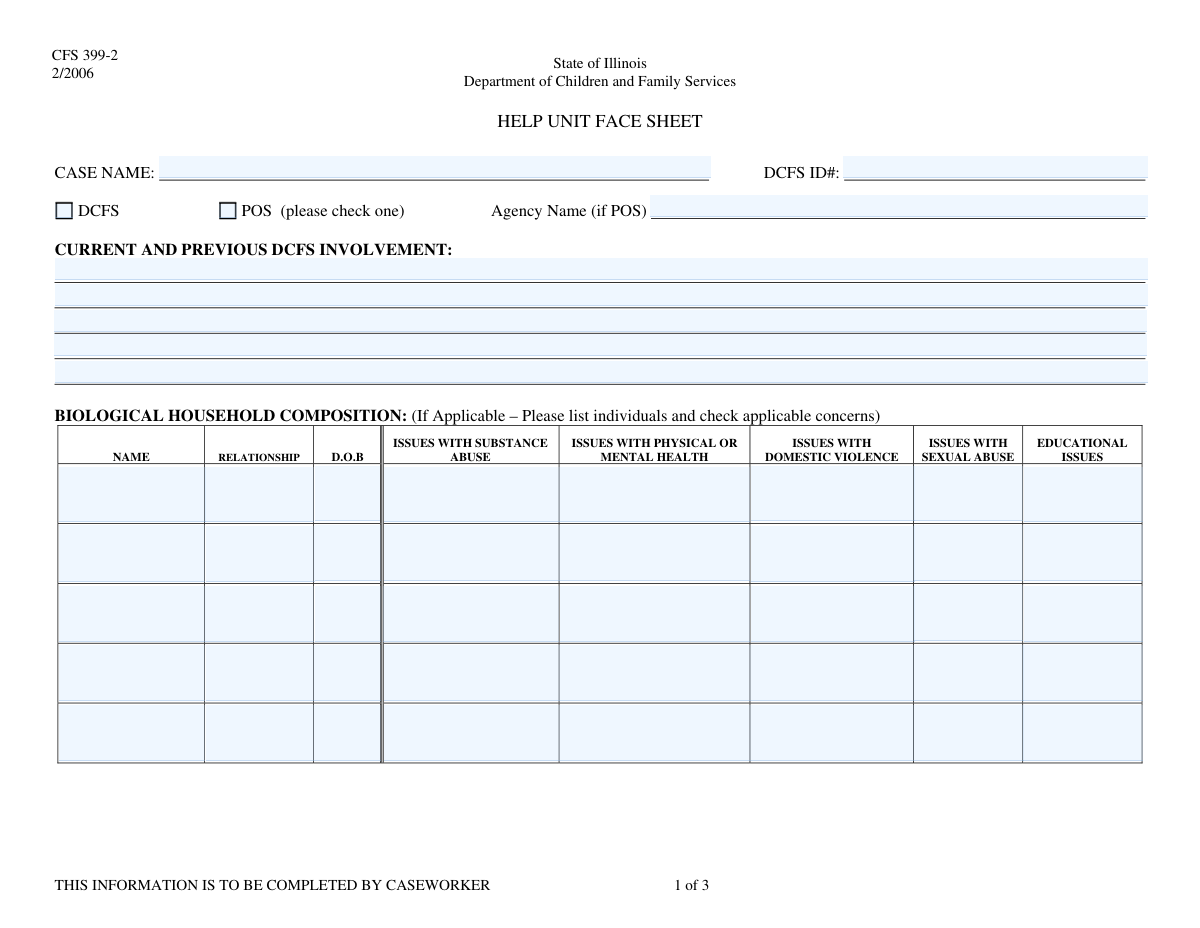
Yes! You can use AI to fill out DCFS Help Unit Consultation Request Form

The DCFS Help Unit Consultation Request Form is a vital document for child welfare caseworkers to request expert guidance on challenging cases. It systematically gathers comprehensive and sensitive data about household members and their specific issues, such as abuse, health, and education, to facilitate a thorough review by the DCFS Help Unit. This process ensures that caseworkers receive the specialized support needed to make informed decisions for the safety and well-being of children and families. Today, this form can be filled out quickly and accurately using AI-powered services like Instafill.ai, which can also convert non-fillable PDF versions into interactive fillable forms.
Our AI automatically handles information lookup, data retrieval, formatting, and form filling.
It takes less than a minute to fill out DCFS Help Unit Request using our AI form filling.
Securely upload your data. Information is encrypted in transit and deleted immediately after the form is filled out.

Form specifications

Form name: DCFS Help Unit Consultation Request Form
Number of fields: 121
Number of pages: 3
Filled form examples: Form DCFS Help Unit Request Examples
Language: English
main-image

Instafill Demo: How to fill out PDF forms in seconds with AI

How to Fill Out DCFS Help Unit Request Online for Free in 2026

Are you looking to fill out a DCFS HELP UNIT REQUEST form online quickly and accurately? Instafill.ai offers the #1 AI-powered PDF filling software of 2026, allowing you to complete your DCFS HELP UNIT REQUEST form in just 37 seconds or less.
Follow these steps to fill out your DCFS HELP UNIT REQUEST form online using Instafill.ai:
  1. 1 Navigate to Instafill.ai and upload or select the DCFS Help Unit Consultation Request Form.
  2. 2 Provide the primary case details, including the Case Name, DCFS ID Number, and agency information, in the 'Case Information' section.
  3. 3 Use the guided interface to list each household member, entering their name, relationship, and date of birth.
  4. 4 Detail the specific concerns for each individual by checking the relevant boxes and providing narrative descriptions for issues like substance abuse, health, domestic violence, or education.
  5. 5 Compose a comprehensive summary in the 'Description of Concerns' and 'Additional Information' sections to give the Help Unit full context for the consultation request.
  6. 6 Review the entire form, ensuring all information is accurate and all required fields are completed before proceeding.
  7. 7 Enter the signature date and download the completed document, ready for submission to the appropriate DCFS channel.

Our AI-powered system ensures each field is filled out correctly, reducing errors and saving you time.

Why Choose Instafill.ai for Your Fillable DCFS Help Unit Request Form?

Speed

Complete your DCFS Help Unit Request in as little as 37 seconds.

Up-to-Date

Always use the latest 2026 DCFS Help Unit Request form version.

Cost-effective

No need to hire expensive lawyers.

Accuracy

Our AI performs 10 compliance checks to ensure your form is error-free.

Security

Your personal information is protected with bank-level encryption.

Frequently Asked Questions About Form DCFS Help Unit Request

This form is used to document detailed case information for the Department of Children and Family Services (DCFS) or a Purchase of Service (POS) agency. It gathers sensitive information about household members and foster children to assess concerns and determine necessary services.

A caseworker from DCFS or an affiliated POS agency is responsible for completing and signing this form. It is used to refer a case for review and discussion, likely with a specialized support unit.

Check 'DCFS' if the case involvement is directly with the Department of Children and Family Services. Check 'POS' if the case is managed by a contracted Purchase of Service agency, and be sure to enter the agency's name in the specified field.

The DCFS ID Number is a unique identifier assigned to the case by the Department of Children and Family Services. This number should be available in the official case file or your agency's case management system.

Yes, you must address each category (e.g., Substance Abuse, Domestic Violence) for every individual on the form. If an issue is not present, you should indicate that clearly, for example, by writing 'None' or 'N/A'.

The form has sections for up to five household members. If the household is larger, fill out the information for the first five and use the 'Additional Information' section to detail the remaining members, or attach a separate sheet.

In this section, you should provide a detailed narrative that summarizes and expands upon the issues you checked in the household composition tables. This helps provide a clear and comprehensive picture of the family's situation.

Provide the most accurate information you can. If an exact date of birth is unknown, enter an approximate age or year of birth and make a note in the 'Additional Information' section to clarify.

In the 'Current and Previous DCFS Involvement' section, you should clearly state that there is no known prior history with DCFS. This is important information for the case assessment.

Attach any documents that support the information and concerns detailed in the form. This could include police reports, medical records, school reports, or previous assessments relevant to the case.

Yes, AI-powered services like Instafill.ai can help you fill out this form more efficiently. These tools can accurately auto-fill repetitive information, saving you time and reducing the risk of errors.

To fill this form using Instafill.ai, upload the form to their platform. The AI will identify the fields, allowing you to quickly input the required case and household information and ensure all sections are completed accurately.

If you have a non-fillable PDF, you can use a service like Instafill.ai to make it interactive. Simply upload the flat PDF, and their technology will convert it into a fillable form that you can complete and sign digitally.

Compliance DCFS Help Unit Request
Validation Checks by Instafill.ai

1
Involvement Type Selection
This check ensures that either the 'DCFS' or 'POS' checkbox is selected, but not both. It is critical to correctly categorize the case involvement for proper routing and processing. If neither or both are selected, the form submission should be blocked, and the user prompted to select exactly one option.
2
Conditional Agency Name Requirement
This validation verifies that the 'Agency Name' field is filled out if the 'POS' (Purchase of Service) checkbox is selected. This information is essential for identifying the specific partner agency involved in the case. Failure to provide the agency name when 'POS' is checked will result in an error, preventing submission until the field is completed.
3
Case Identification Completeness
This check ensures that both 'Case Name' and 'DCFS ID Number' fields are not empty. These fields are fundamental for identifying the case record within the system. Submitting a form without this core information would create an orphaned or unidentifiable record, so validation failure must prevent submission.
4
Date of Birth Format and Validity
This validation rule checks all 'Date of Birth' fields across the form to ensure they are in a valid format (e.g., MM/DD/YYYY) and represent a logical date. The date cannot be in the future or unreasonably far in the past (e.g., more than 120 years ago). This prevents data entry errors and ensures data quality for age-related calculations and identity verification.
5
Household Member Data Integrity
For each household member section (1 through 5), this check ensures that if any information (like Date of Birth or Relationship) is entered, the corresponding 'Name' field for that member is also filled. This prevents the creation of incomplete or anonymous household member records. If a member's details are present but their name is missing, the user will be prompted to add the name before proceeding.
6
Chronological Date Validation
This check validates that the 'Date Received' is on or after the 'Signature Date'. It is logically impossible for the form to be received before it was signed. This validation prevents clerical errors and ensures the timeline of events is accurately recorded, which is crucial for legal and administrative purposes.
7
Signature Date Presence
This validation ensures that the 'Signature Date' field is not empty. The signature date authenticates the form and establishes a legally significant timestamp for when the information was certified by the caseworker. A missing signature date invalidates the form's official status, so submission should be blocked until it is provided.
8
Conditional 'Description of Concerns' Requirement
This rule verifies that the 'Description of Concerns' text area is filled if any of the specific foster child concern checkboxes ('First Foster Child Domestic Violence Issues', 'Sexual Abuse Issues', etc.) are marked as 'Yes'. The checkboxes indicate a problem exists, and this description provides the necessary context and detail. If a concern is checked without a description, the form is incomplete and the user must provide details.
9
Conditional 'Additional Information' Requirement
This validation checks if the 'Additional Information (Page 3)' field has been filled out when any concern is checked in the 'BIOLOGICAL HOUSEHOLD COMPOSITION' table. The form logic requires this field to be filled to provide context for the checked concerns. If a concern is noted but this field is empty, the submission should be flagged as incomplete.
10
First Household Member Requirement
This check ensures that at least the first household member's information is provided. A case form without any associated individuals is not useful for processing. This validation mandates that the 'Name' for the 'First Household Member' is filled, ensuring a primary individual is always associated with the case submission.
11
Third Child Data Dependency Check
This validation enforces the rule that the 'Third Child Domestic Violence Issues' field can only be filled if at least one of the preceding fields for that child ('Third Child D.O.B.', 'Substance Abuse Issues', 'Physical or Mental Health Issues') is also filled. This prevents orphaned data entry where an issue is described for a child who has not been otherwise identified in the section. An error should prompt the user to fill out the identifying information first.
12
Fifth Row Data Dependency Check
This rule ensures that the 'Fifth Row Sexual Abuse Issues' field is only populated if at least one of the other issue fields in that row ('Substance Abuse Issues', 'Physical/Mental Health Issues', 'Domestic Violence Issues') is also checked or filled. This maintains logical consistency and prevents the entry of isolated data points without proper context. If the rule is violated, the user should be notified to provide the prerequisite information.

Common Mistakes in Completing DCFS Help Unit Request

Inconsistent or Invalid Date Formatting

Users often enter dates in various formats like 'Jan 5, 2001', '5/1/2001', or with typos, instead of a consistent MM/DD/YYYY format. This causes data validation failures and requires manual correction, delaying case processing. To avoid this, always use the MM/DD/YYYY format and double-check that the date, especially for Date of Birth, is logical and accurate. AI-powered form fillers like Instafill.ai can automatically format dates correctly to prevent these errors.

Ignoring Conditional Field Instructions

The form contains several fields that should only be filled out if a specific condition is met, such as entering an 'Agency Name' only if the 'POS' box is checked. A common mistake is either failing to fill in these required conditional fields or filling in fields that should have been left blank. This results in incomplete or confusing submissions, requiring follow-up. Carefully read all instructions next to checkboxes and fields to ensure you are providing the correct information.

Providing Vague or Non-Descriptive Answers

For sensitive fields like 'Substance Abuse Issues' or 'Domestic Violence Issues', users may simply write 'Yes' or 'N/A' instead of providing the requested details. This information is critical for the assessment, and a lack of detail makes the form unusable and forces caseworkers to seek the information through other means. To avoid this, provide concise, factual details that describe the concern as requested by the field prompt.

Confusing DCFS and POS Involvement

Users frequently misunderstand the distinction between direct DCFS involvement and a Purchase of Service (POS) agency, leading them to check the wrong box. Furthermore, when 'POS' is correctly checked, they often forget to fill in the mandatory 'Agency Name' field. This initial error can cause the form to be misrouted, leading to significant delays in getting the case to the right department for review.

Entering an Incorrect or Incomplete DCFS ID Number

The DCFS ID Number is the primary identifier for linking the form to a case file, but it is prone to transcription errors, such as transposed digits or missing characters. An incorrect ID can result in the form being rejected or, worse, attached to the wrong case. Always verify the DCFS ID Number against the official case record before entry. Using a tool like Instafill.ai can help by saving and accurately reusing such critical information across documents.

Leaving Narrative Summary Fields Blank

The form includes summary fields like 'Description of Concerns' and 'Additional Information' that are meant to provide context for the issues checked in the tables. People often check boxes indicating problems but then neglect to fill out the corresponding narrative section. This leaves reviewers with an incomplete picture, forcing them to guess the severity and nature of the concerns. Always complete the summary fields to provide a clear and comprehensive overview.

Mixing Up Household Member and Foster Child Sections

The form has a repetitive and confusing layout with separate sections for 'Household Members' and 'Foster Child Concerns' that use very similar field names. Users often enter information for a foster child in the general household member section, or vice-versa. This error confuses the family composition and misrepresents the issues specific to each individual. To prevent this, carefully read the heading of each section before entering data for a person.

Using Ambiguous Relationship Descriptions

In the 'Relationship' field, individuals often enter vague terms like 'friend,' 'family,' or 'roommate.' These descriptions are not specific enough for a formal assessment, which requires a clear understanding of the household structure (e.g., 'maternal uncle,' 'unrelated adult cohabitant'). This ambiguity can slow down the review process as the caseworker may need to clarify these relationships. Always use precise and official relationship titles.

Omitting Information in Sensitive Fields

Due to the personal and sensitive nature of topics like domestic violence, sexual abuse, or mental health, filers may be hesitant to provide details and leave these fields blank, even when issues are known to exist. While understandable, this omission leads to an inaccurate assessment and can prevent vulnerable individuals from receiving necessary services. It is crucial to provide factual, objective information as required for the case review, as this data is essential for determining the appropriate support and intervention.

Inconsistent Data Entry Across Repetitive Sections

When filling out details for multiple household members, it is easy to lose track and accidentally enter information in the wrong person's section. For example, the date of birth for the second household member might be entered in the field for the third household member. Such errors compromise the integrity of the entire report and can have serious consequences for the case. To avoid this, complete all fields for one person before moving to the next, and if the form is a non-fillable PDF, use a tool like Instafill.ai to convert it into a structured, fillable version that can reduce such errors.
Saved over 80 hours a year

“I was never sure if my IRS forms like W-9 were filled correctly. Now, I can complete the forms accurately without any external help.”

Kevin Martin Green

Your data stays secure with advanced protection from Instafill and our subprocessors

Robust compliance program

Transparent business model

You’re not the product. You always know where your data is and what it is processed for.

ISO 27001, HIPAA, and GDPR

Our subprocesses adhere to multiple compliance standards, including but not limited to ISO 27001, HIPAA, and GDPR.

Security & privacy by design

We consider security and privacy from the initial design phase of any new service or functionality. It’s not an afterthought, it’s built-in, including support for two-factor authentication (2FA) to further protect your account.

Fill out DCFS Help Unit Request with Instafill.ai

Worried about filling PDFs wrong? Instafill securely fills dcfs-help-unit-consultation-request-form forms, ensuring each field is accurate.