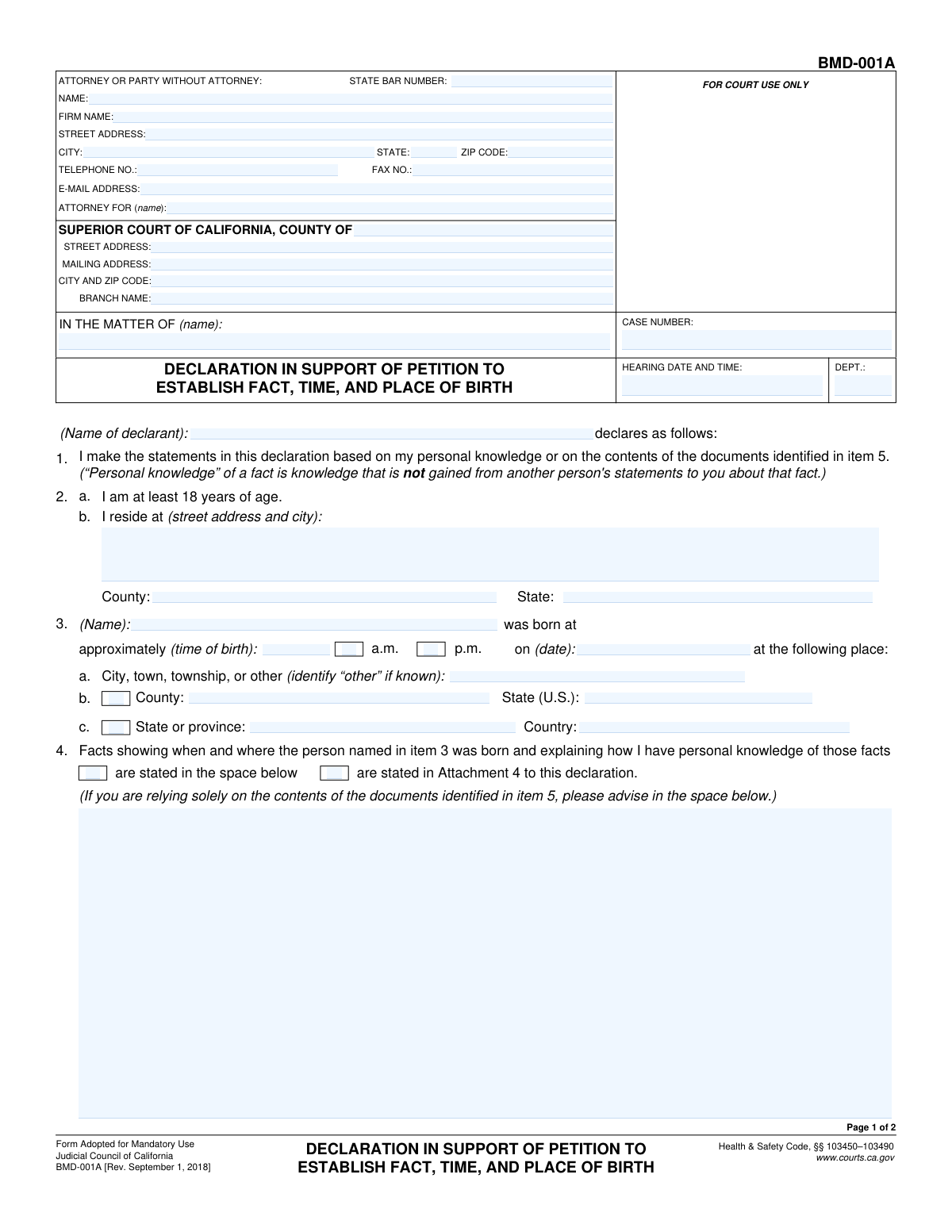
Yes! You can use AI to fill out Declaration to Establish Fact, Time, and Place of Birth
This declaration is a sworn statement submitted to the Superior Court of California to provide evidence of an individual's birth details, including the date, time, and location. It is crucial in legal proceedings such as probate, immigration, or name changes where proof of birth is required but standard documentation is missing, requiring the declarant to state the basis of their personal knowledge. Today, this form can be filled out quickly and accurately using AI-powered services like Instafill.ai, which can also convert non-fillable PDF versions into interactive fillable forms.
Our AI automatically handles information lookup, data retrieval, formatting, and form filling.
It takes less than a minute to fill out Declaration of Birth using our AI form filling.
Securely upload your data. Information is encrypted in transit and deleted immediately after the form is filled out.
Form specifications
| Form name: | Declaration to Establish Fact, Time, and Place of Birth |
| Number of fields: | 61 |
| Number of pages: | 2 |
| Language: | English |
Instafill Demo: How to fill out PDF forms in seconds with AI
How to Fill Out Declaration of Birth Online for Free in 2026
Are you looking to fill out a DECLARATION OF BIRTH form online quickly and accurately? Instafill.ai offers the #1 AI-powered PDF filling software of 2026, allowing you to complete your DECLARATION OF BIRTH form in just 37 seconds or less.
Follow these steps to fill out your DECLARATION OF BIRTH form online using Instafill.ai:
- 1 Navigate to Instafill.ai and upload or select the Declaration of Birth form.
- 2 Provide the court and case information, including the county, court branch, and case number.
- 3 Enter the attorney or party's contact details and specify who the attorney is representing.
- 4 Fill in the declarant's information and the complete birth details (name, date, time, place) of the person in question.
- 5 Explain the facts of the birth and how you have personal knowledge, either in the space provided or by referencing an attachment.
- 6 Indicate any supporting documents you are attaching (e.g., hospital records, witness statements) and describe them as needed.
- 7 Review all entered information for accuracy, then date the declaration before saving or printing for submission to the court.
Our AI-powered system ensures each field is filled out correctly, reducing errors and saving you time.
Why Choose Instafill.ai for Your Fillable Declaration of Birth Form?
Speed
Complete your Declaration of Birth in as little as 37 seconds.
Up-to-Date
Always use the latest 2026 Declaration of Birth form version.
Cost-effective
No need to hire expensive lawyers.
Accuracy
Our AI performs 10 compliance checks to ensure your form is error-free.
Security
Your personal information is protected with bank-level encryption.
Frequently Asked Questions About Form Declaration of Birth
This form is a legal declaration used to state facts about a person's date, time, and place of birth for a court case. It is typically used when an official birth certificate is unavailable or needs to be supplemented with personal testimony.
The declarant is the person signing the form who has direct, personal knowledge of the birth details. This could be a parent, a relative who was present at the birth, or another individual with firsthand information about the event.
You will need the court case number, hearing date, the full name and birth details of the person in question, and your own contact information. It is also helpful to gather any supporting documents you plan to attach, such as hospital records or witness statements.
No, you can fill out this form yourself as a 'party without an attorney.' Simply enter your own name and contact information in the 'Attorney or Party Information' section and leave the State Bar Number field blank.
In this section, you must clearly explain how you personally know the birth details you are declaring. For example, you could state 'I am the person's mother and was present at the birth' or 'I was the attending physician at the hospital during the delivery.'
If your explanation of the facts fits in the space provided on the form, check 'Stated in space below.' If your explanation is too long and requires a separate page, check 'Stated in Attachment 4' and attach that page to your declaration.
The form allows you to enter an 'approximate time of birth.' Provide the time to the best of your knowledge and remember to check the corresponding 'a.m.' or 'p.m.' box.
You can attach copies of hospital records, physician's reports, witness statements, or other documents like school records or vaccination certificates. Be sure to check the appropriate boxes in item 5 to indicate which documents you are attaching.
You must complete this section if you check the box for 'Birth Information is Important.' This is where you explain why the birth details are relevant to a specific court case, including the case name, court, and parties involved.
This form must be filed with the Superior Court of California for the county and branch handling your case. Follow the court's specific rules for filing legal documents, which may include in-person, mail, or electronic filing.
Yes, services like Instafill.ai use AI to accurately auto-fill form fields from your saved information. This can save you significant time and help reduce errors when completing the form.
Simply upload the form to the Instafill.ai platform. The AI will identify all the fields, allowing you to type your information directly, save your progress, and download the completed, professional-looking document.
You can use a service like Instafill.ai, which can convert flat, non-fillable PDFs into interactive, fillable forms. This allows you to type your information directly into the fields instead of having to print the form and write by hand.
This option is used when you need more space to provide information than the form allows. By checking a 'Continued on Attachment' box, you indicate that the full details are included on a separate, attached page that you must also submit.
Compliance Declaration of Birth
Validation Checks by Instafill.ai
1
Ensures Hearing Date and Time is in the Future
This validation confirms that the 'Hearing Date and Time' entered is a future date and time, not one that has already passed. Scheduling a hearing for a past date is a logical impossibility and would render the form invalid for its intended purpose. If the date is in the past, the user must be prompted to correct it before submission.
2
Validates State Bar Number Format
Verifies that the 'State Bar Number' is a valid, active number for an attorney in the specified jurisdiction. This check is important for confirming the credentials of the legal representative and their authority to act on behalf of a party. An invalid or inactive number could lead to the rejection of the legal filing.
3
Validates Zip Code Format
This check ensures that all 'Zip Code' fields contain a valid 5-digit or 9-digit (ZIP+4) format. Correct zip codes are essential for mail delivery and proper location identification for all parties and the court. An incorrect format could result in returned mail and significant delays in legal proceedings.
4
Ensures Valid Email Address Format
This validation checks that the 'Email Address' field contains a string in a standard email format (e.g., '[email protected]'). This is critical for ensuring that electronic communications and service of documents from the court and other parties are successfully delivered. An invalid email address would disrupt communication channels and could lead to missed deadlines or notifications.
5
Ensures Date of Birth is a Past Date
This validation verifies that the 'Date of Birth' entered for the person is a date in the past. A future date of birth is a logical error and would invalidate the declaration. This check prevents data entry mistakes and ensures the integrity of the personal information being declared.
6
Enforces Mutually Exclusive Time of Day Selection
This check ensures that for the 'Time of Birth', only one of the checkboxes, either 'a.m.' or 'p.m.', can be selected at a time. Allowing both to be selected would create ambiguity and make the time of birth information invalid. The system should prevent the user from selecting both options simultaneously.
7
Conditional Requirement for Facts Explanation
This validation enforces that the 'Facts Explanation' text area must be filled out if the 'Stated in space below' checkbox is selected. Conversely, it should be disabled or ignored if 'Stated in Attachment 4' is checked instead. This ensures that the user provides the required information in the correct location and prevents incomplete submissions.
8
Conditional Requirement for Attached Document Details
This validation ensures that if a checkbox for an attached document type (e.g., 'Hospital records dated', 'Physician's report dated') is selected, the corresponding date field must be filled in. This prevents a user from indicating an attachment is included without providing the necessary identifying information like its date. Failure to provide details would make the attachment reference incomplete.
9
Conditional Requirement for 'Other Documents' Description
This check verifies that if the 'Other documents' checkbox is selected, the 'Other Documents Description' text area must contain a description. It is crucial to specify what these other documents are for the record. An empty description would make the attachment reference vague and potentially inadmissible.
10
Enforces Mutually Exclusive Facts Explanation Location
This validation ensures that only one of the two checkboxes, 'Stated in space below' or 'Stated in Attachment 4', can be selected. The facts explanation can either be in the form's body or in an attachment, but not both simultaneously. This prevents confusion and ensures the reader knows exactly where to find the required information.
11
Conditional Requirement for Proceeding Description
This validation enforces that the 'Proceeding Description' text area must be filled out if the 'Birth Information is Important' checkbox is selected. This context is crucial for the court to understand why the birth information is relevant. If the box is not checked, this field should be disabled to prevent unnecessary data entry.
12
Ensures Consistency of Declarant Name
This check verifies that the 'Declarant Name' entered in the main section matches the 'Declarant Name' entered in the final 'Declarant Information' section. This consistency is important for legal documents to avoid ambiguity about who is making the declaration. A mismatch could raise questions about the document's authenticity.
13
Validates Numeric Input for Number of Pages Attached
This check ensures that the value entered into the 'Pages Attached' field is a non-negative integer. This count is used to verify that the submission is complete and that no pages are missing. Entering text or a negative number would be invalid and could cause processing errors.
14
Completeness of Attorney or Party Information
This validation ensures that if an attorney or party is listed, their full contact information (Name, Street Address, City, State, Zip Code, Telephone Number) is provided. This information is mandatory for official communication, service of process, and maintaining accurate court records. An incomplete address or missing phone number can halt proceedings.
15
Completeness of Court Information
Verifies that all fields related to the court's location ('Court County', 'Court Branch Name', 'Court City and Zip Code', 'Court Street Address') are filled out. Precise court identification is fundamental to ensure the document is filed in the correct jurisdiction and courthouse. Any missing information could lead to the document being rejected or sent to the wrong location.
Common Mistakes in Completing Declaration of Birth
Users often enter the case number with incorrect formatting, such as missing hyphens or prefixes, or they may transpose digits. This typically happens due to manual data entry errors from memory or a poor-quality copy of a court document. An incorrect case number is a critical failure that can lead to the document being rejected by the court clerk or misfiled, causing significant delays in the legal proceeding. To avoid this, always copy the number exactly from an official court notice; using a tool like Instafill.ai can help validate and store the correct format for future use.
This field is frequently filled out incorrectly, especially by individuals representing themselves (pro se or pro per). They might leave it blank, write 'self,' or mistakenly enter the opposing party's name. This creates confusion for the court clerk regarding who the filing party is and their representation status. The correct action for a self-represented party is to enter their own full name, as they are the 'party' the document is filed on behalf of.
Filers often provide a general court name, like 'Superior Court of California, County of Los Angeles,' without specifying the exact branch or district address (e.g., 'Stanley Mosk Courthouse'). This occurs when they are unfamiliar with the local court structure and its various locations. This omission can cause the document to be routed to the wrong courthouse, leading to missed deadlines and filing rejections. Always verify the specific branch name and full address from the official hearing notice or summons.
In the 'Facts Explanation' section, declarants often state the facts of the birth but neglect to explain *how* they have personal knowledge of these events. A declaration requires stating the basis of knowledge (e.g., 'I am the person's mother and was present at the birth') to be considered valid evidence. Omitting this foundation can render the entire declaration inadmissible, weakening the legal argument. Always explicitly state your relationship to the person and the circumstances that give you direct knowledge of the facts.
The form contains several sets of mutually exclusive checkboxes, such as 'Stated in space below' versus 'Stated in Attachment 4'. Users often mistakenly check both options or check a box indicating an attachment but then write the information directly on the form. This creates ambiguity and forces the court clerk or judge to guess the filer's intent, which may lead to them disregarding the information entirely. Carefully read the options and select only one, ensuring your actions align with your selection.
A very common error is checking a box for an attachment (e.g., 'Hospital records dated') but failing to include the actual document or fill in the required corresponding data, like the date. People also miscount the number of attached pages, entering an incorrect total in the 'Pages Attached' field. This discrepancy can lead to the court not considering the attached evidence or questioning the filing's accuracy. Before submitting, create a checklist to ensure every referenced attachment is included and that all counts and dates are correct.
When entering the 'Time of Birth', people frequently write down the time but forget to check the corresponding 'a.m.' or 'p.m.' box. This makes the stated time legally ambiguous, as a 12-hour difference is significant for establishing a factual record. This simple oversight can require the form to be corrected and resubmitted, causing unnecessary delays. Always ensure one of the two boxes is checked to clarify whether the birth occurred in the morning or afternoon/evening.
The form asks for the 'Declarant Name' (the person signing the form) and the 'Person's Name' (the subject of the birth declaration). Users sometimes enter the same name in both fields, even when they are different individuals, such as a parent declaring for a child. This error invalidates the purpose of the declaration, which relies on one person's sworn testimony about another. Carefully read each field label to ensure the correct person's name is entered in the appropriate section.
Several fields are required only if a specific checkbox is selected, such as the 'Proceeding Description' which must be filled out if 'Birth Information is Important' is checked. Users often check the box but then overlook the narrative field that becomes mandatory, resulting in an incomplete submission. Since many court forms are distributed as non-fillable PDFs, these dependencies are easy to miss. AI-powered tools like Instafill.ai can convert flat PDFs into smart, fillable forms that highlight fields that become required based on your answers, preventing such omissions.
Saved over 80 hours a year
“I was never sure if my IRS forms like W-9 were filled correctly. Now, I can complete the forms accurately without any external help.”
Kevin Martin Green
Your data stays secure with advanced protection from Instafill and our subprocessors

Robust compliance program
Transparent business model
You’re not the product. You always know where your data is and what it is processed for.
ISO 27001, HIPAA, and GDPR
Our subprocesses adhere to multiple compliance standards, including but not limited to ISO 27001, HIPAA, and GDPR.
Security & privacy by design
We consider security and privacy from the initial design phase of any new service or functionality. It’s not an afterthought, it’s built-in, including support for two-factor authentication (2FA) to further protect your account.
Fill out Declaration of Birth with Instafill.ai
Worried about filling PDFs wrong? Instafill securely fills declaration-to-establish-fact-time-and-place-of-birth forms, ensuring each field is accurate.