Yes! You can use AI to fill out Fax Cover Sheet

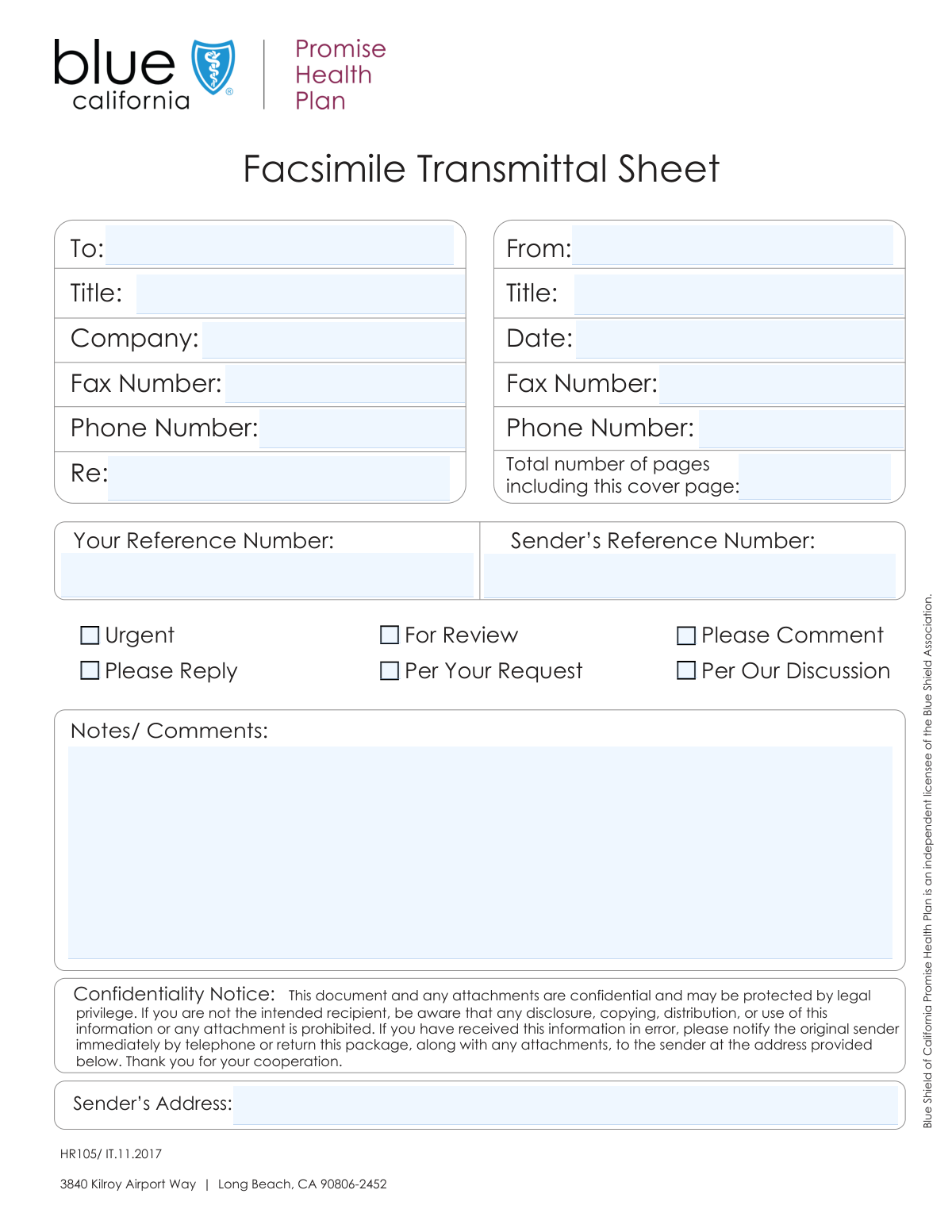
A Fax Cover Sheet is a document sent before the main content of a facsimile transmission to provide the recipient with essential information. It typically includes sender and recipient details, the date, the total number of pages, and a brief subject line, ensuring the fax is routed correctly and understood upon arrival. Today, creating a polished and accurate Fax Cover Sheet is simple with AI-powered services like Instafill.ai, which can also convert non-fillable PDF versions into interactive fillable forms for your convenience.
Our AI automatically handles information lookup, data retrieval, formatting, and form filling.
It takes less than a minute to fill out Fax Cover Sheet using our AI form filling.
Securely upload your data. Information is encrypted in transit and deleted immediately after the form is filled out.

Form specifications

Form name: Fax Cover Sheet
Number of fields: 22
Number of pages: 1
Language: English
main-image

Instafill Demo: How to fill out PDF forms in seconds with AI

How to Fill Out Fax Cover Sheet Online for Free in 2026

Are you looking to fill out a FAX COVER SHEET form online quickly and accurately? Instafill.ai offers the #1 AI-powered PDF filling software of 2026, allowing you to complete your FAX COVER SHEET form in just 37 seconds or less.
Follow these steps to fill out your FAX COVER SHEET form online using Instafill.ai:
  1. 1 Navigate to Instafill.ai and upload your Fax Cover Sheet or select a template.
  2. 2 Use the AI assistant to fill in the recipient's details, including their name, company, and fax number.
  3. 3 Provide your sender information, such as your name, title, and contact details, which Instafill.ai can save for future use.
  4. 4 Enter the transmittal details, including the date, subject, and the total number of pages being sent.
  5. 5 Check the appropriate boxes to indicate the purpose of the fax, such as 'Urgent', 'For Review', or 'Please Reply'.
  6. 6 Add any specific notes or comments in the designated section to provide additional context for the recipient.
  7. 7 Review all the information for accuracy, then download the completed PDF to send with your fax transmission.

Our AI-powered system ensures each field is filled out correctly, reducing errors and saving you time.

Why Choose Instafill.ai for Your Fillable Fax Cover Sheet Form?

Speed

Complete your Fax Cover Sheet in as little as 37 seconds.

Up-to-Date

Always use the latest 2026 Fax Cover Sheet form version.

Cost-effective

No need to hire expensive lawyers.

Accuracy

Our AI performs 10 compliance checks to ensure your form is error-free.

Security

Your personal information is protected with bank-level encryption.

Frequently Asked Questions About Form Fax Cover Sheet

This is a fax transmittal sheet, which acts as a cover page for documents you are sending via facsimile. It provides the recipient with essential information about the sender, the subject, and the contents of the transmission.

The sender of the fax is responsible for filling out this form. It should be completed before transmission and sent as the first page of the document package.

Yes, the number in the 'Total Pages' field should include this cover sheet plus all the other pages you are sending. For example, if you are sending a 5-page report, the total pages would be 6.

These two fields serve the same purpose and you typically only need to fill out one. It is a unique number you assign to the transmittal for your own tracking and reference purposes.

In the 'Subject' field, provide a brief and clear description of the documents being sent. This helps the recipient immediately understand the purpose of your fax, such as 'Invoice #5829' or 'Signed Contract Agreement'.

While not mandatory, checking the appropriate action boxes is highly recommended. It clearly communicates the priority and the action required from the recipient, ensuring your documents are handled correctly.

Use the 'Notes/Comments' section for any additional information or specific instructions that are not covered by the other fields. This could be a brief summary, a personal note, or clarification on the attached documents.

If you are using an online fax service or a machine that does not have a dedicated return number, you can leave the 'Sender Fax Number' field blank. However, ensure your 'Sender Phone Number' is included so the recipient can contact you.

This form is not submitted on its own; it is the first page of your entire fax transmission. You send it along with your other documents through a fax machine or an online faxing service.

Yes, you can use AI-powered services like Instafill.ai to help fill out this form. These tools can accurately auto-fill fields based on your saved information, saving you time and reducing potential errors.

To use Instafill.ai, simply upload the PDF of the form to the platform. The AI will make the form fillable online, allowing you to type in your information, save it for future use, and download the completed document.

If you have a non-fillable or 'flat' PDF, you can use a tool like Instafill.ai. It can convert the non-interactive PDF into a smart, fillable form that you can easily complete on your computer.

The 'To' section is for the recipient's information, such as their name, title, and company. The 'Sender' section is for your details as the person sending the fax.

Compliance Fax Cover Sheet
Validation Checks by Instafill.ai

1
Validates Recipient Fax Number is Present and Correctly Formatted
This check ensures the recipient's 'Fax Number' field is not only present but also adheres to a standard phone/fax number format (e.g., (XXX) XXX-XXXX). This is the most critical field for successful transmission, as an incorrect or missing number will result in a failed delivery. The validation prevents transmission errors before they happen.
2
Ensures Recipient Name is Provided
This check verifies that the 'To' field for the recipient's name is not empty. The recipient's name is essential for ensuring the facsimile reaches the correct individual within the destination company. Failure to provide a recipient name can lead to the document being lost, delayed, or mishandled upon receipt.
3
Ensures Sender Name is Provided
This validation confirms that the 'Sender Name' field has been filled out. The sender's name is critical for identification, allowing the recipient to know who sent the document and who to contact with questions. A missing sender name can cause confusion and delays in processing the transmittal.
4
Validates Transmittal Date Format and Plausibility
This rule verifies that the 'Transmittal Date' is a valid, correctly formatted date (e.g., MM/DD/YYYY). It also checks that the date is not in the distant past or future, ensuring accurate record-keeping. An invalid date can cause confusion for auditing, tracking, and response deadlines.
5
Ensures Total Pages is a Valid Positive Integer
This validation checks that the 'Total Pages' field contains a numeric integer greater than or equal to 1. This number, which includes the cover sheet, allows the recipient to verify they have received all pages of the transmission. An invalid, zero, or missing value prevents the recipient from confirming a complete and successful delivery.
6
Requires a Non-Empty Subject Line
This check ensures that the 'Subject' field is not left blank. A clear subject line is crucial for the recipient to quickly understand the purpose and priority of the fax. It aids in proper routing and timely handling of the documents, preventing them from being overlooked.
7
Validates Sender Phone Number Format
This validation rule checks that if a 'Sender Phone Number' is provided, it conforms to a standard phone number format. This ensures the recipient has a valid contact number for any follow-up questions or to report issues with the transmission. An incorrectly formatted number is useless and can hinder communication.
8
Validates Sender Fax Number Format
This rule ensures that if a 'Sender Fax Number' is provided, it is in a valid phone number format. This allows the recipient to easily send a return fax without having to look up the number. An invalid format would prevent a direct faxed response, delaying communication.
9
Suggests Selection of at Least One Action Item
This is a soft validation that checks if at least one of the action checkboxes ('For Review', 'Please Reply', etc.) has been selected. While not strictly required, selecting an action provides clear instructions to the recipient on what to do with the documents. The system could prompt the user with a warning if no action is selected, improving the clarity of the communication.
10
Validates Basic Completeness of Sender's Address
This check performs a basic validation on the 'Sender's Address' field to ensure it's not just a single word or random characters. It could look for common address components like a number and a street name to increase the likelihood that it's a usable address for mail correspondence. This is important for formal record-keeping and potential physical mail follow-up.
11
Enforces Maximum Length for Subject Field
This validation ensures the 'Subject' field does not exceed a predefined character limit (e.g., 255 characters). The purpose of the subject is to provide a brief description, not a detailed explanation. This check maintains the form's layout and encourages concise communication, preventing users from entering lengthy notes in the wrong field.
12
Enforces Maximum Length for Notes/Comments Field
This check restricts the 'Notes/Comments' field to a reasonable maximum character count (e.g., 1000 characters). This prevents the transmittal sheet from becoming a multi-page document itself and encourages users to include extensive information in the attached pages. It ensures the notes section is used for brief, supplementary information as intended.

Common Mistakes in Completing Fax Cover Sheet

Incorrect Total Page Count

Users often miscount the number of pages being sent or forget to include the cover sheet itself in the total count. This leads to confusion, as the recipient may believe pages are missing and waste time trying to track them down. To avoid this, count all pages, including the cover sheet, right before sending, and clearly write the total in the 'Total Pages' field.

Mixing Up Sender and Recipient Information

The form has similar fields for both the sender and the recipient (Name, Title, Fax, Phone), making it easy to enter information in the wrong section. This error can cause the fax to be sent to the wrong number or addressed incorrectly, leading to a complete communication failure. Double-check each section carefully, or use an AI-powered tool like Instafill.ai which can auto-populate sender details from a saved profile to prevent mix-ups.

Using a Vague or Empty Subject Line

Many people write generic subjects like 'Fax' or 'Documents,' or leave the field blank altogether. A vague subject makes it difficult for the recipient to prioritize the fax or route it to the correct person, especially in a busy office. Always use a specific subject line that includes a project name, invoice number, or a clear document purpose (e.g., 'Signed Contract for Project Apollo').

Ignoring the Action Checkboxes

Senders frequently overlook the checkboxes ('For Review', 'Please Reply', etc.), leaving the recipient unsure of what action is expected. This ambiguity can cause the document to be set aside without the required review, comment, or reply, delaying the entire process. To prevent this, carefully select all applicable checkboxes to provide clear, immediate instructions to the recipient.

Inconsistent or Incorrect Date Formatting

Entering the date in a non-standard or incorrect format (e.g., DD/MM/YY vs. MM/DD/YY) can create confusion, especially in international correspondence. This is crucial for documents where the date has legal or financial significance. To avoid ambiguity, use a clear format like YYYY-MM-DD or spell out the month (e.g., October 26, 2023). Form-filling tools can automatically insert the current date in a standardized format.

Confusing 'Your Reference Number' and 'Sender's Reference Number'

The form has two fields for reference numbers, which can be confusing. Users may enter the same number in both fields or leave one blank, potentially causing issues with document tracking and retrieval for either party. If you have an internal reference number, enter it consistently; if you are referencing a number provided by the recipient, clarify which field to use or specify it in the 'Notes' section.

Placing Critical Instructions in the 'Notes/Comments' Section

While the 'Notes/Comments' section is useful, it should not be used for critical information like deadlines or urgent action items. Recipients often skim this section or may overlook it entirely, causing vital instructions to be missed. Reserve this area for supplementary information and use the dedicated subject line and action checkboxes to highlight important requests.

Providing an Incomplete Sender Address

Users sometimes provide a partial address or omit key details like the postal code or suite number. An incomplete address prevents the recipient from sending a physical reply or returning documents by mail, causing delays and returned mail. Always provide your full, official mailing address to ensure all channels of communication remain open.

Forgetting to Mark 'Urgent' on Time-Sensitive Faxes

In the rush to send a document, it's easy to forget to check the 'Urgent' box. When this happens, a time-sensitive fax may be placed in a routine queue and not receive the immediate attention it requires, leading to missed deadlines. Always perform a final review of the cover sheet before sending to ensure its priority is clearly marked. If the form is a non-fillable PDF, a tool like Instafill.ai can convert it into an interactive version, making it easier to check boxes and fill fields correctly.
Saved over 80 hours a year

“I was never sure if my IRS forms like W-9 were filled correctly. Now, I can complete the forms accurately without any external help.”

Kevin Martin Green

Your data stays secure with advanced protection from Instafill and our subprocessors

Robust compliance program

Transparent business model

You’re not the product. You always know where your data is and what it is processed for.

ISO 27001, HIPAA, and GDPR

Our subprocesses adhere to multiple compliance standards, including but not limited to ISO 27001, HIPAA, and GDPR.

Security & privacy by design

We consider security and privacy from the initial design phase of any new service or functionality. It’s not an afterthought, it’s built-in, including support for two-factor authentication (2FA) to further protect your account.

Fill out Fax Cover Sheet with Instafill.ai

Worried about filling PDFs wrong? Instafill securely fills fax-cover-sheet forms, ensuring each field is accurate.