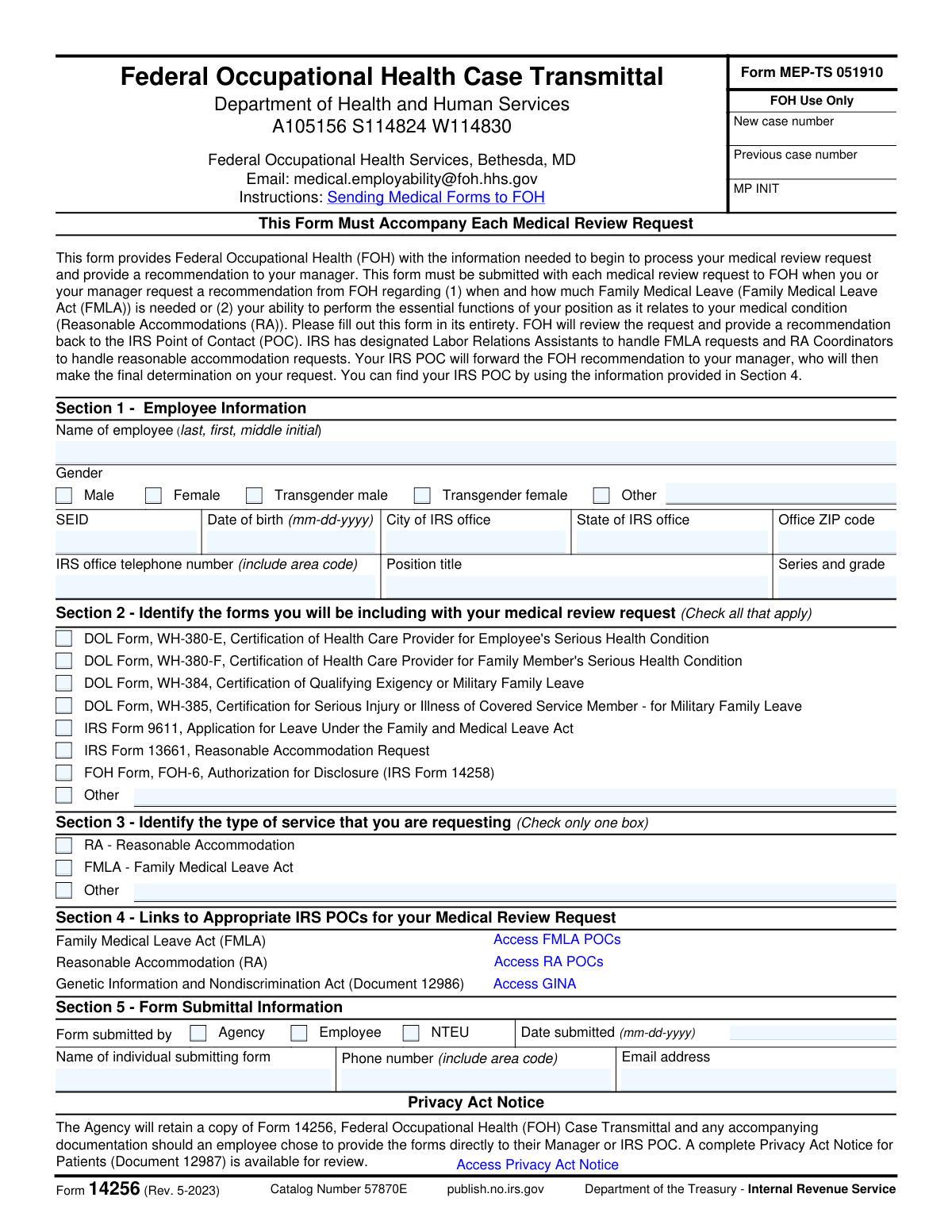
Yes! You can use AI to fill out Form 14256, Federal Occupational Health Case Transmittal
Form 14256 is a transmittal document required by the IRS to accompany any medical review request sent to the Federal Occupational Health (FOH). It provides FOH with the necessary information to process requests related to the Family Medical Leave Act (FMLA) or Reasonable Accommodations (RA), ensuring the employee's case is routed correctly. This form is crucial for initiating the review process that leads to a recommendation for the employee's manager. Today, this form can be filled out quickly and accurately using AI-powered services like Instafill.ai, which can also convert non-fillable PDF versions into interactive fillable forms.
Our AI automatically handles information lookup, data retrieval, formatting, and form filling.
It takes less than a minute to fill out Form 14256 using our AI form filling.
Securely upload your data. Information is encrypted in transit and deleted immediately after the form is filled out.
Form specifications
| Form name: | Form 14256, Federal Occupational Health Case Transmittal |
| Number of fields: | 40 |
| Number of pages: | 2 |
| Language: | English |
Instafill Demo: How to fill out PDF forms in seconds with AI
How to Fill Out Form 14256 Online for Free in 2026
Are you looking to fill out a FORM 14256 form online quickly and accurately? Instafill.ai offers the #1 AI-powered PDF filling software of 2026, allowing you to complete your FORM 14256 form in just 37 seconds or less.
Follow these steps to fill out your FORM 14256 form online using Instafill.ai:
- 1 Navigate to Instafill.ai and upload or select IRS Form 14256.
- 2 Use the AI assistant to accurately fill in your personal and employment details in Section 1, such as your name, SEID, and office location.
- 3 In Section 2, check the boxes corresponding to all the medical forms you are including with your request, like DOL or other IRS forms.
- 4 Proceed to Section 3 and select the type of service you are requesting, either Reasonable Accommodation (RA) or Family Medical Leave Act (FMLA).
- 5 Complete Section 5 by providing the submission details, including who is submitting the form, the date, and contact information.
- 6 Review all the information you've entered for accuracy, then securely download the completed Form 14256 to submit according to the provided instructions.
Our AI-powered system ensures each field is filled out correctly, reducing errors and saving you time.
Why Choose Instafill.ai for Your Fillable Form 14256 Form?
Speed
Complete your Form 14256 in as little as 37 seconds.
Up-to-Date
Always use the latest 2026 Form 14256 form version.
Cost-effective
No need to hire expensive lawyers.
Accuracy
Our AI performs 10 compliance checks to ensure your form is error-free.
Security
Your personal information is protected with bank-level encryption.
Frequently Asked Questions About Form Form 14256
Form 14256 is a transmittal cover sheet that must accompany any medical review request sent to Federal Occupational Health (FOH). It is used when requesting a recommendation for Family Medical Leave (FMLA) or a Reasonable Accommodation (RA) due to a medical condition.
An IRS employee requesting FMLA or an RA must ensure this form is completed. It can be submitted by the employee, their manager, an agency representative, or an NTEU representative on the employee's behalf.
You must include supporting documentation for your request, such as DOL FMLA certification forms (e.g., WH-380-E) or an IRS Reasonable Accommodation Request (Form 13661). Use Section 2 to check off all documents you are including.
You must use SecureZip to create a password-protected file of your forms and email it to [email protected]. A second, separate email must be sent to the same address containing only the password for the zip file.
FOH reviews your case and provides a recommendation to the appropriate IRS Point of Contact (POC). The POC forwards this to your manager, who makes the final determination on your FMLA or RA request.
Section 4 of the form contains links to help you identify the correct IRS POC. There are separate contacts for FMLA requests (Labor Relations Assistants) and Reasonable Accommodation requests (RA Coordinators).
SEID stands for Standard Employee Identification number. This is your unique employee ID number at the IRS, which can typically be found on your employee badge or in your official personnel records.
No, Section 3 instructs you to check only one box for the type of service. You should submit a separate request, including a unique Form 14256, for each type of service you are requesting.
This is a required security measure to protect your sensitive personal and medical information. Separating the encrypted file from its password makes it much more difficult for unauthorized parties to access your data.
This is the person who is physically sending the email and documents to FOH. This could be you (the employee), your manager, or another representative handling the submission process.
Yes, services like Instafill.ai use AI to accurately auto-fill form fields, which saves time and helps prevent errors. This is especially useful when filling out multiple related forms for your request.
Simply upload the Form 14256 PDF to the Instafill.ai platform. The service will make the document interactive, allowing you to type your information directly into the fields and then download the completed form.
If you have a non-fillable or 'flat' PDF, you can use a service like Instafill.ai. It can convert the static document into an interactive, fillable form that you can easily complete on your computer.
Compliance Form 14256
Validation Checks by Instafill.ai
1
SEID Presence and Format
Checks that the Standard Employee Identification (SEID) number is provided and conforms to the expected format. The SEID is a critical unique identifier for the employee within the IRS system, essential for accurate case file creation and retrieval. If the SEID is missing or invalid, the form cannot be processed, and the request will be rejected pending correction.
2
Date of Birth Validity and Range
Validates that the Date of Birth is in the correct 'mm-dd-yyyy' format, represents a real calendar date, and is not in the future. It also checks that the date implies a reasonable working age, for example, the employee must be over 18. This prevents data entry errors and ensures the identity of the employee can be correctly verified. An invalid date will result in a processing error and require the submitter to correct the information.
3
Required Fields in Section 1
Verifies that all fields in Section 1 (Employee Information), such as Name, SEID, Date of Birth, and Office Location, are completed. This information is fundamental for identifying the employee and their work context, which is necessary for FOH to begin processing the request. Incomplete submissions will be returned, delaying the medical review process.
4
Conditional Requirement for 'Other' Gender
Ensures that if the 'Other' checkbox is selected for Gender, the corresponding text field is not empty. This respects the employee's self-identification while ensuring the record is complete as intended by the form design. Failure to provide a description when 'Other' is selected will trigger a validation error, prompting the user to complete the field before submission.
5
Minimum One Form Selection in Section 2
Confirms that at least one checkbox is selected in Section 2, which lists the accompanying medical forms. The entire purpose of this transmittal form is to accompany other documents, so it is meaningless on its own. If no forms are indicated, the submission will be flagged as incomplete, as FOH would have no documentation to review.
6
Conditional Requirement for 'Other' Included Form
Validates that if the 'Other' checkbox is selected in Section 2 (Included Medical Forms), the associated text field specifying the form's name is filled out. This is crucial for FOH to know what document to expect and how to categorize it. An empty description will cause the form to be rejected until the name of the 'Other' document is provided.
7
Exclusive Service Type Selection in Section 3
Checks that exactly one service type (RA, FMLA, or Other) is selected in Section 3. The form explicitly states to 'Check only one box,' and this validation enforces that rule to prevent ambiguity in the request. Submissions with zero or more than one selection will be invalid and require clarification from the submitter.
8
Logical Consistency for FMLA Request
Performs a cross-field validation to ensure that if 'FMLA' is selected as the service type in Section 3, at least one of the FMLA-related forms (e.g., WH-380-E, WH-380-F, IRS 9611) is checked in Section 2. This check ensures the request type is supported by the appropriate documentation. A mismatch will generate a warning or error, indicating a potential discrepancy that could delay the FMLA request processing.
9
Logical Consistency for Reasonable Accommodation Request
Verifies that if 'RA - Reasonable Accommodation' is selected as the service type in Section 3, the 'IRS Form 13661, Reasonable Accommodation Request' checkbox is selected in Section 2. This logical check ensures the primary request form is included for an RA case. If Form 13661 is not indicated, the submission will be flagged as potentially incomplete for an RA request.
10
Submission Date Validity
Validates that the 'Date submitted' in Section 5 is in the correct 'mm-dd-yyyy' format and is not a future date. This ensures the chronological accuracy of the submission record for tracking and compliance purposes. A future or improperly formatted date will be rejected, requiring the user to enter the current date.
11
Submitter Email Address Format
Checks that the email address provided in the 'Form Submittal Information' section follows the standard format (e.g., [email protected]). A valid email is essential for FOH and the IRS POC to communicate with the submitter regarding the case status or requests for more information. An invalid email format will prevent submission until corrected.
12
U.S. Postal State Abbreviation
Ensures the 'State of IRS office' field contains a valid two-letter U.S. postal abbreviation. This standardizes location data, prevents ambiguity, and facilitates correct routing and record-keeping. An entry that does not match a valid state abbreviation will be flagged for correction.
13
U.S. Phone Number Format
Validates that both the 'IRS office telephone number' and the 'Submitter Phone number' fields contain a 10-digit number, optionally allowing for common formatting like parentheses or hyphens. This ensures that contact numbers are complete and usable for any necessary follow-up communication. Incomplete or improperly formatted numbers will trigger an error.
14
Completeness of Submitter Information
Verifies that all fields in Section 5 under 'Form Submittal Information' (who submitted, date, name, phone, email) are filled out. This information is critical for case management, tracking, and communication. If any part of this section is missing, the form is considered incomplete and cannot be processed until the submitter's details are fully provided.
Common Mistakes in Completing Form 14256
The form provides very specific, multi-step instructions for emailing documents using SecureZip, including sending the password in a separate, unencrypted email. A common error is sending the password in the same email as the documents or using Outlook's encryption feature, which is explicitly forbidden. This prevents FOH from accessing the sensitive medical files, causing significant delays and requiring a complete resubmission of all forms.
An applicant might check boxes for FMLA-related forms in Section 2 (e.g., WH-380-E) but then select 'RA - Reasonable Accommodation' in Section 3. This contradiction happens due to confusion about the purpose of the request. It creates ambiguity for FOH, forcing them to seek clarification and delaying the case review until the correct service type is confirmed.
The Standard Employee Identification (SEID) is a critical identifier, but employees sometimes enter their Social Security Number by mistake, make a typo, or leave it blank. Without the correct SEID, FOH cannot locate the employee's record in their system, which brings the entire review process to a halt. To avoid this, double-check your SEID on an official IRS document or pay stub before entering it.
The instructions require checking all forms included with the request, but people often only check the main application (e.g., Form 13661) and forget to check mandatory accompanying forms like the FOH-6 Authorization for Disclosure. This makes the submission appear incomplete to the reviewers. To prevent this, create a checklist of all documents you are sending and ensure every corresponding box in Section 2 is ticked.
Section 3 explicitly states to 'Check only one box,' but an employee might be dealing with overlapping issues and check both 'RA' and 'FMLA'. This violates the form's instructions and makes the primary request unclear, leading to processing delays. You must determine the single, primary purpose of your submission and select only that one box to ensure a smooth review.
The form specifies the 'mm-dd-yyyy' format for the Date of Birth and Submission Date fields. Applicants frequently use other formats like 'dd-mm-yyyy' or 'mm/dd/yy', which can cause data entry errors in the FOH system and may require manual correction. Using an AI-powered form filler like Instafill.ai can help prevent this by automatically formatting dates correctly as you enter them.
Employees, particularly those new to a position, may not know their official job series and grade and leave this field empty. This information is vital for FOH to assess the essential functions of the position, especially for Reasonable Accommodation requests. An incomplete field will delay the review, so you should find this information on a pay stub or by asking your manager before submitting.
When an employee submits the form for themselves, they sometimes assume Section 1 is sufficient and leave the 'Name of individual submitting form' and contact details in Section 5 blank. FOH uses Section 5 to contact the submitter with questions about the package itself, which may be different from case-specific questions for the employee. Always complete Section 5, even if you are the employee from Section 1.
This form acts as a cover sheet, and sometimes users believe that simply attaching the medical certifications is enough, so they send a blank or partially filled Form 14256. The form is often a non-fillable PDF, making it harder to complete. This is a critical error, as this transmittal form contains the essential routing and identification data needed to initiate the case; without it, the submission is invalid. Tools like Instafill.ai can convert flat PDFs into fillable forms to ensure all necessary fields are completed.
In Sections 2 and 3, users may check the 'Other' box but neglect to write a description in the corresponding text field. This happens due to simple oversight while quickly filling out the form. This leaves the reviewers with incomplete information, forcing them to follow up and causing unnecessary delays. Always ensure that if you check an 'Other' box, you provide a clear and concise explanation in the space provided.
Saved over 80 hours a year
“I was never sure if my IRS forms like W-9 were filled correctly. Now, I can complete the forms accurately without any external help.”
Kevin Martin Green
Your data stays secure with advanced protection from Instafill and our subprocessors

Robust compliance program
Transparent business model
You’re not the product. You always know where your data is and what it is processed for.
ISO 27001, HIPAA, and GDPR
Our subprocesses adhere to multiple compliance standards, including but not limited to ISO 27001, HIPAA, and GDPR.
Security & privacy by design
We consider security and privacy from the initial design phase of any new service or functionality. It’s not an afterthought, it’s built-in, including support for two-factor authentication (2FA) to further protect your account.
Fill out Form 14256 with Instafill.ai
Worried about filling PDFs wrong? Instafill securely fills form-14256-federal-occupational-health-case-transmittal forms, ensuring each field is accurate.