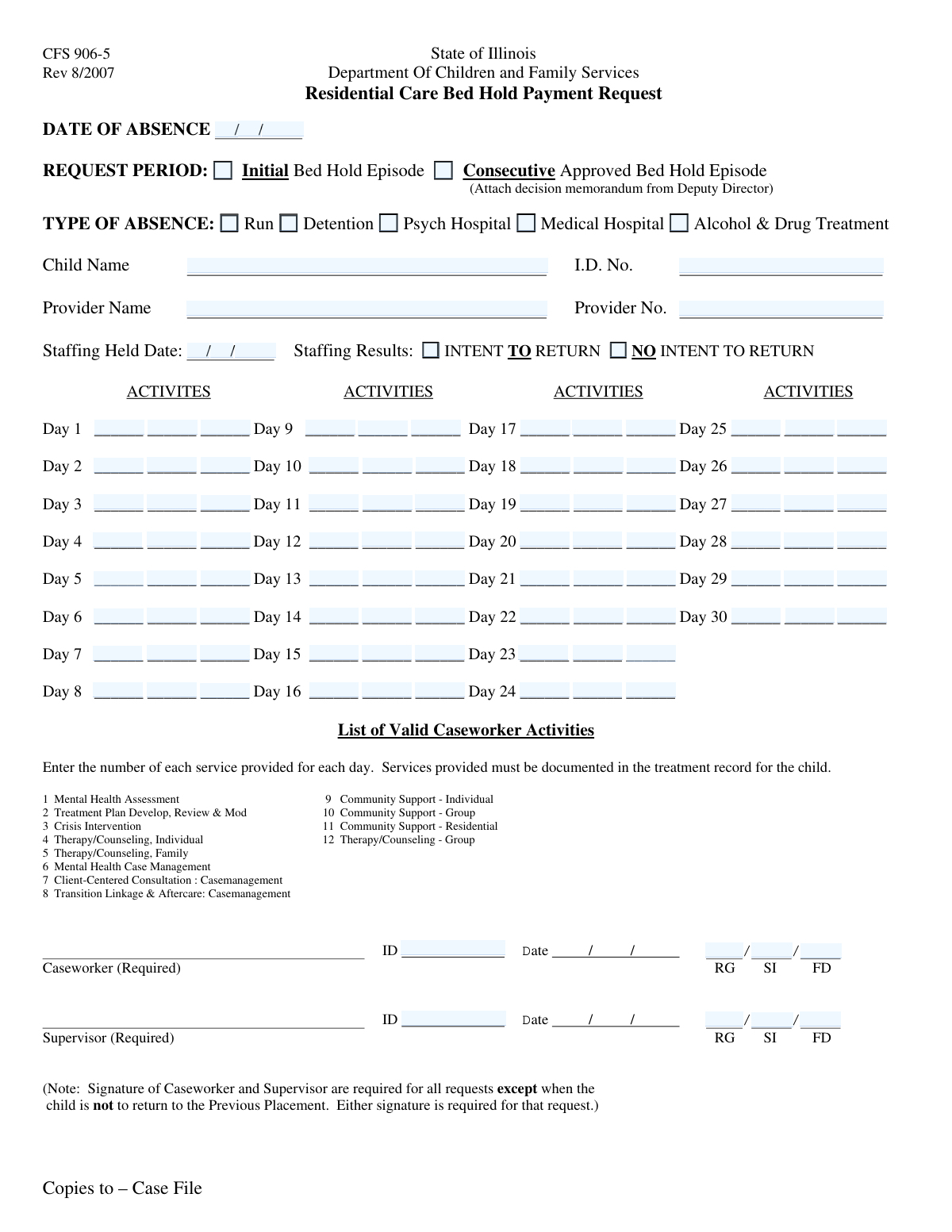
Yes! You can use AI to fill out Form 2085-B, Child Protective Services - Bed Hold Request
Form 2085-B is a document used within the Texas Child Protective Services system for residential care providers to request and justify payment for a 'bed hold.' This occurs when a child is temporarily absent from the facility (e.g., for hospitalization or detention), and the provider holds their place for their return, requiring detailed documentation of daily activities to demonstrate ongoing case management. Today, this form can be filled out quickly and accurately using AI-powered services like Instafill.ai, which can also convert non-fillable PDF versions into interactive fillable forms.
Our AI automatically handles information lookup, data retrieval, formatting, and form filling.
It takes less than a minute to fill out Form 2085-B using our AI form filling.
Securely upload your data. Information is encrypted in transit and deleted immediately after the form is filled out.
Form specifications
| Form name: | Form 2085-B, Child Protective Services - Bed Hold Request |
| Number of fields: | 117 |
| Number of pages: | 1 |
| Filled form examples: | Form Form 2085-B Examples |
| Language: | English |
Instafill Demo: How to fill out PDF forms in seconds with AI
How to Fill Out Form 2085-B Online for Free in 2026
Are you looking to fill out a FORM 2085-B form online quickly and accurately? Instafill.ai offers the #1 AI-powered PDF filling software of 2026, allowing you to complete your FORM 2085-B form in just 37 seconds or less.
Follow these steps to fill out your FORM 2085-B form online using Instafill.ai:
- 1 Navigate to Instafill.ai and upload or select Form 2085-B.
- 2 Enter the child's name and ID number, along with the provider's name and number in the designated fields.
- 3 Specify the date of absence, the request period (initial or consecutive), and the reason for the absence (e.g., medical hospital, detention).
- 4 Provide the date the staffing meeting was held and indicate if there is an intent for the child to return based on the meeting's outcome.
- 5 Diligently fill out the daily activity log for each day of the absence, detailing contacts, services, and case management efforts to justify the bed hold.
- 6 Input the caseworker and supervisor information, including ID, Rate Group (RG), Staffing Intensity (SI), and Funding Days (FD) as required.
- 7 Review all entered information for accuracy and completeness before submitting the form as per agency guidelines.
Our AI-powered system ensures each field is filled out correctly, reducing errors and saving you time.
Why Choose Instafill.ai for Your Fillable Form 2085-B Form?
Speed
Complete your Form 2085-B in as little as 37 seconds.
Up-to-Date
Always use the latest 2026 Form 2085-B form version.
Cost-effective
No need to hire expensive lawyers.
Accuracy
Our AI performs 10 compliance checks to ensure your form is error-free.
Security
Your personal information is protected with bank-level encryption.
Frequently Asked Questions About Form Form 2085-B
This form is used to request and document a 'bed hold' for a child who is temporarily absent from a provider's care due to hospitalization, detention, or treatment. It serves as a justification to reserve the child's spot at the facility.
Service providers, caseworkers, or other authorized staff responsible for the child's care and placement are required to complete this form to request payment for holding a bed during a child's absence.
Select 'Initial Bed Hold Episode' for the first request related to a specific absence. If a prior bed hold for the same absence was approved and you are requesting an extension, you must select 'Consecutive Approved Bed Hold Episode'.
Documenting daily activities is required to show ongoing case management and planning for the child's return. This detailed log justifies the need to hold the child's spot and ensures compliance with program requirements.
For each day, you should briefly describe specific actions, services, or communications related to the child's case. Examples include team meetings, calls with the hospital, or planning for the child's return.
This is the date on which a formal meeting or 'staffing' was conducted with relevant parties to discuss the child's case, progress, and the plan for their potential return to the provider.
Only check this box if the official staffing meeting resulted in a formal decision that the child will not be returning to the provider's care. This indicates a change in the child's placement plan.
These identification numbers are essential for processing the form. You should contact your supervisor or the appropriate administrative department to obtain the correct numbers before submission.
The supervisor information section, including their ID and rate values, should only be completed if a specific condition, indicated by 'Check Box18' on the form, is met. Refer to your program guidelines to see if this applies.
Processing times can vary by agency. Submitting a complete and accurate form is the best way to prevent delays in the approval process.
Yes, services like Instafill.ai use AI to help you accurately auto-fill form fields from your records. This can save a significant amount of time, especially with the detailed daily activity logs required.
Simply upload the form's PDF to the Instafill.ai platform. The AI will make all the fields interactive, allowing you to easily click and type your information directly into the form online.
If you have a flat, non-fillable PDF, you can use a service like Instafill.ai. It automatically converts non-fillable PDFs into interactive forms that you can complete on your computer.
Compliance Form 2085-B
Validation Checks by Instafill.ai
1
Valid Date of Absence Composition
This check ensures that the entered Absence Month, Day, and Year combine to form a valid calendar date. It prevents impossible dates like February 30th or April 31st. This is critical for accurate record-keeping and ensuring the absence period is correctly documented. If validation fails, the user should be prompted to correct the date components before submission.
2
Valid Staffing Held Date Composition
This validation verifies that the Staffing Held Date's Month, Day, and Year fields constitute a legitimate calendar date. Accurate staffing dates are essential for compliance and auditing purposes, proving that required meetings took place. An invalid date would corrupt the record and could lead to compliance issues, so the user must correct it.
3
Chronological Order of Dates
This check ensures the 'Staffing Held Date' is not later than the 'Date of Absence'. A staffing meeting to discuss an absence should logically occur on or before the absence begins. This validation prevents logical impossibilities in the timeline of events. If the staffing date is after the absence date, the form should return an error asking the user to review the dates.
4
Exclusive Request Period Selection
This validation ensures that only one of the 'Request Period' checkboxes ('Initial Bed Hold Episode' or 'Consecutive Approved Bed Hold Episode') is selected. A single request cannot be both an initial and a consecutive episode simultaneously. This check prevents contradictory data entry, and if both are selected, an error should instruct the user to choose only one.
5
Exclusive Type of Absence Selection
This check verifies that only one checkbox under 'Type of Absence' (e.g., Detention, Psych Hospital) is selected. A child can only be absent for one primary reason at a time. Selecting multiple reasons would create ambiguity and processing errors. The system should enforce a single selection to ensure data clarity.
6
Completeness of Child and Provider Identifiers
This validation confirms that the 'Child Name', 'ID Number', 'Provider Name', and 'Provider Number' fields are all filled out. These fields are fundamental for identifying the individuals and entities involved in the bed hold request. Missing information would make the record incomplete and unusable for processing or payment, so these fields must be mandatory.
7
Child ID Number Format
This check validates that the 'ID Number' for the child adheres to a predefined format (e.g., a specific length, numeric-only, or alphanumeric pattern). Maintaining a consistent ID format is crucial for data integrity and successful integration with other systems. If the format is incorrect, the system should reject the entry and inform the user of the required pattern.
8
Provider Number Format
This validation ensures the 'Provider No.' field matches its expected format, which could be a specific length or character type. Correct provider numbers are essential for accurate billing, communication, and record linkage. An incorrectly formatted number could lead to payment delays or misidentification of the provider.
9
Conditional Requirement for Supervisor Information
This check enforces that the 'Supervisor ID', 'Supervisor RG Value', 'Supervisor SI Value', and 'Supervisor FD Value' fields are mandatory if and only if 'Check Box18' is checked. This rule ensures that supplemental information is provided when required, but not erroneously collected when it is not. If the condition is not met, the user should be prompted to either fill the supervisor fields or uncheck the box.
10
Numeric Value for Funding Days
This validation ensures that the 'Funding Days (FD)' field contains only a positive integer value. This number is likely used for financial calculations or resource allocation, so it must be a valid number. Submitting non-numeric or negative values would cause calculation errors, so the input must be restricted to whole numbers.
11
Numeric Value for Service Count Fields
This check verifies that fields explicitly asking for a number of services, such as 'Day 8 Activity 1', 'Day 16 Activity 1 Services', and 'Day 24 Activity 1', contain only numeric data. Textual descriptions in these fields would disrupt any automated counting or reporting. The validation ensures data type consistency for fields intended for quantitative measurement.
12
Plausible Year for Absence Date
This check ensures the 'Absence Year' is within a reasonable range, such as the current or previous calendar year. This simple check helps catch major typographical errors, like entering '2042' instead of '2024'. Preventing such errors is important for maintaining a clean and accurate historical record. If the year is outside the plausible range, a warning or error should be displayed.
13
Mandatory Selection for Type of Absence
This validation ensures that at least one checkbox under 'Type of Absence' has been selected. The reason for the absence is a critical piece of information for determining eligibility and processing the request. A form submitted without this information is incomplete and cannot be properly evaluated, so the user must be required to make a selection.
14
Logical Consistency for 'No Intent to Return'
This check validates the form's logic if the 'No Intent to Return' box is checked. For example, it could prevent the user from logging activities for an extended period (e.g., beyond 14 days) if the child is not expected to return. This prevents the submission of contradictory information, ensuring the data reflects the stated outcome of the staffing. An error or warning should appear if activities are logged that conflict with this status.
Common Mistakes in Completing Form 2085-B
This form separates dates into distinct Month, Day, and Year fields, but users often enter the full date in one field or transpose the month and day. This leads to data entry errors and can cause the submission to be rejected or logged with an incorrect date. To avoid this, carefully enter each component of the date into its corresponding field, ensuring the year is four digits.
The form requires detailed activity logs for up to 30 days to justify the bed hold. A common mistake is providing generic entries like 'Spoke to parent' or 'Activity' instead of specific, actionable details. This lack of substance can lead to the request being denied, as it fails to demonstrate sufficient effort. Always include who was contacted, the topic of discussion, and the outcome for each entry.
The daily activity logs have inconsistent requirements; some days ask for a text description, while others ask for a number (e.g., 'Enter the number of services provided' for Day 16). Users frequently overlook this and enter the wrong data type, causing validation errors and invalidating the submission. Carefully read the prompt for each field to ensure the correct type of information is entered.
The form requires specifying whether the request is for an 'Initial' or 'Consecutive' bed hold episode. Users often get confused and check the wrong box, both, or neither, which can impact billing and compliance. An error here can result in denied payment or a failed audit. Always verify the child's recent history to determine if a prior approved bed hold for the same absence exists.
The form requires multiple IDs, including for the child, provider, and caseworker. It is very common to accidentally transpose digits or enter an incorrect number, which can associate the form with the wrong case, causing significant administrative delays and privacy issues. To prevent this, always double-check numbers against official source documents before submitting. AI-powered tools like Instafill.ai can help by validating number formats and auto-filling correct information from a saved profile.
The supervisor information section is conditional, required only if 'Check Box18' is selected. Since 'Check Box18' is unlabeled, users are guaranteed to make errors by either leaving required information blank or filling it out unnecessarily. This leads to processing delays while the ambiguity is resolved. If you encounter an unclear conditional field, you must contact the issuing agency for clarification before submitting.
A critical checkbox exists to indicate when 'there is no intent for the child to return' based on staffing results. Forgetting to check this box has serious consequences for placement planning and funding, as it may lead to continued billing for a bed that should be made available. This box must be checked accurately and promptly as soon as this decision is formally made.
The form requires specific internal codes for Rate Group (RG), Staffing Intensity (SI), and Funding Days (FD). These codes are easily confused, and entering the wrong one can directly impact billing rates, funding allocation, and performance reporting. Always refer to an up-to-date code sheet or system lookup to ensure accuracy, as mistakes can lead to significant financial and administrative discrepancies.
Often, forms like this are only available as a flat, non-fillable PDF, leading users to print, fill by hand, and submit a low-quality scan. Handwritten entries can be illegible, and scans can be blurry, resulting in data entry errors and rejection. To avoid this, use a tool like Instafill.ai, which can convert a non-fillable PDF into an interactive, fillable form, ensuring all entries are clear, legible, and correctly formatted.
Saved over 80 hours a year
“I was never sure if my IRS forms like W-9 were filled correctly. Now, I can complete the forms accurately without any external help.”
Kevin Martin Green
Your data stays secure with advanced protection from Instafill and our subprocessors
Robust compliance program
Transparent business model
You’re not the product. You always know where your data is and what it is processed for.
ISO 27001, HIPAA, and GDPR
Our subprocesses adhere to multiple compliance standards, including but not limited to ISO 27001, HIPAA, and GDPR.
Security & privacy by design
We consider security and privacy from the initial design phase of any new service or functionality. It’s not an afterthought, it’s built-in, including support for two-factor authentication (2FA) to further protect your account.
Fill out Form 2085-B with Instafill.ai
Worried about filling PDFs wrong? Instafill securely fills form-2085-b-child-protective-services-bed-hold-request forms, ensuring each field is accurate.