Yes! You can use AI to fill out Form 296, MLS® Data Information Form - Freehold – Lease/Sub-Lease
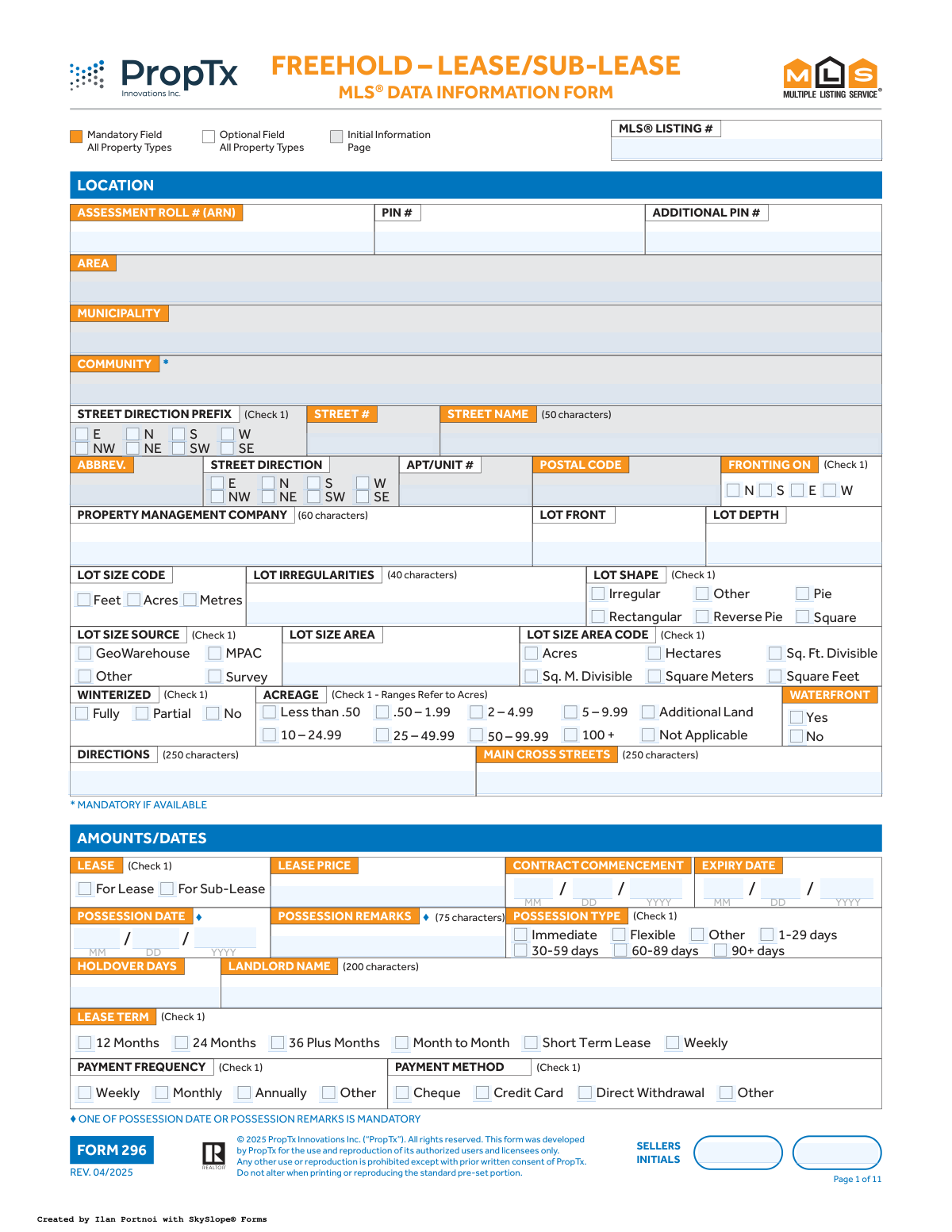
Form 296, the MLS® Data Information Form for Freehold Lease/Sub-Lease, is a detailed document used by real estate professionals to collect all necessary information for listing a property on the Multiple Listing Service (MLS). It captures extensive details about the property's location, features, lease terms, and showing instructions to ensure an accurate and complete public listing. Today, this form can be filled out quickly and accurately using AI-powered services like Instafill.ai, which can also convert non-fillable PDF versions into interactive fillable forms.
Our AI automatically handles information lookup, data retrieval, formatting, and form filling.
It takes less than a minute to fill out Form 296 using our AI form filling.
Securely upload your data. Information is encrypted in transit and deleted immediately after the form is filled out.
Form specifications
| Form name: | Form 296, MLS® Data Information Form - Freehold – Lease/Sub-Lease |
| Number of fields: | 1273 |
| Number of pages: | 11 |
| Filled form examples: | Form Form 296 Examples |
| Language: | English |
Instafill Demo: How to fill out PDF forms in seconds with AI
How to Fill Out Form 296 Online for Free in 2026
Are you looking to fill out a FORM 296 form online quickly and accurately? Instafill.ai offers the #1 AI-powered PDF filling software of 2026, allowing you to complete your FORM 296 form in just 37 seconds or less.
Follow these steps to fill out your FORM 296 form online using Instafill.ai:
- 1 Navigate to Instafill.ai and upload or select the MLS® Data Information Form 296.
- 2 Use the AI assistant to automatically populate known information, such as brokerage and agent details, from your profile.
- 3 Complete the property identification section, including the MLS number, address, PIN, and lot size details.
- 4 Fill in the lease specifics, such as contract dates, possession details, lease term, payment methods, and required documents like credit checks or employment letters.
- 5 Detail the property's exterior and interior features, checking off all applicable options for property type, style, rooms, amenities, and waterfront details.
- 6 Enter brokerage information, commission details, showing instructions, and any remarks for clients or other realtors.
- 7 Review all entered data across the form, have the seller(s) provide their initials on each page, and then sign and date the final page to complete the information gathering process.
Our AI-powered system ensures each field is filled out correctly, reducing errors and saving you time.
Why Choose Instafill.ai for Your Fillable Form 296 Form?
Speed
Complete your Form 296 in as little as 37 seconds.
Up-to-Date
Always use the latest 2026 Form 296 form version.
Cost-effective
No need to hire expensive lawyers.
Accuracy
Our AI performs 10 compliance checks to ensure your form is error-free.
Security
Your personal information is protected with bank-level encryption.
Frequently Asked Questions About Form Form 296
This is an MLS® Data Information Form (Form 296) used by real estate professionals to list a freehold property for lease or sub-lease on the Multiple Listing Service (MLS®). It is typically filled out by the listing agent or brokerage with information provided by the property owner.
'For Lease' means the property owner is leasing the property directly to a new tenant. 'For Sub-Lease' indicates that an existing tenant is leasing their interest in the property to a new sub-tenant for a portion of their remaining lease term.
Mandatory fields are often marked with a special symbol like a diamond (♦) or an asterisk (*), or are explicitly noted as mandatory in the form's footnotes. For example, the form states that either a Possession Date or Possession Remarks must be provided.
In this section, you should check all the utilities and services, such as Heat, Hydro, Water, or Parking, that are included in the monthly lease price. If the lease covers all typical expenses, you can select 'All Inclusive'.
This table is for detailing each room in the property. For each room, specify its level (e.g., Main, 2nd), name (e.g., Kitchen), dimensions in metres, and up to three descriptive features from the list on the last page of the form.
A POTL is a freehold property tied to a shared common elements condominium corporation, which may have amenities like a private road or park. You must fill in the 'POTL MONTHLY FEES' field if you check 'Yes' for the property being a POTL.
'Inclusions' are items that are part of the lease at no extra cost, such as appliances. 'Rental Items/Under Contract' are items the tenant must continue to pay for, like a hot water tank rental, and you should specify the monthly cost.
The seller (landlord) must initial each page to confirm they have reviewed and approved the information being submitted to the MLS®. This ensures the accuracy of the listing details and serves as an acknowledgment of the terms.
This section is for confidential information intended only for other real estate agents, not the public. It often includes specific showing instructions, offer presentation details, or information about the commission offered to a cooperating brokerage.
Yes, AI-powered services like Instafill.ai can significantly speed up the process by accurately auto-filling many of the form's fields from your existing data. This helps reduce manual entry and ensures consistency across your documents.
To fill this form online, simply upload the PDF to Instafill.ai. The platform will convert it into a fillable format, and its AI can help you populate the fields, which you can then review, edit, and complete digitally.
If you have a non-fillable or 'flat' PDF, you can use a service like Instafill.ai to make it interactive. Simply upload the file, and the platform will automatically convert it into a fillable form that you can complete on your computer.
Compliance Form 296
Validation Checks by Instafill.ai
1
Lease Date Sequence Validation
This validation ensures that the 'Expiry Date' is chronologically after the 'Contract Commencement Date'. It is a critical logical check to prevent impossible contract terms. If the expiry date is not after the commencement date, the system should display an error message prompting the user to correct the dates before submission.
2
Mandatory Possession Information
This check enforces the rule that either the 'Possession Date' must be filled out or the 'Possession Remarks' field must contain text. The form explicitly states that one of these is mandatory. This ensures that crucial information about when a tenant can take possession is always captured. If neither field is completed, the form submission will be blocked with a message indicating the requirement.
3
Conditional POTL Fee Mandate
This validation checks if the 'Parcel of Tied Land (POTL)' checkbox is set to 'Yes'. If it is, the 'POTL MONTHLY FEES' field becomes mandatory and must contain a valid numerical value. This is important for financial accuracy and transparency, ensuring potential costs are not missed. Failure to provide the fee when required will prevent form submission.
4
Parking Space Totals Consistency
This check validates that the 'Total Parking Spaces' is greater than or equal to the sum of 'Garage Parking Spaces' and 'Drive Parking Spaces'. This maintains logical consistency in the property's data, preventing inaccurate advertising of parking availability. If the total is less than the sum of its parts, an error is flagged, requiring the user to reconcile the numbers.
5
Waterfront Feature Dependency
This validation enforces that waterfront-specific sections, such as 'Waterfront Features', 'Shoreline', and 'Shoreline Allowance', are only enabled and potentially mandatory if the 'Waterfront' field is marked 'Yes'. This rule prevents irrelevant data entry and ensures that all necessary details are collected for properties that are on the waterfront. If 'Waterfront' is 'No', these dependent sections should be disabled.
6
Mutually Exclusive Lease Type Selection
This check ensures that a user can only select one option between 'For Lease' and 'For Sub-Lease', as the form indicates '(Check 1)'. These options are mutually exclusive and define the fundamental nature of the listing. Allowing both to be selected would create ambiguity; therefore, the system should use radio buttons or a validation rule to enforce a single choice.
7
Year Built and Approximate Age Consistency
This validation cross-references the 'Year Built' with the selected 'Approximate Age' range. For example, if a user enters '2020' for 'Year Built', the 'Approximate Age' must correspond to the '0-5' years range. This check prevents contradictory information and improves data accuracy. A mismatch would trigger a warning, asking the user to confirm or correct the entries.
8
Body of Water Name and Type Dependency
This check enforces the rule that if the 'Body of Water Name' field is filled, the 'Water Body Type' field becomes mandatory. This ensures that when a specific water body is named, its type (e.g., Lake, River) is also classified, providing more complete and useful information. If the name is provided without the type, the form will prompt the user to select a type.
9
URL Format Validation
This validation applies to all URL fields, such as 'Unbranded Virtual Tour URL' and 'Sales Brochure URL'. It checks that the entered text is a valid, well-formed URL (e.g., starts with http:// or https://). This ensures that links provided in the listing are functional, improving the user experience for potential tenants and agents. An invalid format would result in an error message.
10
Postal Code Format Validation
This check ensures the 'Postal Code' field is entered in the correct format for the region (e.g., A1A 1A1 for Canada). Proper formatting is essential for mail delivery, address verification systems, and geographic data mapping. The system should reject incorrectly formatted postal codes and provide an example of the expected format.
11
Checkbox Group Selection Limit
This validation enforces the maximum number of selections allowed in a checkbox group, such as the '(Max 10)' rule for 'Included In Lease Cost'. This prevents users from selecting more options than permitted, ensuring the data conforms to system and display limits. If a user attempts to select an eleventh item, the selection should be prevented or an immediate warning should appear.
12
Exclusivity of 'None' Option in Checkbox Groups
This validation applies to multi-select checkbox groups that include a 'None' option, such as 'Included In Lease Cost' or 'Other Structures'. If 'None' is selected, no other options within that same group can be selected. Conversely, if any other option is selected, 'None' should be automatically deselected. This prevents logically contradictory data from being submitted.
13
Conditional Mandatory Foundation and Roof Details
This check enforces the rule that the 'Foundation Detail' and 'Roof' sections are mandatory unless the 'Property Type' is 'Condo', 'Locker', 'Parking Space', 'Farm', or 'Vacant Land'. This complex conditional logic ensures that structural details are captured for relevant property types (like houses) but not for types where they are inapplicable. If the property type requires these details and they are missing, the submission is blocked.
14
Room Count and Details Grid Consistency
This validation ensures that the number entered in the 'Number of Rooms' field matches the actual number of room entries provided in the 'ROOMS / DETAILS' grid. This maintains data integrity between the summary count and the detailed breakdown. If the count and the number of entries do not match, the system should flag the discrepancy and require the user to correct it.
Common Mistakes in Completing Form 296
The form uses symbols (e.g., ◘, *, ***) and footnotes to indicate fields that become mandatory based on other selections, like 'POTL MONTHLY FEES' being required if 'Parcel of Tied Land (POTL)' is checked. People often miss these footnotes, leading to incomplete submissions that get rejected by the MLS system, delaying the listing process. To avoid this, carefully read all footnotes and instructions associated with each field. AI-powered tools like Instafill.ai can automatically highlight these conditional fields based on your input, ensuring no mandatory information is missed.
The form asks for 'Garage Parking Spaces,' 'Drive Parking Spaces,' and 'Total Parking Spaces.' A frequent error is when the sum of garage and drive spaces does not match the entered total, which happens due to simple miscalculation. This inconsistency confuses potential tenants and can lead to disputes or misrepresentation claims. Always double-check your math before submitting to ensure that the individual space counts add up correctly to the total provided.
The detailed room grid on page 7 is a common source of errors. People often enter measurements in feet instead of the required metres, use their own room names instead of the official list provided, or use incorrect level codes. These mistakes result in inaccurate and unsearchable data on the final listing, making the property harder to find for agents and tenants. Always refer to the provided lists for Levels, Rooms, and Descriptions on the last page, and ensure all measurements are in metres.
The form explicitly states, 'ONE OF POSSESSION DATE OR POSSESSION REMARKS IS MANDATORY.' Fillers often miss this instruction, either leaving both blank or filling in both when only one is needed. Leaving both blank will cause an immediate rejection of the form, while filling both can create ambiguity. If a specific date is known, use the 'Possession Date' fields; if the date is conditional (e.g., 'Upon condo registration'), use the 'Possession Remarks' field.
Several sections, such as 'Included In Lease Cost (Max 10)' and 'Property Features / Area Influences (Max 6),' limit the number of checkboxes that can be selected. Eager to showcase a property's best attributes, users often select more than the allowed number, which can cause the form data to be truncated or rejected by the processing system. This means key features might not appear on the public listing. To prevent this, prioritize the most important features and count your selections to ensure you stay within the specified limit.
The address section is broken into multiple specific fields: Street #, Street Name, Street Direction Prefix, Abbrev., and Street Direction. A common mistake is to enter the full street name like 'Annie Craig Dr' into the 'Street Name' field, when 'Dr' should go in the 'Abbrev.' field. This can lead to issues with mail delivery, mapping services, and official records. Carefully parse the address into the corresponding components as requested by the form.
The form contains fields for both 'Year Built' and 'Approximate Age' (as a selectable range). Users sometimes provide information that contradicts, for example, entering '2018' for Year Built but selecting the '6-15 years' range for Approximate Age. This creates confusion and undermines the credibility of the listing data. Ensure the selected age range accurately reflects the 'Year Built' entered to maintain data integrity.
For utilities like Hydro and Gas, the form offers a three-state logic: 'Yes' (connected), 'No' (not connected), and 'Available' (can be connected). A frequent error is checking 'Yes' when the service is merely available at the lot line but not yet connected to the dwelling. This misrepresents the property's readiness and can lead to unexpected costs and delays for the tenant. Correctly distinguish between services that are actively connected ('Yes') and those that are simply available for connection ('Available').
The form requires separate entries for 'Above Grade Finished Sqft' and 'Below Grade Finished Sqft,' along with the source of this information (e.g., MPAC, Builder, Estimated). People often guess the square footage or forget to select the source, making the data unreliable. Inaccurate square footage is a major point of contention and can lead to legal disputes. Always use the most reliable source available and accurately report it on the form. AI-powered tools like Instafill.ai can often pull this data from official sources, reducing the chance of error.
This multi-page form requires the seller's initials at the bottom of almost every page to acknowledge the information provided. It is very common for one or more of these initial boxes to be missed on a long document. A missing initial can invalidate that section or even the entire agreement, causing significant delays. To avoid this, methodically review each page specifically for the initial boxes before final submission. If the form is a non-fillable PDF, a tool like Instafill.ai can convert it to a fillable version, making it easier to track and complete all required fields.
The 'Inclusions' and 'Exclusions' sections are legally significant, yet are often filled out hastily with vague terms like 'all appliances.' This can lead to disputes over whether a specific item, like a basement freezer or a high-end microwave, was meant to be included. Be extremely specific, listing items by brand and type (e.g., 'Samsung stainless steel refrigerator,' 'All window coverings except for primary bedroom curtains') to leave no room for interpretation.
Many text fields, such as 'Realtor Only Remarks (1050 characters)' or 'Possession Remarks (75 characters),' have strict character limits. Users often write detailed notes without regard for these limits, and the data is often truncated upon submission to the MLS system, cutting off critical information mid-sentence. This can result in incomplete instructions or misleading remarks on the final listing. Always be mindful of the stated character counts and write concisely to fit within the allowed space.
Saved over 80 hours a year
“I was never sure if my IRS forms like W-9 were filled correctly. Now, I can complete the forms accurately without any external help.”
Kevin Martin Green
Your data stays secure with advanced protection from Instafill and our subprocessors

Robust compliance program
Transparent business model
You’re not the product. You always know where your data is and what it is processed for.
ISO 27001, HIPAA, and GDPR
Our subprocesses adhere to multiple compliance standards, including but not limited to ISO 27001, HIPAA, and GDPR.
Security & privacy by design
We consider security and privacy from the initial design phase of any new service or functionality. It’s not an afterthought, it’s built-in, including support for two-factor authentication (2FA) to further protect your account.
Fill out Form 296 with Instafill.ai
Worried about filling PDFs wrong? Instafill securely fills form-296-mls-data-information-form-freehold-leasesub-lease forms, ensuring each field is accurate.



