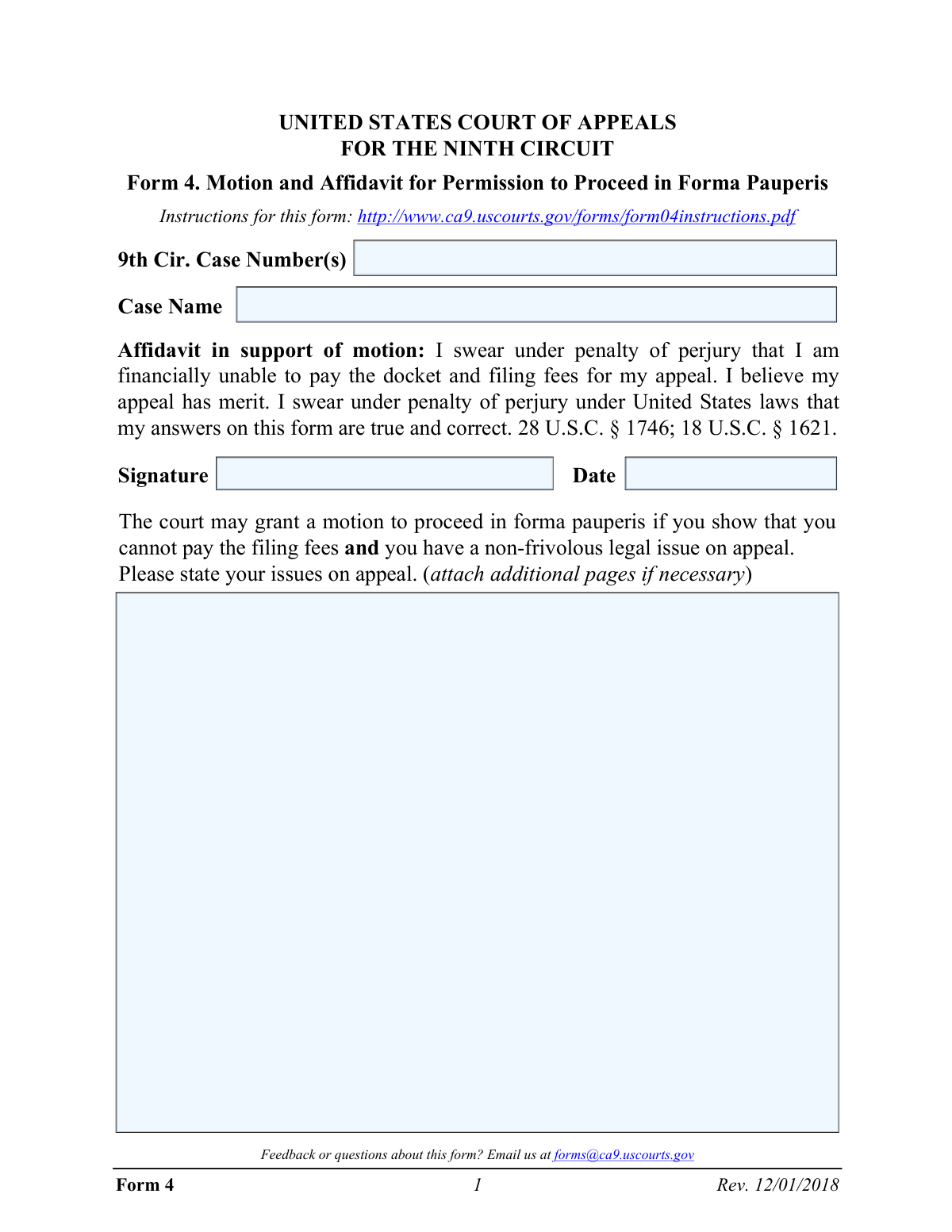
Yes! You can use AI to fill out Form 4, Motion and Affidavit for Permission to Proceed in Forma Pauperis

This form, officially titled 'Motion and Affidavit for Permission to Proceed in Forma Pauperis,' is used by individuals appealing a case in the U.S. Court of Appeals for the Ninth Circuit who cannot afford the associated court fees. It requires a detailed declaration of the filer's financial status, including income, assets, expenses, and dependents, to demonstrate indigence to the court. Today, this form can be filled out quickly and accurately using AI-powered services like Instafill.ai, which can also convert non-fillable PDF versions into interactive fillable forms.
Our AI automatically handles information lookup, data retrieval, formatting, and form filling.
It takes less than a minute to fill out Form 4 using our AI form filling.
Securely upload your data. Information is encrypted in transit and deleted immediately after the form is filled out.

Form specifications

Form name: Form 4, Motion and Affidavit for Permission to Proceed in Forma Pauperis
Number of fields: 215
Number of pages: 7
Language: English
main-image

Instafill Demo: How to fill out PDF forms in seconds with AI

How to Fill Out Form 4 Online for Free in 2026

Are you looking to fill out a FORM 4 form online quickly and accurately? Instafill.ai offers the #1 AI-powered PDF filling software of 2026, allowing you to complete your FORM 4 form in just 37 seconds or less.
Follow these steps to fill out your FORM 4 form online using Instafill.ai:
  1. 1 Navigate to an AI-powered form filler like Instafill.ai and upload or select Form 4 for the Ninth Circuit.
  2. 2 Provide your case information, including the 9th Circuit Case Number and the full Case Name.
  3. 3 Use the guided interface to enter detailed financial information, including all sources of monthly income for both yourself and your spouse.
  4. 4 List all assets, such as cash, bank accounts, real estate, and vehicles, as prompted by the service.
  5. 5 Detail your monthly expenses, list any dependents, and provide information about any money owed to you.
  6. 6 Carefully articulate the legal issues for your appeal to demonstrate that it is non-frivolous.
  7. 7 Review all entered information for accuracy, then digitally sign and date the affidavit before downloading the completed form for submission to the court.

Our AI-powered system ensures each field is filled out correctly, reducing errors and saving you time.

Why Choose Instafill.ai for Your Fillable Form 4 Form?

Speed

Complete your Form 4 in as little as 37 seconds.

Up-to-Date

Always use the latest 2026 Form 4 form version.

Cost-effective

No need to hire expensive lawyers.

Accuracy

Our AI performs 10 compliance checks to ensure your form is error-free.

Security

Your personal information is protected with bank-level encryption.

Frequently Asked Questions About Form Form 4

This form is a motion to ask the U.S. Court of Appeals for the Ninth Circuit for permission to proceed with your appeal without paying the required filing fees. This is also known as proceeding 'in forma pauperis'.

You should complete this form if you are appealing a case to the Ninth Circuit and cannot afford to pay the court's docketing and filing fees. You must demonstrate financial hardship to the court.

Gross amount is your total income before any deductions for taxes, social security, or other expenses. You should report your full earnings, not your take-home pay.

If you are paid weekly, multiply your weekly gross income by 4.33. If you are paid biweekly, multiply by 2.167. If you know your annual income, divide it by 12 to find the monthly average.

Yes, the form requires you to provide detailed financial information for both yourself and your spouse. This allows the court to assess your entire household's financial situation.

You must briefly state the legal issues you are raising on appeal to show that your case is non-frivolous. Describe the errors you believe the lower court made in its decision.

Yes, if you are a prisoner appealing a civil action, you must attach a certified statement from your institution showing all transactions in your accounts for the last six months.

You must list valuable assets like your home, other real estate, and motor vehicles, along with their estimated value. You do not need to list ordinary clothing or household furniture.

This is a privacy measure to protect the identities of children involved in court filings. For any dependent who is a minor, list only their initials, relationship, and age.

This form must be filed with the United States Court of Appeals for the Ninth Circuit. Check the court's official website for the most current submission instructions and address.

Yes, services like Instafill.ai use AI to help you accurately auto-fill form fields, which can save time and reduce errors. The AI can recognize fields and populate them with your saved information.

You can use a service like Instafill.ai to complete this form online. Simply upload the PDF, and the platform will make it an interactive, fillable form that you can complete and save on your device.

If you have a non-fillable or 'flat' PDF, you can upload it to Instafill.ai. The service will automatically convert the document into an interactive form that you can fill out on your computer.

Compliance Form 4
Validation Checks by Instafill.ai

1
Case Number Presence and Format
This check verifies that the '9th Cir. Case Number(s)' field is not empty and conforms to the expected format for Ninth Circuit case numbers. This is critical for correctly identifying and docketing the motion with the corresponding appeal. A failure would prevent the form from being associated with the correct case file, leading to processing delays or rejection.
2
Affidavit Signature and Date Completion
This validation ensures that the 'Signature' and 'Date' fields are both completed. An unsigned or undated affidavit is legally invalid and cannot be processed by the court. This check is essential to confirm the filer is swearing to the form's contents under penalty of perjury as of a specific date.
3
Signature Date Validity
This check validates that the 'Date' field contains a valid date in MM/DD/YYYY format and that the date is not in the future. An invalid or future date would call the authenticity and timing of the sworn statement into question. If the date is invalid, the form cannot be accepted as it would lack a proper attestation date.
4
Total Monthly Income Calculation
This is a logical check that verifies the 'TOTAL MONTHLY INCOME' amount for both the filer and spouse is the correct sum of all individual income sources listed in Section 1. This ensures the financial data is internally consistent and accurately reflects the information provided. A discrepancy could indicate a calculation error by the filer and would require correction before the court can assess financial eligibility.
5
Total Monthly Expenses Calculation
This validation confirms that the 'TOTAL MONTHLY EXPENSES' amount for both the filer and spouse is the correct sum of all individual expense items listed in Section 8. Accurate expense totals are crucial for the court to evaluate the filer's net financial situation. If the sum is incorrect, it suggests an error in the provided data, and the form will be flagged for review and correction.
6
Conditional 'Other (specify)' Requirement
This rule checks that if a monetary value is entered into an 'Other' income (Section 1) or expense (Section 8) field, the corresponding 'specify' text field must be filled out. This context is necessary for the court to understand the nature of the income or expense and determine its relevance. A missing description for a listed amount makes the financial picture incomplete and will trigger a validation failure.
7
Employment Dates Chronology
This validation ensures that for each entry in the employment history (Sections 2 and 3), the 'From' date is chronologically earlier than the 'To' date. This logical check prevents nonsensical data entry and ensures the timeline of employment is coherent. An invalid date range would be flagged as an error, requiring the filer to correct the employment period.
8
Employment Income and History Consistency
This check cross-references Section 1 with Sections 2 and 3. If a filer or spouse reports 'Employment' income in Section 1, the system verifies that at least one corresponding entry exists in their employment history. This ensures that reported income sources are substantiated with employer details. A failure suggests missing information and would require the filer to provide the relevant employment history.
9
Conditional Expense Creditor Name
This rule validates that if an amount is entered for 'Credit Card' or 'Department Store' installment payments in Section 8, the corresponding '(name)' field must be completed. Identifying the creditor is necessary for verifying the legitimacy and nature of the debt. An amount without a named creditor is incomplete information and will cause the validation to fail.
10
Conditional Lawsuit Expense Amount
This check applies to Question 10. If the filer answers 'Yes' to spending money on the lawsuit, the 'If Yes, how much?' field becomes mandatory and must contain a non-negative numeric value. This ensures that any declared expenses related to the lawsuit are quantified for the court's consideration. A 'Yes' answer without an amount is an incomplete response.
11
Daytime Phone Number Format
This validation checks that the 'Your daytime phone number' field in Section 12 matches a standard U.S. phone number format (e.g., ###-###-####). A valid phone number is essential for the court clerk or staff to contact the filer if there are questions about the motion. An improperly formatted number could prevent communication and will be flagged for correction.
12
Issues on Appeal Completeness
This check ensures the 'Issues on appeal' text area is not left empty. The form requires the filer to state their legal issues to demonstrate the appeal is 'non-frivolous,' which is a condition for being granted in forma pauperis status. An empty or missing explanation would result in an automatic failure to meet a key requirement of the motion.
13
Numeric Dollar Field Validation
This is a general validation that runs on all fields intended to hold a monetary value. It ensures the entry is a valid, non-negative number and contains no text or special characters (other than a decimal point). This is fundamental for data integrity and to allow for accurate calculations of totals, preventing errors that would make the financial assessment impossible.
14
Dependent Age Integer Validation
This check verifies that the 'Age' field in the dependents table (Section 7) contains a valid, non-negative integer. This ensures the data is logical and can be used to properly assess the filer's support obligations. An entry like 'five' or '-2' would be rejected, requiring the filer to input a proper numerical age.

Common Mistakes in Completing Form 4

Reporting Net Income Instead of Gross Income

The form explicitly requires 'gross amounts,' which is income before any taxes or deductions. Many people mistakenly enter their net (take-home) pay, which understates their true financial resources. This inaccuracy can lead to the court questioning the entire financial disclosure and may result in the motion being denied. To avoid this, refer to your pay stubs or tax documents to find the gross income figure for all employment entries.

Incorrectly Calculating Monthly Rates

The form requires converting income and expenses paid weekly, biweekly, or quarterly into a monthly average. A common error is to multiply weekly amounts by 4, which is inaccurate. This miscalculation skews the total monthly income and expense figures, potentially jeopardizing the motion's approval. To avoid this, multiply weekly amounts by 4.33 and bi-weekly amounts by 2.167, or use an AI form-filling tool like Instafill.ai that can perform these calculations automatically.

Failing to State a Clear Issue on Appeal

The form requires a statement of the 'issues on appeal' to show the case is 'non-frivolous.' Applicants often provide a vague narrative or emotional plea instead of identifying specific legal errors made by the lower court. An insufficient explanation can lead the court to conclude the appeal lacks merit, resulting in the denial of the motion to proceed without paying fees. To avoid this, clearly and concisely state the legal grounds for your appeal.

Omitting Spouse's Financial Information

When an applicant is married, the form requires a complete financial picture of the household, including the spouse's income, assets, and expenses. Forgetting or intentionally omitting this information is a critical error that misrepresents the applicant's ability to pay. This will almost certainly lead to the motion being rejected for being incomplete or misleading. Always gather and include all required financial information for your spouse.

Forgetting to Sign and Date the Affidavit

The signature under 'penalty of perjury' is what makes the document a legally binding affidavit. An unsigned or undated form is invalid and will be rejected by the court clerk upon filing. This simple oversight forces the applicant to refile, causing significant and unnecessary delays in their appeal. Always perform a final check to ensure the signature and date fields on the first page are completed.

Using the Wrong Case Number

Applicants frequently enter the case number from the lower district court instead of the new number assigned by the Ninth Circuit Court of Appeals. This causes filing errors, as the clerk cannot immediately match the motion to the correct appellate case. This can delay the processing of your motion or even lead to its rejection. To avoid this, use only the case number provided by the Ninth Circuit for your appeal.

Failing to Disclose All Assets and Cash

Applicants must list all cash and assets, including all bank accounts, real estate, and vehicles owned by themselves or their spouse. People sometimes forget secondary savings accounts or other property, which can be viewed as an attempt to hide assets. Such omissions undermine the credibility of the affidavit and are a common reason for the court to deny the motion. Carefully review and list all financial assets to ensure full disclosure.

Mathematical Errors in Totals

The form requires summing multiple lines of income and expenses, and simple arithmetic mistakes are common. If the totals in Section 1 (Income) or Section 8 (Expenses) do not match the sum of the individual line items, it raises red flags about the accuracy of the entire document. This can lead to delays while the court requests a corrected form. To prevent this, use a calculator to double-check all your totals before submission. AI-powered tools like Instafill.ai can eliminate this risk by calculating totals automatically.

Using Full Names for Minor Dependents

For privacy protection, Section 7 explicitly instructs applicants to list 'only the initials and not the full name' for any dependent who is a minor. Overlooking this instruction and writing a child's full name is a common mistake. While it may not lead to an outright denial, it shows a failure to follow directions and may require the submission of a corrected page. Always read field-specific instructions carefully to protect personal information.

Forgetting to Attach Required Prisoner Account Statements

The form has a specific, mandatory requirement for prisoners to attach a certified statement of their institutional accounts for the last six months. This is a frequently missed step for incarcerated filers. Failure to include this certified statement makes the application incomplete and will result in its rejection, halting the progress of the appeal. If this applies to you, you must contact the appropriate institutional officer to obtain this certified document before filing.

Ignoring Follow-Up Explanations for 'Yes' Answers

Questions 9 and 10 ask for a 'Yes' or 'No' response and require a detailed explanation if the answer is 'Yes'. Applicants often check 'Yes' but fail to provide the mandatory description of expected financial changes or lawsuit expenses. This makes the application incomplete and prevents the court from fully understanding the financial situation. If you answer 'Yes' to a question, ensure you provide the required follow-up information clearly and completely on an attached sheet.
Saved over 80 hours a year

“I was never sure if my IRS forms like W-9 were filled correctly. Now, I can complete the forms accurately without any external help.”

Kevin Martin Green

Your data stays secure with advanced protection from Instafill and our subprocessors

Robust compliance program

Transparent business model

You’re not the product. You always know where your data is and what it is processed for.

ISO 27001, HIPAA, and GDPR

Our subprocesses adhere to multiple compliance standards, including but not limited to ISO 27001, HIPAA, and GDPR.

Security & privacy by design

We consider security and privacy from the initial design phase of any new service or functionality. It’s not an afterthought, it’s built-in, including support for two-factor authentication (2FA) to further protect your account.

Fill out Form 4 with Instafill.ai

Worried about filling PDFs wrong? Instafill securely fills form-4-motion-and-affidavit-for-permission-to-proceed-in-forma-pauperis forms, ensuring each field is accurate.