Yes! You can use AI to fill out Form ADOPT-205, Declaration Confirming Parentage in Stepparent Adoption
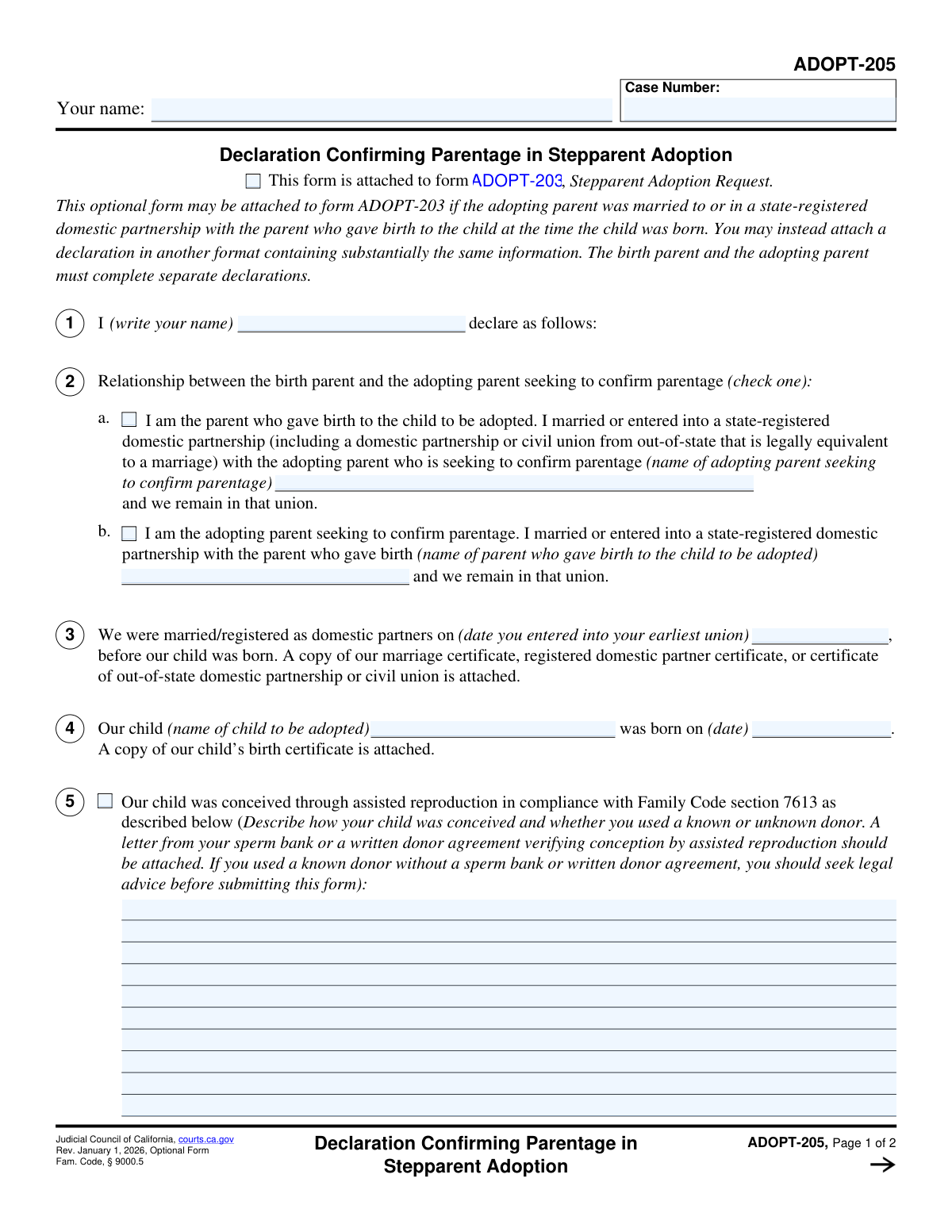
Form ADOPT-205, Declaration Confirming Parentage in Stepparent Adoption, is a legal document used in California courts as an attachment to the Stepparent Adoption Request. It is used by the birth parent and the adopting stepparent to declare under penalty of perjury that they were married or in a registered domestic partnership when the child was born, which simplifies the adoption process. Today, this form can be filled out quickly and accurately using AI-powered services like Instafill.ai, which can also convert non-fillable PDF versions into interactive fillable forms.
Our AI automatically handles information lookup, data retrieval, formatting, and form filling.
It takes less than a minute to fill out ADOPT-205 using our AI form filling.
Securely upload your data. Information is encrypted in transit and deleted immediately after the form is filled out.
Form specifications
| Form name: | Form ADOPT-205, Declaration Confirming Parentage in Stepparent Adoption |
| Number of fields: | 23 |
| Number of pages: | 2 |
| Language: | English |
Instafill Demo: How to fill out PDF forms in seconds with AI
How to Fill Out ADOPT-205 Online for Free in 2026
Are you looking to fill out a ADOPT-205 form online quickly and accurately? Instafill.ai offers the #1 AI-powered PDF filling software of 2026, allowing you to complete your ADOPT-205 form in just 37 seconds or less.
Follow these steps to fill out your ADOPT-205 form online using Instafill.ai:
- 1 Navigate to Instafill.ai and upload or select the ADOPT-205 form.
- 2 Allow the AI to scan and identify all the fields on the form, including your name, case number, and relationship details.
- 3 Answer a series of simple questions presented by the AI assistant regarding your relationship to the child, date of marriage/partnership, and details of the child's conception.
- 4 Follow the prompts to securely upload required supporting documents, such as your marriage certificate, the child's birth certificate, and any donor agreements.
- 5 Review the auto-filled ADOPT-205 form to ensure all information, including names, dates, and checked boxes, is accurate and complete.
- 6 Electronically sign the declaration under penalty of perjury and download the completed, signed document ready for submission to the court.
Our AI-powered system ensures each field is filled out correctly, reducing errors and saving you time.
Why Choose Instafill.ai for Your Fillable ADOPT-205 Form?
Speed
Complete your ADOPT-205 in as little as 37 seconds.
Up-to-Date
Always use the latest 2026 ADOPT-205 form version.
Cost-effective
No need to hire expensive lawyers.
Accuracy
Our AI performs 10 compliance checks to ensure your form is error-free.
Security
Your personal information is protected with bank-level encryption.
Frequently Asked Questions About Form ADOPT-205
This form, Declaration Confirming Parentage in Stepparent Adoption, is used to officially state that the adopting stepparent is a legal parent of the child. It is specifically for cases where the parents were married or in a registered domestic partnership when the child was born, often through assisted reproduction.
No, this is an optional form. It can be attached to your Stepparent Adoption Request (ADOPT-200) to provide clear evidence of parentage, but you can also submit a declaration in another format with the same information.
Both the parent who gave birth and the adopting stepparent must complete this form. However, you must each fill out and sign your own separate copy of the declaration.
You must attach a copy of your marriage or domestic partnership certificate and a copy of the child's birth certificate. If the child was conceived via assisted reproduction, you should also attach proof like a letter from a sperm bank or a written donor agreement.
Check box 2a if you are the parent who gave birth to the child. Check box 2b if you are the adopting stepparent seeking to confirm your parentage.
The form strongly advises that you seek legal advice before submitting the form in this situation. An attorney can help you understand the legal implications and ensure parentage is correctly and securely established.
This form is intended for couples who 'remain in that union.' If you are separated or no longer together, this form may not be appropriate, and you should consult with an attorney about your stepparent adoption case.
This form is an attachment to your main Stepparent Adoption Request (form ADOPT-200). You will file it with the court as part of your complete adoption petition package.
In Section 6, you must disclose any other person who might be considered a legal parent, such as a known sperm donor without a clear waiver. You should describe their relationship to the child and state whether they consent to the adoption.
Yes, services like Instafill.ai use AI to accurately auto-fill form fields, which can save you time and help prevent errors. This is especially useful for repetitive information like names and case numbers.
Simply upload the ADOPT-205 PDF to the Instafill.ai platform. The service will make the form interactive, allowing you to type your information directly into the fields, then save or print the completed document.
If you have a non-fillable or 'flat' PDF, you can use a service like Instafill.ai. It can convert the flat PDF into an interactive, fillable form that you can easily complete on your computer.
Compliance ADOPT-205
Validation Checks by Instafill.ai
1
Header Information Consistency
This check ensures that the 'Your name' and 'Case Number' fields in the header of Page 1 are identical to the corresponding fields on Page 2. Maintaining consistency across pages is crucial for document integrity, preventing pages from being mismatched or incorrectly associated. If the information does not match, the form may be rejected for being incomplete or improperly assembled.
2
Exclusive Relationship Role Selection
Validates that in Section 2, either checkbox 'a' or 'b' is selected, but not both and not neither. This selection is fundamental as it defines the declarant's role as either the birth parent or the adopting parent. An invalid selection makes the context of the entire declaration ambiguous and legally unsound, leading to form rejection.
3
Conditional Name Entry for Section 2a
If checkbox 'a' in Section 2 is selected (indicating the declarant is the birth parent), this validation ensures the 'name of adopting parent' text field is not empty. This information is required to identify the other party in the adoption. Failure to provide the name results in an incomplete declaration and will prevent the form from being processed.
4
Conditional Name Entry for Section 2b
If checkbox 'b' in Section 2 is selected (indicating the declarant is the adopting parent), this validation ensures the 'name of parent who gave birth' text field is not empty. This name is essential for identifying the birth parent and confirming the relationship context. An empty field will cause the form to be rejected for missing critical information.
5
Chronological Date Verification
This check performs a logical comparison between the date of marriage/partnership in Section 3 and the child's date of birth in Section 4. The validation ensures the union date is strictly before the child's birth date, as this is the legal premise for using this form. If the child was born before the union, this form is inapplicable, and the submission would be legally invalid.
6
Marriage/Partnership Date Format
Verifies that the date entered in Section 3 for the marriage or domestic partnership is a valid, correctly formatted date (e.g., MM/DD/YYYY). Proper date formatting is essential for accurate record-keeping and for the logical chronological check against the child's birth date. An invalid format would cause a processing error and rejection.
7
Child's Birth Date Format
Ensures the child's date of birth entered in Section 4 is a valid and properly formatted date. The child's birth date is a critical piece of legal information for the adoption proceedings. An invalid or malformed date would halt the process and require correction.
8
Child's Name Completeness
This validation confirms that the 'name of child to be adopted' field in Section 4 is not left blank. The entire declaration pertains to a specific child, making their name a non-negotiable, required piece of information. A missing name renders the form meaningless and will result in immediate rejection.
9
Declarant Name Consistency
Confirms that the declarant's name entered in Section 1 ('I (write your name) declare...') matches the 'Type or print your name' field in the signature block. This consistency check helps verify the identity of the person making the sworn declaration. A mismatch could raise questions about the authenticity of the document.
10
Case Number Presence and Format
Checks that the 'Case Number' field in the header is not empty and, if possible, validates it against the standard format for California court case numbers. The case number is the primary identifier linking this declaration to the main stepparent adoption case file. An absent or incorrect case number will prevent the document from being correctly filed.
11
Signature Date Logic
Validates that the 'Date' field in the signature block is present, is a valid date, and is not a future date. A signed declaration must be dated to be legally valid, and the date must be logically sound (i.e., in the past or present). A future date or missing date would invalidate the signature and require resubmission.
12
Printed Name at Signature Requirement
Ensures the 'Type or print your name' field beneath the signature line is filled out. This is crucial for legibility and positively identifying the signatory, as handwritten signatures can often be difficult to read. A missing printed name can cause processing delays or rejection if the signature cannot be deciphered.
13
Attachment Verification for Required Documents
This check verifies that there is an indication that the required supporting documents are attached, as stated in the form text. The form explicitly requires a marriage/partnership certificate (Sec 3) and the child's birth certificate (Sec 4). A submission without these documents is incomplete and cannot be processed, so the system should flag if their inclusion is not confirmed.
Common Mistakes in Completing ADOPT-205
Applicants often fill out their name and case number on the first page but forget to repeat it in the header of the second page. This happens due to oversight when dealing with multi-page documents. If the pages are separated during processing, the second page can become disassociated from the case file, causing significant delays and requiring the applicant to resubmit the entire form.
A critical mistake is for both the birth parent and the adopting parent to fill out or sign the same ADOPT-205 form. The instructions explicitly state, 'The birth parent and the adopting parent must complete separate declarations.' This error invalidates the submission, as the court requires an individual declaration from each parent, leading to rejection and the need to start the process over.
In Section 2, a person may accidentally check the wrong box, for instance, the birth parent might mistakenly identify as the 'adopting parent'. This often occurs from rushing or misreading the options. Such an error fundamentally misrepresents the filer's role in the adoption, which can lead to immediate rejection of the form and require a corrected submission, delaying the legal proceedings.
An applicant might enter a nickname, a shortened version of their name, or fail to include a middle name in Section 1 and the signature block. Legal documents require the full, official name as it appears on government identification and other case documents. This discrepancy can create identity verification issues and may require filing an amended declaration to correct the record.
The form explicitly requires attaching copies of the marriage/domestic partnership certificate (Section 3) and the child's birth certificate (Section 4). Forgetting to include these essential documents is a frequent oversight that results in an incomplete filing. The court cannot proceed without this evidence, and the clerk will issue a deficiency notice, halting the adoption process until the documents are provided.
In Section 5, simply stating 'IVF' or 'assisted conception' is insufficient. The form requires details about whether a known or unknown donor was used, and supporting documentation is expected. A vague description can raise legal questions about the parental rights of a potential donor, creating significant legal complications and potentially jeopardizing the adoption. The form specifically advises seeking legal counsel if documentation is unavailable.
Applicants may be tempted to leave Section 6 blank to simplify the process, even if another person could potentially be considered a parent. This is a serious error, as failing to disclose and properly notify all potential parents can be grounds for the adoption to be challenged and overturned in the future. Full transparency is required to ensure the finality of the adoption decree.
A common data entry error is to mistype the date of marriage, the child's name, or the child's date of birth, creating a mismatch with the information on the attached certificates. These inconsistencies undermine the credibility of the declaration and will be flagged by the court clerk. This forces the applicant to file corrected paperwork, adding unnecessary delays to the adoption timeline.
Mistakes in the final section include typing a name on the signature line instead of providing a handwritten signature, forgetting to date the form, or post-dating it. A declaration under penalty of perjury requires a valid, dated signature to be legally binding. An improperly signed form is invalid and will be returned, requiring the applicant to print and sign it correctly.
If the form is only available as a non-fillable PDF, people may print it and fill it out by hand. Illegible handwriting can lead to court clerks making data entry errors when inputting case information into the system, potentially misspelling names or recording incorrect dates. To avoid this, it's best to use a tool like Instafill.ai, which can convert flat PDFs into fillable versions, ensuring all entries are clear, legible, and accurate.
Saved over 80 hours a year
“I was never sure if my IRS forms like W-9 were filled correctly. Now, I can complete the forms accurately without any external help.”
Kevin Martin Green
Your data stays secure with advanced protection from Instafill and our subprocessors
Robust compliance program
Transparent business model
You’re not the product. You always know where your data is and what it is processed for.
ISO 27001, HIPAA, and GDPR
Our subprocesses adhere to multiple compliance standards, including but not limited to ISO 27001, HIPAA, and GDPR.
Security & privacy by design
We consider security and privacy from the initial design phase of any new service or functionality. It’s not an afterthought, it’s built-in, including support for two-factor authentication (2FA) to further protect your account.
Fill out ADOPT-205 with Instafill.ai
Worried about filling PDFs wrong? Instafill securely fills form-adopt-205-declaration-confirming-parentage-in-stepparent-adoption forms, ensuring each field is accurate.