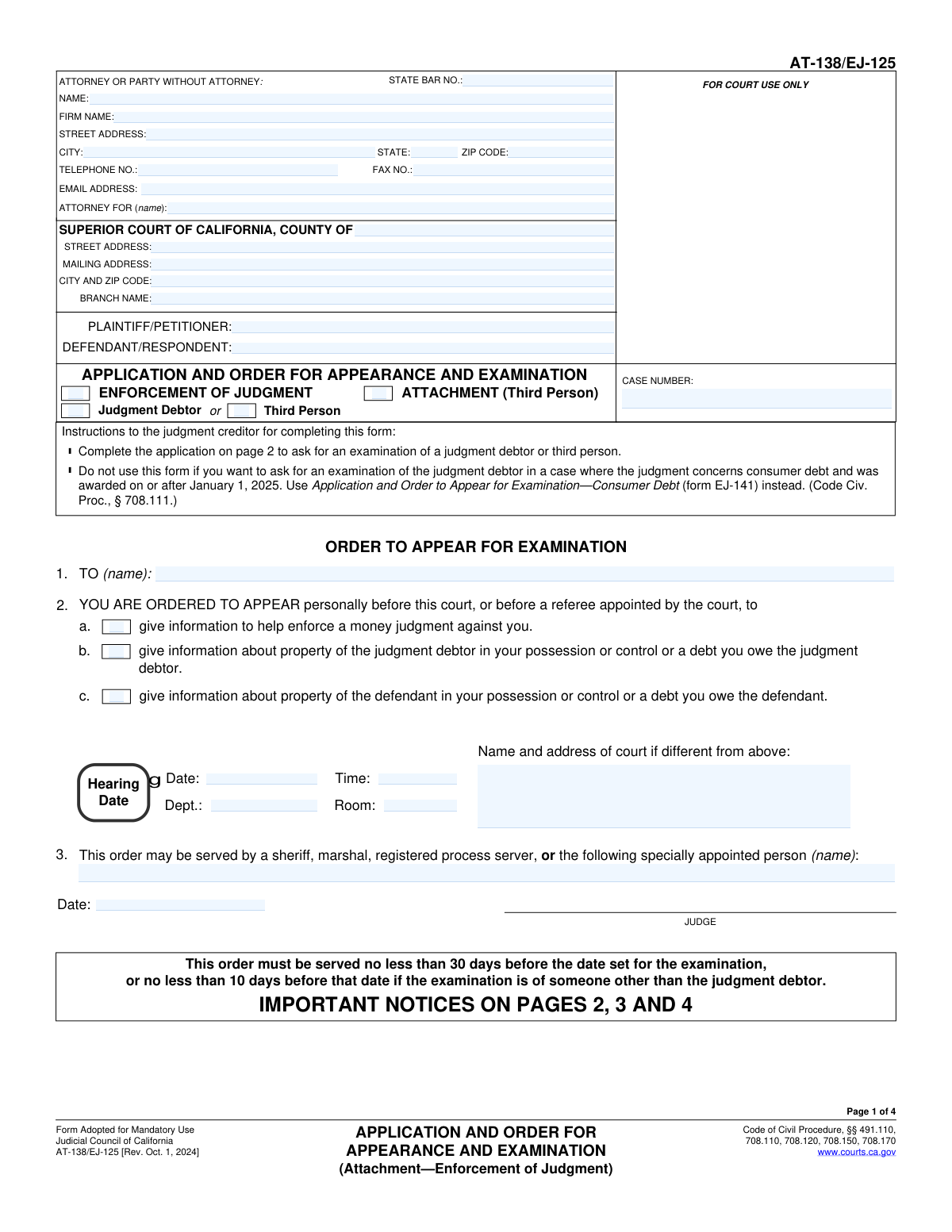
Yes! You can use AI to fill out Form AT-138/EJ-125, Application and Order for Appearance and Examination
California Form AT-138/EJ-125, also known as the Application and Order for Appearance and Examination, is a legal document used to request a court order compelling a judgment debtor or a third party to appear for questioning. This process, known as a debtor's examination, is a critical tool for creditors to discover assets that can be used to satisfy a money judgment or an attachment order. Today, this form can be filled out quickly and accurately using AI-powered services like Instafill.ai, which can also convert non-fillable PDF versions into interactive fillable forms.
Our AI automatically handles information lookup, data retrieval, formatting, and form filling.
It takes less than a minute to fill out AT-138/EJ-125 using our AI form filling.
Securely upload your data. Information is encrypted in transit and deleted immediately after the form is filled out.
Form specifications
| Form name: | Form AT-138/EJ-125, Application and Order for Appearance and Examination |
| Number of fields: | 55 |
| Number of pages: | 4 |
| Language: | English |
Instafill Demo: How to fill out PDF forms in seconds with AI
How to Fill Out AT-138/EJ-125 Online for Free in 2026
Are you looking to fill out a AT-138/EJ-125 form online quickly and accurately? Instafill.ai offers the #1 AI-powered PDF filling software of 2026, allowing you to complete your AT-138/EJ-125 form in just 37 seconds or less.
Follow these steps to fill out your AT-138/EJ-125 form online using Instafill.ai:
- 1 Navigate to Instafill.ai and upload your Form AT-138/EJ-125, or select it from their library of official documents.
- 2 Use the AI assistant to accurately fill in the Attorney or Party Information section, including your name, firm, address, and State Bar number if applicable.
- 3 Provide the court and case information, such as the county, court address, party names (Plaintiff/Petitioner and Defendant/Respondent), and the specific case number.
- 4 Specify the details of your application by selecting the type of enforcement, the person to be examined (Judgment Debtor or Third Person), and your status as the applicant.
- 5 Complete the declaration section, providing any necessary affidavits or descriptions of property, and then date and provide the declarant's name.
- 6 Review all the information entered by the AI for accuracy. Once confirmed, you can download, print, or electronically file the completed Form AT-138/EJ-125 as required by the court.
Our AI-powered system ensures each field is filled out correctly, reducing errors and saving you time.
Why Choose Instafill.ai for Your Fillable AT-138/EJ-125 Form?
Speed
Complete your AT-138/EJ-125 in as little as 37 seconds.
Up-to-Date
Always use the latest 2026 AT-138/EJ-125 form version.
Cost-effective
No need to hire expensive lawyers.
Accuracy
Our AI performs 10 compliance checks to ensure your form is error-free.
Security
Your personal information is protected with bank-level encryption.
Frequently Asked Questions About Form AT-138/EJ-125
This form is used to ask a court to order a person to appear for an examination. The goal is to get information about a judgment debtor's or defendant's assets to help enforce a money judgment or an attachment order.
This form should be completed by a judgment creditor, an assignee of record, or a plaintiff who has a right to attach order. It is for parties seeking to discover the assets of a person who owes them money under a court case.
A 'Judgment Debtor' is the person who directly owes the money from the court's judgment. A 'Third Person' is someone else who you believe is holding property for the debtor or owes the debtor money.
You will need the court name, case number, and the names of all parties involved. You also need the full name and address of the person you want to examine and, for a third person, a description of the property or debt they control.
Check 'Enforcement of Judgment' if you have already won a money judgment and are trying to collect. Check 'Attachment (Third Person)' if the case is ongoing but you have a 'right to attach order' to secure property before a final judgment.
You must check this box if the judgment debtor has already been examined in the last 120 days. If so, you are required to attach a separate affidavit explaining to the court why another examination is necessary.
After you file the application, a judge will review it. If approved, the judge will sign the order, setting a hearing date, time, and location for the person to appear, and the signed order must then be served on that person.
You must check the box indicating the examination is sought in a different court than where the judgment was entered. You will also need to attach a specific affidavit justifying the request to hold the examination in that other county.
Yes, services like Instafill.ai use AI to help you accurately auto-fill form fields from your saved information, which can save you time and help prevent errors.
You can use a service like Instafill.ai to complete this form online. Simply upload the form to the platform, and it will guide you through filling out all the required fields interactively.
If you have a non-fillable or 'flat' PDF, you can upload it to a platform like Instafill.ai. The service can convert it into an interactive, fillable form that you can complete and save on your computer.
Check this box if your application is not for examining a judgment debtor about a consumer debt where the judgment was entered on or after January 1, 2025. This indicates that certain new procedural rules do not apply to your case.
The order can be served by a sheriff, marshal, or a registered process server. You can also ask the court to appoint a specific individual by entering their name in the 'Specially Appointed Person Name' field.
Compliance AT-138/EJ-125
Validation Checks by Instafill.ai
Common Mistakes in Completing AT-138/EJ-125
Entering the case number with typos, incorrect formatting, or missing digits is a frequent and critical error. Since the case number is the primary identifier for the legal proceeding, any mistake can lead to the document being rejected by the court clerk or misfiled, causing significant delays. To avoid this, double-check the case number against official court documents and ensure it matches the required format exactly. AI-powered tools like Instafill.ai can help by validating the format and auto-populating the number consistently across the form.
Users often mistakenly enter the plaintiff's name in the defendant's field and vice versa. This fundamental error misrepresents the parties involved in the case and can lead to the application being deemed defective, requiring correction and refiling. Carefully read each label and confirm the role of each party before entering their names. This is especially important as these fields may appear multiple times on the form.
The form contains several checkboxes with instructions like 'Fill only if 'Third Person' is 'Yes''. A common mistake is to ignore these conditions and check boxes that contradict previous selections, such as checking a box related to a 'Judgment Debtor' after indicating the examination is for a 'Third Person'. This demonstrates a misunderstanding of the form's purpose and will likely result in its rejection. Pay close attention to all conditional instructions to ensure your selections form a logical and valid application.
The form includes checkboxes for special circumstances, such as 'Judgment debtor examined within 120 days' or seeking an examination in a different court. These selections explicitly state that a supporting affidavit must be attached. Filers often check the box but forget to include the required document, leading to an incomplete and rejectable submission. Always review any checked boxes that mention an attachment and ensure the corresponding document is included with your filing.
When applying to examine a third person, the form requires a description of the property they control or the debt they owe. A frequent error is providing a vague description like 'bank account' or 'money owed'. This is insufficient and can render the resulting court order unenforceable. The description must be specific enough to identify the exact property or debt, such as 'Savings Account ending in 1234 at ABC Bank, N.A.' or 'A debt arising from a promissory note dated January 1, 2023'.
In the 'Attorney or Party Information' section, the 'Attorney For' field requires the name of the client being represented (e.g., the Plaintiff or Defendant). A common slip-up is for the attorney to enter their own name or their firm's name in this field. This creates confusion about who is being represented and can cause processing delays. Always enter the full, correct name of the client party in this field.
Filers sometimes enter the main county courthouse address when the case is actually assigned to a specific branch with a different location. Failing to specify the correct 'Court Branch Name' and its corresponding address can lead to the application being filed in the wrong venue, causing delays and requiring refiling. Verify the specific branch court handling your case from prior notices or the court's website before filling out this section.
The form asks for multiple dates: the 'Declaration Date' (when you sign), the 'Order Date' (when the judge signs), and the 'Hearing Date' (when the examination occurs). People often mix these up or enter them in the wrong format. An incorrect hearing date can cause the party to miss the appearance, while an incorrect declaration date can raise questions about the document's validity. Carefully read each date field and enter the correct information, leaving fields like 'Order Date' blank for the court to complete.
This form asks for the same information, such as the 'Case Number' and party names, in multiple locations (e.g., in the top header and again in the body). A common data entry error is to have slight variations or typos between these repeated fields. This inconsistency can create confusion and may trigger a rejection, so it's crucial to ensure the information is identical everywhere it appears. Using a tool like Instafill.ai can prevent this by populating all related fields from a single entry.
The form provides distinct fields for the court's 'Street Address' and 'Mailing Address'. Many filers assume these are the same and leave the mailing address field blank, even when the court uses a P.O. Box or centralized mail processing center. This can cause crucial notices and orders sent from the court to be delayed or returned as undeliverable. Always check the court's official website to confirm if a separate mailing address should be used.
Saved over 80 hours a year
“I was never sure if my IRS forms like W-9 were filled correctly. Now, I can complete the forms accurately without any external help.”
Kevin Martin Green
Your data stays secure with advanced protection from Instafill and our subprocessors
Robust compliance program
Transparent business model
You’re not the product. You always know where your data is and what it is processed for.
ISO 27001, HIPAA, and GDPR
Our subprocesses adhere to multiple compliance standards, including but not limited to ISO 27001, HIPAA, and GDPR.
Security & privacy by design
We consider security and privacy from the initial design phase of any new service or functionality. It’s not an afterthought, it’s built-in, including support for two-factor authentication (2FA) to further protect your account.
Fill out AT-138/EJ-125 with Instafill.ai
Worried about filling PDFs wrong? Instafill securely fills form-at-138ej-125-application-and-order-for-appearance-and-examination forms, ensuring each field is accurate.