Yes! You can use AI to fill out Form AT-160 / CD-140, Undertaking by Personal Sureties

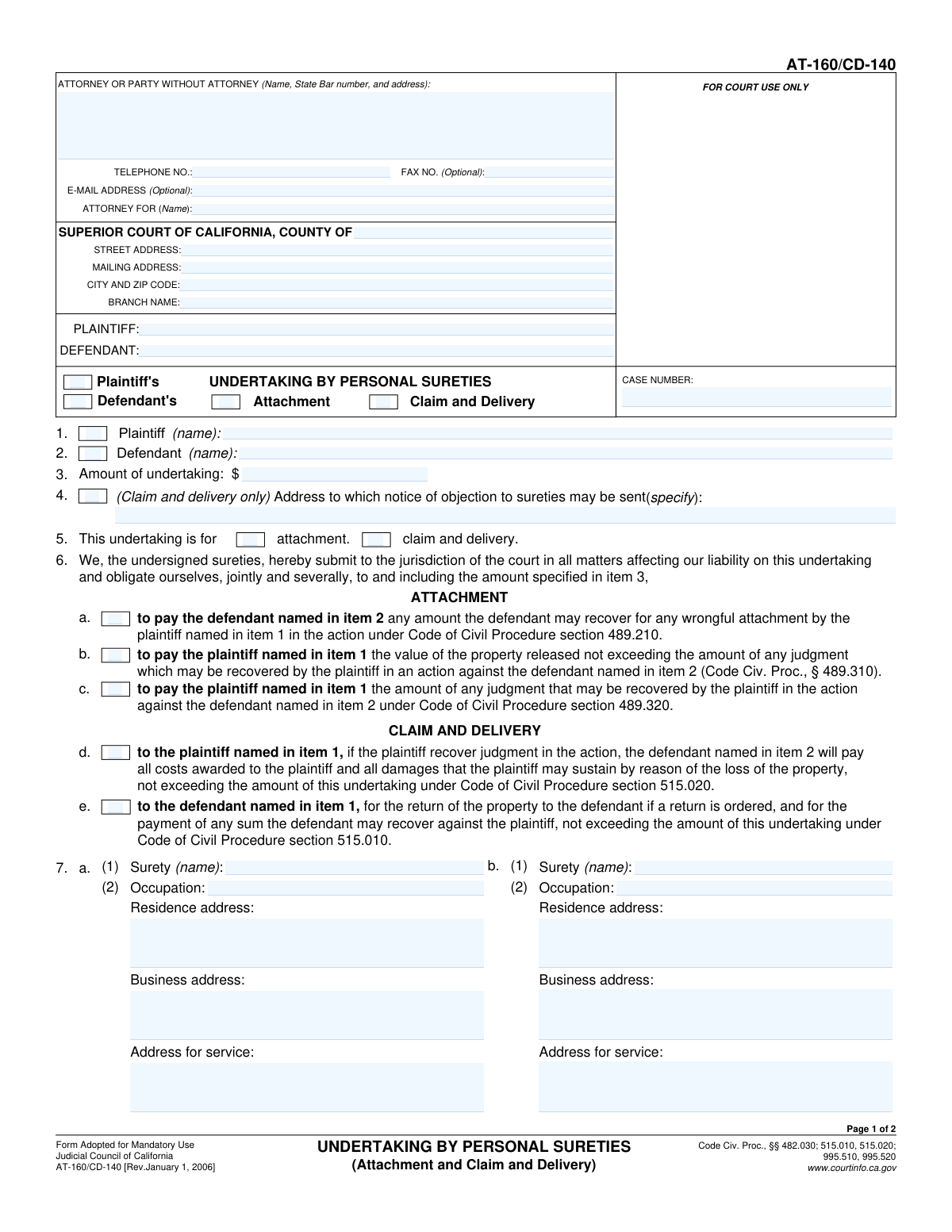
Form AT-160 / CD-140, Undertaking by Personal Sureties, is a legal document filed in the Superior Court of California. It's used when individuals, rather than a bonding company, act as sureties, guaranteeing to pay a specified sum if a party to a lawsuit fails to meet their obligations, particularly in attachment or claim and delivery proceedings. This undertaking is crucial as it provides financial assurance to the opposing party against potential losses or wrongful actions. Today this form can be filled out quickly and accurately using AI-powered services like Instafill.ai, which can also convert non-fillable PDF versions into interactive fillable forms.
Our AI automatically handles information lookup, data retrieval, formatting, and form filling.
It takes less than a minute to fill out AT-160 / CD-140 using our AI form filling.
Securely upload your data. Information is encrypted in transit and deleted immediately after the form is filled out.

Form specifications

Form name: Form AT-160 / CD-140, Undertaking by Personal Sureties
Number of fields: 67
Number of pages: 2
Filled form examples: Form AT-160 / CD-140 Examples
Language: English
main-image

Instafill Demo: How to fill out PDF forms in seconds with AI

How to Fill Out AT-160 / CD-140 Online for Free in 2026

Are you looking to fill out a AT-160 / CD-140 form online quickly and accurately? Instafill.ai offers the #1 AI-powered PDF filling software of 2026, allowing you to complete your AT-160 / CD-140 form in just 37 seconds or less.
Follow these steps to fill out your AT-160 / CD-140 form online using Instafill.ai:
  1. 1 Navigate to Instafill.ai and upload your Form AT-160 / CD-140 or select it from the template library.
  2. 2 Use the AI assistant to accurately fill in the attorney or party information, along with the specific Superior Court details like county and branch name.
  3. 3 Enter the case number, plaintiff and defendant names, and specify the type of undertaking (e.g., Attachment, Claim and Delivery) and the total amount.
  4. 4 Provide the detailed personal and financial information for the first and second sureties, including their names, addresses, and occupations.
  5. 5 Complete the sworn declarations for each surety, including details about their property if the undertaking amount exceeds the statutory threshold, letting the AI guide you through the specific requirements.
  6. 6 Carefully review all entered information for accuracy. The sureties will then date and sign the declarations as required before the form is filed.
  7. 7 Download, print, and file the completed and signed form with the appropriate court, noting that court approval may be required for certain undertaking types.

Our AI-powered system ensures each field is filled out correctly, reducing errors and saving you time.

Why Choose Instafill.ai for Your Fillable AT-160 / CD-140 Form?

Speed

Complete your AT-160 / CD-140 in as little as 37 seconds.

Up-to-Date

Always use the latest 2026 AT-160 / CD-140 form version.

Cost-effective

No need to hire expensive lawyers.

Accuracy

Our AI performs 10 compliance checks to ensure your form is error-free.

Security

Your personal information is protected with bank-level encryption.

Frequently Asked Questions About Form AT-160 / CD-140

This form is used in legal proceedings like 'Attachment' or 'Claim and Delivery' to provide a financial guarantee to the court. Two individuals, the 'sureties', promise to pay a specified amount if certain court-ordered conditions are not met by the plaintiff or defendant.

The party in the lawsuit (plaintiff or defendant) who is required to provide the undertaking must initiate the form. The two individuals acting as personal sureties must then complete their respective declaration sections with their personal and financial information.

An 'Attachment' undertaking is generally used to secure a defendant's assets to satisfy a potential future judgment. A 'Claim and Delivery' undertaking is used in actions to recover possession of specific personal property pending the court's final decision.

Yes, this form is specifically for an 'Undertaking by Personal Sureties' (plural) and has distinct sections for two separate individuals to provide their information and sign declarations.

Each surety must provide their full name, occupation, residence and business addresses, and an address for service of legal documents. They must also declare their residency status as a householder or owner of real property.

If the undertaking exceeds $5,000, each surety must provide a detailed description of the property they are using to qualify, its estimated fair market value, and a list of any charges or liens against that property.

This is the specific mailing address where the opposing party must send any formal objection to the qualifications of the sureties you have chosen. This field is only required for Claim and Delivery undertakings.

You must file the completed and signed form with the Superior Court of California for the county and branch where your case is being heard, as identified in the court information section at the top of the form.

Yes, services like Instafill.ai use AI to accurately auto-fill form fields with your saved information, which can save you time and help reduce errors when completing complex legal forms.

You can upload the PDF of the form to Instafill.ai. The platform will make it fillable online, and you can use its AI-powered tools to quickly populate case details, party information, and surety data before printing for signature.

You can use a service like Instafill.ai, which can convert non-fillable PDFs into interactive, fillable forms. This allows you to easily type your information into the correct fields online.

Each of the two personal sureties must sign and date their own respective declaration section. Their signature confirms, under penalty of perjury, that the information they have provided is true and correct.

These are legal qualifications showing the surety has sufficient assets and ties to the community. A 'householder' is the head of a household, and an 'owner of real property' owns land or buildings, which demonstrates financial stability.

The Case Number is the unique identifier assigned to your lawsuit by the court. You can find this number on any previous official court documents you have received for this case, such as the complaint or summons.

Compliance AT-160 / CD-140
Validation Checks by Instafill.ai

1
Case Number Consistency
Ensures the 'Case Number' is identical across all sections of the form where it appears (header, case information block, etc.). This is crucial for data integrity and ensures the document is correctly associated with the proper legal case upon filing. If the numbers do not match, the system will flag the discrepancy and require the user to correct it before submission.
2
Exclusive Undertaking Party Selection
Validates that only one of 'Plaintiff's Undertaking' or 'Defendant's Undertaking' is selected. The form is designed to process an undertaking for a single party in the action, not both simultaneously. Allowing both to be selected would create a legally ambiguous document, so the system will force the user to choose only one option.
3
Conditional Attachment Condition Fields
Verifies that the checkboxes under 'Attachment Conditions' (e.g., 'Wrongful Attachment Payment') can only be selected if the undertaking type is specified as 'Attachment Undertaking' or 'Attachment'. This enforces the logical flow of the form, preventing the user from entering contradictory or irrelevant information. The system will disable these fields unless the prerequisite is met.
4
Conditional Claim and Delivery Fields
Ensures that fields related to 'Claim and Delivery' actions, such as the 'Objection Notice Address' and 'Claim and Delivery Conditions' checkboxes, are only fillable if 'Claim and Delivery Undertaking' or 'Claim and Delivery' is selected. This is important for creating a legally precise document tailored to the specific action type. An error will be displayed if a user attempts to fill these fields without selecting the correct undertaking type.
5
Amount of Undertaking Numerical Format
Validates that the 'Amount of Undertaking' field contains a valid, positive monetary value. This amount is a critical piece of data that defines the surety's financial liability and triggers other conditional logic on the form. The validation will reject any non-numeric characters (aside from standard currency formatting) or negative values to ensure the amount is legally sound.
6
Conditional Surety Property Declaration for High-Value Undertakings
Checks if the 'Amount of Undertaking' exceeds $5,000 and, if so, mandates the completion of the surety's property declaration sections (e.g., 'Described Property and Value'). This is a legal requirement to prove the surety has sufficient assets to cover a significant financial obligation. The form submission will be blocked if the amount is over $5,000 and these required details are missing.
7
Plaintiff Name Consistency Across Form
Confirms that the name entered for the plaintiff is identical in all fields where it is required ('Parties' section, 'Item 1 Plaintiff', 'Case Information' section). Consistency in party names is fundamental for the legal validity of the document and prevents ambiguity. A mismatch will trigger an alert requiring the user to standardize the name before proceeding.
8
Defendant Name Consistency Across Form
Verifies that the defendant's name is entered identically in all corresponding fields throughout the form ('Parties' section, 'Item 2 Defendant', 'Case Information' section). This check is essential to prevent clerical errors that could lead to filing rejections or legal challenges regarding the identity of the parties. The system will flag any inconsistencies for correction.
9
State Bar Number Format Validation
Validates that the 'State Bar number' entered in the attorney information section is a valid number, conforming to the format required by the State Bar of California. This helps verify the attorney's credentials and ensures the provided contact information is accurate for legal correspondence. The system will reject entries containing letters or an incorrect number of digits.
10
Mandatory First Surety Information
Ensures that all required fields for the first surety, including name, occupation, residence address, and address for service, are fully completed. An undertaking is invalid without at least one qualified surety, making this information essential to the document's purpose. The form cannot be submitted if the primary surety's information is incomplete.
11
Valid Declaration Date Check
Checks that the 'Date of Declaration' for each surety is a valid calendar date and is not set in the future. The declaration date is legally significant as it marks the moment the surety formally attests to the information provided. An invalid or future date would compromise the document's integrity, so the system will require a valid date that is on or before the submission day.
12
Surety Name and Printed Name Cross-Validation
Validates that the name entered in the 'Surety Name' field matches the 'Printed Name of Surety' in the corresponding declaration section. This simple cross-reference ensures the individual identified as the surety is the same person making the sworn declaration, preventing critical errors. A mismatch will halt submission until the names are consistent.
13
Completeness of Court Address
Verifies that the core court information fields, including 'County', 'Street Address', 'City and Zip Code', and 'Branch Name', are all filled out. This information is critical for identifying the correct jurisdiction and courthouse for filing. An incomplete court address would render the document un-fileable, so the system will flag these fields as required.
14
Exclusive Undertaking Purpose Selection
Validates that only one of 'Attachment' or 'Claim and Delivery' is selected under the 'Undertaking Purpose' section. These two purposes represent different legal actions with distinct requirements. Selecting both would create ambiguity, so the system will require the user to choose a single, specific purpose for the undertaking.

Common Mistakes in Completing AT-160 / CD-140

Incomplete Surety Property Declaration

When an undertaking amount exceeds $5,000, sureties must detail the property used to qualify, including its value and any liens. Filers often provide vague descriptions, forget to list mortgages, or skip the section entirely. This critical error invalidates the surety's declaration and will cause the court to reject the undertaking, delaying the case. To avoid this, meticulously list all required property and lien information as specified.

Contradictory or Incomplete Undertaking Selections

Users frequently check conflicting boxes, such as both 'Plaintiff's Undertaking' and 'Defendant's Undertaking,' or select a type like 'Attachment Undertaking' without checking the corresponding purpose 'Attachment'. This ambiguity confuses the filing's intent and can lead to immediate rejection by the court clerk. Carefully review your selections to ensure they logically represent who is providing the undertaking and for what specific legal action.

Missing Information in Conditional Fields

The form contains numerous fields that are only required if a preceding box is checked, such as the 'Objection Notice Address' for Claim and Delivery matters. A common error is checking the box but then failing to provide the required follow-up information. This renders the form incomplete and will result in its rejection, forcing a corrected resubmission and delaying the legal process.

Using Incorrect or Incomplete Court Information

Filers often enter a general county courthouse address instead of the specific branch address where the case is being heard. This can cause the document to be misrouted or delayed, potentially leading to missed deadlines. Always verify the exact street address, city, zip code, and 'Branch Name' for your specific case before completing the form. AI-powered tools like Instafill.ai can help by auto-populating correct court information based on the case.

Omitting Case Information in the Header/Footer

Many court forms require the case number and party names to be repeated on every page, often in a header or footer section. People frequently fill this out on the first page but forget the subsequent ones. If pages become separated, this omission makes it impossible for the court to associate the page with the correct file, potentially invalidating the document. Using a tool like Instafill.ai can ensure this repetitive data is accurately populated on all pages.

Mismatching 'Attachment' Checkboxes and Documents

The form allows users to indicate that additional information is provided on an attachment (e.g., 'Continued on Attachment 8a'). A frequent mistake is checking this box but failing to include the actual attachment with the submission, or vice-versa. This discrepancy makes the filing incomplete and will be flagged by the clerk, requiring a full resubmission.

Providing an Invalid Address for Service for a Surety

Each surety must provide a valid physical address where legal documents can be served. Filers sometimes leave this blank, use a P.O. Box which is often invalid for service, or enter an incomplete address. An invalid service address can nullify the undertaking, as it prevents opposing parties from legally notifying the surety of any objections.

Omitting the Attorney's State Bar Number

When an attorney is representing a party, their State Bar number is a required piece of information. Forgetting to include this number or entering it incorrectly is a common oversight that can lead to filing rejections. The number is a crucial identifier for the court to verify the attorney's standing. Automated form-fillers like Instafill.ai can store and accurately populate this information to prevent such errors.

Using Abbreviated or Incorrect Party Names

Filers may use incomplete names, initials, or abbreviations for the plaintiff or defendant (e.g., 'J. Smith' instead of 'Johnathan Smith'). Legal documents require the full, official names of all parties as they appear on the case caption. Inconsistencies can create legal ambiguity and require correction, so it is vital to copy the names exactly from official case documents.

Failing to Complete All Surety Declaration Fields

The surety declaration section requires checking boxes for status (e.g., 'Householder'), providing addresses, and signing and dating the form. It is easy to miss one of these small but essential elements. An incomplete declaration, such as a missing date or printed name next to the signature line, can invalidate the entire undertaking and force the filer to obtain new signatures and start over. If the form is a non-fillable PDF, a tool like Instafill.ai can convert it to a fillable version, making it easier to see and complete every required field.
Saved over 80 hours a year

“I was never sure if my IRS forms like W-9 were filled correctly. Now, I can complete the forms accurately without any external help.”

Kevin Martin Green

Your data stays secure with advanced protection from Instafill and our subprocessors

Robust compliance program

Transparent business model

You’re not the product. You always know where your data is and what it is processed for.

ISO 27001, HIPAA, and GDPR

Our subprocesses adhere to multiple compliance standards, including but not limited to ISO 27001, HIPAA, and GDPR.

Security & privacy by design

We consider security and privacy from the initial design phase of any new service or functionality. It’s not an afterthought, it’s built-in, including support for two-factor authentication (2FA) to further protect your account.

Fill out AT-160 / CD-140 with Instafill.ai

Worried about filling PDFs wrong? Instafill securely fills form-at-160-cd-140-undertaking-by-personal-sureties forms, ensuring each field is accurate.