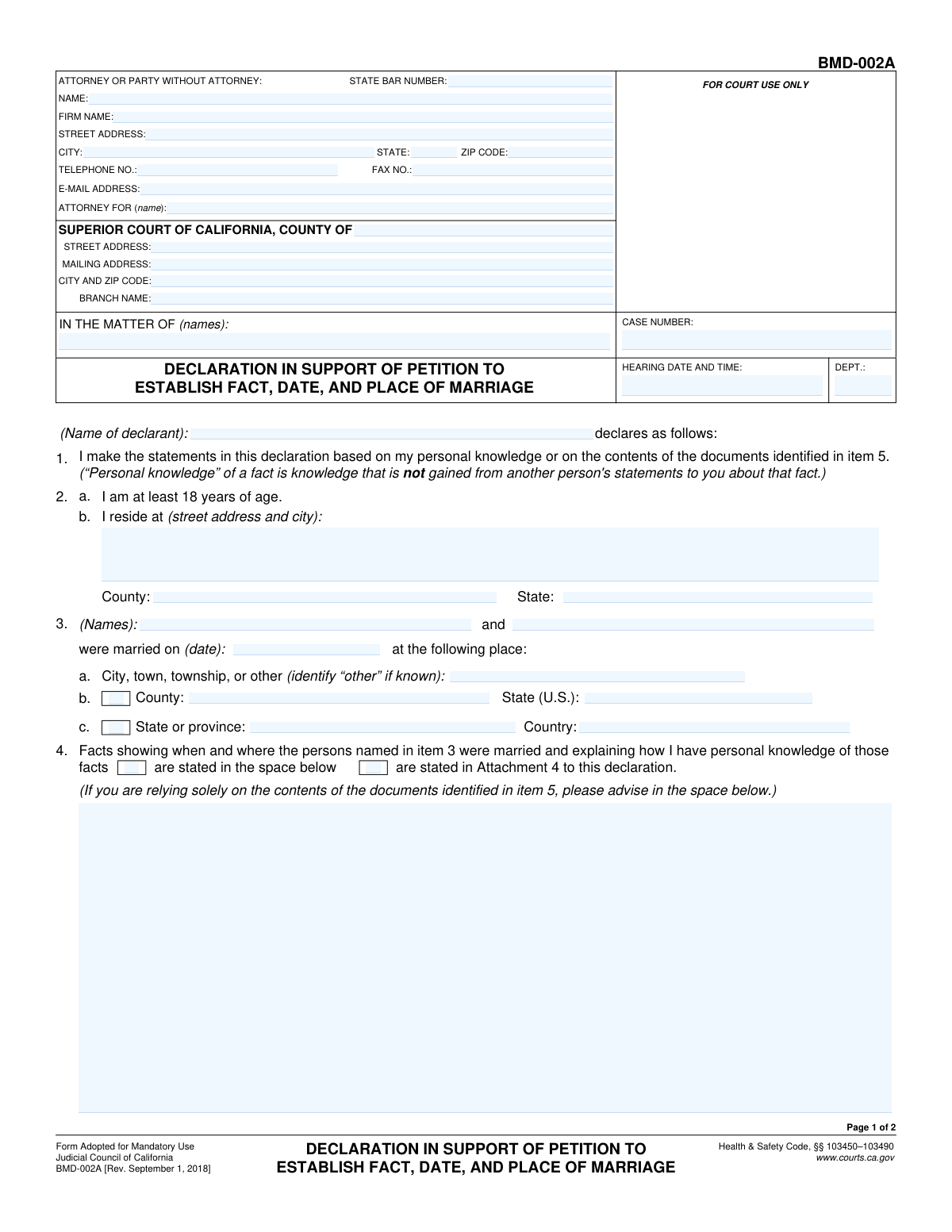
Yes! You can use AI to fill out Form BMD-002A, Declaration in Support of Petition to Establish Fact, Date, and Place of Marriage
Form BMD-002A is a legal document used in California courts as a sworn statement to support a 'Petition to Establish Fact, Date, and Place of Marriage'. It is filed by a declarant who has personal knowledge or documentary evidence about a marriage when official records are missing, incomplete, or incorrect. This declaration is crucial for legally recognizing the marriage's details for various purposes, such as inheritance or other legal proceedings. Today, this form can be filled out quickly and accurately using AI-powered services like Instafill.ai, which can also convert non-fillable PDF versions into interactive fillable forms.
Our AI automatically handles information lookup, data retrieval, formatting, and form filling.
It takes less than a minute to fill out BMD-002A using our AI form filling.
Securely upload your data. Information is encrypted in transit and deleted immediately after the form is filled out.
Form specifications
| Form name: | Form BMD-002A, Declaration in Support of Petition to Establish Fact, Date, and Place of Marriage |
| Number of fields: | 59 |
| Number of pages: | 2 |
| Language: | English |
Instafill Demo: How to fill out PDF forms in seconds with AI
How to Fill Out BMD-002A Online for Free in 2026
Are you looking to fill out a BMD-002A form online quickly and accurately? Instafill.ai offers the #1 AI-powered PDF filling software of 2026, allowing you to complete your BMD-002A form in just 37 seconds or less.
Follow these steps to fill out your BMD-002A form online using Instafill.ai:
- 1 Navigate to Instafill.ai and upload or select Form BMD-002A.
- 2 Use the AI assistant to fill in the court, case number, and attorney/party information in the header section.
- 3 Enter your personal information as the declarant in sections 1 and 2, including your name and address.
- 4 In section 3, provide the full names of the married individuals, the date of the marriage, and the specific location (city, county, state/country).
- 5 Detail the facts supporting the marriage in section 4, explaining how you have personal knowledge of these events.
- 6 In section 5, check the boxes corresponding to any supporting documents you are attaching, such as a marriage license or witness statements.
- 7 Review all entered information for accuracy, then e-sign and date the declaration to finalize the document for court submission.
Our AI-powered system ensures each field is filled out correctly, reducing errors and saving you time.
Why Choose Instafill.ai for Your Fillable BMD-002A Form?
Speed
Complete your BMD-002A in as little as 37 seconds.
Up-to-Date
Always use the latest 2026 BMD-002A form version.
Cost-effective
No need to hire expensive lawyers.
Accuracy
Our AI performs 10 compliance checks to ensure your form is error-free.
Security
Your personal information is protected with bank-level encryption.
Frequently Asked Questions About Form BMD-002A
This form, a Declaration in Support of a Petition, is used to provide a sworn statement to a California court. It helps legally establish the facts of a marriage, such as the date and location, when an official record is missing or needs correction.
This form must be completed by a 'declarant,' who is someone with direct, personal knowledge of the marriage. This could be one of the spouses, a witness who attended the ceremony, or the person who officiated.
Personal knowledge means you know the facts of the marriage from your own experience, such as being physically present at the wedding. It is not information you heard from someone else.
You should attach copies of any relevant documents, such as the marriage license, sworn statements from the officiant or other witnesses, or other records that help prove the marriage occurred. Be sure to check the corresponding boxes in Section 5.
The form explicitly states that a marriage license is required for a valid marriage in California. This court process cannot be used to establish the validity of a California marriage if no license was ever obtained.
Any statements from witnesses or the officiating person must be signed under oath. This means they must either be sworn before a Notary Public or include a specific declaration of truth under penalty of perjury just above the signature.
If establishing the facts of this marriage is necessary for another legal proceeding, like an inheritance or immigration case, you must describe that case in Section 6. You will need to provide the case name, number, and court information.
This declaration is part of a larger court action and must be filed with the Superior Court of California in the appropriate county. It is submitted in support of the main petition, Form BMD-001.
Yes, as one of the parties to the marriage, you have personal knowledge of the event. You can fill out this form as a declarant to support your own petition.
You may need multiple declarations to strengthen your case. Each person providing a statement (e.g., a spouse, a witness, the officiant) should fill out and sign their own separate BMD-002A form.
Yes, services like Instafill.ai use AI to accurately auto-fill your personal information and other known details onto the form. This can save you time and help prevent common errors.
You can use a service like Instafill.ai to complete this form online. Simply upload the PDF, and the platform will make the fields interactive for you to type in your information, which can then be saved or printed.
If you have a non-fillable or 'flat' PDF, you can upload it to a platform like Instafill.ai. It can convert the static document into an interactive, fillable form that you can easily complete on your computer.
Compliance BMD-002A
Validation Checks by Instafill.ai
1
Declarant Name and Signature Name Consistency
This check ensures the name of the declarant entered in Item 1 ('DeclarantName_ft') is identical to the typed or printed name under the signature line on page 2 ('sigName'). This is crucial for verifying the identity of the person making the declaration and ensuring the document's legal integrity. A mismatch could lead to the form being rejected for ambiguity or potential fraud.
2
Marriage Date Must Be in the Past
Validates that the 'Date of Marriage' entered in Item 3 is a valid, fully-formed date that occurs before the current submission date. This check is essential because the form is used to establish a past event. An invalid format or a future date would be a logical impossibility and would invalidate the petition's core claim, causing immediate rejection.
3
Marriage Participants Required
Ensures that both name fields for the married persons in Item 3 ('SpouseOneName_ft' and 'SpouseTwoName_ft') are completed. A petition to establish a marriage cannot proceed without identifying both individuals involved. Failure to provide both names would render the form incomplete and legally insufficient for the court to act upon.
4
Marriage Location Specified
Verifies that at least one of the location fields in Item 3 (City, County, State, or Country) is filled out. The purpose of the petition is to establish the fact, date, AND place of marriage. If the location is missing, a key element of the petition is absent, and the court cannot issue a complete order.
5
Exclusive Selection for Knowledge Explanation
Confirms that in Item 4, only one of the two checkboxes ('stated in the space below' or 'stated in Attachment 4') is selected. These options are mutually exclusive ways to provide evidence. Selecting both creates ambiguity, and the system should flag this for correction to ensure the declarant's statement is clear and unambiguous.
6
Conditional Requirement for Knowledge Details
If the checkbox 'stated in the space below' in Item 4 is selected, this validation ensures the corresponding text area ('FactsKnown_ft') is not empty. The declarant must provide the promised explanation for their knowledge. An empty field would contradict the selection and make the declaration incomplete, requiring the user to provide the details or select the attachment option instead.
7
Conditional Document Date Entry
This check verifies that if any document checkbox in Item 5 (e.g., 'Marriage license', 'Officiating person's statement') is checked, the corresponding date field for that document is also filled. The date is a critical piece of information for each piece of evidence. An omission would make the evidence difficult to verify and could lead to the court disregarding it.
8
Logical Marriage License Date
Validates that the 'Marriage license' date from Item 5a is on or before the 'Date of Marriage' from Item 3. A marriage license must be obtained before the ceremony can legally take place. A license dated after the marriage would be a significant logical inconsistency, casting doubt on the validity of the entire petition.
9
Exclusive Selection for Court Case Relevance
Ensures that in Item 6, only one of the 'is' or 'is not' checkboxes is selected regarding the marriage's importance to a pending court case. These are mutually exclusive statements. The form requires a definitive answer, and selecting both or neither would leave the status unclear, prompting a validation failure.
10
Conditional Requirement for Pending Case Details
If the 'is' checkbox is selected in Item 6, this validation confirms that the subsequent text area for describing the pending proceeding is not empty. The form explicitly requires details of the pending case if the marriage fact is relevant to it. Failure to provide this information would make the declaration incomplete and prevent proper notice to all involved parties.
11
Attachment Count Logic
Verifies that the 'Number of pages attached' in Item 7 is a non-negative integer. Furthermore, it cross-references this number with any checkboxes indicating an attachment (e.g., 'Attachment 4', 'Attachment 5d', 'Attachment 6'). If attachments are indicated, the number must be greater than zero, ensuring consistency and preventing claims of attached documents that are not accounted for.
12
Mandatory Signature Date
This check ensures that the 'Date' field next to the declarant's signature on page 2 is filled with a valid date. The signature date is legally significant as it indicates when the declaration was made under penalty of perjury. A missing date can render the document invalid, leading to its rejection by the court clerk.
13
Case Number Consistency Across Pages
Validates that the 'CASE NUMBER' entered in the header of page 1 is identical to the 'CASE NUMBER' entered in the header of page 2. This is a critical data integrity check to ensure all pages of the submission belong to the same legal case. A mismatch could lead to pages being misfiled and the entire submission being rejected.
14
Valid Email Address Format
Checks that the value entered in the 'E-MAIL ADDRESS' field for the attorney or party follows a standard email format (e.g., [email protected]). This is important for ensuring that electronic communications and notices from the court can be successfully delivered. An invalid format would result in failed communication, potentially causing the party to miss important deadlines or hearings.
15
California Bar Number Format
Ensures that the 'STATE BAR NUMBER' field, if provided, contains only numeric digits. California State Bar numbers are numeric identifiers for attorneys. This validation prevents data entry errors and ensures the number can be correctly looked up in the State Bar's system for verification.
Common Mistakes in Completing BMD-002A
Filers often struggle to find the precise court address and branch name, leading to filings being rejected or sent to the wrong location. This happens when using a generic address from a web search instead of the specific address for the correct filing department (e.g., Family Law). To avoid this, use the court's official website to confirm the exact street address, mailing address, and branch name before filling out the form. AI-powered tools like Instafill.ai can help by maintaining a database of correct court addresses.
People frequently use informal names, nicknames, or initials in item 3 ('In the matter of') instead of the parties' full legal names. This creates discrepancies with official records like marriage licenses or birth certificates, which can cause processing delays or rejection of the petition. Always use the complete legal names as they appear on government-issued identification to ensure consistency and validity. Form-filling tools can help by storing and reusing correct legal names across documents.
In section 4, declarants mistakenly believe they can report information they heard from others, which is legally defined as hearsay. The form explicitly requires knowledge gained from direct, personal experience, not from another person's statements. A declaration based on hearsay can be deemed inadmissible by the court, leading to the petition's failure. To avoid this, only state facts you personally witnessed and be prepared to explain how you witnessed them.
The form's layout for the marriage location in item 3 causes confusion, with separate fields for U.S. and non-U.S. locations. Filers often provide incomplete data (e.g., a city without a county) or fill out parts of both sections incorrectly. This ambiguity can prevent the court from legally establishing the place of marriage. You must carefully and completely fill out *either* the U.S. fields (3a, 3b) *or* the non-U.S. fields (3c), but not both.
When completing the free-text portion of section 4, declarants often provide a vague or conclusory statement (e.g., 'I know they were married') instead of explaining *how* they know. The court requires specific facts to establish the basis of the declarant's knowledge, such as 'I was the officiant at the wedding and signed the marriage license.' Failing to provide this concrete detail can weaken the petition and lead to its denial.
Section 5 requires that statements from officiating persons or witnesses be legally binding, either signed under oath (notarized) or including a specific California perjury clause. A common and critical mistake is submitting simple, unsigned letters or statements that lack this legal requirement. Such documents hold no evidentiary value and will be disregarded by the court, potentially invalidating the entire petition.
A frequent error is checking a box in section 5 for a document that is not actually attached, or attaching a document without checking the corresponding box and entering its date. This creates confusion for the court clerk and can lead to the filing being deemed incomplete. Before submitting, double-check that every attached document is referenced on the form and that the total page count in item 7 is accurate.
Forgetting to physically sign and date the declaration on page 2 is a critical and surprisingly common error. An unsigned declaration is legally invalid and will be rejected outright by the court clerk, causing significant and unnecessary delays. Always perform a final review to ensure the form is signed and dated with the current date before filing.
Individuals representing themselves (pro se) often get confused by the 'ATTORNEY OR PARTY WITHOUT ATTORNEY' section at the top of the form. They may leave their own contact information blank or incorrectly fill in the 'ATTORNEY FOR' line. This can lead to critical communication issues with the court. If you do not have an attorney, you must enter your own full name and contact information in this section. AI form-fillers like Instafill.ai can help correctly populate this section based on whether you have legal representation.
Saved over 80 hours a year
“I was never sure if my IRS forms like W-9 were filled correctly. Now, I can complete the forms accurately without any external help.”
Kevin Martin Green
Your data stays secure with advanced protection from Instafill and our subprocessors
Robust compliance program
Transparent business model
You’re not the product. You always know where your data is and what it is processed for.
ISO 27001, HIPAA, and GDPR
Our subprocesses adhere to multiple compliance standards, including but not limited to ISO 27001, HIPAA, and GDPR.
Security & privacy by design
We consider security and privacy from the initial design phase of any new service or functionality. It’s not an afterthought, it’s built-in, including support for two-factor authentication (2FA) to further protect your account.
Fill out BMD-002A with Instafill.ai
Worried about filling PDFs wrong? Instafill securely fills form-bmd-002a-declaration-in-support-of-petition-to-establish-fact-date-and-place-of-marriage forms, ensuring each field is accurate.