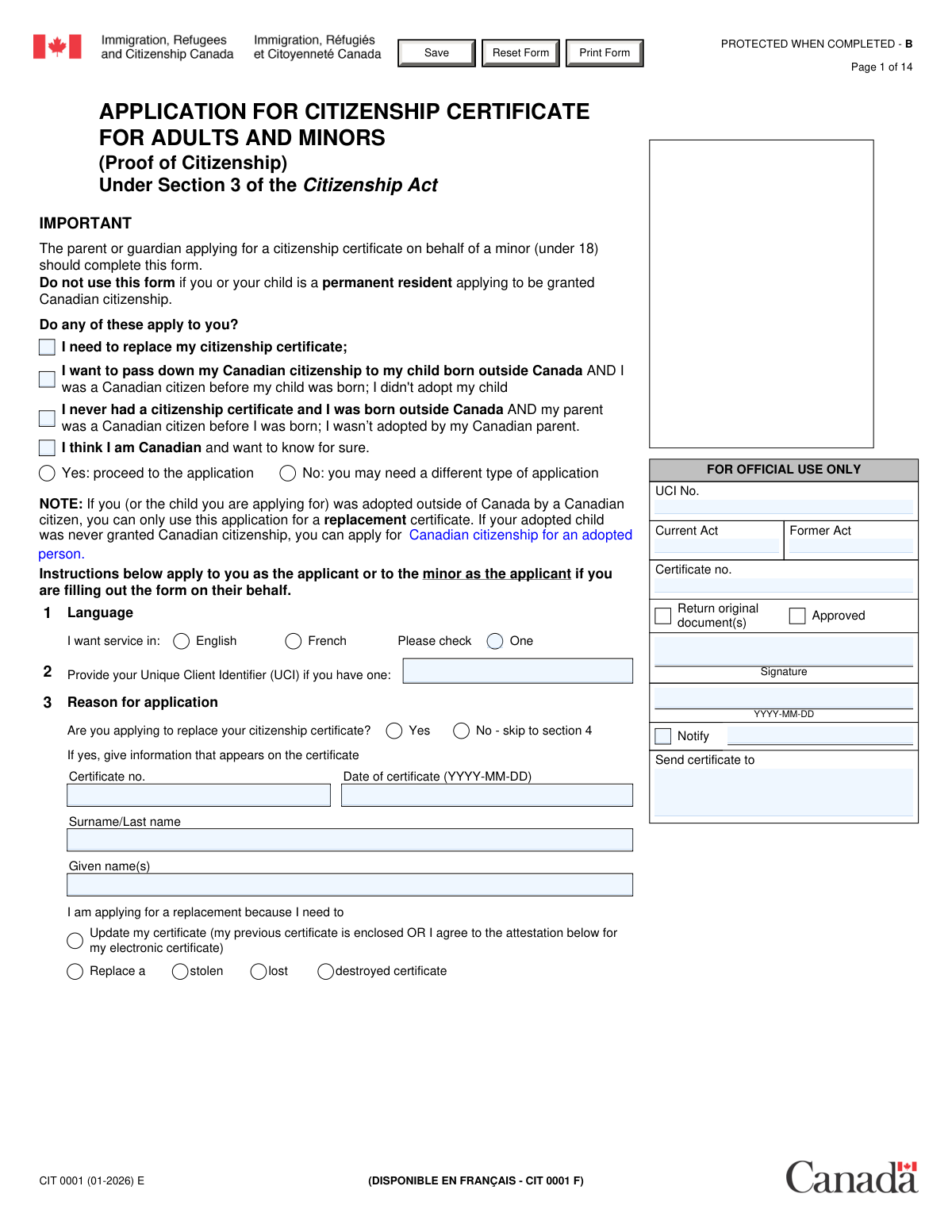
Yes! You can use AI to fill out Form CIT 0001, Application for a Citizenship Certificate (Proof of Citizenship)
Form CIT 0001, Application for a Citizenship Certificate, is a document used by individuals to apply for proof of Canadian citizenship from Immigration, Refugees and Citizenship Canada (IRCC). It is essential for those who need to obtain their first citizenship certificate, replace a lost, stolen, or damaged one, or get an official determination of their citizenship status. Today, this comprehensive form can be filled out quickly and accurately using AI-powered services like Instafill.ai, which can also convert non-fillable PDF versions into interactive fillable forms.
Our AI automatically handles information lookup, data retrieval, formatting, and form filling.
It takes less than a minute to fill out CIT 0001 using our AI form filling.
Securely upload your data. Information is encrypted in transit and deleted immediately after the form is filled out.
Form specifications
| Form name: | Form CIT 0001, Application for a Citizenship Certificate (Proof of Citizenship) |
| Number of fields: | 356 |
| Number of pages: | 14 |
| Language: | English |
Instafill Demo: How to fill out PDF forms in seconds with AI
How to Fill Out CIT 0001 Online for Free in 2026
Are you looking to fill out a CIT 0001 form online quickly and accurately? Instafill.ai offers the #1 AI-powered PDF filling software of 2026, allowing you to complete your CIT 0001 form in just 37 seconds or less.
Follow these steps to fill out your CIT 0001 form online using Instafill.ai:
- 1 Navigate to Instafill.ai and upload Form CIT 0001, or select it from their library of official documents.
- 2 Answer the initial questions to specify your application's purpose, such as applying for a new certificate, replacing a lost one, or confirming your status.
- 3 Use the AI-guided interface to enter your personal information, including name, date of birth, physical descriptors, and any requested changes.
- 4 Complete the detailed sections on your parents' and grandparents' citizenship history, as the AI prompts you for the necessary information to establish your claim.
- 5 Provide your current mailing address, contact details, and indicate if you are using a representative.
- 6 Carefully review all the information populated by the AI, make any corrections, and then sign the declaration section.
- 7 Download the completed CIT 0001 form, print it, and submit it to Immigration, Refugees and Citizenship Canada (IRCC) with all required supporting documents and fees.
Our AI-powered system ensures each field is filled out correctly, reducing errors and saving you time.
Why Choose Instafill.ai for Your Fillable CIT 0001 Form?
Speed
Complete your CIT 0001 in as little as 37 seconds.
Up-to-Date
Always use the latest 2026 CIT 0001 form version.
Cost-effective
No need to hire expensive lawyers.
Accuracy
Our AI performs 10 compliance checks to ensure your form is error-free.
Security
Your personal information is protected with bank-level encryption.
Frequently Asked Questions About Form CIT 0001
This form is an Application for a Citizenship Certificate (Proof of Citizenship). You should use it if you need to replace a lost or stolen certificate, or if you are applying for your first certificate to prove you are a Canadian citizen through a parent.
You should fill out this form if you need to replace your citizenship certificate, want to pass citizenship to your child born abroad, or believe you are a Canadian citizen through descent but have never had a certificate. If you were adopted by a Canadian citizen, you may need a different application for a first-time certificate.
A UCI is an 8 or 10-digit number assigned by Immigration, Refugees and Citizenship Canada (IRCC). If you have previously dealt with IRCC, you can find this number on official documents they have sent you.
On the form, you must indicate that the certificate was stolen and provide details about the incident, including when and where it happened. You should also state whether you reported the theft to the police.
Yes, the application allows you to choose whether you want a traditional paper certificate sent by mail or a digital electronic certificate (PDF). If you choose the electronic option, you must provide a valid email address.
The form has a section to request changes to personal details. You must check the box for a name change, enter the new name exactly as you want it to appear, and provide the required supporting legal documents as per the instruction guide.
This information is essential for IRCC to determine your eligibility for citizenship through descent. Your claim may depend on your parents' or grandparents' citizenship status at the time of your birth.
Your certificate will be sent to the mailing address you provide on the form. If you live outside of Canada or the USA, it will be sent to the nearest Canadian embassy, high commission, or consulate.
No, you must leave all sections marked 'For official use only' completely blank. These areas are reserved for immigration officials to process your application.
The required documents depend on your situation, but you will likely need your birth certificate and documents for your parents. If you are requesting a change of name or date of birth, you must provide legal documents supporting that change as specified in the instruction guide.
Yes, services like Instafill.ai use AI to help you accurately auto-fill form fields, which can save you time and reduce errors. These tools can make completing complex forms much easier.
Simply upload the form to the Instafill.ai platform. The AI will analyze the document and create an interactive version that you can fill out directly in your web browser, with helpful prompts and auto-filling capabilities.
If you have a non-fillable or 'flat' PDF, you can use a service like Instafill.ai. It can convert the non-interactive PDF into a fillable form that you can easily complete and sign online.
You must declare that all information is true and complete. Providing false information can result in your application being denied, your citizenship certificate being revoked, and potential charges under the Citizenship Act or the Criminal Code.
Compliance CIT 0001
Validation Checks by Instafill.ai
1
Ensures Exclusive Application Purpose Selection
This check verifies that the applicant selects at least one primary purpose for the application (e.g., 'replace my certificate') and also selects 'Yes: proceed to the application'. It ensures that the 'No: you may need a different type of application' option is not selected concurrently with a valid purpose. This is critical for routing the application correctly and preventing submissions from users who may be on the wrong form. If validation fails, the user is prompted to correct their selection before proceeding.
2
Validates Singular Language Preference
This validation ensures that the applicant selects exactly one language preference, either 'English' or 'French', but not both. The form is designed to provide services in one official language per application. This check prevents ambiguity in communication preferences. A failed validation would require the user to select only one of the two language options.
3
Conditional Requirement for Previous Certificate Details
This check is triggered if the applicant selects 'Yes' to the question 'Are you applying to replace your citizenship certificate?'. It then verifies that the 'Certificate number', 'Date of certificate', 'Surname / Last name on certificate', and 'Given name(s) on certificate' fields are all completed. This information is essential for locating and verifying the previous certificate being replaced. If these fields are empty after selecting 'Yes', the submission will be blocked until the required information is provided.
4
Mandatory Reason for Certificate Replacement
If an applicant is replacing a certificate, this validation ensures they select a specific reason, such as 'stolen', 'lost', 'destroyed', or 'Update'. This information is required for internal processing and statistical purposes, and may trigger different documentation requirements. Failure to select a reason will prevent the user from moving forward, as the context for the replacement is a mandatory data point.
5
Requires Details for Stolen, Lost, or Destroyed Certificates
This validation ensures that if an applicant indicates their certificate was 'stolen', 'lost', or 'destroyed', the 'Details of the theft/loss/destruction' text field is not empty. This narrative is a required part of the application, providing context for the replacement request and forming part of the official record. If the reason is selected but the details are missing, the form will prompt the user to provide a description of the circumstances.
6
Requires Email for Electronic Certificate Selection
This check verifies that if the applicant selects 'Electronic (digital PDF format)' as their desired certificate type, the 'Email address' and 'Confirm email address' fields are filled out. The email address is the sole method for delivering an electronic certificate, making it a critical piece of information. If this validation fails, the user will be unable to submit the form until a valid email address is provided and confirmed.
7
Validates Date of Birth Format and Plausibility
This validation checks that the applicant's 'Date of birth' is entered in the correct YYYY-MM-DD format and represents a logical date. It ensures the date is not in the future and that the applicant's age is within a reasonable range (e.g., not older than 120 years). This prevents data entry errors and ensures the integrity of a core identifier on the legal document. An invalid or implausible date would trigger an error message.
8
Ensures Consistent Height Measurement Units
This check validates that height is provided in one unit of measure only, either centimeters or feet and inches, but not both. If the 'Height (cm)' field is filled, the 'Height (ft)' and 'Height (in)' fields must be empty, and vice versa. This prevents data ambiguity and ensures a single, accurate measurement is recorded. A validation failure would require the user to clear one set of fields.
9
Validates Conditional Logic for Personal Detail Changes
If an applicant selects 'Yes' to request a change to personal details, this validation ensures they both select a specific type of change (name, DOB, or gender) and fill out the corresponding new information fields. For example, checking 'I want a different name...' makes the 'Requested Surname' and 'Requested Given Name(s)' fields mandatory. This ensures that a request for a change is complete and actionable. An incomplete request will block submission.
10
Verifies Logical Chronology of Parent's Dates
This validation checks for logical consistency between the dates provided for a parent, such as 'Date of birth', 'Date of marriage', and 'Date of death'. It ensures that the date of marriage is after the date of birth, and the date of death is after both the date of birth and date of marriage. This prevents the submission of impossible timelines and maintains data integrity. If a chronological conflict is found, an error will be displayed.
11
Confirms Matching Email Addresses
This validation ensures that the entry in the 'Email address' field is identical to the entry in the 'Confirm email address' field. This is a standard user interface check to minimize the risk of typos in a critical contact field, which is especially important for receiving notifications or an electronic certificate. If the two fields do not match, the user will be prompted to correct the information before the form can be submitted.
12
Validates UCI Number Format
This check verifies that if a Unique Client Identifier (UCI) is provided, it adheres to the official format (e.g., an 8 or 10-digit number, sometimes formatted as XXXX-XXXX). Correct formatting is crucial for the system to accurately identify and retrieve the applicant's file within the IRCC database. An incorrectly formatted UCI would be rejected to prevent processing delays and errors.
13
Cross-Validates Certificate Date Against Applicant's Birth Date
This logical check ensures that the 'Date of certificate' entered for a previous certificate is after the applicant's 'Date of birth'. It is impossible for a person to be issued a citizenship certificate before they were born. This simple cross-field validation catches significant data entry errors and ensures the timeline of events is plausible. A failure would result in an error message indicating the logical inconsistency.
14
Ensures Mandatory Declaration Checkboxes are Ticked
This validation confirms that all checkboxes in the final declaration section are checked before submission. These declarations are legally binding attestations regarding the truthfulness of the information provided and the applicant's understanding of the consequences of misrepresentation. The form cannot be legally processed without the applicant's explicit agreement to all declarations, so submission is blocked until they are all checked.
15
Validates Exclusive Gender Selection
This check ensures that for any gender selection section on the form, the applicant chooses exactly one option: 'F Female', 'M Male', or 'X Another gender'. The system must prevent the selection of multiple options or no option at all. This is essential for recording a single, unambiguous gender identity on the official certificate. A validation failure would require the user to make a single selection.
Common Mistakes in Completing CIT 0001
Applicants often see an empty box and feel compelled to fill it, not noticing the 'For official use only' label. This can confuse processing officers and may require them to manually correct the form, causing delays. To avoid this, carefully read the label for every field and leave any section marked for official or government use completely blank.
The initial section determines the application's context (e.g., replacement vs. proof of citizenship). Applicants may misunderstand the nuanced legal descriptions and choose the wrong option, leading to their application being returned because it doesn't match their supporting documents or actual eligibility. It's crucial to read each option carefully and consult the instruction guide before proceeding to ensure you are using the correct form for your situation.
The form contains many instructions like 'If No - skip to section 4'. Applicants often miss these cues and either fill out sections they shouldn't or skip sections they should complete. This results in an incomplete or contradictory application, causing significant processing delays or rejection. Always follow the flow of the form precisely, paying close attention to conditional 'if/then' statements.
Applicants may use nicknames, abbreviations, or a different name than what appears on their official documents like birth certificates. This creates a discrepancy that must be investigated, delaying the application. Always enter your full legal name exactly as it appears on your supporting documents, and use the 'Other names' field for any aliases, married names, or former names.
The form consistently specifies the YYYY-MM-DD format for dates. Applicants frequently use their local format (e.g., MM/DD/YYYY or DD-MM-YYYY), which can cause data entry errors and ambiguity, potentially delaying the application. Using an AI-powered form filling tool like Instafill.ai can help prevent this by automatically validating and formatting dates correctly as you type.
The sections on parents and grandparents are complex and require detailed historical data which can be hard to find. Applicants often leave fields blank if they don't have the information, but this is treated as an incomplete answer. It is better to write 'Unknown' or 'N/A' (Not Applicable) where appropriate and provide an explanation if required, as this shows the question was considered and answered to the best of your ability.
The form asks for an email address and a confirmation, but applicants sometimes make a typo in the first field and then copy-paste it into the second. Since the electronic certificate and all correspondence are sent to this address, a mistake means the applicant will not receive critical updates or their certificate. Always type the email address carefully in both fields without using copy-paste to ensure accuracy.
Forgetting to sign and date the declaration section is a critical error that renders the entire application invalid. The application will be returned unprocessed, forcing the applicant to start over from the beginning. Always perform a final review of the form, specifically checking the last pages for all required signature and date fields before submission.
Throughout the form, checking 'Yes' to certain questions triggers a requirement to provide a detailed explanation in a subsequent text box. Applicants often check the box but forget or neglect to write the mandatory explanation. This is considered an incomplete answer and will halt the processing of the application until the missing information is provided via a follow-up request.
The form asks for a UCI 'if you have one.' New applicants may not have a UCI, but some feel pressured to fill the field and mistakenly enter a passport number or other irrelevant ID. This can cause file linkage errors within the immigration system. Only enter the 8 or 10-digit UCI if you have previously dealt with IRCC and have been assigned one; otherwise, leave it blank.
The form allows applicants to request a change of name, date of birth, or gender, but these are legal changes that require specific supporting documents mentioned in the instruction guide. Applicants sometimes check these boxes to correct a simple typo, or check them without including the required proof. This leads to rejection or lengthy delays. Only use these sections for official, documented changes and ensure all required evidence is attached.
This form is a complex PDF that may not be fillable on all devices, leading people to print and fill it by hand, which can be illegible. If the form is only available as a flat, non-fillable PDF, it can be difficult to complete cleanly. Tools like Instafill.ai can convert such documents into an interactive, fillable version, ensuring all entries are clear, properly formatted, and validated before you print for submission.
Saved over 80 hours a year
“I was never sure if my IRS forms like W-9 were filled correctly. Now, I can complete the forms accurately without any external help.”
Kevin Martin Green
Your data stays secure with advanced protection from Instafill and our subprocessors

Robust compliance program
Transparent business model
You’re not the product. You always know where your data is and what it is processed for.
ISO 27001, HIPAA, and GDPR
Our subprocesses adhere to multiple compliance standards, including but not limited to ISO 27001, HIPAA, and GDPR.
Security & privacy by design
We consider security and privacy from the initial design phase of any new service or functionality. It’s not an afterthought, it’s built-in, including support for two-factor authentication (2FA) to further protect your account.
Fill out CIT 0001 with Instafill.ai
Worried about filling PDFs wrong? Instafill securely fills form-cit-0001-application-for-a-citizenship-certificate-proof-of-citizenship forms, ensuring each field is accurate.