Yes! You can use AI to fill out Form CIV-140, Declaration of Demurring or Moving Party Regarding Meet and Confer
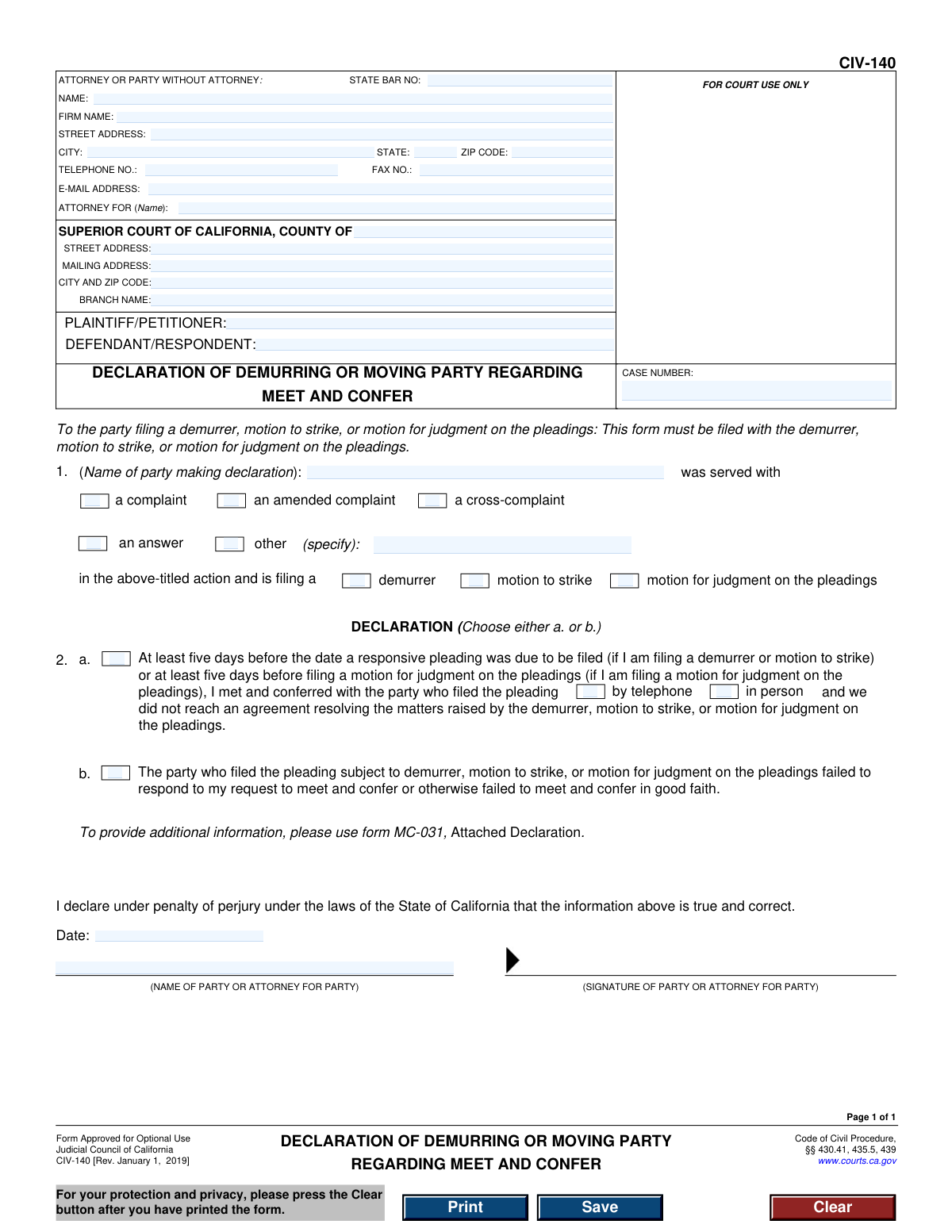
The Declaration of Demurring or Moving Party Regarding Meet and Confer, Form CIV-140, is a required document in California civil court proceedings. It serves as a sworn statement confirming that the party filing a demurrer or similar motion has complied with the legal requirement to 'meet and confer' with the opposing party in an attempt to resolve the issues without court intervention. This process is mandated by the California Code of Civil Procedure to promote efficiency and reduce court workload. Today, this form can be filled out quickly and accurately using AI-powered services like Instafill.ai, which can also convert non-fillable PDF versions into interactive fillable forms.
Rather not fill this in by hand? Instafill is an online form filler that completes PDF forms automatically — upload the blank form, answer a few questions, and the AI fills every field.
Form specifications
| Form name: | Form CIV-140, Declaration of Demurring or Moving Party Regarding Meet and Confer |
| Number of pages: | 1 |
| Field instructions: | CIV-140 Instructions |
| Filled form examples: | CIV-140 Examples |
| Language: | English |
Our AI automatically handles information lookup, data retrieval, formatting, and form filling.
It takes less than a minute to fill out CIV-140 using our AI form filling.
Securely upload your data. Information is encrypted in transit and deleted immediately after the form is filled out.
Instafill Demo: How to fill out PDF forms in seconds with AI
How to Fill Out CIV-140 Online for Free in 2026
Are you looking to fill out a CIV-140 form online quickly and accurately? Instafill.ai offers the #1 AI-powered PDF filling software of 2026, allowing you to complete your CIV-140 form in just 37 seconds or less.
Follow these steps to fill out your CIV-140 form online using Instafill.ai:
- 1 Navigate to Instafill.ai and upload or select the CIV-140 form.
- 2 Provide the court and case information, including the county, case number, and the names of the plaintiff and defendant.
- 3 Enter your information as the attorney or party without an attorney, including your name, address, and contact details.
- 4 In Section 1, identify yourself as the declarant and specify the type of pleading you are responding to (e.g., complaint, cross-complaint) and the motion you are filing (e.g., demurrer, motion to strike).
- 5 In Section 2, check the appropriate box to declare whether you met and conferred with the opposing party or if they failed to respond to your attempts.
- 6 Review all the information auto-filled by the AI for accuracy and make any necessary corrections.
- 7 Date and sign the declaration under penalty of perjury before downloading the completed form for filing with the court.
Our AI-powered system ensures each field is filled out correctly, reducing errors and saving you time.
Why Choose Instafill.ai for Your Fillable CIV-140 Form?
Speed
Complete your CIV-140 in as little as 37 seconds.
Up-to-Date
Always use the latest 2026 CIV-140 form version.
Cost-effective
No need to hire expensive lawyers.
Accuracy
Our AI performs 10 compliance checks to ensure your form is error-free.
Security
Your personal information is protected with bank-level encryption.
Frequently Asked Questions About CIV-140
This form is a declaration to the court that you have complied with the legal requirement to 'meet and confer' with the opposing party before filing a demurrer, motion to strike, or motion for judgment on the pleadings.
The party who is filing a demurrer, motion to strike, or motion for judgment on the pleadings must complete and file this form along with their motion.
You must file this declaration at the same time you file your demurrer, motion to strike, or motion for judgment on the pleadings with the court.
It is a required process where you must contact the party who filed the pleading you are challenging and make a good faith effort to discuss the issues, either by telephone or in person, to try and resolve them without court action.
You must conduct the meet and confer discussion at least five days before the deadline for filing your responsive pleading (for a demurrer or motion to strike), or at least five days before filing your motion for judgment on the pleadings.
Check box 2a if you met with the other party but did not reach an agreement. Check box 2b if the other party failed to respond to your request to meet or did not participate in the discussion in good faith.
If the other party fails to respond or participate, you should check box 2b on the form. It is wise to keep records of your attempts to contact them as evidence of your good faith effort.
You will need the full case caption information, including the court, case number, and party names, as well as the date and method of your meet and confer attempt.
Yes, services like Instafill.ai use AI to help you accurately auto-fill form fields with your case and personal information, which saves time and helps reduce errors.
You can upload the CIV-140 PDF to the Instafill.ai platform. The service will make the document fillable online, and you can provide your information once to have it automatically and accurately placed in all the correct fields.
Services like Instafill.ai can convert flat, non-fillable PDFs into interactive forms. Simply upload the file, and the platform will make it so you can easily type your information directly onto the form.
The form directs you to use Form MC-031, Attached Declaration, if you need to provide additional information or a more detailed explanation of your meet and confer efforts.
Yes, by signing this form, you are declaring under penalty of perjury under the laws of the State of California that the information you have provided is true and correct.
Compliance CIV-140
Validation Checks by Instafill.ai
1
Case Number Presence
Verifies that the 'CASE NUMBER' field is not empty. The case number is a critical identifier for routing and filing the document correctly with the court. A missing case number would cause the document to be rejected or misfiled.
2
State Bar Number for Attorneys
Ensures that if an attorney's name is provided in the 'ATTORNEY OR PARTY WITHOUT ATTORNEY' section, the 'STATE BAR NO' field is also filled with a numeric value. This is required for identifying and verifying the attorney's standing with the State Bar. Failure to provide it can lead to rejection of the filing.
3
Valid Email Address Format
Checks that the value entered in the 'E-MAIL ADDRESS' field follows the standard format for an email address (e.g., [email protected]). This is important for ensuring that electronic communications and service from the court or other parties are deliverable. An invalid format would prevent successful communication.
4
Party Roles Identification
Validates that both the 'PLAINTIFF/PETITIONER' and 'DEFENDANT/RESPONDENT' fields contain text. These fields identify the primary parties to the litigation, and their absence makes the document contextually incomplete. The form cannot be properly associated with a case without identifying the parties.
5
Declarant Name Presence
Ensures that the name of the party making the declaration is filled in section 1. This identifies the individual who is attesting to the facts in the declaration. Without this name, the declaration lacks a declarant and is legally insufficient.
6
Pleading Served Selection
Verifies that at least one checkbox is selected in section 1 to indicate the type of pleading that was served (e.g., 'a complaint', 'an answer'). This information is necessary to establish the context for the meet and confer declaration. The form is incomplete without this selection.
7
Conditional 'Other' Pleading Specification
If the 'other' checkbox is selected in section 1, this validation ensures the accompanying '(specify)' text field is not empty. This provides necessary clarification that is legally required when a standard option is not chosen. An empty specification field makes the 'other' selection meaningless.
8
Filing Action Selection
Confirms that at least one checkbox is selected in section 1 to indicate the action being filed (e.g., 'demurrer', 'motion to strike'). This defines the purpose of the declaration itself. The form is invalid if it does not state which motion it supports.
9
Exclusive Declaration Choice (2.a or 2.b)
Validates that exactly one of the two main declaration options, checkbox '2.a.' or '2.b.', is selected. These options are mutually exclusive and one is required to explain the outcome of the meet and confer process. Selecting both or neither makes the declaration logically inconsistent and invalid.
10
Conditional Meet and Confer Method
If declaration option '2.a.' is selected, this check ensures that a method of conference ('by telephone' or 'in person') is also selected. This detail is a required part of the declaration under 2.a. Failure to specify the method makes the declaration incomplete.
11
Valid Declaration Date
Ensures the 'Date' field in the signature block contains a valid, non-future date. The date of signature is legally significant as it attests to when the declaration was made under penalty of perjury. A future date is logically impossible and would invalidate the document.
12
Signature Name Presence
Verifies that the '(NAME OF PARTY OR ATTORNEY FOR PARTY)' field in the signature block is filled out. This printed name clarifies the identity of the signatory. A missing name makes the signature difficult to attribute and can lead to rejection.
13
Signature Field Completion
Checks that the '(SIGNATURE OF PARTY OR ATTORNEY FOR PARTY)' field is not empty. The signature is what makes the declaration legally binding under penalty of perjury. In an electronic system, this may be a typed '/s/ Name' or a digital signature, but it cannot be blank.
14
Zip Code Format
Validates that all 'ZIP CODE' fields contain a value that conforms to the 5-digit or 9-digit (ZIP+4) format. Correctly formatted zip codes are essential for mail delivery and for accurately identifying court and party locations. Incorrect formats can lead to returned mail and service issues.
Common Mistakes in Completing CIV-140
Filers often mistype the case number or forget to enter it entirely, especially when handling multiple cases. A wrong or missing case number is a critical error that will cause the court clerk to reject the filing or misfile the document, leading to significant delays and potentially missed deadlines. To avoid this, always double-check the case number against official court records. AI-powered tools like Instafill.ai can help by saving and auto-populating correct case information across all related documents, ensuring consistency and accuracy.
In large counties, a single Superior Court may have multiple branches. Filers often mistakenly list the main courthouse address instead of the specific branch where the case is assigned, causing the document to be sent to the wrong location. This leads to filing delays and potential rejection by the clerk. Always verify the correct branch name and address from the initial complaint or other court notices before filling out this section.
Parties, especially those representing themselves, may leave fields like State Bar No. (for attorneys), fax number, or email address blank. Courts and opposing counsel rely on this information for official communication, and its absence can lead to missed notices, procedural disadvantages, and delays. Ensure every field is filled out completely and accurately. Using a tool like Instafill.ai can store your contact profile and automatically populate these fields correctly every time.
The case caption requires precise identification of the parties. In complex litigation with cross-complaints, it's easy to confuse the roles of Plaintiff, Defendant, and others. Listing the parties incorrectly can create confusion and may lead to the document being rejected for not conforming to the official case record. Always copy the party names and their roles exactly as they appear on the court-filed complaint or other official documents.
In section 1, the filer must check boxes to indicate which pleading is being challenged (e.g., 'complaint') and what type of motion is being filed (e.g., 'demurrer'). When rushing, filers often forget to check these boxes, making the declaration incomplete and meaningless. An incomplete declaration will be rejected by the court, delaying the hearing on your motion and creating extra work.
The name in section 1 ('Name of party making declaration') must be the individual who actually participated in the meet and confer discussion, which is typically the attorney, not their client. Entering the client's name instead of the attorney's name is a common mistake that makes the declaration factually incorrect under penalty of perjury. The person signing the declaration should be the same person named in section 1.
Section 2 requires the filer to choose between option 'a' (meet and confer occurred) and 'b' (the opposing party failed to participate). A filer might incorrectly select 'a' after a brief, unsuccessful email exchange, when 'b' might be more appropriate. This is a substantive declaration, and a misrepresentation can have serious consequences, including court sanctions. Choose the option that most accurately reflects the events that transpired.
An unsigned or undated declaration is legally invalid and will be rejected outright by the court clerk. This mistake often happens when filers are in a hurry and print the form without signing it, or they forget to enter the date of signature. This can be a fatal error, causing you to miss a filing deadline and forfeit your right to bring the motion. Always perform a final check for a valid, dated signature before submission.
The form notes that MC-031 (Attached Declaration) should be used for additional information. The meet and confer process can be complex, involving multiple attempts or detailed discussions that cannot be summarized by checking a box. Failing to attach a declaration explaining these details can weaken your position and may lead a judge to find your meet and confer efforts insufficient. When in doubt, provide a detailed account on an attached declaration.
Section 2a requires affirming the meet and confer happened 'at least five days before' a responsive pleading was due. Filers may miscalculate this deadline or conduct the meeting too late, making their declaration factually incorrect. This procedural error can invalidate the entire motion, forcing the party to file an answer and waive their objections. Carefully calendar all deadlines to ensure compliance with statutory timeframes.
Many court forms are distributed as flat, non-fillable PDFs, leading to handwritten submissions that are prone to errors and can be difficult to read. This can result in data entry mistakes by the court clerk, rejection of the form for being illegible, or a poor impression on the judge. To avoid this, use a tool like Instafill.ai that can convert non-fillable PDFs into interactive, fillable forms, ensuring a clean, professional, and accurate submission.
Saved over 80 hours a year
“I was never sure if my IRS forms like W-9 were filled correctly. Now, I can complete the forms accurately without any external help.”
Kevin Martin Green
Your data stays secure with advanced protection from Instafill and our subprocessors




Robust compliance program
Transparent business model
You’re not the product. You always know where your data is and what it is processed for.
ISO 27001, HIPAA, and GDPR
Our subprocesses adhere to multiple compliance standards, including but not limited to ISO 27001, HIPAA, and GDPR.
Security & privacy by design
We consider security and privacy from the initial design phase of any new service or functionality. It’s not an afterthought, it’s built-in, including support for two-factor authentication (2FA) to further protect your account.
Fill out CIV-140 with Instafill.ai
Worried about filling PDFs wrong? Instafill securely fills form-civ-140-declaration-of-demurring-or-moving-party-regarding-meet-and-confer forms, ensuring each field is accurate.
