
Yes! You can use AI to fill out Form DE 4, Employee's Withholding Allowance Certificate
Don't type 47 fields by hand. Tell our AI about yourself, or upload a document you already have, and it fills every field in seconds. You check it, then download, print or sign.
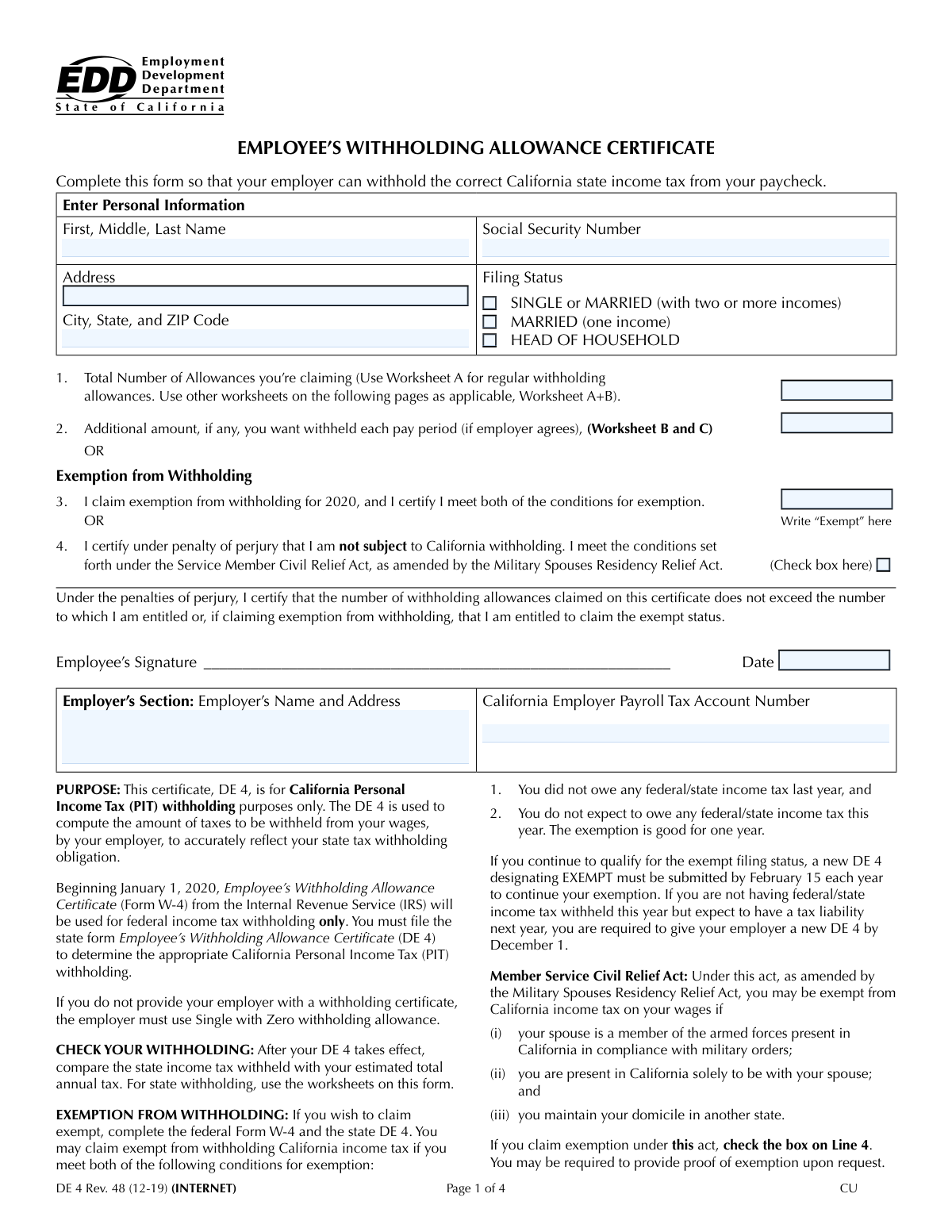
The AI does the filling. You just check it.
No typing into boxes, nothing to install.
What this form asks for
The AI fills all of it, from your answers or your documents.
The AI checks your answers before you download
14 checks built for this form, so a wrong date or a missing answer is caught before anyone else sees it.
Checks that the Social Security Number is provided and follows the 9-digit format, either as a continuous string of numbers or with hyphens (XXX-XX-XXXX). This is a critical field for correctly identifying the employee for tax reporting purposes. A missing or malformed SSN will prevent the form from being processed by payroll and tax authorities, leading to rejection.
Validates that only one filing status box ('Single or Married (two or more incomes)', 'Married (one income)', or 'Head of Household') is selected. Selecting multiple statuses is a logical contradiction that makes it impossible to determine the correct tax withholding table. The submission should be rejected, requiring the user to select only one option.
Ensures that if the employee claims exemption from withholding by writing 'Exempt', the sections for 'Regular Withholding Allowances' and 'Estimated Deductions' are left blank. Filling out allowance details while also claiming exemption is a direct contradiction of the form's rules. This check prevents logically invalid forms that would require manual correction and clarification.
Verifies that the 'Signature Date' field contains a valid date and is not a date in the future. The signature date establishes when the withholding instructions become effective. An invalid or future date can cause legal and processing issues, so the form should be rejected until a valid date is provided.
Confirms that the value entered for 'Total Regular Withholding Allowances' is the correct mathematical sum of the individual allowances claimed for self, spouse, blindness, and dependents (lines A through E). This check ensures the integrity of the worksheet calculations, as this total directly impacts the amount of tax withheld. An incorrect sum would lead to incorrect withholding.
Checks that if an allowance is claimed for a spouse or for a spouse's blindness, the filing status selected is one of the 'Married' options. Claiming a spousal allowance while filing as 'Single' or 'Head of Household' is a logical error. This validation prevents incorrect allowance claims and ensures the form data is internally consistent.
And 8 more checks
- Required Employee Information
- ZIP Code Format
- Required Employer Information
- Standard Deduction Value Constraint
- Estimated Deductions Worksheet Calculation Check
- Worksheet C Calculation Integrity
- Conditional Worksheet Logic
- Total Allowances Consistency
Let AI fill out your DE 4
No typing. Every field filled in seconds, checked, ready to sign.
How to Fill Out DE 4 Online for Free in 2026
What the AI walks you through.
- Navigate to Instafill.ai and upload your Form DE 4 or select it from the platform's template library.
- Enter your personal details, such as your full name, Social Security Number, and address, into the designated fields.
- Indicate your tax filing status—Single, Married, or Head of Household—based on your personal circumstances.
- Complete the form's worksheets to accurately determine your withholding allowances, considering dependents, deductions, and other income sources.
- Enter the total number of allowances you are claiming and specify any additional amount you wish to have withheld from each paycheck.
- Carefully review all entered information for accuracy, then electronically sign and date the form to certify it.
- Download the completed Form DE 4 and submit it to your employer for their payroll records.
Common Mistakes in Completing DE 4
The ones the AI is built to catch.
Selecting the Wrong Filing Status
Improperly Claiming 'Exempt' Status
Making Calculation Errors in the Allowance Worksheets
Entering an Incorrect Social Security Number
Ignoring Conditional 'Fill only if...' Instructions
Submitting an Unsigned or Undated Form
Entering the Wrong Additional Withholding Amount
Confusing Total Allowances with Number of Dependents
Omitting Apartment or Unit Numbers in the Address
Guessing on Estimated Deductions and Income
Frequently Asked Questions About DE 4
Is it really free for 7 days?
Can I fill other forms too?
How do I cancel?
How does the AI fill out DE 4?
What happens to my information?
How complex is DE 4 to fill out?
What is the purpose of this form?
Who needs to fill out this form?
Where do I submit the completed form?
How do I determine my filing status on the form?
How do I calculate my total withholding allowances?
What is the 'Additional Withholding Amount' field for?
What does it mean to claim 'Exempt' from withholding?
I am a military spouse. Do I need to pay California income tax?
Do I need to fill out all the worksheets on the form?
What happens if I claim the wrong number of allowances?
Can AI tools help me fill out this form?
How can I fill this form out online?
My employer gave me a PDF that I can't type into. What can I do?
Get your DE 4 filled out by AI
$0 today. Cancel before Nov 10 and you pay nothing.
Other forms like this one
employee forms: Form 1099-NEC, Nonemployee Compensation, Form W-4, Employee's Withholding Certificate, Form CA-1, Federal Employee's Notice of Traumatic Injury, Form 5884-A, Employee Retention Credit, Form 1099-NEC, Nonemployee Compensation, Form 1099-NEC, Nonemployee Compensation, Form 1099-NEC, Nonemployee Compensation, HR-Pol-Rec&Res-04 Employment Application Form (Recruitment of Permanent Employees), Commonwealth of Massachusetts Department of Industrial Accidents Form 110, Employee’s Claim, Commonwealth of Massachusetts Department of Industrial Accidents (DIA) Form 110, Employee’s Claim, Form 1099-NEC, Nonemployee Compensation, WTIA 401(k) Plan Rollover Contribution Employee Certification, BNSF Investment and Retirement Plan [401(k) Plan for Salaried Employees], Form 5500, Annual Return/Report of Employee Benefit Plan, Form 5500, Annual Return/Report of Employee Benefit Plan, The Principal Pension Plan Summary Plan Description: Cash Balance Formula for Employees and Individual Field, The Principal Pension Plan Summary Plan Description: Traditional and Cash Balance Formulas for Employees and Individual Field, Sensus USA Inc. 401(k) Plan Summary Plan Description (For Non-Union Employees), Paychex Retirement Services Employee Rollover Form, Employee’s Frequently Asked Questions: Leave of Absence
withholding forms: Excess Withdrawal Request and Form W-4R, Withholding Certificate for Nonperiodic Payments and Eligible Rollover Distributions, Form W-4, Employee's Withholding Certificate, Form 593, Real Estate Withholding, Form 8288, U.S. Withholding Tax Return, Form I-589, Application for Asylum and for Withholding of Removal, Form W-4P, Withholding Certificate, Form W-8IMY (Rev. October 2021), Certificate of Foreign Intermediary, Foreign Flow-Through Entity, or Certain U.S. Branches for United States Tax Withholding and Reporting, Form W-8BEN-E, Certificate of Status of Beneficial Owner for United States Tax Withholding and Reporting (Entities), Form W-4P (2026), Withholding Certificate for Periodic Pension or Annuity Payments, Form 8288, U.S. Withholding Tax Return for Certain Dispositions by Foreign Persons, Form W-4V, Voluntary Withholding Request, Arizona Form A1-QRT, Arizona Quarterly Withholding Tax Return, Form DE 4, Employee’s Withholding Allowance Certificate (Rev. 53), Form DE 4, Employee’s Withholding Allowance Certificate (Rev. 56), Form SS-8, Determination of Worker Status, Form W-8BEN-E, Certificate of Status of Beneficial Owner
employee withholding forms: Form W-4, Employee's Withholding Certificate, Form DE 4, Employee’s Withholding Allowance Certificate (Rev. 53), Form DE 4, Employee’s Withholding Allowance Certificate (Rev. 56)
Let AI fill out your DE 4
Your trial starts once a card is added. You pay nothing before Nov 10.
Our AI already knows this form, all 47 fields of it. Skip the typing: tell it about yourself, or upload what you have, and it fills the whole form in seconds.
- AI fills every field on all 4 pages, checkboxes included
- No typing into boxes: answer a few questions, or upload a document you already have, an old copy of this form, a photo of a document
- The AI checks the answers; you review and change anything before you download
- Download the finished PDF, print it, or sign it online
- Encrypted, and never used to train AI
Cancel before Nov 10 and you pay nothing.
A card is needed to start the trial. Cancel in two clicks from your account.
Terms · Privacy