Yes! You can use AI to fill out Form DISC-020, Requests for Admission
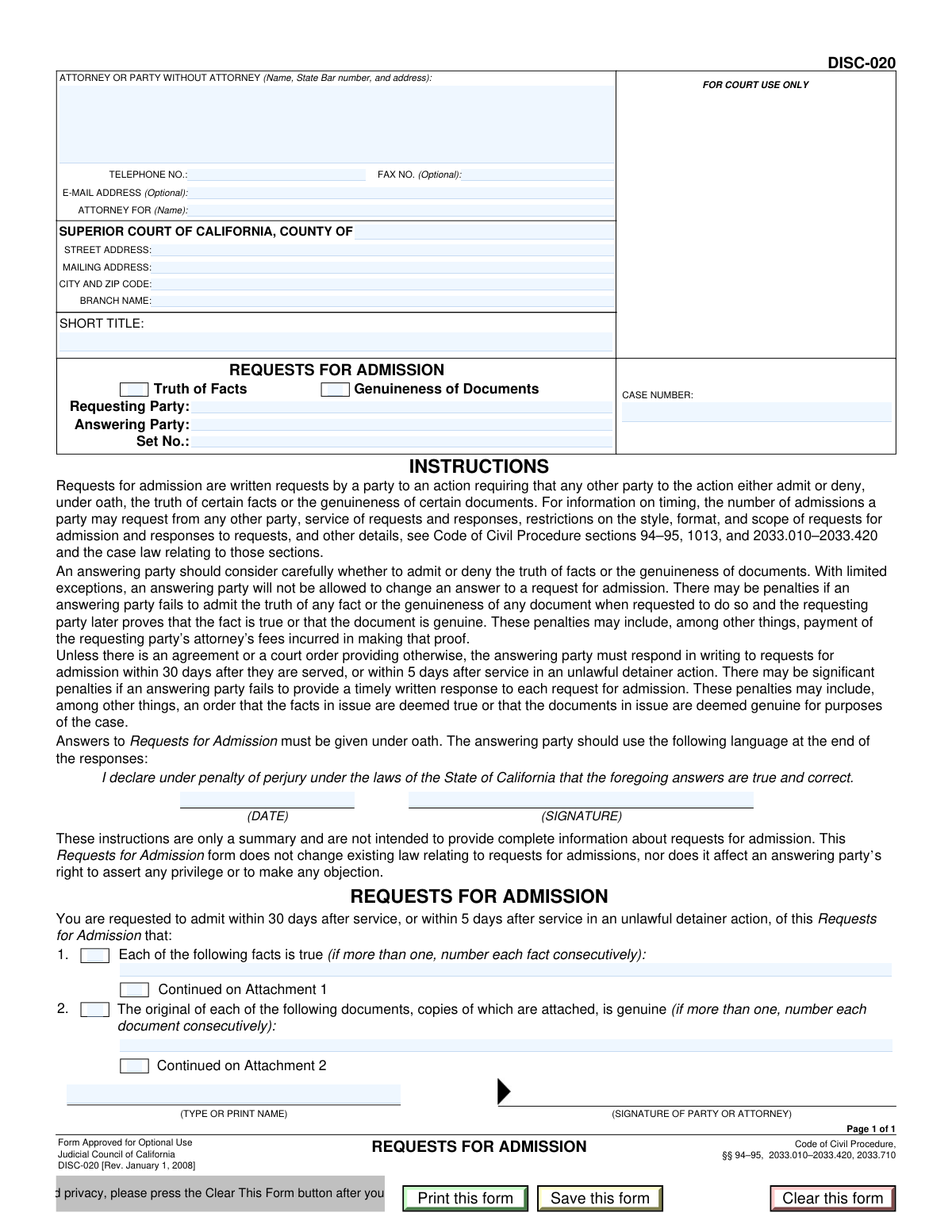
Form DISC-020, Requests for Admission, is a formal discovery tool approved for optional use by the Judicial Council of California. It is used during the litigation process to ask an opposing party to formally admit or deny specific factual statements or the authenticity of certain documents, which can help narrow the issues for trial. Using this form correctly is crucial for streamlining legal proceedings and potentially avoiding the costs of proving undisputed facts. Today, this form can be filled out quickly and accurately using AI-powered services like Instafill.ai, which can also convert non-fillable PDF versions into interactive fillable forms.
Our AI automatically handles information lookup, data retrieval, formatting, and form filling.
It takes less than a minute to fill out DISC-020 using our AI form filling.
Securely upload your data. Information is encrypted in transit and deleted immediately after the form is filled out.
Form specifications
| Form name: | Form DISC-020, Requests for Admission |
| Number of fields: | 30 |
| Number of pages: | 1 |
| Filled form examples: | Form DISC-020 Examples |
| Language: | English |
Instafill Demo: How to fill out PDF forms in seconds with AI
How to Fill Out DISC-020 Online for Free in 2026
Are you looking to fill out a DISC-020 form online quickly and accurately? Instafill.ai offers the #1 AI-powered PDF filling software of 2026, allowing you to complete your DISC-020 form in just 37 seconds or less.
Follow these steps to fill out your DISC-020 form online using Instafill.ai:
- 1 Navigate to Instafill.ai and upload or select the California Form DISC-020.
- 2 Use the AI assistant to input the court and case information, including the county, court address, and case number.
- 3 Enter the names of the requesting and answering parties, your name and contact details as the attorney or party, and the set number for this request.
- 4 Clearly type each fact you are requesting the other party to admit under the 'Truth of Facts' section, numbering them consecutively.
- 5 If applicable, list the documents for which you seek an admission of genuineness and ensure copies are attached to the form.
- 6 Review all the entered information, including the specific requests, for accuracy and completeness with the help of the AI-powered review tools.
- 7 Electronically or manually sign and date the form before serving it on the answering party according to the California Code of Civil Procedure.
Our AI-powered system ensures each field is filled out correctly, reducing errors and saving you time.
Why Choose Instafill.ai for Your Fillable DISC-020 Form?
Speed
Complete your DISC-020 in as little as 37 seconds.
Up-to-Date
Always use the latest 2026 DISC-020 form version.
Cost-effective
No need to hire expensive lawyers.
Accuracy
Our AI performs 10 compliance checks to ensure your form is error-free.
Security
Your personal information is protected with bank-level encryption.
Frequently Asked Questions About Form DISC-020
This form is used by one party in a lawsuit to ask another party to formally admit or deny that certain facts are true or that specific documents are genuine. It helps simplify and shorten the legal process by identifying undisputed facts before a trial.
The 'Requesting Party' (or their attorney) fills out this form to send to the 'Answering Party' in a legal case. The Answering Party does not fill out this specific form but must provide their answers in a separate written document.
You generally have 30 days after the requests are served on you to provide a written response. In unlawful detainer (eviction) cases, this is shortened to only 5 days.
Failure to respond within the deadline can have serious consequences. The court may order that all the facts and the genuineness of the documents in the request are automatically deemed admitted as true for the case.
Admitting the 'Truth of Facts' means you agree a specific statement is true. Admitting 'Genuineness of Documents' means you agree that a provided copy of a document, like a contract, is an authentic copy of the original.
The 'Set Number' is used to track discovery requests. If this is the first time you are sending Requests for Admission to a particular party, you would label it 'Set No.: 1'.
Your answers must be in writing and given under oath. Your response document must end with the statement 'I declare under penalty of perjury under the laws of the State of California that the foregoing answers are true and correct,' followed by your signature and the date.
If you fail to admit the truth of a fact and the requesting party later proves it is true, the court may order you to pay the attorney's fees and costs they incurred to prove it.
The form has checkboxes for 'Continued on Attachment 1' (for facts) and 'Continued on Attachment 2' (for documents). You can check these and list the additional items on separate attached pages.
The attorney for the requesting party, or the party themselves if they do not have an attorney, must sign the form before it is sent. The answering party signs their own separate response document, not this form.
Yes, services like Instafill.ai use AI to accurately auto-fill form fields with your case and party information, which saves time and helps prevent errors.
You can use a service like Instafill.ai to complete this form online. Simply upload the document, and the tool will create an interactive version for you to fill, save, and print.
If you have a non-fillable or 'flat' PDF, you can use a platform like Instafill.ai. It can convert the document into an interactive, fillable form that you can easily complete on your computer.
Compliance DISC-020
Validation Checks by Instafill.ai
1
Validates Case Number Format
Checks that the Case Number field conforms to the standard format used by the California Superior Court. This ensures the document can be correctly filed and associated with the existing case record. A malformed case number could lead to filing rejection or misfiling, causing significant delays.
2
Ensures State Bar Number is Valid for Attorneys
This validation verifies that if an attorney is listed, the State Bar number field contains a valid, numeric identifier. This is crucial for verifying the attorney's credentials and standing with the State Bar of California. Failure to provide a valid number when required may call the legitimacy of the representation into question.
3
Prevents Requesting and Answering Parties from Being Identical
This check ensures that the names entered for the 'Requesting Party' and 'Answering Party' are not the same. In legal discovery, a party cannot serve requests upon itself. This validation prevents a logical error that would make the entire request invalid and nonsensical.
4
Validates Set Number is a Positive Integer
This rule confirms that the 'Set No.' field contains a positive integer (e.g., 1, 2, 3). This number is used to uniquely identify and track different sets of admission requests sent between parties. An invalid or missing set number can create confusion and ambiguity in the discovery record, making it difficult to reference specific requests.
5
Requires Selection of At Least One Request Type
This validation ensures that either the 'Truth of Facts' or 'Genuineness of Documents' checkbox (or both) is selected. A request for admission must actually request something, and these checkboxes define the nature of the request. Submitting a form without selecting a request type would result in an empty, meaningless document that serves no legal purpose.
6
Requires Fact Details if 'Truth of Facts' is Checked
This check enforces that if the 'Truth of Facts' box is checked, the corresponding text area for listing facts must not be empty. It is illogical to request an admission of facts without specifying what those facts are. This prevents the submission of an incomplete and unenforceable request.
7
Requires Document Details if 'Genuineness of Documents' is Checked
This validation ensures that if the 'Genuineness of Documents' box is checked, the corresponding text area for listing documents is filled. The answering party cannot admit the genuineness of unspecified documents. This check prevents an incomplete submission and ensures the attached documents are properly identified.
8
Validates 'Attorney For' Name Consistency
This check verifies that the name listed in the 'ATTORNEY FOR (Name)' field matches either the 'Requesting Party' or another party officially involved in the case. This confirms that the attorney is representing a valid participant in the litigation. A mismatch could indicate a clerical error or an unauthorized filing.
9
Ensures All Court Information Fields are Complete
This validation confirms that the County, Street Address, City and ZIP Code, and Branch Name for the court are all filled in. This information is essential for identifying the correct jurisdiction and courthouse where the case is being heard. Incomplete court details can lead to the document being rejected by the clerk or filed in the wrong venue.
10
Ensures Verification Date is a Valid, Non-Future Date
This check validates that the 'DATE' field next to the signature line contains a properly formatted date that is not in the future. The date of signature is legally significant as it attests to the truthfulness of the statements as of that day. An invalid or future date would invalidate the declaration made under penalty of perjury.
11
Ensures Typed Name Matches Filer's Name
This validation compares the typed or printed name under the signature line with the 'ATTORNEY OR PARTY WITHOUT ATTORNEY' name at the top of the form. This ensures the person signing the document is the same person identified as the filer. A discrepancy could invalidate the signature and the legal effect of the document.
12
Validates Telephone Number Format
This check ensures the telephone number is entered in a standard, valid format (e.g., XXX-XXX-XXXX or (XXX) XXX-XXXX). Proper formatting is necessary for system processing and ensures that court staff or opposing counsel can successfully contact the filer. An improperly formatted number could be un-dialable, hindering communication.
13
Validates Optional Email Address Format
This rule checks that if an E-Mail Address is provided, it follows the standard '[email protected]' format. While optional, an invalid email address is useless for electronic communication and service. This validation helps ensure that if a party chooses to provide an email, it is a functional one.
14
Validates 'Continued on Attachment 1' Usage
This check ensures the 'Continued on Attachment 1' box can only be checked if the 'Truth of Facts' request type is selected. It is illogical to have an attachment for facts if no facts are being requested in the first place. This prevents user error and ensures the form's structure remains coherent.
Common Mistakes in Completing DISC-020
Users frequently enter the wrong court address or branch name, especially in large counties with multiple courthouses. This happens due to confusion about which specific branch is handling the case. Submitting a document to the wrong court location can lead to significant delays, missed deadlines, or outright rejection by the clerk's office, jeopardizing the legal standing of the request.
A critical error is swapping the names in the 'Requesting Party' and 'Answering Party' fields. This mistake, often made in haste, renders the document legally nonsensical as it incorrectly identifies who is making the demand and who must respond. To avoid this, carefully double-check that the 'Requesting Party' is your client (or you, if self-represented) and the 'Answering Party' is the opposing side.
Parties often overlook the 'Set No.' field, which is crucial for tracking discovery. Each set of requests sent to a party must be numbered sequentially (e.g., Set No. 1, Set No. 2). Failing to do so creates confusion, makes it difficult to manage discovery limits, and can lead to objections from the opposing counsel for being ambiguous.
Requests are often written in a way that is vague, ambiguous, or compound, asking for admission of multiple facts in a single request. This violates legal procedure and allows the answering party to object, defeating the purpose of the request. Each numbered request should be a single, simple, and direct statement of fact to ensure a clear admission or denial.
A common mistake is checking the 'Continued on Attachment' box but failing to include the actual attachment, or vice-versa. Similarly, when requesting admission of a document's genuineness, users forget to attach copies of the documents in question. An incomplete submission like this invalidates the related requests and requires re-serving the entire package, wasting time and resources.
The form requires both a signature and a typed or printed name of the attorney or party filing the request. Forgetting to physically sign the document or omitting the printed name can render the request invalid. An unsigned discovery document has no legal effect and will be disregarded by the court and the opposing party.
Attorneys sometimes forget to include their State Bar number next to their name in the header section. This is a mandatory piece of information for attorneys practicing in California. Its omission can lead to the document being rejected by the court clerk for being incomplete, causing delays in filing.
In the 'ATTORNEY FOR (Name):' field, users sometimes mistakenly write their own name or the law firm's name instead of the name of the party they represent (the plaintiff or defendant). This creates ambiguity about who the attorney is representing in the action. The field must contain the official name of the party involved in the lawsuit to be correct.
Many court forms are available as non-fillable PDFs, forcing users to print them and fill them out by hand. Using illegible handwriting for critical information like case numbers, party names, or the requests themselves can lead to filing errors or make the requests impossible for the opposing party to answer. To prevent this, it's best to use a fillable version of the form. AI tools like Instafill.ai can convert flat, non-fillable PDFs into interactive forms to ensure all entries are typed and legible.
The form requires the user to specify whether they are requesting the admission of 'Truth of Facts' or 'Genuineness of Documents' by checking the corresponding box. Users sometimes forget to check either box, making the entire request ambiguous and objectionable. It is essential to check the appropriate box to clearly define the nature of the admissions being sought in the document.
Saved over 80 hours a year
“I was never sure if my IRS forms like W-9 were filled correctly. Now, I can complete the forms accurately without any external help.”
Kevin Martin Green
Your data stays secure with advanced protection from Instafill and our subprocessors
Robust compliance program
Transparent business model
You’re not the product. You always know where your data is and what it is processed for.
ISO 27001, HIPAA, and GDPR
Our subprocesses adhere to multiple compliance standards, including but not limited to ISO 27001, HIPAA, and GDPR.
Security & privacy by design
We consider security and privacy from the initial design phase of any new service or functionality. It’s not an afterthought, it’s built-in, including support for two-factor authentication (2FA) to further protect your account.
Fill out DISC-020 with Instafill.ai
Worried about filling PDFs wrong? Instafill securely fills form-disc-020-requests-for-admission forms, ensuring each field is accurate.