
Instafill.ai
7 days free
AI form filling · 73 fields · 2 pages · done in seconds

Yes! You can use AI to fill out Form DR 2324, Drive Time Log Sheet

Don't type 73 fields by hand. Tell our AI about yourself, or upload a document you already have, and it fills every field in seconds. You check it, then download, print or sign.
7 days free, then $19.99/month · Cancel anytime
AI fills it, no typingEncrypted, never used to train AICancel in two clicks
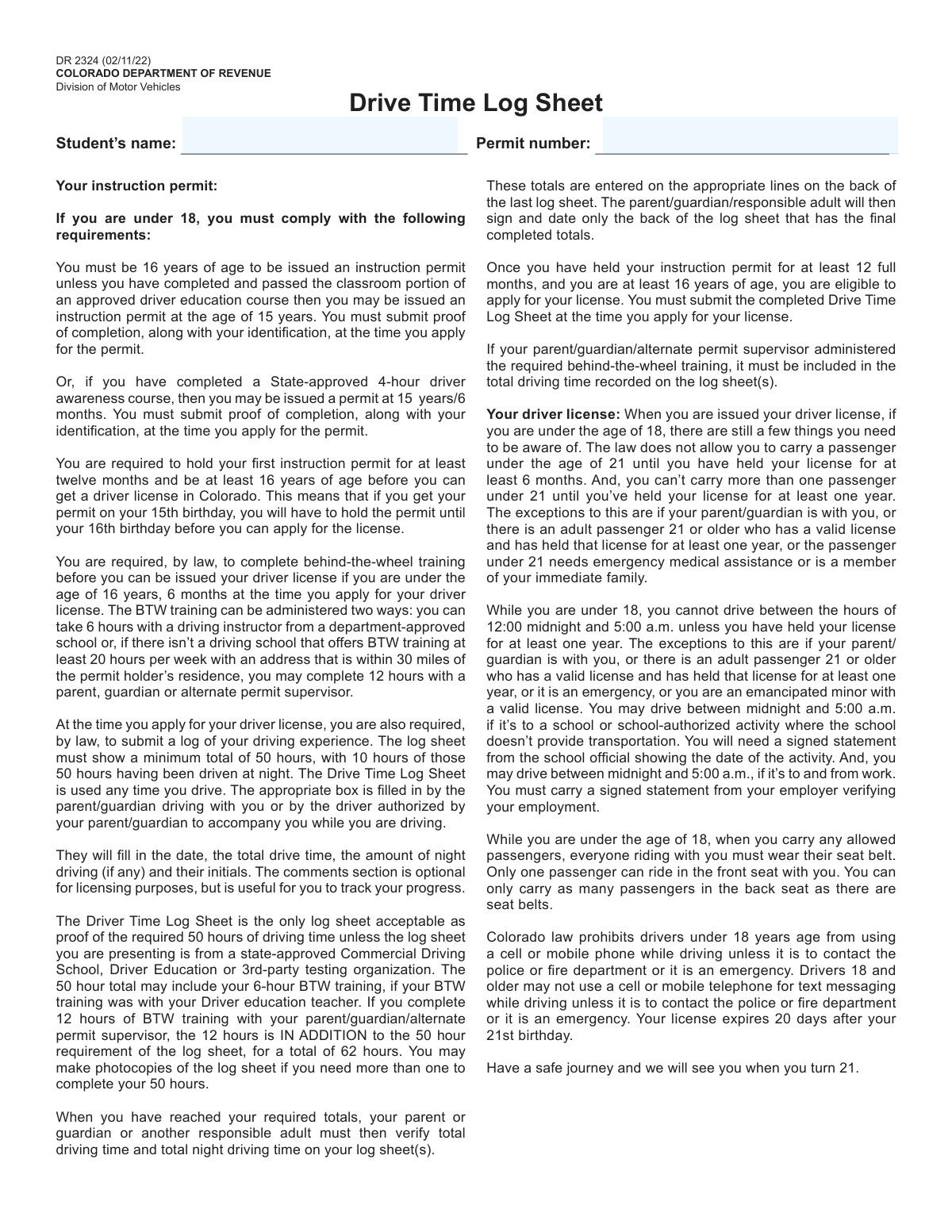
Form DR 2324, Drive Time Log Sheet, page 1
Moderate · 57/100Form Complexity Index

The AI does the filling. You just check it.

No typing into boxes, nothing to install.

Tell the AI about youAnswer a few questions in plain words, or upload a document you already have. That is all the typing there is.
AI fills every field in secondsIt puts each answer in the right box on every page, tables and checkboxes included.
Check it and downloadReview every field, change anything, then download, print or sign the PDF.

What this form asks for

The AI fills all of it, from your answers or your documents.

Form DR 2324 is a mandatory document from the Colorado Department of Revenue, Division of Motor Vehicles, for individuals under 18 applying for a driver's license. It serves as the official log to track and certify a minimum of 50 hours of supervised driving experience, including at least 10 hours at night. Today, this form can be filled out quickly and accurately using AI-powered services like Instafill.ai, which can also convert non-fillable PDF versions into interactive fillable forms.
Fillable fields73
Pages2
Sections17
Tables and lists1
Form Complexity IndexModerate, 57/100

The AI checks your answers before you download

12 checks built for this form, so a wrong date or a missing answer is caught before anyone else sees it.

Grand Total Driving Time Minimum

This check verifies that the 'GRAND TOTAL DRIVING TIME' is at least 50 hours. This is a mandatory legal requirement for license application eligibility as stated on the form. If the total is less than 50 hours, the form submission will be rejected, and the applicant will be notified that they have not met the minimum driving experience.

Grand Total Night Driving Time Minimum

This validation ensures the 'GRAND TOTAL NIGHT DRIVING TIME' is at least 10 hours. The form explicitly states this is a required component of the 50-hour total. Failure to meet this minimum will result in the application being denied until the required night driving hours are completed and logged.

Night vs. Total Driving Time Consistency

For each individual log entry, this check confirms that the 'Night Driving Time' is not greater than the 'Driving Time'. It is logically impossible to have more night driving hours than total driving hours for a single session. An error will be flagged on the specific row, requiring the user to correct the time entry before submission.

Page Totals Calculation Accuracy

This validation cross-references the sum of individual 'Driving Time' and 'Night Driving Time' entries on a page with the 'Totals for this page' fields. This ensures the sub-totals are calculated correctly, preventing arithmetic errors from affecting the grand total. If the sums do not match the provided totals, the user will be prompted to review and correct their calculations on that page.

Grand Total Summation Accuracy

This check verifies that the 'GRAND TOTAL DRIVING TIME' and 'GRAND TOTAL NIGHT DRIVING TIME' fields accurately reflect the sum of all page totals across all submitted log sheets. This is a final check to ensure the overall reported hours are correct and not just manually entered values that don't match the logs. A mismatch would invalidate the certification and require correction of either the page totals or the grand totals.

Certification Signature Date Logic

This validation ensures the 'Date' in the final certification section is on or after the latest date recorded in the driving log entries. A parent or guardian cannot certify the log as complete before the final driving session has occurred. A signature date that precedes the last driving date would be considered invalid and require correction.

And 6 more checks
  • Student and Permit Number Completeness
  • Log Entry Date Format and Validity
  • Verifier's Initials Presence for Logged Time
  • Certification Section Completeness
  • Driving Time Format Validation
  • Chronological Order of Log Entries

Let AI fill out your DR 2324

No typing. Every field filled in seconds, checked, ready to sign.

7 days free, then $19.99/month · Cancel anytime

How to Fill Out DR 2324 Online for Free in 2026

What the AI walks you through.

  1. Navigate to Instafill.ai and upload or select the Colorado Drive Time Log Sheet (DR 2324).
  2. Use the AI assistant to automatically populate the student's name and instruction permit number at the top of the form.
  3. For each driving session, enter the date, total driving time, and the portion of that time driven at night into the corresponding rows of the log.
  4. Have the supervising parent, guardian, or authorized driver enter their initials to verify each driving entry.
  5. After logging at least 50 total hours (with 10 at night), calculate and enter the grand total driving time and grand total night driving time in the final section.
  6. Request a signature from the parent, guardian, or responsible adult to certify the accuracy of the logged hours.
  7. Review the completed form for accuracy and download the final document for submission to the Colorado DMV.

Common Mistakes in Completing DR 2324

The ones the AI is built to catch.

Incorrectly Calculating Time Totals
This common mistake occurs from simple arithmetic errors when summing the 'Driving Time' and 'Night Driving Time' columns for page totals and grand totals. An incorrect total, even by a small amount, can lead to the log being rejected and delaying the license application. To avoid this, carefully double-check all calculations before signing. AI-powered form fillers like Instafill.ai can prevent this by automatically calculating sums as you enter data, ensuring accuracy.
Double-Counting Night Driving Time
A frequent error is logging night driving time as separate from, rather than a part of, the total driving time for a session. For example, for a 60-minute drive where 20 minutes were at night, the entry should be '60 minutes' for Driving Time and '20 minutes' for Night Driving Time. This mistake incorrectly inflates the total hours and will cause the log to be rejected. Always remember that Night Driving Time is a subset of the Total Driving Time for each entry.
Failing to Meet Minimum Hour Requirements
Applicants sometimes miscalculate their hours and submit a log with less than the required 50 total hours or 10 night hours. This is an automatic reason for rejection, forcing the applicant to continue logging hours and reschedule their driving test. Keep a running tally and ensure you exceed the minimums before submitting the form. Using a digital log can help track progress towards these goals automatically.
Missing or Inconsistent Verifier Initials
Each driving session must be initialed by the supervising parent, guardian, or authorized adult, but people often forget to complete this step for every entry. Using different initials without a clear reason can also raise red flags and invalidate those hours. To prevent this, the supervising adult should initial each entry immediately after the drive is completed to ensure the log is accurate and complete.
Improper Final Certification Signature
The instructions specify that the parent or guardian must sign and date *only* the final page that contains the grand totals. A common mistake is to either sign every single page or to forget the signature on the final page entirely. Either error can invalidate the entire logbook. Carefully read the certification block and only sign the last sheet after all hours are logged and totaled.
Misinterpreting Behind-the-Wheel (BTW) Hour Rules
The form has complex rules for BTW training; 12 hours of parent-taught BTW must be *in addition* to the 50-hour log, for a total of 62 hours. Many people mistakenly include these 12 hours within their 50-hour total, resulting in an insufficient number of logged hours and application rejection. Carefully review whether your BTW hours are part of or in addition to the 50-hour requirement based on who provided the training.
Using Inconsistent Time Formats
Drivers often switch between writing time in minutes (e.g., '45 min') and decimal hours (e.g., '0.75 hrs'), which complicates calculations and often leads to errors. Submitting a log with mixed formats can cause confusion and potential rejection. To prevent this, decide on one format (such as hours and decimal fractions, like 1.5 for 90 minutes) and use it for all entries to ensure consistency and accurate totals.
Missing Student Name or Permit Number
It's easy to focus on the log entries and forget to fill out the student's full name and permit number at the top of each sheet. A log sheet without this identifying information is invalid and cannot be linked to the applicant. This simple oversight requires you to go back and fill in the information, potentially on multiple photocopied pages. Always complete the header information on every sheet you use.
Illegible Handwriting
Since this log is often filled out over many months, handwriting can become messy or unreadable. If a DMV official cannot clearly read the dates, times, or initials, they may disqualify those entries or reject the entire log. Since the official form is a non-fillable PDF, using a tool like Instafill.ai to convert it into a fillable version allows you to type entries for perfect legibility, preventing any issues.
Submitting an Unofficial Log Sheet
Some applicants create their own spreadsheet or use a generic log template instead of the official Colorado DR 2324 form. The instructions explicitly state that this is the only acceptable log sheet unless it is from a state-approved commercial driving school. Using the wrong form will result in an automatic rejection of your driving hours. Always download and use the current version of the DR 2324 form from the DMV website.

Frequently Asked Questions About DR 2324


Is it really free for 7 days?
Yes. You pay $0 today. Cancel before Nov 4 and you are never charged. Keep it, and it is $19.99 a month for 5 fills of your DR 2324.
Can I fill other forms too?
This plan is for your DR 2324: your own AI agent fills it as often as 5 times a month. To fill other forms and upload your own, choose a Professional plan from your account.
How do I cancel?
From your account, in two clicks, any time. No email, no call.
How does the AI fill out DR 2324?
You answer a few questions in plain words, or upload a document you already have. The AI reads what you give it and puts each answer into the right field of DR 2324, on every page, in seconds. It checks the answers against the form's own rules, and you review and change anything before you download, print or sign.
What happens to my information?
It is encrypted in transit and at rest, and it is never used to train AI.
How complex is DR 2324 to fill out?
DR 2324 has a Form Complexity Index of 57 out of 100, in the moderate tier: 73 fillable fields across 2 pages. Instafill.ai's AI fills it in under a minute, with every field there for you to review before you download.
What is the purpose of the Drive Time Log Sheet (DR 2324)?
This form is used by Colorado drivers under 18 to log their required driving experience before they can apply for a driver's license. It serves as official proof that the driving requirements have been met.
Who needs to fill out this form?
Any driver under the age of 18 who holds an instruction permit must complete this log sheet to apply for a Colorado driver's license.
How many hours of driving do I need to log?
You must log a minimum total of 50 hours of driving experience. At least 10 of those 50 hours must be driven at night.
Who can verify my driving time by initialing the log?
The parent, guardian, or other authorized adult who accompanies you while you are driving must fill in the date, drive time, and their initials for each entry.
Does my behind-the-wheel (BTW) training count towards the 50 hours?
If you take 6 hours of BTW with a driving instructor, it can be included in the 50-hour total. However, if you complete 12 hours of BTW with a parent or guardian, those hours are in addition to the 50-hour requirement, for a total of 62 hours.
What do I do if I need more space than one sheet provides?
You can make photocopies of the log sheet if you need more than one page to document all of your required driving hours.
Can I use a different log sheet or a mobile app to track my hours?
No, the DR 2324 Drive Time Log Sheet is the only log sheet accepted as proof, unless you are using a log provided by a state-approved Commercial Driving School or Driver Education program.
Where does the form get signed?
A parent, guardian, or responsible adult must sign and date the back of the very last log sheet, after the grand total driving hours have been calculated and entered.
Is the 'Comments' section required?
No, the comments section is optional for licensing purposes. However, it can be a useful tool for you and your supervising driver to track your progress, road conditions, or skills practiced.
When do I submit the completed Drive Time Log Sheet?
You must submit the completed and signed log sheet(s) at the time you apply for your driver's license, after holding your permit for at least 12 months and turning 16.
How do I calculate the totals on the form?
At the bottom of each page, sum the 'Driving Time' and 'Night Driving Time' columns. On the final page, enter the grand total of all driving and night driving hours from all sheets you've used.
Can AI tools help me fill out this form?
Yes, services like Instafill.ai use AI to accurately auto-fill form fields, which can save you time and help prevent errors when completing the log.
How can I fill out the Drive Time Log Sheet online?
You can use a service like Instafill.ai to upload the PDF form, fill out your driving entries digitally, and then download or print the completed document for submission.
What should I do if the PDF version of this form is not fillable?
If you have a non-fillable PDF, you can use Instafill.ai to convert it into an interactive, fillable form that you can easily complete on your computer or mobile device.
Encrypted in transit and at restNever used to train AIDelete your forms any time

Get your DR 2324 filled out by AI

$0 today. Cancel before Nov 4 and you pay nothing.

7 days free, then $19.99/month · Cancel anytime