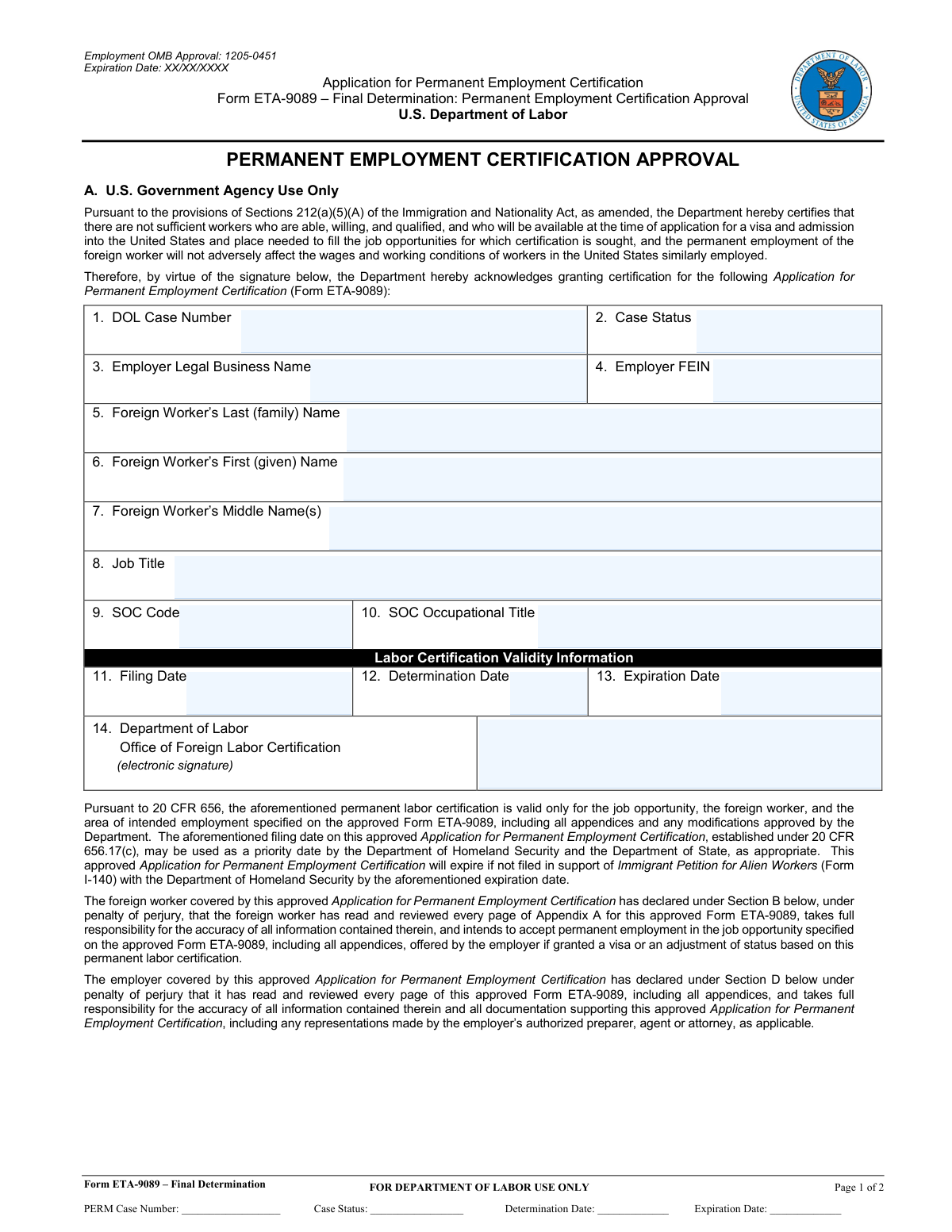
Yes! You can use AI to fill out Form ETA-9089 – Final Determination: Permanent Employment Certification Approval

Form ETA-9089, also known as the Application for Permanent Employment Certification, is a crucial document used by employers to obtain labor certification from the U.S. Department of Labor for foreign workers seeking permanent employment in the United States. This certification confirms that there are insufficient U.S. workers available for the position and that hiring a foreign worker will not adversely affect U.S. workers' wages and working conditions. Today, this form can be filled out quickly and accurately using AI-powered services like Instafill.ai, which can also convert non-fillable PDF versions into interactive fillable forms.
ETA-9089 has a basic Form Complexity Index of 39/100 — 28 fillable fields across 2 pages. Instafill’s AI completes it accurately in under a minute.

Form specifications

Form name: Form ETA-9089 – Final Determination: Permanent Employment Certification Approval
Number of fields: 28
Number of pages: 2
FCI: Basic (39/100)
Filled form examples: ETA-9089 Examples
Language: English
Our AI automatically handles information lookup, data retrieval, formatting, and form filling.
It takes less than a minute to fill out ETA-9089 using our AI form filling.
Securely upload your data. Information is encrypted in transit and deleted immediately after the form is filled out.
Preview of Form ETA-9089 – Final Determination: Permanent Employment Certification Approval

Instafill Demo: How to fill out PDF forms in seconds with AI

How to Fill Out ETA-9089 Online for Free in 2026

Are you looking to fill out a ETA-9089 form online quickly and accurately? Instafill.ai offers the #1 AI-powered PDF filling software of 2026, allowing you to complete your ETA-9089 form in just 37 seconds or less.
Follow these steps to fill out your ETA-9089 form online using Instafill.ai:
  1. 1 Navigate to Instafill.ai and upload or select the Form ETA-9089.
  2. 2 Allow the AI to automatically identify and extract all fields from the form.
  3. 3 Provide the necessary information for each field, such as employer details, foreign worker information, and job specifics.
  4. 4 Review the AI-generated data for accuracy and completeness.
  5. 5 Electronically sign the relevant sections of the form as required (Foreign Worker, Attorney/Agent, Employer Declarant).
  6. 6 Download the completed and signed Form ETA-9089.
  7. 7 Submit the finalized form to the appropriate authorities.

Our AI-powered system ensures each field is filled out correctly, reducing errors and saving you time.

Why Choose Instafill.ai for Your Fillable ETA-9089 Form?

Speed

Complete your ETA-9089 in as little as 37 seconds.

Up-to-Date

Always use the latest 2026 ETA-9089 form version.

Cost-effective

No need to hire expensive lawyers.

Accuracy

Our AI performs 10 compliance checks to ensure your form is error-free.

Security

Your personal information is protected with bank-level encryption.

Frequently Asked Questions About ETA-9089

ETA-9089 has a Form Complexity Index of 39 out of 100, placing it in the basic complexity tier. This score is calculated deterministically from the form’s own structure using Instafill’s published Form Complexity Index methodology, so it can be reproduced and independently verified — it is not a subjective estimate.

For ETA-9089 specifically, the score reflects 28 fillable fields across 2 pages, grouped into 11 sections. The number of fields is the largest factor in the base score (weighted 36%), followed by how difficult those fields are to complete based on their type, where free-text and signature fields count for more than simple checkboxes (26%). The number of pages that actually contain fields (15%), the amount of conditional “fill-only-if” logic (16%), and how many sections the form is divided into (7%) account for the rest of the base. On top of that base, the index adds points for tables and repeating lists, bundled instruction pages, and dense page layouts — capturing difficulty the base alone can miss.

In practical terms, a basic score means the form is relatively light, but still needs careful, accurate entry. Instafill removes that effort entirely: our AI reads your information, maps each value to the correct field — including the conditional ones — and completes ETA-9089 accurately in under a minute, with every field available for you to review before you download. See exactly how the Form Complexity Index is calculated.

This form is the U.S. Department of Labor's official notification that a permanent employment certification has been approved. It certifies that there are not sufficient U.S. workers available for the position and that hiring a foreign worker will not adversely affect U.S. workers' wages and working conditions.

This form is primarily for U.S. Government Agency use, specifically the Department of Labor, to document the approval of a permanent employment certification. The foreign worker, attorney/agent, and employer declarant must sign sections of the form to acknowledge their responsibilities and the accuracy of the information.

The form requires details such as the DOL Case Number, Employer Legal Business Name and FEIN, Foreign Worker's name, Job Title, SOC Code and Title, Filing Date, Determination Date, and Expiration Date. Signatures and declarations from the foreign worker, attorney/agent (if applicable), and employer are also necessary.

The Filing Date is used as a priority date by the Department of Homeland Security and the Department of State. The Expiration Date is crucial because the approved certification must be filed in support of an Immigrant Petition for Alien Workers (Form I-140) with the Department of Homeland Security before this date.

The 'Case Status' field, used by the Department of Labor, indicates the current standing of the permanent employment certification application. This could be 'Certified,' 'Deny,' or other relevant statuses determined by the DOL.

Section B is the Foreign Worker Declaration, where the worker affirms the accuracy of the information and their intent to accept the job. Section C is the Attorney or Agent Declaration, confirming their role and the accuracy of information provided on behalf of the employer. Section D is the Employer Declaration, where the employer takes responsibility for the application's accuracy.

The Standard Occupational Classification (SOC) Code and Title are used to categorize the job opportunity. This ensures consistency and accurate classification of the job for which permanent employment certification is being sought.

The labor certification is valid only for the specific job opportunity, the foreign worker, and the area of intended employment as detailed on the approved Form ETA-9089 and its appendices. It also has a specific expiration date by which it must be filed with USCIS.

If the approved Form ETA-9089 is not filed in support of an Immigrant Petition for Alien Workers (Form I-140) with the Department of Homeland Security by the specified expiration date, the labor certification will expire and will no longer be valid.

Yes, AI tools like Instafill.ai can help fill out form fields accurately and save time. These services can often extract information from other documents or databases to pre-fill the necessary fields on forms like the ETA-9089.

You can typically upload the PDF of the ETA-9089 to Instafill.ai, and its AI will identify the fields. You can then input the required information, and Instafill.ai will generate a completed, fillable version of the form for you to review and save.

If your PDF is a scanned document or a flat image and not interactive, Instafill.ai can convert it into a fillable form. This allows you to easily input all the necessary data directly into the form fields.

Comments regarding the burden estimate or any other aspect of this information collection should be sent to the U.S. Department of Labor, Employment and Training Administration, Office of Foreign Labor Certification, or by email to [email protected]. Do not send the completed application to this address.

Compliance ETA-9089
Validation Checks by Instafill.ai

1
Ensures Employer Legal Business Name is provided
Validates that the 'Employer Legal Business Name' field is not empty. This is crucial for accurately identifying the employer sponsoring the foreign worker. If this field is missing, the application may be rejected due to insufficient identification of the sponsoring entity.
2
Validates Employer FEIN format
Checks if the 'Employer FEIN' field contains a valid Federal Employer Identification Number. FEINs have a specific format (e.g., XX-XXXXXXX). An incorrect FEIN can lead to processing delays or rejection, as it's a primary identifier for the employer.
3
Ensures Foreign Worker's Last Name is provided
Confirms that the 'Foreign Worker's Last Name' field is populated. This is a mandatory field for identifying the foreign worker. Failure to provide this information will result in the application being incomplete and likely rejected.
4
Ensures Foreign Worker's First Name is provided
Confirms that the 'Foreign Worker's First Name' field is populated. This is a mandatory field for identifying the foreign worker. Without this, the application cannot proceed, leading to rejection.
5
Validates Job Title is provided
Ensures that the 'Job Title' field is not empty. The job title is essential for understanding the nature of the employment being certified. An incomplete job title can cause confusion and lead to the application being returned for clarification.
6
Validates SOC Code format and existence
Checks if the 'SOC Code' entered is a valid Standard Occupational Classification code and if it exists in the official SOC database. This ensures the job is correctly categorized for statistical and regulatory purposes. An invalid or non-existent SOC code will cause the application to be rejected.
7
Ensures SOC Occupational Title matches SOC Code
Verifies that the 'SOC Occupational Title' provided accurately corresponds to the entered 'SOC Code'. This is a logical consistency check. Mismatched titles and codes indicate potential errors or misrepresentation, leading to rejection.
8
Validates Filing Date format
Ensures the 'Filing Date' is in a valid date format (e.g., MM/DD/YYYY). This date is critical for establishing the priority date for the application. An incorrectly formatted date can lead to misinterpretation and processing issues.
9
Validates Determination Date format
Checks if the 'Determination Date' is entered in a valid date format. This date signifies when the Department of Labor made its decision. An invalid format can cause confusion regarding the timeline of the certification process.
10
Validates Expiration Date format and logic
Ensures the 'Expiration Date' is in a valid date format and that it is logically after the 'Determination Date' and 'Filing Date'. This date determines the validity period of the certification. An invalid or illogical date could render the certification unusable.
11
Ensures Foreign Worker Signature is provided
Confirms that the 'Foreign Worker Signature' field is completed. This signature signifies the foreign worker's agreement with the declarations made. A missing signature invalidates the declaration and will lead to rejection.
12
Validates Foreign Worker Date Signed format
Checks if the 'Date Signed' by the foreign worker is in a valid date format. This date is important for establishing when the worker's declaration was made. An invalid format can create ambiguity about the declaration's timeliness.
13
Ensures Attorney/Agent Signature is provided (if applicable)
Validates that the 'Attorney or Agent’s Signature' is provided if an attorney or agent is listed. This signature confirms the representative's involvement and declaration. If an agent is designated but does not sign, the application may be considered incomplete.
14
Ensures Employer Declarant Signature is provided
Confirms that the 'Employer Declarant Signature' is present. This signature represents the employer's affirmation of the application's accuracy. A missing signature means the employer has not officially attested to the information, leading to rejection.
15
Validates Employer Declarant Date Signed format
Checks if the 'Employer Declarant Date Signed' is in a valid date format. This date indicates when the employer representative officially signed off on the application. An invalid format can lead to uncertainty about the declaration's effective date.
16
Checks for consistency between Foreign Worker Name fields
Ensures that the 'Foreign Worker's Last Name', 'First Name', and 'Middle Name(s)' fields are consistent with any other references to the foreign worker's name within the application and its appendices. Inconsistencies can lead to misidentification and rejection.

Common Mistakes in Completing ETA-9089

Incorrect or Incomplete Employer Legal Business Name

Entering a DBA (Doing Business As) name instead of the full legal business name can cause issues with verification. The legal name is crucial for official government records. Always use the exact legal name registered with the state or federal government. AI-powered form filling tools can help by pre-filling this information from verified databases.

Typographical Errors in Foreign Worker's Name

Mistakes in the foreign worker's last, first, or middle names can lead to significant problems with immigration processing and visa applications. Even a single misplaced letter can cause a mismatch with other official documents. Double-check spelling meticulously against the worker's passport and other identification. AI tools can help by standardizing name formats.

Inaccurate or Missing FEIN

An incorrect or missing Federal Employer Identification Number (FEIN) will prevent the application from being processed. This number is essential for identifying the employer for tax and employment purposes. Ensure the FEIN is entered exactly as it appears on official IRS documents. AI tools can validate FEIN formats.

Incorrect SOC Code or Title Mismatch

Using the wrong Standard Occupational Classification (SOC) code or its corresponding title can lead to the rejection of the application. The SOC code must accurately reflect the job duties and requirements. Verify the correct SOC code and title using official government resources before entering them. AI tools can assist in finding the correct SOC code based on the job title.

Improper Date Formatting

Dates for Filing, Determination, and Expiration must be entered in a consistent and correct format (e.g., MM/DD/YYYY). Inconsistent or incorrect date formats can lead to misinterpretation and processing delays. Always adhere to the specified format or use an AI tool that automatically formats dates correctly.

Missing Signatures or Dates

Failure to sign and date the declarations by the foreign worker, attorney/agent, or employer representative invalidates the application. These signatures attest to the accuracy of the information provided. Ensure all required fields are signed and dated accurately on the correct lines. AI tools can prompt users for missing signatures and dates.

Incomplete Attorney/Agent Information

If an attorney or agent is representing the employer, all their details (name, firm name) must be accurately provided. Incomplete or incorrect information can lead to communication breakdowns and delays. Verify all details are correct and complete before submission. AI tools can help pre-fill this information if previously used.

Misunderstanding of 'FOR DEPARTMENT OF LABOR USE ONLY' fields

Applicants sometimes mistakenly fill in fields designated for Department of Labor use only. These fields are not for applicant input and should be left blank. Carefully read all instructions and identify sections meant solely for government officials. AI tools can help identify and ignore these fields.

Failure to Review Appendices and Supporting Documentation

The declarations explicitly state that the applicant has reviewed all appendices and supporting documentation. Failing to do so, or not understanding the content, can lead to inaccurate declarations. Thoroughly review all related documents before signing. AI tools can help organize and present these documents for easier review.

Using an Outdated or Non-Fillable PDF Version

If the form is an older, non-fillable PDF, users may resort to printing and handwriting, leading to illegible entries or missed fields. This can cause significant processing delays. Using a fillable version, potentially created by an AI tool like Instafill.ai, ensures clarity and completeness.
Saved over 80 hours a year

“I was never sure if my IRS forms like W-9 were filled correctly. Now, I can complete the forms accurately without any external help.”

Kevin Martin Green

Your data stays secure with advanced protection from Instafill and our subprocessors

Robust compliance program

Transparent business model

You’re not the product. You always know where your data is and what it is processed for.

ISO 27001, HIPAA, and GDPR

Our subprocesses adhere to multiple compliance standards, including but not limited to ISO 27001, HIPAA, and GDPR.

Security & privacy by design

We consider security and privacy from the initial design phase of any new service or functionality. It’s not an afterthought, it’s built-in, including support for two-factor authentication (2FA) to further protect your account.

Fill out ETA-9089 with Instafill.ai

Worried about filling PDFs wrong? Instafill securely fills form-eta-9089-final-determination-permanent-employment-certification-approval forms, ensuring each field is accurate.