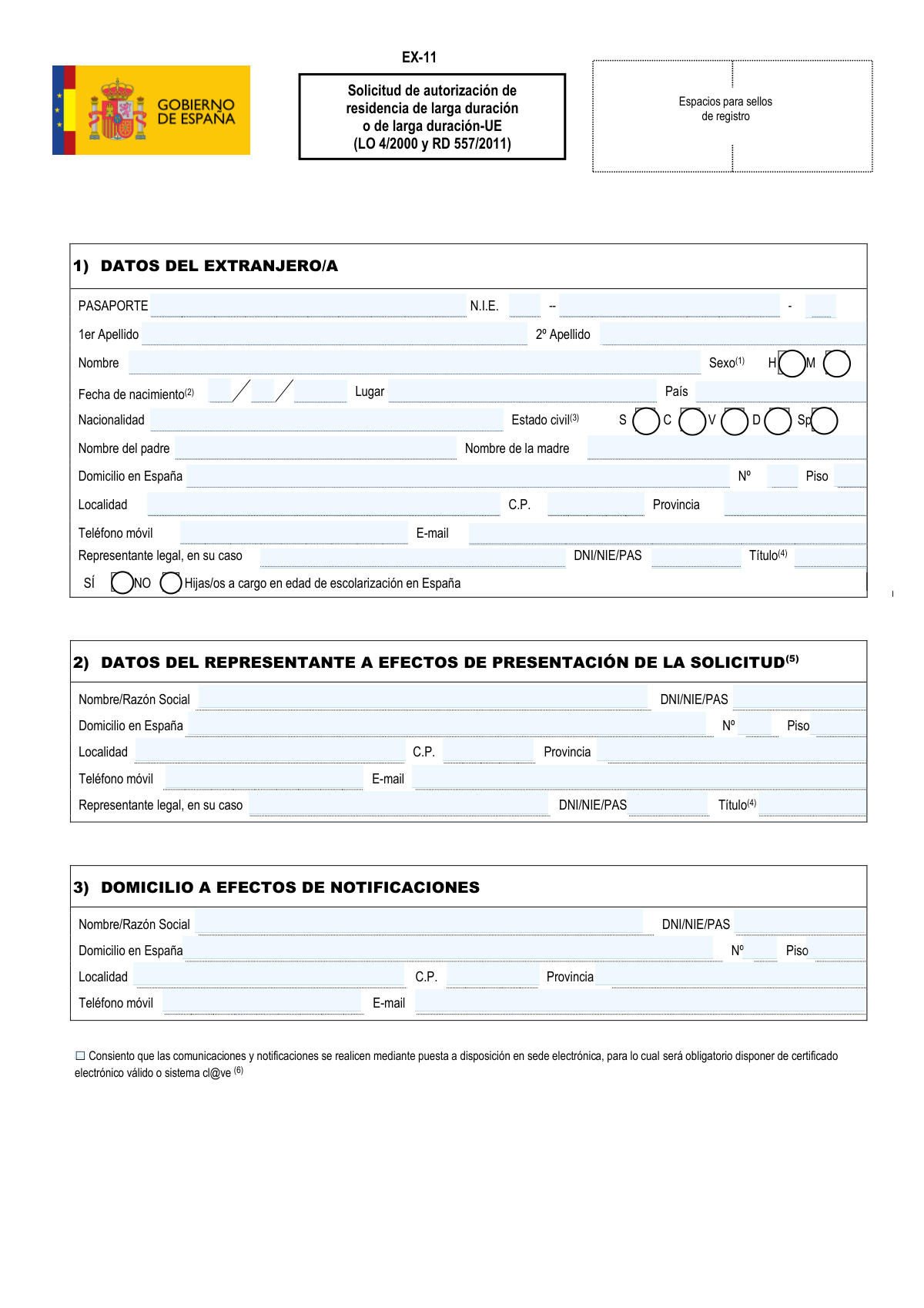
Yes! You can use AI to fill out Form EX-11, Solicitud de autorización de residencia de larga duración o de larga duración-UE
Form EX-11 is the official application submitted to the Spanish authorities to request a long-term or long-term EU residence permit. It is a critical document for non-EU citizens who have legally and continuously resided in Spain for a specified period, allowing them to live and work in Spain indefinitely under similar conditions to Spanish citizens. Today, this form can be filled out quickly and accurately using AI-powered services like Instafill.ai, which can also convert non-fillable PDF versions into interactive fillable forms.
Our AI automatically handles information lookup, data retrieval, formatting, and form filling.
It takes less than a minute to fill out EX-11 using our AI form filling.
Securely upload your data. Information is encrypted in transit and deleted immediately after the form is filled out.
Form specifications
| Form name: | Form EX-11, Solicitud de autorización de residencia de larga duración o de larga duración-UE |
| Number of fields: | 91 |
| Number of pages: | 2 |
| Language: | English |
Instafill Demo: How to fill out PDF forms in seconds with AI
How to Fill Out EX-11 Online for Free in 2026
Are you looking to fill out a EX-11 form online quickly and accurately? Instafill.ai offers the #1 AI-powered PDF filling software of 2026, allowing you to complete your EX-11 form in just 37 seconds or less.
Follow these steps to fill out your EX-11 form online using Instafill.ai:
- 1 Navigate to Instafill.ai and upload or select the Form EX-11.
- 2 Complete Section 1 with your personal details, including NIE/passport number, full name, date of birth, nationality, and current address in Spain.
- 3 If you are using a representative to submit the application, fill out their information in Section 2.
- 4 Provide the address for official notifications in Section 3 and choose whether to consent to electronic communications.
- 5 In Section 4, carefully select the type of authorization you are applying for (Residencia Larga Duración or Larga Duración-UE) and check the specific legal basis for your request.
- 6 Review all entered information for accuracy, then date and sign the application in the final section before submitting it to the designated government office.
Our AI-powered system ensures each field is filled out correctly, reducing errors and saving you time.
Why Choose Instafill.ai for Your Fillable EX-11 Form?
Speed
Complete your EX-11 in as little as 37 seconds.
Up-to-Date
Always use the latest 2026 EX-11 form version.
Cost-effective
No need to hire expensive lawyers.
Accuracy
Our AI performs 10 compliance checks to ensure your form is error-free.
Security
Your personal information is protected with bank-level encryption.
Frequently Asked Questions About Form EX-11
The EX-11 form is the official application used to request long-term residence or EU long-term residence in Spain. It is intended for foreign nationals who meet the legal requirements for this status, such as having lived in Spain legally for a continuous period.
This form should be completed by non-EU foreign nationals who wish to obtain long-term residence status in Spain. This typically applies after five years of continuous legal residence, but also covers other specific situations like being a pensioner or a family member of a long-term resident.
While both grant long-term residence in Spain, the 'Larga Duración-UE' permit also makes it easier to obtain residence and work rights in other EU member states. The EU version has additional requirements, such as proving stable financial resources and health insurance.
The form indicates that a full list of required documents, information on fees, and procedural details are available on the official Spanish government migrations website: https://www.inclusion.gob.es/web/migraciones.
You must carefully review the options and select the one that accurately describes your situation. The most common option is 'Supuesto general 5 años de residencia continuada en España', but you should choose the specific article that applies to your case.
If you do not have a second last name ('2º Apellido') as per your official passport, you should leave that field blank. Only enter information that matches your official identification documents.
The 'Representante legal' in Section 1 is for someone with legal authority over the applicant (e.g., a parent of a minor). Section 2 is for any person (like a lawyer or advisor) who is simply submitting the form on the applicant's behalf.
By checking this box in Section 3, you agree to receive all official communications about your application electronically. This requires you to have a valid Spanish digital certificate or Cl@ve access to check for notifications on the government's online portal.
The DIR3 code is a unique identifier for the specific public administration office. You need to find the code for the Immigration Office (Oficina de Extranjería) in the province where you are submitting your application, which is usually available on their website.
Yes, services like Instafill.ai use AI to help you fill out forms like the EX-11 accurately and efficiently. These tools can auto-fill fields from your data, reducing the chance of errors and saving you time.
To use Instafill.ai, you just need to upload the EX-11 PDF to the platform. The AI will make the form interactive, allowing you to easily type in your information or use its auto-fill capabilities to complete it.
If you have a non-fillable or 'flat' PDF, you can use a service like Instafill.ai. It can convert the static PDF into an interactive, fillable form that you can complete on your computer before printing for submission.
The instructions state you can fill it out with a black pen in capital letters or type it. Using a tool to fill it out on a computer before printing is recommended for clarity and to avoid mistakes.
Yes, Section 1 has dedicated fields for both your Passport number and your NIE (Número de Identificación de Extranjero). You should provide both as they appear on your official documents.
Compliance EX-11
Validation Checks by Instafill.ai
1
Validates NIE Format and Check Digit
This check ensures the 'N.I.E.' field follows the correct Spanish format, which is an initial letter (X, Y, or Z), followed by seven digits, and a final calculated control letter. It is crucial for correctly identifying the applicant within Spanish government systems. A failure in this validation means the application cannot be linked to the correct person, leading to immediate rejection or processing delays.
2
Ensures Exclusive Authorization Type Selection
This validation verifies that the applicant selects only one main authorization category ('RESIDENCIA LARGA DURACIÓN' or 'RESIDENCIA LARGA DURACIÓN-UE') and exactly one sub-option within that chosen category. This prevents ambiguity and ensures the application is processed under the correct legal article. If multiple incompatible options are selected, the form submission will be blocked until the user makes a single, valid choice.
3
Verifies Date of Birth is in the Past
This check confirms that the 'Fecha de nacimiento' (Date of Birth) is a valid date in dd/mm/yyyy format and that the date is not in the future. This is a fundamental logical check to ensure data integrity and prevent nonsensical entries. An invalid or future date would cause the application to be rejected as it implies an impossible scenario.
4
Requires Specification for 'Otros' Option
If the applicant selects an 'Otros (especificar)' checkbox in section 4, this validation ensures that the corresponding text field is not empty. This is important because selecting 'Other' without providing an explanation makes it impossible for the authorities to understand the basis of the request. Failure to provide a specification will result in an error message prompting the user to either provide details or select a different option.
5
Enforces Conditional Completion of Legal Representative Data
This check validates that if the applicant indicates they have a legal representative (Section 1), then the representative's identification fields ('Representante legal — DNI/NIE/PAS' and 'Título') must be filled out. This is critical for verifying the identity and legal authority of the person acting on the applicant's behalf. If these fields are left blank after indicating a representative exists, the form cannot be submitted.
6
Validates Spanish Postal Code Format
This validation ensures that the 'C.P.' (Código Postal) fields for all addresses in Spain consist of exactly five digits. A correct postal code is essential for physical mail delivery and for administrative systems to correctly identify the geographical location (province and locality). An incorrectly formatted postal code can lead to lost notifications and processing delays.
7
Cross-Validates Applicant Age with Authorization Type
This is a logical consistency check that compares the applicant's age, calculated from the 'Fecha de nacimiento', with the requirements of the selected authorization type. For example, if 'Menor nacido en España' is checked, the applicant must be under 18. This prevents applications for statuses for which the applicant is clearly ineligible, saving time for both the applicant and the administration.
8
Validates Email Address Format
This check verifies that any value entered into an 'E-mail' field follows the standard '[email protected]' format. This is crucial, especially if the applicant consents to electronic notifications, as an invalid email address would mean they never receive critical updates about their case. The validation prevents typos and ensures a reliable channel of communication.
9
Ensures Signature Date is Logical
This validation confirms that the signature date ('Fecha de firma') is a valid date that is not in the future and is on or after the applicant's date of birth. This ensures the document is signed at a plausible time. A future date would invalidate the signature and cause the form to be rejected.
10
Validates DNI/NIE/PAS Format
This check ensures that the identification numbers entered in 'DNI/NIE/PAS' fields adhere to their respective official formats (e.g., DNI is 8 digits and a letter, NIE starts and ends with a letter). Correct identification numbers are the primary key for individuals in government databases. An incorrect ID format would prevent the system from finding the person's record, halting the process entirely.
11
Requires Email for Electronic Notification Consent
If the 'Consiento que las comunicaciones y notificaciones se realicen mediante puesta a disposición en sede electrónica' checkbox is marked, this validation makes the 'E-mail' field in the notification section mandatory. The system sends an informational email alert when a new notification is available in the electronic portal. Without a valid email, the applicant might miss important, time-sensitive legal notifications.
12
Ensures Completeness of Applicant's Primary Address
This validation verifies that all components of the applicant's primary address in Spain ('Domicilio en España') are filled out, including the street, number, locality, postal code, and province. A complete and accurate address is a legal requirement and is essential for official correspondence and residency verification. An incomplete address will block submission until all required parts are provided.
Common Mistakes in Completing EX-11
Section 4 is the most critical and complex part of the form. Applicants often misunderstand the nuanced legal requirements for each checkbox and select a category that does not match their situation, such as choosing the general 5-year rule when they actually qualify under a family reunification clause. This error is critical because it defines the legal basis of the request, and a mistake can lead to immediate denial or significant processing delays while the administration requests clarification. To avoid this, carefully read the official 'Hojas Informativas' for each category or consult with a legal expert before selecting an option.
Many applicants leave Section 3, 'Domicilio a efectos de notificaciones', blank, assuming that communications will automatically be sent to their home address from Section 1. This section must be completed, even if the address is identical. An error or omission here is severe, as it can result in not receiving crucial updates, requests for additional documents, or the final decision on the application. Always fill out this section completely and double-check it for accuracy to ensure you receive all official correspondence.
Applicants may check the box to consent to electronic notifications without having the required Spanish 'certificado electrónico' or 'sistema cl@ve'. If this box is checked, the government is only obligated to notify you via its electronic portal. Without the proper credentials to access it, you will miss critical, time-sensitive notifications, which can lead to your application being automatically denied ('desistido por incomparecencia'). Only check this box if you are certain you have and can access the required digital identification systems.
The form follows the Spanish naming convention: '1er Apellido' (first surname), '2º Apellido' (second surname), and then 'Nombre' (first name). Applicants from cultures with different naming orders often mistakenly enter their first name in the surname field or reverse the order of their surnames. This creates a data mismatch with their official documents, leading to identity verification problems and delays. To prevent this, carefully match each part of your name to the corresponding field as it appears on your passport.
The form requires the applicant's address to be broken down into separate fields: 'Domicilio' (street name), 'Nº' (number), 'Piso' (floor/apartment), 'Localidad' (city), 'C.P.' (postal code), and 'Provincia' (province). A frequent mistake is to write the entire address into the first 'Domicilio' field. This can cause the address to be recorded incorrectly in the system, leading to failed mail delivery for important documents and notifications.
The NIE (Número de Identificación de Extranjero) has a specific format (an initial letter, seven digits, and a final letter), which is often entered incorrectly. Common errors include omitting the letters, transposing numbers, or entering the NIE in the passport field and vice-versa. Such an error can cause the application to be rejected at the initial stage, as the system cannot correctly identify the applicant. Always double-check the number and format against your official TIE card or passport.
The form distinguishes between a 'Representante legal' (Section 1, e.g., a parent of a minor) and a 'Representante a efectos de presentación' (Section 2, e.g., a lawyer submitting the form). Applicants often get confused and fill in the wrong section, or fill in their own information in the representative section. This creates confusion for the processing office and may require clarification, delaying the application. These sections should only be filled if they are truly applicable to your situation.
The form includes fields for the destination office name ('DIRIGIDA A') and its 'Código DIR3'. Many applicants are unsure of this information and leave it blank, assuming the clerk will fill it in. However, omitting this can cause the application to be misrouted or delayed as officials determine the correct processing office for that province. It is best to find the correct 'Oficina de Extranjería' and its DIR3 code from the official government immigration portal before submitting.
The form's instructions specify the date of birth format as dd/mm/aaaa (day/month/year). Applicants accustomed to other formats, such as the mm/dd/yyyy used in the United States, often make this mistake out of habit. This can lead to data entry errors in the official database, potentially causing issues with age verification or identity matching down the line. Always use the dd/mm/aaaa format as instructed to ensure accuracy.
The instructions clearly state the form must be filled out in capital block letters with a black pen or be typewritten ('RELLENAR EN MAYÚSCULAS CON BOLÍGRAFO NEGRO Y LETRA DE IMPRENTA O A MÁQUINA'). Submitting a form with illegible handwriting, lowercase letters, or in blue ink can lead to data entry errors by the staff processing the application. If the form is a non-fillable PDF, AI-powered tools like Instafill.ai can convert it into a fillable version, ensuring all entries are clean, legible, and correctly formatted, thus preventing these avoidable errors.
Saved over 80 hours a year
“I was never sure if my IRS forms like W-9 were filled correctly. Now, I can complete the forms accurately without any external help.”
Kevin Martin Green
Your data stays secure with advanced protection from Instafill and our subprocessors

Robust compliance program
Transparent business model
You’re not the product. You always know where your data is and what it is processed for.
ISO 27001, HIPAA, and GDPR
Our subprocesses adhere to multiple compliance standards, including but not limited to ISO 27001, HIPAA, and GDPR.
Security & privacy by design
We consider security and privacy from the initial design phase of any new service or functionality. It’s not an afterthought, it’s built-in, including support for two-factor authentication (2FA) to further protect your account.
Fill out EX-11 with Instafill.ai
Worried about filling PDFs wrong? Instafill securely fills form-ex-11-solicitud-de-autorizacin-de-residencia-de-larga-duracin-o-de-larga-duracin-ue forms, ensuring each field is accurate.