
Instafill.ai
7 days free
AI form filling · 65 fields · 2 pages · done in seconds

Yes! You can use AI to fill out Form GC-110, Petition for Appointment of Temporary Guardian (Probate—Guardianships and Conservatorships)

Don't type 65 fields by hand. Tell our AI about yourself, or upload a document you already have, and it fills every field in seconds. You check it, then download, print or sign.
7 days free, then $19.99/month · Cancel anytime
AI fills it, no typingEncrypted, never used to train AICancel in two clicks
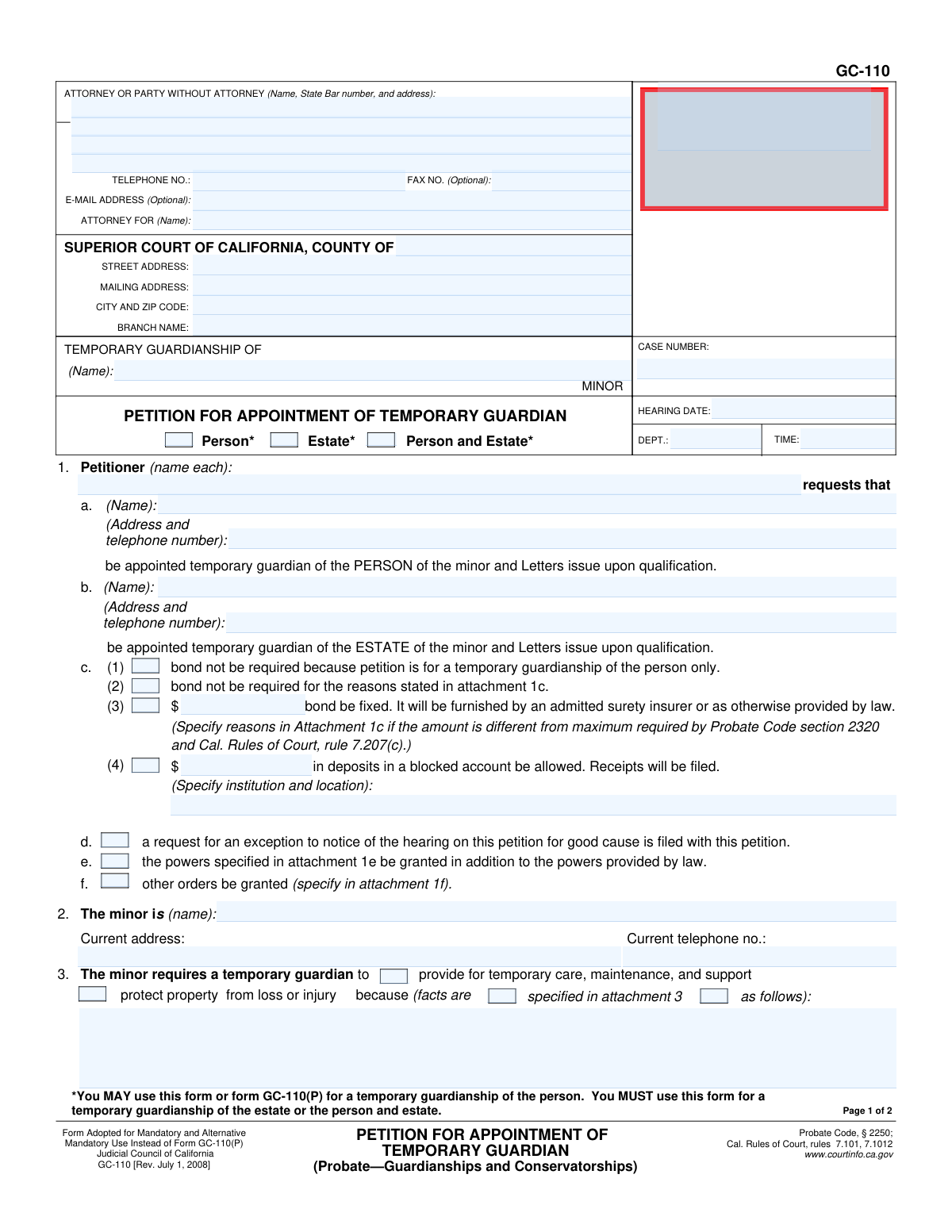
Form GC-110, Petition for Appointment of Temporary Guardian (Probate—Guardianships and Conservatorships), page 1
Moderate · 54/100Form Complexity Index

The AI does the filling. You just check it.

No typing into boxes, nothing to install.

Tell the AI about youAnswer a few questions in plain words, or upload a document you already have. That is all the typing there is.
AI fills every field in secondsIt puts each answer in the right box on every page, tables and checkboxes included.
Check it and downloadReview every field, change anything, then download, print or sign the PDF.

What this form asks for

The AI fills all of it, from your answers or your documents.

Form GC-110, Petition for Appointment of Temporary Guardian, is a legal document filed with the Superior Court of California to request the urgent appointment of a guardian for a minor for a limited time. This is typically done when immediate action is needed to provide for the minor's care or to protect their property from loss, pending a hearing for a general guardianship. Today, this form can be filled out quickly and accurately using AI-powered services like Instafill.ai, which can also convert non-fillable PDF versions into interactive fillable forms.
Fillable fields65
Pages2
Sections19
Tables and lists2
Form Complexity IndexModerate, 54/100

The AI checks your answers before you download

14 checks built for this form, so a wrong date or a missing answer is caught before anyone else sees it.

Hearing Date Must Be in the Future

This validation ensures that the 'Hearing Date' entered is a valid date that occurs after the current date. A hearing cannot be scheduled for the past, so this check prevents a fundamental error that would make the petition invalid. If a past date is entered, the system should display an error and require the user to correct it before submission.

Conditional Requirement for Estate Value Details

This check verifies that if the guardianship type 'Estate*' or 'Person and Estate*' is selected, then the fields in section 5 ('Personal property value', 'Annual gross income') must be filled out. This financial information is legally required for the court to assess the estate and determine the appropriate bond amount. Failure to provide this information when requesting guardianship of an estate will result in an incomplete and likely rejected petition.

Estate Value Total Calculation

This validation confirms that the 'Total estate property value' in section 5c is the correct sum of the 'Personal property value' (5a), 'Annual gross income' (5b), and 'Recovery bond cost amount' (5d). This ensures mathematical accuracy on a critical part of the legal document. An incorrect total could lead to an improperly calculated bond, requiring an amended filing and causing delays.

Guardianship Type Selection is Mandatory

This check ensures that at least one of the guardianship type checkboxes ('Person*', 'Estate*', 'Person and Estate*') is selected at the top of the form. This selection defines the scope and nature of the legal request. Without this information, the court cannot process the petition, as the fundamental purpose of the filing is unclear.

Bond Request Logic for 'Person Only'

This validation enforces a logical rule: if the 'No bond required (person only)' checkbox (item 1c(1)) is selected, the system must verify that only the 'Person*' guardianship type is checked. Requesting 'no bond for person only' while also seeking guardianship of the estate is a direct contradiction. This check prevents logically inconsistent filings.

Blocked Account Details Requirement

This check ensures that if the 'Blocked account deposit' checkbox (item 1c(4)) is selected, then the corresponding 'Blocked account deposit amount' and 'Blocked account institution and location' fields are also filled out. The court cannot approve a request to use a blocked account without knowing the amount and where it will be held. This validation prevents incomplete financial requests.

And 8 more checks
  • Exclusive Selection for Minor's Hearing Attendance
  • Attachment Reference Consistency Check
  • Mandatory Justification for Guardianship
  • California State Bar Number Format
  • Petitioner and Minor Name Completeness
  • Proposed Guardian Name Requirement
  • Valid Signature Date
  • Case Number Format Validation

Let AI fill out your GC-110

No typing. Every field filled in seconds, checked, ready to sign.

7 days free, then $19.99/month · Cancel anytime

How to Fill Out GC-110 Online for Free in 2026

What the AI walks you through.

  1. Navigate to Instafill.ai and upload the GC-110 form or select it from their template library.
  2. Provide the necessary court, petitioner, and attorney information in the designated fields.
  3. Enter the personal details of the minor and the proposed temporary guardian(s).
  4. Specify the type of guardianship requested (person, estate, or both) and detail the reasons why the temporary guardianship is necessary.
  5. Complete the sections regarding the minor's estate, property value, and any bond requirements.
  6. Review all the information populated by the AI for accuracy, make any necessary corrections, and then e-sign the document.
  7. Download the completed and signed Form GC-110, ready for filing with the appropriate California Superior Court.

Common Mistakes in Completing GC-110

The ones the AI is built to catch.

Using Incomplete or Informal Names
Petitioners often use nicknames or fail to enter the full legal name for themselves, the minor, and the proposed guardian as it appears on official documents. This creates ambiguity and can lead to rejection or delays while the court seeks to verify identities. Always use the full legal name as it appears on government-issued identification to ensure the petition is processed smoothly. AI-powered form filling tools like Instafill.ai can help prevent this by prompting for full legal names and flagging potentially incomplete entries.
Selecting the Wrong Type of Guardianship
A frequent point of confusion is the difference between guardianship of the 'Person' (for care and custody) and the 'Estate' (for managing finances). Choosing the wrong option, or failing to select both when a minor has assets, can result in the guardian lacking necessary legal authority. This mistake can be avoided by carefully assessing the minor's needs before filing.
Providing Vague Reasons for Guardianship
In Section 3, petitioners must provide specific facts demonstrating the urgent need for a temporary guardian. Many submit vague, conclusory statements like 'it is in the minor's best interest' instead of detailing the specific risk of harm or financial loss. The court requires concrete evidence to approve such a significant request, and insufficient detail is a primary reason for denial.
Mishandling the Bond Request Section
The bond section (Item 1) is legally complex and a common source of errors. Petitioners may incorrectly request 'no bond' for an estate guardianship or fail to attach the required justification (Attachment 1c) for a waiver or modified amount. Such errors will halt the process, as the court cannot proceed without a correctly justified and calculated bond proposal.
Incorrectly Calculating the Estate Value
When petitioning for guardianship of the estate, the value calculation in Item 5 must be precise. People often omit sources of income like public benefits or miscalculate the total, which directly impacts the required bond amount. An inaccurate calculation can lead to the court rejecting the petition and requiring a corrected amendment, delaying protection for the minor's assets. AI-powered tools like Instafill.ai can help prevent this by providing an integrated calculator and ensuring all required financial fields are completed.
Writing in the 'FOR COURT USE ONLY' Box
The box at the top right of the form is strictly for the court clerk's use to assign a case number and file-stamp the document. Inexperienced filers sometimes write the minor's name or other information in this area, which can disrupt the clerk's workflow. This may result in the form being returned, forcing the petitioner to start over with a clean copy.
Missing or Unreferenced Attachments
The form relies on attachments for detailed explanations (e.g., Attachments 1c, 1e, 3). A common oversight is checking a box indicating an attachment but then failing to include the document or forgetting to state the total page count in Item 7. This creates an incomplete filing that the court cannot act upon, causing delays until all referenced documents are submitted and accounted for.
Incomplete Petitioner Signatures
Probate Code § 1020 requires all petitioners to sign the form, but it's common for one co-petitioner to overlook signing. A petition with a missing signature is legally invalid and will be rejected by the court clerk upon submission. This simple oversight forces a complete refiling, delaying the entire guardianship process.
Failing to Specify the Correct Court Branch
In large counties with multiple courthouses, simply writing the county name is insufficient. Petitioners must identify the correct 'BRANCH NAME' and its specific address where probate matters are heard. Filing at the wrong branch will result in rejection and significant delays, as the case must be transferred or refiled at the proper venue. AI-powered tools like Instafill.ai can help users identify the correct court branch based on their location, preventing misfiling.
Omitting Information for Proposed Guardians
The form requires the name, address, and telephone number for each proposed temporary guardian, whether for the person or the estate. Petitioners sometimes leave this information blank, especially if the petitioner is also the proposed guardian. This information is mandatory for the court to conduct background checks and contact the individual, and its absence will render the petition incomplete.

Frequently Asked Questions About GC-110


Is it really free for 7 days?
Yes. You pay $0 today. Cancel before Nov 12 and you are never charged. Keep it, and it is $19.99 a month for 5 fills of your GC-110.
Can I fill other forms too?
This plan is for your GC-110: your own AI agent fills it as often as 5 times a month. To fill other forms and upload your own, choose a Professional plan from your account.
How do I cancel?
From your account, in two clicks, any time. No email, no call.
How does the AI fill out GC-110?
You answer a few questions in plain words, or upload a document you already have. The AI reads what you give it and puts each answer into the right field of GC-110, on every page, in seconds. It checks the answers against the form's own rules, and you review and change anything before you download, print or sign.
What happens to my information?
It is encrypted in transit and at rest, and it is never used to train AI.
How complex is GC-110 to fill out?
GC-110 has a Form Complexity Index of 54 out of 100, in the moderate tier: 65 fillable fields across 2 pages. Instafill.ai's AI fills it in under a minute, with every field there for you to review before you download.
What is the purpose of Form GC-110?
Form GC-110 is used to petition the California Superior Court for the appointment of a temporary guardian for a minor. This is necessary when there is an urgent need to provide for a minor's care or protect their property before a general guardian can be appointed.
Who needs to fill out this form?
Any person concerned about a minor's welfare can file this petition. This is typically a relative or another adult seeking temporary legal authority to care for the minor and/or manage their assets.
What is the difference between a temporary guardian of the 'person' versus the 'estate'?
A guardian of the 'person' is responsible for the minor's care, custody, and well-being. A guardian of the 'estate' is responsible for managing the minor's finances and property. You can use this form to petition for either or both.
What information do I need to have ready to complete this form?
You will need the full names and addresses for the minor and the proposed guardian(s). If petitioning for guardianship of the estate, you'll also need an estimate of the minor's property value and annual income.
What is a 'bond' and will I need to get one?
A bond is a form of insurance that protects the minor's assets from mismanagement by the guardian. It is typically required for a guardianship of the estate but may be waived for a guardianship of the person only.
In section 3, what kind of 'facts' do I need to provide?
You must describe the specific, urgent circumstances that make a temporary guardianship necessary. Explain why the minor needs immediate care or why their property is at risk of loss or injury.
Where do I file the completed Form GC-110?
The completed and signed petition must be filed with the Superior Court in the county where the minor lives. Make sure to include the correct court address and branch name on the form.
Does the minor need to attend the court hearing?
It depends on the circumstances and the minor's age. You must indicate in section 6 whether you believe the minor will or will not be present at the hearing.
What are the attachments mentioned on the form for?
Attachments are used to provide additional information that won't fit on the form itself. For example, you would use an attachment to list detailed reasons for the guardianship (Attachment 3) or to request specific powers for the guardian (Attachment 1e).
Can I use an AI tool to help me fill out this form?
Yes, services like Instafill.ai use AI to help you accurately auto-fill form fields, which can save time and reduce errors. The AI can pull information from your records to populate the required fields on the form.
How can I fill out Form GC-110 online?
You can use a service like Instafill.ai to complete the form online. Simply upload the GC-110 PDF, and the platform will allow you to fill in all the fields digitally before printing the completed form for submission.
My copy of the GC-110 PDF is not fillable. What can I do?
If you have a non-fillable or 'flat' PDF, you can upload it to a platform like Instafill.ai. The service will automatically convert it into an interactive, fillable form that you can easily complete on your computer.
Who needs to sign the petition?
All individuals listed as petitioners must sign and date the declaration on page 2. If an attorney is representing you, they must also sign the form.
Encrypted in transit and at restNever used to train AIDelete your forms any time

Get your GC-110 filled out by AI

$0 today. Cancel before Nov 12 and you pay nothing.

7 days free, then $19.99/month · Cancel anytime