Yes! You can use AI to fill out Form GC-150, Letters of Temporary Guardianship or Conservatorship

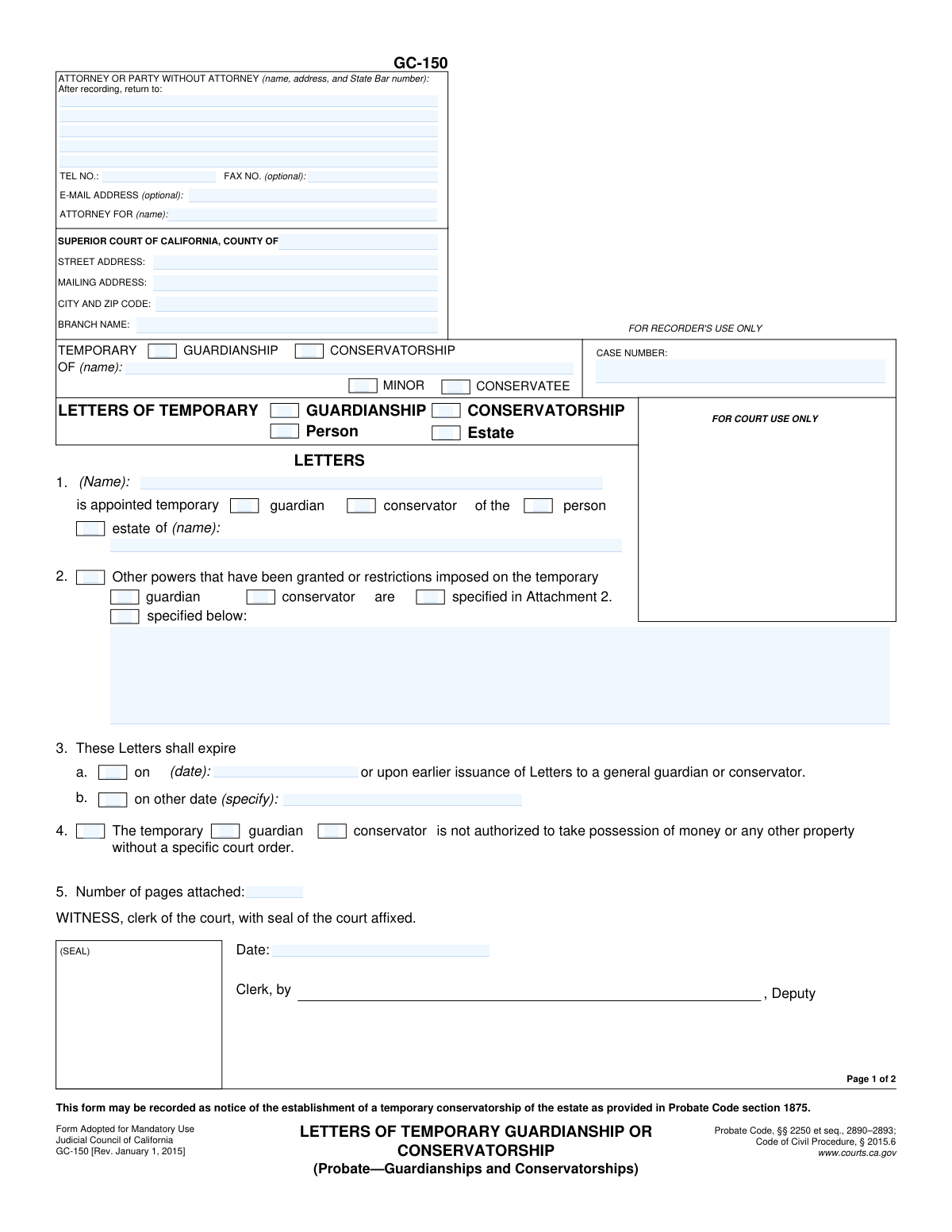
Form GC-150, Letters of Temporary Guardianship or Conservatorship, is a legal document issued by a California Superior Court. It serves as official proof of a court's appointment of a temporary guardian (for a minor) or a temporary conservator (for an adult), outlining their specific powers and the duration of their authority over the person and/or their estate. This document is essential for the appointee to present to financial institutions and other entities to manage the affairs of the minor or conservatee. Today, this form can be filled out quickly and accurately using AI-powered services like Instafill.ai, which can also convert non-fillable PDF versions into interactive fillable forms.
Our AI automatically handles information lookup, data retrieval, formatting, and form filling.
It takes less than a minute to fill out GC-150 using our AI form filling.
Securely upload your data. Information is encrypted in transit and deleted immediately after the form is filled out.

Form specifications

Form name: Form GC-150, Letters of Temporary Guardianship or Conservatorship
Number of fields: 63
Number of pages: 2
Language: English
main-image

Instafill Demo: How to fill out PDF forms in seconds with AI

How to Fill Out GC-150 Online for Free in 2026

Are you looking to fill out a GC-150 form online quickly and accurately? Instafill.ai offers the #1 AI-powered PDF filling software of 2026, allowing you to complete your GC-150 form in just 37 seconds or less.
Follow these steps to fill out your GC-150 form online using Instafill.ai:
  1. 1 Navigate to Instafill.ai and upload your Form GC-150 or select it from the template library.
  2. 2 Provide the court and case information, including the county, branch name, case number, and the name of the minor or conservatee.
  3. 3 Enter the details of the appointed temporary guardian or conservator and specify whether the appointment is for the person, the estate, or both.
  4. 4 Indicate any special powers or restrictions imposed by the court, either by referencing an attachment or describing them directly on the form.
  5. 5 Specify the expiration date for the temporary letters as ordered by the court.
  6. 6 The appointed guardian or conservator must complete the affirmation section by signing and dating the form.
  7. 7 Review all the information for accuracy before the form is submitted to the court for the clerk's signature, seal, and official issuance.

Our AI-powered system ensures each field is filled out correctly, reducing errors and saving you time.

Why Choose Instafill.ai for Your Fillable GC-150 Form?

Speed

Complete your GC-150 in as little as 37 seconds.

Up-to-Date

Always use the latest 2026 GC-150 form version.

Cost-effective

No need to hire expensive lawyers.

Accuracy

Our AI performs 10 compliance checks to ensure your form is error-free.

Security

Your personal information is protected with bank-level encryption.

Frequently Asked Questions About Form GC-150

Form GC-150 is the official court document issued in California that proves a person has been appointed as a temporary guardian for a minor or a temporary conservator for an adult. It serves as legal proof of their authority to act on behalf of the minor or conservatee for a limited time.

This form is typically prepared by the petitioner or their attorney and submitted to the court for approval. After a judge grants the temporary appointment, the court clerk will officially issue and certify the Letters, making it an official court order.

A temporary guardianship is established for a minor (under 18), while a temporary conservatorship is for an adult who is unable to manage their own personal or financial affairs. You must select the appropriate checkboxes on the form to indicate which type of appointment it is.

The expiration date is specified by the court in Section 3 of the form. The authority granted by these Letters automatically ends on that date or when a general (non-temporary) guardian or conservator is appointed, whichever comes first.

Not always. The form may restrict your ability to take possession of assets without a specific court order (Section 4). Furthermore, financial institutions are required to file a separate form (GC-050 or GC-051) with the court before granting you access to accounts.

As per the notice on page 2, your institution must complete and file Form GC-051, 'Notice of Opening or Changing a Guardianship or Conservatorship Account,' with the court. This is a mandatory step to notify the court that the conservator is accessing or controlling assets.

The Affirmation is a required oath where the appointed person must sign and date, solemnly promising to perform their duties as temporary guardian or conservator according to the law. The Letters are not valid without this signed affirmation.

You will need the court case number, the full legal names of the appointee and the minor or conservatee, the court's address, and any specific powers or restrictions that the court has ordered for the appointment.

If this box is checked, it means the temporary guardian or conservator has a significant restriction and cannot take control of the minor's or conservatee's money or property without obtaining a separate, specific order from the court.

Once the Letters expire, your authority as a temporary appointee ends. The court case will typically proceed to determine if a general (long-term) guardianship or conservatorship is needed, which would result in new, non-temporary Letters being issued.

Yes, services like Instafill.ai use AI to help you accurately auto-fill form fields, which saves time and reduces the risk of errors. This is particularly helpful for ensuring all required information is entered correctly on legal forms.

You can upload the GC-150 PDF to the Instafill.ai platform. The service's AI will identify all the form fields, allowing you to enter your information once and have it automatically and accurately populated throughout the document.

If you have a non-fillable or 'flat' PDF, you can use a tool like Instafill.ai. It can convert the static document into an interactive, fillable form online, so you can easily type in your information before printing.

Compliance GC-150
Validation Checks by Instafill.ai

1
Consistent Case Number
Ensures the 'Case Number' entered in the main header on page 1 is identical to the 'Case number' in the header of page 2. This is critical for ensuring all pages of the document are correctly associated with the same court case. A mismatch could lead to filing errors or the document being rejected by the court clerk.
2
Exclusive Guardianship or Conservatorship Selection
Validates that only one primary proceeding type, either 'Temporary Guardianship' or 'Temporary Conservatorship', is selected throughout the form. The form cannot be for both. This check prevents ambiguity and ensures all subsequent related fields (e.g., 'Guardian' vs. 'Conservator', 'Minor' vs. 'Conservatee') are filled out consistently.
3
Subject Type Consistency
Checks that if 'Temporary Guardianship' is selected, the 'Minor' checkbox is also selected, and if 'Temporary Conservatorship' is selected, the 'Conservatee' checkbox is selected. This enforces the legal distinction that guardianships are for minors and conservatorships are for adult conservatees. An incorrect association would render the legal document invalid.
4
Consistent Subject Name
Verifies that the name entered for the minor or conservatee is consistent across all relevant fields on the form, including the main 'OF (name)' field, the Section 1 'estate of (name)' field, and the page 2 header 'OF (name)' field. This prevents confusion and ensures the letters apply unequivocally to the correct individual.
5
Required Fiduciary Name
Ensures that the name of the appointee in Section 1, 'Temporary Fiduciary Name', is not empty. This field identifies the person being granted temporary powers, and its absence would make the entire document legally meaningless. The name should be the full legal name of the individual.
6
Appointment Scope Selection
Validates that in Section 1, at least one of the checkboxes for 'person' or 'estate' is selected. This defines the scope of the appointee's authority. Failure to specify the scope would leave the appointee's duties undefined and the letters unenforceable.
7
Conditional Power Specification Logic
Checks that if the 'Other powers... are' checkbox in Section 2 is selected, then either 'specified in Attachment 2' or 'specified below' must also be selected. Furthermore, if 'specified below' is checked, the corresponding text area must not be empty. This ensures that the declaration of special powers is actually followed by a description of those powers.
8
Exclusive Expiration Date Logic
Validates that in Section 3, either checkbox 'a' or 'b' is selected, but not both. It also ensures that if a checkbox is selected, its corresponding date field ('3a Expiration Date' or '3b Other Expiration Date') is filled. This prevents conflicting or missing expiration information for the temporary letters.
9
Valid and Future Expiration Date
Checks that the date entered in Section 3a or 3b is a valid date format (e.g., MM/DD/YYYY) and is a date in the future. Temporary letters cannot expire in the past. This validation prevents logical errors and ensures the letters are valid for a future period as intended.
10
Required Affirmation Fields
Ensures that the 'Affirmation Date', 'Affirmation Place', and 'Appointee Printed Name' fields are all completed in the Affirmation section. These fields are required to make the appointee's sworn statement legally valid. An incomplete affirmation section could invalidate the appointee's authority.
11
State Bar Number Format
Validates that the 'State Bar Number' field, if filled, contains only numbers and conforms to the expected format for a California State Bar ID. This helps verify the attorney's credentials and ensures accuracy in court records. An invalid number could cause communication and filing issues.
12
Attachment Count Validation
Verifies that the 'Number of pages attached' field contains a non-negative integer. Additionally, if the 'specified in Attachment 2' checkbox is selected in Section 2, this validation should check that the number of attached pages is greater than zero. This ensures that referenced attachments are accounted for.
13
Required Court Information
Checks for the completeness of the court information, specifically requiring 'Court County', 'Court Street Address', and 'Court Branch Name'. This information is essential for identifying the correct jurisdiction and courthouse for filing the document. Missing information will result in the form being rejected.
14
Valid Phone Number Format
Ensures that the 'Telephone Number' provided for the attorney or party follows a standard format, such as (XXX) XXX-XXXX or similar patterns, including an area code. This facilitates reliable communication from the court or other parties. An improperly formatted number may be unusable.

Common Mistakes in Completing GC-150

Incorrectly Identifying the Fiduciary Role

Users often confuse 'Guardianship' for a 'Minor' with 'Conservatorship' for an adult 'Conservatee'. They may check the wrong boxes in the main header and again in the affirmation section. This fundamental error misrepresents the nature of the legal proceeding and will lead to immediate rejection by the court clerk, requiring the form to be corrected and refiled, causing significant delays. To avoid this, carefully read the court order and select 'Guardianship' and 'Minor' for cases involving children, and 'Conservatorship' and 'Conservatee' for cases involving adults.

Incomplete or Inconsistent Case Captions

The form requires the case caption (name of minor/conservatee and case number) to be entered at the top of both page 1 and page 2. A frequent mistake is filling it out on the first page but leaving the second page blank, or entering inconsistent information between the two pages. This can cause processing errors or lead to the second page being misfiled. Always double-check that the name and case number are identical on both pages before submitting.

Omitting the Scope of Appointment (Person/Estate)

In Section 1, filers must specify whether the appointment is for the 'Person' (handling personal/medical decisions), the 'Estate' (handling financial matters), or both. People often forget to check one or both of these boxes, leaving the temporary appointee's authority dangerously ambiguous. This can prevent the guardian/conservator from performing necessary duties and requires clarification from the court. Ensure you check the box(es) that match the authority granted in the court's order.

Improperly Documenting Special Powers or Restrictions

When detailing special powers in Section 2, users frequently write a description in the text box but forget to check the 'specified below' box, or vice versa. This makes the entry legally ineffective, as the form's structure requires both the checkbox and the text to be completed. To avoid this, if you are adding custom powers, you must check the 'specified below' box and then provide the details. AI-powered tools like Instafill.ai can help by highlighting dependent fields and ensuring all parts of a section are completed correctly.

Incomplete Affirmation by Appointee

The Affirmation section on page 2 is a sworn statement that must be fully completed by the appointed guardian or conservator. Common mistakes include forgetting to sign, date, enter the place of execution (city/state), or print their name. An incomplete affirmation invalidates the Letters, as it shows the appointee has not legally sworn to perform their duties, leading to rejection by the court. The appointee must personally and completely fill out this section.

Confusing the Appointee's Name with the Minor/Conservatee's Name

The form has several fields labeled 'OF (name):' which refer to the minor or conservatee. However, filers sometimes mistakenly enter their own name (the appointee's name) in these fields. This error creates confusion about who the case is for and will result in the form being rejected. The appointee's name should only be entered in Section 1 ('is appointed temporary...') and in the Affirmation section at the end.

Filling Out 'For Court Use Only' Sections

The sections for the Clerk's signature ('WITNESS, clerk of the court...') and the 'CERTIFICATION' on page 2 are reserved exclusively for court personnel. Filers sometimes mistakenly try to date or sign these areas, which can deface the document and cause it to be rejected. These sections are completed by the clerk to certify that the Letters are official and in effect. Filers should leave any area marked 'FOR COURT USE ONLY' or designated for the clerk completely blank.

Missing or Incomplete Attorney/Filer Contact Information

The box at the top-left of the form for the attorney or self-represented party's information is often left incomplete. Common omissions include the State Bar number for attorneys, a complete mailing address, or a phone number. This information is critical for the court to return recorded documents and communicate about the case. An incomplete box can lead to lost documents or significant delays in communication. Using a tool like Instafill.ai can help autofill this recurring information accurately across all legal documents.

Invalid Expiration Date Entry

In Section 3, the form provides two options for the expiration date of the Letters. A common error is to type a date into field 3a or 3b without checking the corresponding checkbox next to it. Without the checkbox selected, the entered date has no legal effect, creating uncertainty about when the temporary powers expire. Always ensure you check the box for the option you are using to validate the date entry.

Ignoring Attachment References and Count

If special powers are detailed in a separate document, filers must check the 'specified in Attachment 2' box in Section 2. Additionally, they often forget to state the total number of attached pages in Section 5. Failing to do so can result in the court not considering the attachment as part of the official Letters, limiting the appointee's authority. Always check the attachment box and accurately count and list the number of attached pages. If the form is a non-fillable PDF, a tool like Instafill.ai can convert it to a fillable version, making it easier to manage attachments and page counts digitally.
Saved over 80 hours a year

“I was never sure if my IRS forms like W-9 were filled correctly. Now, I can complete the forms accurately without any external help.”

Kevin Martin Green

Your data stays secure with advanced protection from Instafill and our subprocessors

Robust compliance program

Transparent business model

You’re not the product. You always know where your data is and what it is processed for.

ISO 27001, HIPAA, and GDPR

Our subprocesses adhere to multiple compliance standards, including but not limited to ISO 27001, HIPAA, and GDPR.

Security & privacy by design

We consider security and privacy from the initial design phase of any new service or functionality. It’s not an afterthought, it’s built-in, including support for two-factor authentication (2FA) to further protect your account.

Fill out GC-150 with Instafill.ai

Worried about filling PDFs wrong? Instafill securely fills form-gc-150-letters-of-temporary-guardianship-or-conservatorship forms, ensuring each field is accurate.