Yes! You can use AI to fill out Form GC-330, Order Appointing Court Investigator
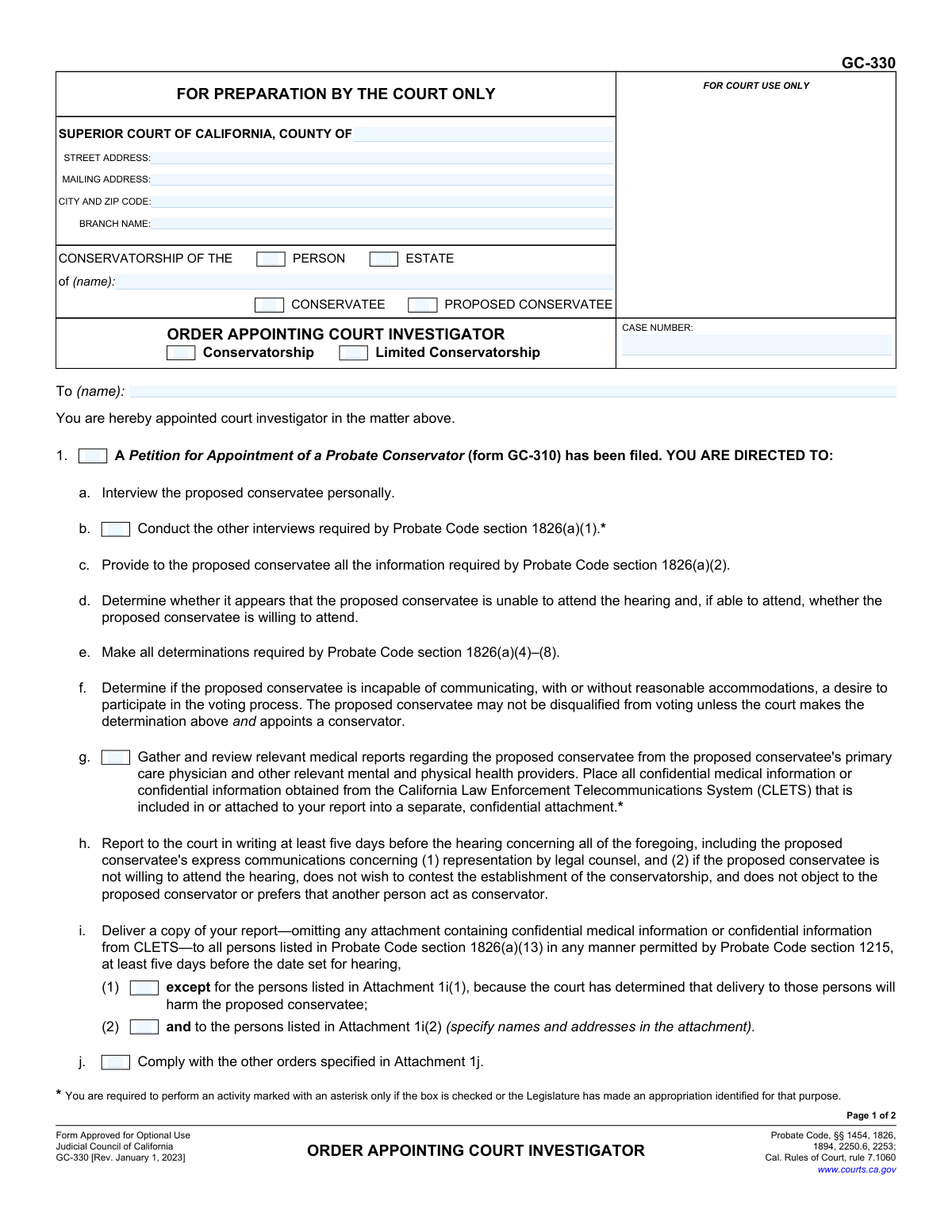
Form GC-330, Order Appointing Court Investigator, is a legal document issued by the Superior Court of California to officially appoint and direct a court investigator in matters of probate or temporary conservatorship. The form outlines the specific duties the investigator must perform, such as interviewing the proposed conservatee and reporting findings to the court, ensuring the individual's rights are protected. Today, this form can be filled out quickly and accurately using AI-powered services like Instafill.ai, which can also convert non-fillable PDF versions into interactive fillable forms.
Our AI automatically handles information lookup, data retrieval, formatting, and form filling.
It takes less than a minute to fill out GC-330 using our AI form filling.
Securely upload your data. Information is encrypted in transit and deleted immediately after the form is filled out.
Form specifications
| Form name: | Form GC-330, Order Appointing Court Investigator |
| Number of fields: | 45 |
| Number of pages: | 2 |
| Language: | English |
Instafill Demo: How to fill out PDF forms in seconds with AI
How to Fill Out GC-330 Online for Free in 2026
Are you looking to fill out a GC-330 form online quickly and accurately? Instafill.ai offers the #1 AI-powered PDF filling software of 2026, allowing you to complete your GC-330 form in just 37 seconds or less.
Follow these steps to fill out your GC-330 form online using Instafill.ai:
- 1 Navigate to an AI-powered service like Instafill.ai and upload or select the GC-330 form.
- 2 Enter the court information, including the county, street address, and branch name, into the designated fields.
- 3 Provide the case details, such as the name of the conservatee/proposed conservatee and the case number.
- 4 Input the name of the individual being appointed as the court investigator.
- 5 Check the appropriate boxes to specify the investigator's duties based on the type of petition filed (e.g., probate conservatorship, temporary conservatorship, medical consent).
- 6 Review all the information entered with the AI's assistance to ensure accuracy and completeness before the judicial officer signs.
- 7 Download, save, or print the completed GC-330 form for official court records and distribution.
Our AI-powered system ensures each field is filled out correctly, reducing errors and saving you time.
Why Choose Instafill.ai for Your Fillable GC-330 Form?
Speed
Complete your GC-330 in as little as 37 seconds.
Up-to-Date
Always use the latest 2026 GC-330 form version.
Cost-effective
No need to hire expensive lawyers.
Accuracy
Our AI performs 10 compliance checks to ensure your form is error-free.
Security
Your personal information is protected with bank-level encryption.
Frequently Asked Questions About Form GC-330
Form GC-330 is a court order used by a California Superior Court judge to officially appoint a court investigator in a conservatorship case. It specifies the exact duties the investigator must perform, such as interviewing the proposed conservatee and reporting findings to the court.
This form is for court use only and is prepared and signed by a judicial officer. Individuals petitioning for or involved in a conservatorship do not fill out Form GC-330.
A court investigator is appointed after a petition for conservatorship is filed to act as a neutral fact-finder for the court. Their job is to assess the situation, interview the proposed conservatee, and provide the judge with an unbiased report to help them make a decision.
The investigator will personally interview the proposed conservatee, inform them of their rights, review medical records, and determine their views on the conservatorship. They will then submit a written report of their findings to the court before the hearing.
Yes. The form directs the investigator to place all confidential medical information into a separate, confidential attachment that is not shared with all parties, protecting your privacy.
For a general conservatorship, the form requires the investigator to report to the court in writing at least five days before the scheduled hearing. Timelines can be shorter for temporary or emergency proceedings.
You should clearly communicate your wishes to the court investigator during your interview. Part of their role is to report your express communications to the court, including whether you object to the conservatorship and if you want a lawyer.
The asterisk signifies that the investigator is only required to perform that specific task if the corresponding box is checked by the court or if the state Legislature has provided specific funding for that activity.
No, because this form is prepared by the court, not the public. However, AI-powered services like Instafill.ai can help you accurately complete the petition forms, such as Form GC-310, which you must file to initiate the conservatorship process.
You can upload the forms you are responsible for, like the initial petition, to the Instafill.ai platform. The service uses AI to help you auto-fill the required fields accurately, which saves time and helps prevent common errors.
Services like Instafill.ai can convert flat, non-fillable PDFs into interactive forms. This allows you to easily type your information into the document, ensuring it is neat, legible, and ready for filing with the court.
A 'Conservatorship of the Person' is for making decisions about personal care, like health and housing. A 'Conservatorship of the Estate' is for managing financial matters. This order can be issued for either or both types of conservatorships.
Section 1 applies to a standard, long-term conservatorship investigation. Section 2 applies to a temporary or emergency conservatorship, which involves more urgent deadlines for the investigator to complete their duties and report to the court.
Compliance GC-330
Validation Checks by Instafill.ai
1
Case Number Presence and Format
This check verifies that the 'CASE NUMBER' field is not empty and conforms to the standard format for case numbers in the specified jurisdiction. A valid case number is essential for correctly filing the document and linking it to the proper legal proceeding. If the case number is missing or incorrectly formatted, the form may be rejected by the court clerk, causing delays in the appointment of the investigator.
2
Header Information Consistency Across Pages
This validation ensures that the case-identifying information in the header, specifically the 'Conservatee Name' and 'Case Number', is identical on both page 1 and page 2. Consistency is critical for multi-page legal documents to prevent confusion and ensure all pages are correctly associated with the same case. A mismatch could lead to the pages being separated or the order being deemed invalid.
3
Exclusive Conservatee Status Selection
This check ensures that exactly one of the 'CONSERVATEE' or 'PROPOSED CONSERVATEE' checkboxes is selected. These statuses are mutually exclusive; a person is either already under a conservatorship or is proposed for one, but not both simultaneously in this context. Failure to select one, or selecting both, creates ambiguity and will result in the form being returned for correction.
4
Required Conservatorship Scope Selection
This validation confirms that at least one of the 'PERSON' or 'ESTATE' checkboxes is selected under the 'CONSERVATORSHIP OF THE' heading. This selection defines the scope of the conservatorship and the investigator's duties. Without this information, the nature of the legal action is unclear, making the order unenforceable and requiring clarification before it can be processed.
5
Exclusive Order Category Selection
This check verifies that either the 'Conservatorship' or 'Limited Conservatorship' checkbox is selected, but not both. These are distinct legal proceedings with different requirements and implications for the conservatee's rights. Selecting the correct category is fundamental to the order's validity, and an incorrect or ambiguous selection will halt the process.
6
Court Investigator Name Presence
This validation ensures that the name of the court investigator being appointed is entered in the 'To (name):' field. This is the central purpose of the order—to appoint a specific individual. An order without the appointee's name is incomplete and has no legal effect, as it fails to direct anyone to perform the required duties.
7
Minimum Directive Selection
This check ensures that at least one of the main numbered directives (Item 1, 2, 3, or 4) is checked. These items specify the legal basis for the investigation (e.g., a petition has been filed) and outline the investigator's tasks. An order with no directives checked provides no instructions and is therefore purposeless and invalid.
8
Dependent Sub-Task Validation
This validation enforces conditional logic, ensuring that sub-task checkboxes (e.g., 1.g, 2.a, 3.c) can only be selected if their corresponding parent directive (Item 1, 2, or 3) is also checked. This prevents the creation of illogical or contradictory instructions. For example, ordering the investigator to perform tasks related to a temporary conservatorship (Item 2) is only valid if the form indicates a petition for one has been filed.
9
Attachment Count Coherence
This check verifies that if any checkbox referring to an attachment is selected (e.g., 'Attachment 1i(1)', 'Attachment 1j', 'Attachment 3e'), the 'Number of pages attached' field must contain a number greater than zero. This ensures consistency between the order's instructions and the physical document assembly. If an attachment is referenced but the page count is zero, it indicates a clerical error that must be corrected.
10
Signature Location Logic
This validation ensures the 'SIGNATURE FOLLOWS LAST ATTACHMENT' checkbox can only be selected if the 'Number of pages attached' is greater than zero. The judicial officer's signature must be on the main form or after the final attachment, but not designated as 'following an attachment' if none exist. This rule prevents ambiguity about the document's final, signed version.
11
Valid and Current Order Date
This check validates that the 'Date' field contains a complete and valid date in a recognized format (e.g., MM/DD/YYYY). It also ensures the date is not set in the future, as an order cannot be signed on a future date. An invalid or future date would call the authenticity and timing of the judicial order into question, likely leading to its rejection.
12
Court Location ZIP Code Format
This validation ensures the ZIP code entered in the 'CITY AND ZIP CODE' field for the court's address is a valid 5-digit or 9-digit (ZIP+4) format. Correctly formatted address information is crucial for mail delivery and proper identification of the court location. An invalid ZIP code could lead to misrouted correspondence or filing errors.
13
California County Validation
This check verifies that the name entered in the 'COUNTY OF' field is one of the 58 official counties in California. Specifying the correct superior court jurisdiction is a fundamental requirement for any legal filing. An incorrect or misspelled county name would render the filing invalid as it would be directed to the wrong legal authority.
14
Required Court Address Information
This validation ensures that the 'STREET ADDRESS' and 'CITY AND ZIP CODE' fields for the court are filled out. This information is essential for identifying the specific courthouse where the order is being issued and filed. Omitting this information creates ambiguity about the order's origin and jurisdiction, making it defective.
Common Mistakes in Completing GC-330
This mistake occurs when the user fills out the case caption (Conservatee Name, Case Number) on page 1 but forgets to complete the identical fields on page 2, or enters conflicting information. This often happens due to oversight when handling multi-page documents. The consequence is a document that appears unprofessional and may be rejected by the court clerk for being incomplete or inconsistent, causing filing delays. To avoid this, meticulously review every page before submission. AI-powered tools like Instafill.ai can prevent this by automatically populating recurring fields across all pages of a document, ensuring perfect consistency.
Users frequently check the 'Conservatee' box when the individual is still a 'Proposed Conservatee.' This error stems from a misunderstanding of the legal distinction; a person is only a 'Conservatee' after the court has officially established the conservatorship. Issuing an order that misidentifies the person's status can create legal ambiguity and may even be challenged as invalid. To prevent this, always verify the current status of the case by checking the initiating petition and ensure the box for 'Proposed Conservatee' is checked for all pre-appointment matters.
This form contains separate sections for different types of petitions (e.g., Section 1 for a general conservatorship, Section 2 for a temporary one). A common error is checking the wrong primary section, for instance, checking Section 1 when the order is for a temporary conservatorship filed on form GC-111. This results in the court investigator being given a completely incorrect set of legal duties and deadlines, which can derail the entire process and require a corrected order. Always match the checked section on form GC-330 to the specific petition form number that initiated the action.
Filers sometimes enter a generic county address or P.O. Box instead of the full street address and specific branch name of the courthouse handling the probate case. This happens when the filer is unfamiliar with the court's structure or rushes the process. This mistake can lead to the order being misrouted, delayed, or filed in the wrong courthouse, causing significant administrative delays. To avoid this, always use the precise street address and branch name (e.g., 'Stanley Mosk Courthouse,' 'Probate Division') as listed on the court's official website for that specific case.
A user might check a box indicating that an attachment is included (e.g., 'Attachment 1j') but fail to physically attach the document, or they may include attachments but forget to enter the correct number in the 'Number of pages attached' field. This creates confusion and results in an incomplete filing that the court cannot fully act upon, often leading to hearings being postponed. To prevent this, create a checklist for all required attachments as you fill out the form and double-check the final page count before the judicial officer signs it.
Many investigator duties, marked with an asterisk (e.g., 1g: 'Gather and review relevant medical reports'), are only assigned if their corresponding box is checked. Court staff may overlook checking these boxes, even when the tasks are essential for the case. This leads to an incomplete investigation, as the investigator is not authorized to perform the tasks, resulting in a deficient report and delays. Carefully review the case file and any specific instructions from the judge to ensure all necessary directives are explicitly checked on the order.
Transposing digits or making a typo when entering the case number is a frequent data entry error. This is a critical mistake because it can cause the official order to be filed in the wrong case record, creating a serious administrative problem that can be difficult to untangle. To avoid this, carefully proofread the case number against the official court file. Using a tool like Instafill.ai can help by storing and accurately auto-filling correct case information, reducing the risk of manual typos.
In the header, the user must select whether the action is for a 'Conservatorship' or a 'Limited Conservatorship.' These are distinct legal proceedings with different standards and implications. Accidentally checking the wrong box creates an order with an incorrect legal basis, which could invalidate the investigator's appointment and any subsequent actions. It is crucial to verify the type of petition filed and ensure the correct box is checked on the order to align with the legal nature of the case.
The form requires specifying whether the conservatorship is of the 'Person,' 'Estate,' or both. A common mistake is to check only 'Person' when the petition also seeks control over the 'Estate,' or vice versa. This oversight can result in an order that fails to grant the necessary authority requested in the petition, requiring later amendment and causing delays. The selections on the order must precisely mirror the scope requested in the underlying Petition for Appointment of a Probate Conservator (form GC-310).
Saved over 80 hours a year
“I was never sure if my IRS forms like W-9 were filled correctly. Now, I can complete the forms accurately without any external help.”
Kevin Martin Green
Your data stays secure with advanced protection from Instafill and our subprocessors

Robust compliance program
Transparent business model
You’re not the product. You always know where your data is and what it is processed for.
ISO 27001, HIPAA, and GDPR
Our subprocesses adhere to multiple compliance standards, including but not limited to ISO 27001, HIPAA, and GDPR.
Security & privacy by design
We consider security and privacy from the initial design phase of any new service or functionality. It’s not an afterthought, it’s built-in, including support for two-factor authentication (2FA) to further protect your account.
Fill out GC-330 with Instafill.ai
Worried about filling PDFs wrong? Instafill securely fills form-gc-330-order-appointing-court-investigator forms, ensuring each field is accurate.