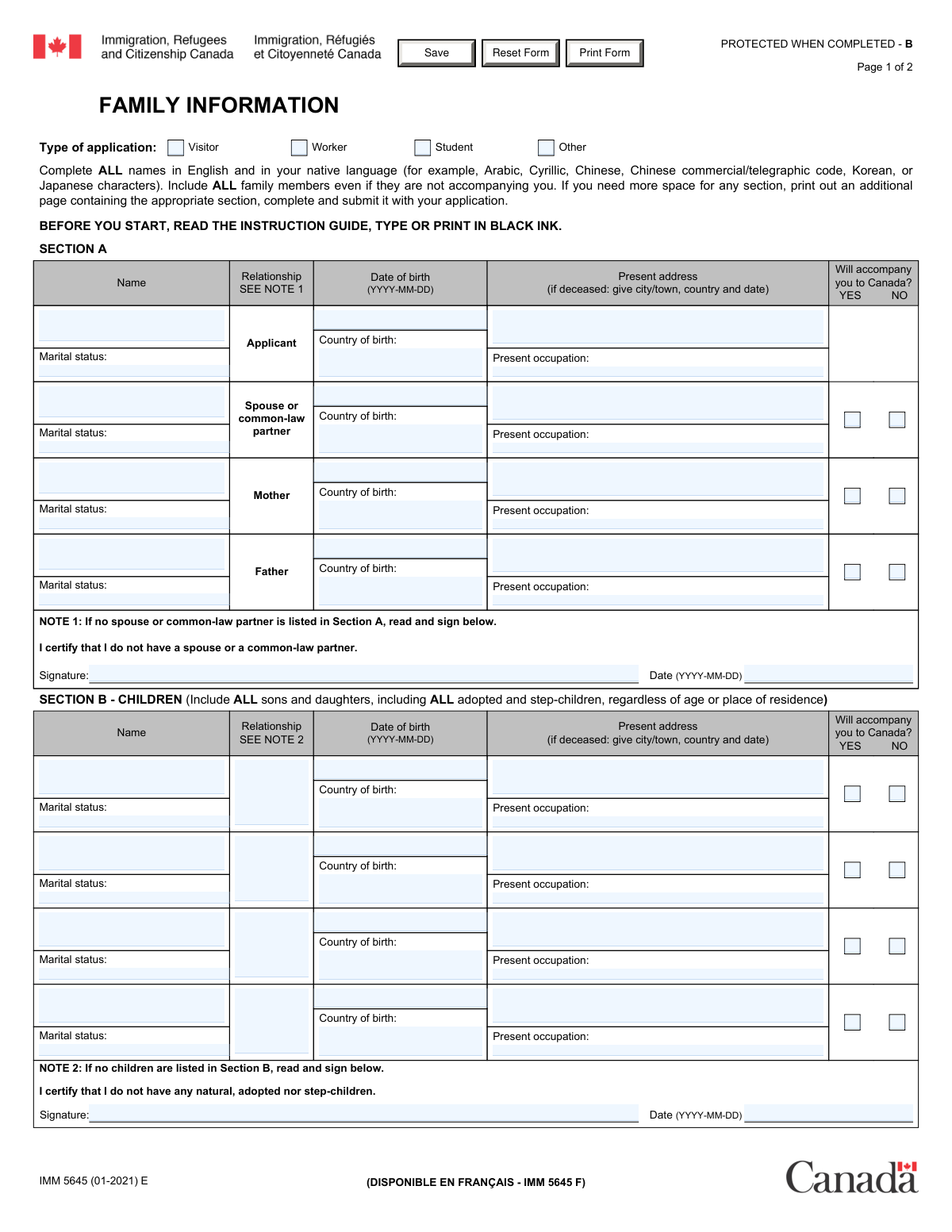
Yes! You can use AI to fill out Form IMM 5645, Family Information
Form IMM 5645 is a Canadian immigration document required for various applications, including visitor, worker, and student visas. Applicants must provide comprehensive details about their immediate family, such as their spouse, parents, children, and siblings, regardless of whether they are accompanying the applicant to Canada. This information is crucial for IRCC to verify family details for current and future applications. Today, this form can be filled out quickly and accurately using AI-powered services like Instafill.ai, which can also convert non-fillable PDF versions into interactive fillable forms.
Our AI automatically handles information lookup, data retrieval, formatting, and form filling.
It takes less than a minute to fill out IMM 5645 using our AI form filling.
Securely upload your data. Information is encrypted in transit and deleted immediately after the form is filled out.
Form specifications
| Form name: | Form IMM 5645, Family Information |
| Number of fields: | 145 |
| Number of pages: | 2 |
| Language: | English |
Instafill Demo: How to fill out PDF forms in seconds with AI
How to Fill Out IMM 5645 Online for Free in 2026
Are you looking to fill out a IMM 5645 form online quickly and accurately? Instafill.ai offers the #1 AI-powered PDF filling software of 2026, allowing you to complete your IMM 5645 form in just 37 seconds or less.
Follow these steps to fill out your IMM 5645 form online using Instafill.ai:
- 1 Navigate to Instafill.ai and upload or select Form IMM 5645.
- 2 Select your application type (e.g., Visitor, Worker, Student) at the top of the form.
- 3 Complete Section A by providing personal details for yourself, your spouse or common-law partner, and your parents.
- 4 Fill out Section B with the required information for all your children, including adopted and step-children.
- 5 Provide details for all your brothers and sisters, including half- and step-siblings, in Section C.
- 6 Carefully review all the information you've entered across all sections to ensure it is complete and accurate.
- 7 Complete the certification in Section D by providing your digital signature and the date to confirm the accuracy of the information.
Our AI-powered system ensures each field is filled out correctly, reducing errors and saving you time.
Why Choose Instafill.ai for Your Fillable IMM 5645 Form?
Speed
Complete your IMM 5645 in as little as 37 seconds.
Up-to-Date
Always use the latest 2026 IMM 5645 form version.
Cost-effective
No need to hire expensive lawyers.
Accuracy
Our AI performs 10 compliance checks to ensure your form is error-free.
Security
Your personal information is protected with bank-level encryption.
Frequently Asked Questions About Form IMM 5645
This form is used by Immigration, Refugees, and Citizenship Canada (IRCC) to collect detailed information about your family members. This information is required for processing applications for visitor, worker, student, or other visas.
Yes, you must include all family members as specified in each section, even if they are not accompanying you to Canada. The form requires you to check 'Yes' or 'No' for each person to indicate if they will accompany you.
In the 'Present address' field for any deceased family member, you should provide the city/town, country, and the date of their death.
If you do not have a spouse or common-law partner, you must leave that part of Section A blank and sign the declaration at the bottom of the section certifying this fact.
Yes, Section B requires you to list all of your sons and daughters, including adopted and step-children, regardless of their age or where they live.
If you need more space for any section, you should print an additional page of the form, complete the relevant section with the extra information, and submit it with your application.
Yes, the instructions for Section C specify that you must include all brothers and sisters, which includes full, half-, and step-siblings.
This means you must write the names using the characters or script of your native language, such as Arabic, Cyrillic, or Chinese characters, in addition to writing them in English.
Failure to complete the form in full may result in a delay in processing your application, or your application may not be processed at all. You must sign the certification in Section D to confirm all information is complete and accurate.
Yes, you can use AI-powered services like Instafill.ai to help you fill out your forms. These tools can auto-fill fields accurately, which helps save time and reduce errors.
You can use a service like Instafill.ai to fill out your form online. Simply upload the IMM 5645 PDF to their platform to begin filling it out interactively in your browser.
If you have a non-fillable or 'flat' PDF, you can use a tool like Instafill.ai. It can convert the non-fillable PDF into an interactive form that you can easily complete online.
By signing Section D, you are legally certifying that all the information you have provided is complete, accurate, and factual. This signed document becomes a permanent part of your immigration record.
Compliance IMM 5645
Validation Checks by Instafill.ai
1
Date Format Validation (YYYY-MM-DD)
This check ensures that all date fields, including dates of birth and signature dates, strictly adhere to the YYYY-MM-DD format. This is critical for data consistency and to prevent processing errors by the immigration system. If a date is entered in any other format (e.g., MM/DD/YYYY or DD-MM-YYYY), the form submission will be rejected, and the user will be prompted to correct the entry.
2
Logical Date of Birth
Verifies that all entered dates of birth are in the past and are plausible (e.g., not more than 120 years ago). This check prevents data entry errors, such as entering a future date or a typo that results in an impossible age. An invalid date of birth would halt the application process and require manual correction.
3
Application Type Selection Exclusivity
Ensures that one and only one 'Type of application' (Visitor, Worker, Student, or Other) is selected. Submitting with no selection or multiple selections would create ambiguity in how the application should be processed. This validation forces a clear choice, preventing delays and ensuring the application is routed to the correct processing stream.
4
Applicant Information Completeness
This check confirms that all fields in the 'Applicant' portion of Section A (Name, Date of birth, Country of birth, Present address, Present occupation, Marital status) are filled out. This information is fundamental to the application and its identity verification purpose. An incomplete applicant section would render the entire form invalid and result in an immediate rejection or request for more information.
5
Parental Age Consistency
This validation performs a logical check to ensure the applicant's date of birth is at least 14 years after their mother's and father's dates of birth. This helps catch significant data entry errors in the date fields. If the age gap is too small or negative, it indicates a likely mistake that must be corrected before submission.
6
Child Age Consistency
Verifies that any listed child's date of birth is chronologically after the applicant's date of birth by a reasonable margin (e.g., at least 14 years). This logical check prevents errors where a child is listed as being older than the parent. A failure would trigger a warning to review the dates for accuracy.
7
Spouse Declaration Logic
This check enforces the rule for the 'No Spouse' declaration. If any information is entered in the 'Spouse or common-law partner' section, the 'I certify that I do not have a spouse...' declaration must not be signed. Conversely, if the spouse section is left blank, the declaration signature and date become mandatory. This prevents contradictory information on the applicant's marital status.
8
Children Declaration Logic
This validation ensures consistency for the 'No Children' declaration in Section B. If one or more children are listed, the 'I certify that I do not have any... children' declaration must not be signed. If Section B is empty, the declaration signature and date are required. This prevents conflicting statements about the applicant's dependents.
9
Deceased Person Accompaniment Status
This check validates that if a family member's 'Present address' field indicates they are deceased (by containing a date of death), the 'Will accompany you to Canada?' option for that person must be 'No'. It is logically impossible for a deceased person to accompany the applicant. This prevents nonsensical data and ensures the integrity of the information provided.
10
Mandatory 'Accompany' Status Selection
For every family member listed in Sections A, B, and C, this validation ensures that either 'Yes' or 'No' is selected for the 'Will accompany you to Canada?' question. This information is critical for determining the scope of the application and who needs to be assessed. Missing this selection for any listed individual would result in an incomplete application.
11
Marital Status and Spouse Section Consistency
This check cross-references the applicant's 'Marital status' with the 'Spouse or common-law partner' section. If the applicant's status is 'Married' or 'Common-law partner', the system will expect the spouse section to be filled. If the status is 'Single', 'Divorced', or 'Widowed', the system will expect the spouse section to be empty and the corresponding declaration to be signed.
12
Incomplete Family Member Row
Verifies that if a name is entered for any family member in Sections A, B, or C, all other required fields for that person (Date of birth, Present address, 'Will accompany' status, etc.) are also completed. This prevents submission of partial records for family members. The system should flag any row that is started but not finished, ensuring all declared family members are fully documented.
13
Final Certification Completeness and Validity
Ensures the certification in Section D is signed and dated before submission. The validation also checks that the certification date is not in the future. This signature is a legal attestation of the form's accuracy, and its absence or an invalid date would make the entire document legally non-binding and invalid for processing.
Common Mistakes in Completing IMM 5645
Applicants often mistakenly omit family members who are not accompanying them, are estranged, or are deceased. The form explicitly requires listing ALL parents, spouses, children (including adopted and step-children regardless of age), and siblings (including half and step-siblings). Failure to disclose all family members can be considered misrepresentation, a serious offense that can lead to application refusal and a ban on future applications.
The form requires names to be written in both English (Roman alphabet) and the applicant's native script (e.g., Chinese characters, Arabic script). Many applicants only provide the English version, which makes the form incomplete and can cause delays in identity verification. To avoid this, prepare all names in both scripts beforehand, ensuring they match official documents like passports and birth certificates.
In Section A and Section B, there are specific declarations that must be signed if the applicant has no spouse/common-law partner or no children. Applicants often overlook this and simply leave the corresponding section blank, which renders the form incomplete. An incomplete form will be returned or its processing will be delayed, so it is crucial to sign and date these declarations if they apply to your situation.
When a family member is deceased, the 'Present address' field must contain the city/town, country, and date of death. A frequent error is to just write 'Deceased' or omit the date and location details, which fails to meet the form's requirements. This missing information can halt the processing of your application until clarification is provided, so be sure to gather these specific details beforehand.
This form strictly requires the YYYY-MM-DD format for all dates, but applicants often default to their local format (e.g., MM/DD/YYYY or DD/MM/YYYY). This inconsistency can lead to data entry errors by officials and create confusion about key dates like births, which can delay the application. To prevent this, double-check every date field before submission. AI-powered form filling tools like Instafill.ai can help by automatically validating and formatting dates correctly.
Fields such as 'Present occupation' should not be left empty, even for children, retired parents, or unemployed individuals. Leaving fields blank creates ambiguity and may cause an officer to deem the form incomplete. Instead of leaving a blank space, you should enter a clear status like 'Student', 'Retired', 'Unemployed', or 'None' to ensure the form is filled out completely and accurately.
The signature in Section D is a legal declaration that all information provided is complete and accurate, and it is one of the most critical parts of the form. Forgetting to sign and date this final certification will automatically result in the application being considered incomplete and returned to you. Always perform a final check of the entire document, paying special attention to all signature boxes before you submit.
The form has a limited number of rows for children and siblings, and the instructions state to attach an additional page if more space is needed. Applicants with large families sometimes try to squeeze extra names into the margins or, worse, omit family members entirely. Both actions can lead to refusal, so it is essential to print a new page for the relevant section, fill it out, and include it with your application.
While the instructions permit printing in black ink, a handwritten form that is difficult to read can lead to transcription errors and significant processing delays. For clarity and professionalism, it is always better to type the information. If you have a non-fillable PDF version of the form, you can use a tool like Instafill.ai to convert it into a fillable format, ensuring your responses are perfectly legible.
The family details on form IMM 5645 must be identical to the information on every other document in your application package. Even minor discrepancies in the spelling of a name, a date of birth, or marital status can raise red flags for misrepresentation, leading to delays or refusal. To avoid this, cross-reference all your forms to ensure perfect consistency. Using a tool like Instafill.ai can help by populating data from a single, accurate profile across all your documents.
Saved over 80 hours a year
“I was never sure if my IRS forms like W-9 were filled correctly. Now, I can complete the forms accurately without any external help.”
Kevin Martin Green
Your data stays secure with advanced protection from Instafill and our subprocessors

Robust compliance program
Transparent business model
You’re not the product. You always know where your data is and what it is processed for.
ISO 27001, HIPAA, and GDPR
Our subprocesses adhere to multiple compliance standards, including but not limited to ISO 27001, HIPAA, and GDPR.
Security & privacy by design
We consider security and privacy from the initial design phase of any new service or functionality. It’s not an afterthought, it’s built-in, including support for two-factor authentication (2FA) to further protect your account.
Fill out IMM 5645 with Instafill.ai
Worried about filling PDFs wrong? Instafill securely fills form-imm-5645-family-information forms, ensuring each field is accurate.