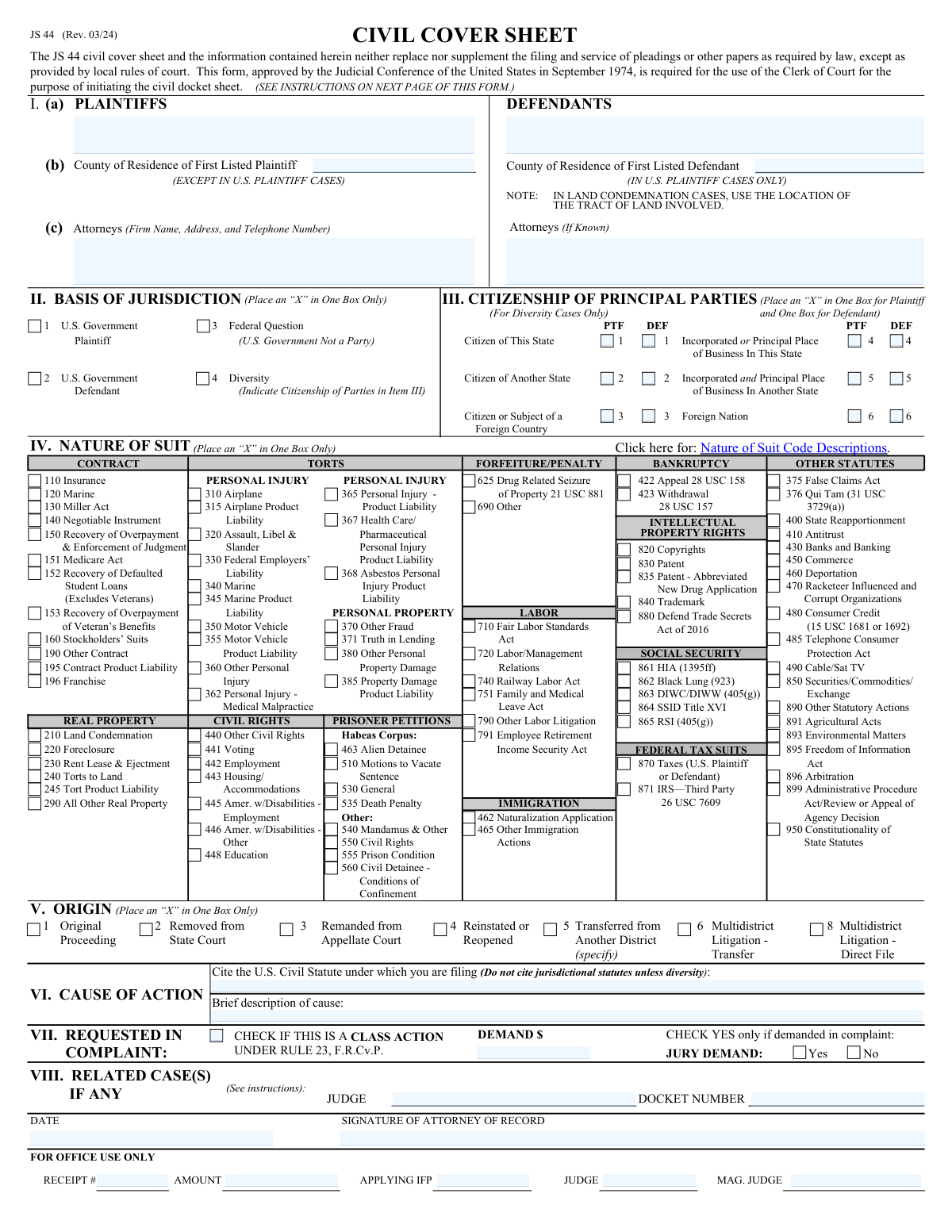
Yes! You can use AI to fill out Form JS 44, Civil Cover Sheet

Form JS 44, the Civil Cover Sheet, is a mandatory document used in United States federal district courts to initiate a civil lawsuit. It provides the court with a summary of the case, including details about the parties involved, the legal basis for the court's jurisdiction, the nature of the suit, and the relief sought. This information is crucial for the court's administrative purposes, such as case assignment and statistical reporting. Today this form can be filled out quickly and accurately using AI-powered services like Instafill.ai, which can also convert non-fillable PDF versions into interactive fillable forms.
Our AI automatically handles information lookup, data retrieval, formatting, and form filling.
It takes less than a minute to fill out JS 44 using our AI form filling.
Securely upload your data. Information is encrypted in transit and deleted immediately after the form is filled out.

Form specifications

Form name: Form JS 44, Civil Cover Sheet
Number of fields: 137
Filled form examples: Form JS 44 Examples
Language: English
main-image

Instafill Demo: How to fill out PDF forms in seconds with AI

How to Fill Out JS 44 Online for Free in 2026

Are you looking to fill out a JS 44 form online quickly and accurately? Instafill.ai offers the #1 AI-powered PDF filling software of 2026, allowing you to complete your JS 44 form in just 37 seconds or less.
Follow these steps to fill out your JS 44 form online using Instafill.ai:
  1. 1 Navigate to Instafill.ai and upload your JS 44 form or select it from the template library to begin.
  2. 2 Use the AI assistant to accurately enter the full names, counties of residence, and citizenship details for all plaintiffs and defendants.
  3. 3 Provide the firm name, address, and contact information for the attorneys representing the plaintiffs and, if known, the defendants.
  4. 4 Specify the basis for the court's jurisdiction (e.g., Federal Question, Diversity), cite the relevant U.S. Civil Statute for your cause of action, and write a brief description of the cause.
  5. 5 Select the appropriate codes for the 'Nature of Suit' section and indicate other case details, such as whether it is a class action or if a jury demand is being made.
  6. 6 If there are any related cases, provide their docket numbers and judge information. Enter filing fee details or indicate if you are applying to proceed In Forma Pauperis (IFP).
  7. 7 Review all the information auto-filled by the AI for accuracy, then electronically sign and date the form to complete the process before filing with the court.

Our AI-powered system ensures each field is filled out correctly, reducing errors and saving you time.

Why Choose Instafill.ai for Your Fillable JS 44 Form?

Speed

Complete your JS 44 in as little as 37 seconds.

Up-to-Date

Always use the latest 2026 JS 44 form version.

Cost-effective

No need to hire expensive lawyers.

Accuracy

Our AI performs 10 compliance checks to ensure your form is error-free.

Security

Your personal information is protected with bank-level encryption.

Frequently Asked Questions About Form JS 44

This form, often called a Civil Cover Sheet, provides the court with a summary of a new lawsuit for administrative and statistical purposes. It identifies the parties, the legal basis for the case, and the nature of the suit.

The plaintiff or their attorney must complete and submit this form when they first file a new civil case with the court.

You will need the names and counties of residence for the main plaintiff and defendant, your attorney's contact information, and the specific U.S. Civil Statute under which you are filing the case.

The form includes the field 'Attorneys (If Known)' for the defendant's side. If this information is not known at the time of filing, you can leave this section blank.

For both the plaintiff and defendant, check the box that best describes their status, such as a citizen of the state, a citizen of another state, a corporation, or a foreign national. This is critical for establishing the court's jurisdiction.

'Basis of Jurisdiction' is the legal reason the court has authority to hear the case, like 'Federal Question' or 'Diversity'. 'Cause of Action' is the specific law you are suing under and a brief description of your claim.

IFP stands for 'In Forma Pauperis,' which is a request to the court to waive filing fees due to financial hardship. If you check this, you will likely need to submit a separate application to prove you qualify.

In the 'Case Details' section, there should be a radio button or checkbox labeled 'jury' or 'Jury Demand'. Select this option to formally request a trial by jury.

No, you should typically leave the 'JUDGE' and 'MAG. JUDGE' fields blank. These are filled in by the court clerk after the case is assigned.

The form provides checkboxes for up to six defendants. If your case involves more parties, list the primary ones and attach a separate sheet with the complete list, following court rules.

Yes, services like Instafill.ai use AI to accurately auto-fill form fields with your saved information, which can save you time and help prevent errors.

Upload the form to the Instafill.ai platform. The AI will make the fields interactive, and you can use the auto-fill feature to populate your information instantly before downloading or printing.

You can use a service like Instafill.ai, which can convert flat, non-fillable PDFs into interactive, fillable forms. This allows you to easily type your information directly into the fields online.

Compliance JS 44
Validation Checks by Instafill.ai

1
Ensures Plaintiff Name is Provided
This validation confirms that the 'PLAINTIFFS' field is not empty. Identifying the plaintiff is the most fundamental requirement for initiating a legal action, as it establishes who is bringing the suit. A failure to provide a plaintiff name would make the form invalid and lead to immediate rejection by the court clerk.
2
Ensures Defendant Name is Provided
This check verifies that the 'Defendants' field contains at least one name. The defendant must be clearly identified so they can be properly served and notified of the lawsuit against them. Without a named defendant, the case cannot proceed, and the filing will be rejected.
3
Requires Selection of a Jurisdictional Basis
This validation ensures that one of the options under 'Basis of Jurisdiction' has been selected. The court must have proper jurisdiction to hear a case, and this selection is the filer's assertion of why that jurisdiction exists. A form submitted without this information is incomplete and cannot be processed.
4
Validates Diversity of Citizenship for Jurisdiction
If 'Diversity' is selected as the basis for jurisdiction, this check confirms the parties are from different states. It cross-references the 'Citizenship of Principal Parties' checkboxes to ensure a plaintiff and defendant are not both marked as citizens of the same state. This is a critical requirement for diversity jurisdiction, and failure to meet it would result in the case being dismissed.
5
Ensures Mutually Exclusive Citizenship Selection
This validation ensures that for each party (plaintiff and defendant), only one citizenship checkbox is selected. For example, a plaintiff cannot be both 'a citizen of this state' (PTF 1) and 'a corporation incorporated in another state' (PTF 5). This prevents contradictory information and ensures the party's status is clearly and unambiguously defined.
6
Validates Consistency Between Filing Fee and IFP Status
This check enforces a logical rule between the filing fee fields and the In Forma Pauperis (IFP) application. If the 'APPLYING IFP' box is checked, the 'AMOUNT' and 'RECEIPT' fields should be empty. Conversely, if 'APPLYING IFP' is not checked, the 'AMOUNT' field must contain a valid monetary value.
7
Validates Attorney Telephone Number Format
This check verifies that the telephone number entered for the plaintiff's attorney adheres to a standard format (e.g., NNN-NNN-NNNN or (NNN) NNN-NNNN). Proper formatting ensures the number is valid and can be used by the court for communication. An invalid format could lead to failed communication attempts and delays.
8
Ensures Demand Amount is a Valid Number
This validation confirms that the value entered in the 'DEMAND' field is a numeric or currency format. The demand amount is often crucial for determining jurisdiction and for classifying the case. An invalid entry would prevent the court from properly assessing these factors.
9
Validates Form Completion Date
This check ensures the 'DATE' field contains a valid date that is not in the future. The date of signing is legally significant as it marks when the information was certified as true by the filer. An invalid or future date would call the validity of the entire submission into question.
10
Requires Both Statute Citation and Description for Cause of Action
This validation ensures that both the 'Cite the U.S. Civil Statute' and 'Brief description of cause' fields are completed. The statute provides the specific legal authority for the lawsuit, while the description gives a concise summary of the facts. Both are essential for the court to understand the legal and factual basis of the claim.
11
Ensures Completeness of Related Case Information
This check verifies that if either the 'Judge' or 'DOCKET NUMBER' field is filled out in the 'Related Cases' section, the other field must also be completed. Providing partial information is unhelpful and can lead to confusion when trying to link related matters. This rule ensures that any reference to a related case is complete and actionable.
12
Ensures a 'Nature of Suit' is Selected
This validation confirms that an option from the 'Nature of Suit' section has been chosen. This classification is vital for the court's administrative purposes, including statistical tracking, assignment to the correct judicial track, and resource allocation. Failure to select a nature of suit would render the form incomplete for case management.
13
Requires Plaintiff Attorney Contact Information
This check ensures that the firm name, address, and telephone number are all provided for the plaintiff's attorney. This information is essential for all official communication from the court and opposing parties. Missing contact details can halt case proceedings until the information is provided.

Common Mistakes in Completing JS 44

Incorrectly Selecting the Basis of Jurisdiction

This form requires the filer to select the legal basis for the court's authority, such as 'Federal Question' or 'Diversity of Citizenship'. Many filers, particularly those without legal training, misunderstand these complex legal concepts and select the wrong option. An incorrect selection can lead to the case being dismissed for lack of subject-matter jurisdiction, wasting time and filing fees. To avoid this, carefully review the definitions for each jurisdictional basis or consult with legal counsel, and use tools that can provide guidance on these fields.

Citing a Jurisdictional Statute as the Cause of Action

The form explicitly warns, 'Do not cite jurisdictional statutes unless diversity,' yet it's a frequent error to list statutes like 28 U.S.C. § 1331 in the 'Cause of Action' field. This field is for the substantive law that creates the legal claim (e.g., 42 U.S.C. § 1983 for a civil rights violation), not the law that gives the court power to hear the case. This mistake shows a misunderstanding of the legal claims and can cause confusion or require amendment. Always cite the specific statute your claim is based on, not the general jurisdictional one.

Mismatched Citizenship and Jurisdictional Basis

A filer might select 'Diversity' as the basis of jurisdiction but then check boxes indicating the plaintiff and defendant are citizens of the same state. This creates a direct contradiction on the face of the form, making the claim for diversity jurisdiction invalid. Court clerks will immediately flag this inconsistency, leading to rejection of the filing. To prevent this, ensure the citizenship information provided in the 'Citizenship of Principal Parties' section directly supports the jurisdictional basis selected.

Providing Incomplete or Incorrect Party Names

Filers sometimes use nicknames, initials, or incomplete business names for plaintiffs and defendants instead of their full, legal names. This can create significant problems for serving process, enforcing judgments, and maintaining a clear court record. An incorrect party name may require filing an amended complaint to fix, causing delays. Always use the complete and official legal name for all individuals and entities involved in the lawsuit.

Confusing County of Residence with Court Location

The form asks for the 'County of Residence' for the plaintiff and defendant, which is critical for determining the proper venue. A common mistake is to enter the county where the courthouse is located or a person's county of work, rather than their actual county of legal residence. This error can lead to challenges over improper venue and potential transfer of the case. Double-check the legal residence of all parties before filling out this section.

Choosing an Inaccurate 'Nature of Suit' Code

The form provides a long list of codes for the 'Nature of Suit,' and filers often pick one that is only generally related to their case instead of the most specific and accurate option. This information is used for statistical tracking and proper case assignment to judges with relevant expertise. While not always a fatal error, a significantly incorrect code can delay case processing or assignment. Carefully read all available options to find the one that best describes the primary cause of action.

Failing to Disclose Known Related Cases

The 'Related Cases' section is frequently overlooked or intentionally left blank. Filers are required to disclose any pending or prior cases that are factually or legally related to the current one. Failing to do so can be viewed as an attempt to 'judge shop' and may result in sanctions from the court or forced consolidation of the cases later. Diligently research and report any related matters, including the docket number and judge, if known.

Missing Signature or Date

An unsigned or undated form is legally invalid and will be rejected by the court clerk, halting the entire filing process. This often happens when filers print a non-fillable PDF, fill it out by hand, and forget to sign before scanning. This simple oversight can cause you to miss a critical statute of limitations deadline. To avoid this, always perform a final check for a signature and date before submission. AI-powered tools like Instafill.ai can convert flat PDFs into fillable forms, which can include validation checks to ensure these critical fields are not left empty.

Incomplete Attorney Contact Information

The form requires the firm name, address, and telephone number for the attorneys, not just their name. Filers may omit the firm name or provide a P.O. Box instead of a full street address, which can be insufficient for service. Incomplete information hinders communication from the court and opposing counsel, causing unnecessary delays. Ensure all contact details are complete and accurate as per the court's requirements.

Incorrectly Checking the 'Class Action' Box

The 'Class Action' checkbox should only be marked if the lawsuit is being formally filed on behalf of a larger group under specific procedural rules (e.g., FRCP 23). Some filers mistakenly check this box simply because their case involves multiple plaintiffs or defendants, which is incorrect. Improperly designating a case as a class action creates immediate and significant procedural hurdles and will be quickly questioned by the court, requiring clarification and amendment.
Saved over 80 hours a year

“I was never sure if my IRS forms like W-9 were filled correctly. Now, I can complete the forms accurately without any external help.”

Kevin Martin Green

Your data stays secure with advanced protection from Instafill and our subprocessors

Robust compliance program

Transparent business model

You’re not the product. You always know where your data is and what it is processed for.

ISO 27001, HIPAA, and GDPR

Our subprocesses adhere to multiple compliance standards, including but not limited to ISO 27001, HIPAA, and GDPR.

Security & privacy by design

We consider security and privacy from the initial design phase of any new service or functionality. It’s not an afterthought, it’s built-in, including support for two-factor authentication (2FA) to further protect your account.

Fill out JS 44 with Instafill.ai

Worried about filling PDFs wrong? Instafill securely fills form-js-44-civil-cover-sheet-1 forms, ensuring each field is accurate.