
Instafill.ai
7 days free
AI form filling · 179 fields · 9 pages · done in seconds

Yes! You can use AI to fill out Form N-565, Application for Replacement Naturalization/Citizenship Document (Edition 04/01/24)

Don't type 179 fields by hand. Tell our AI about yourself, or upload a document you already have, and it fills every field in seconds. You check it, then download, print or sign.
7 days free, then $19.99/month · Cancel anytime
AI fills it, no typingEncrypted, never used to train AICancel in two clicks
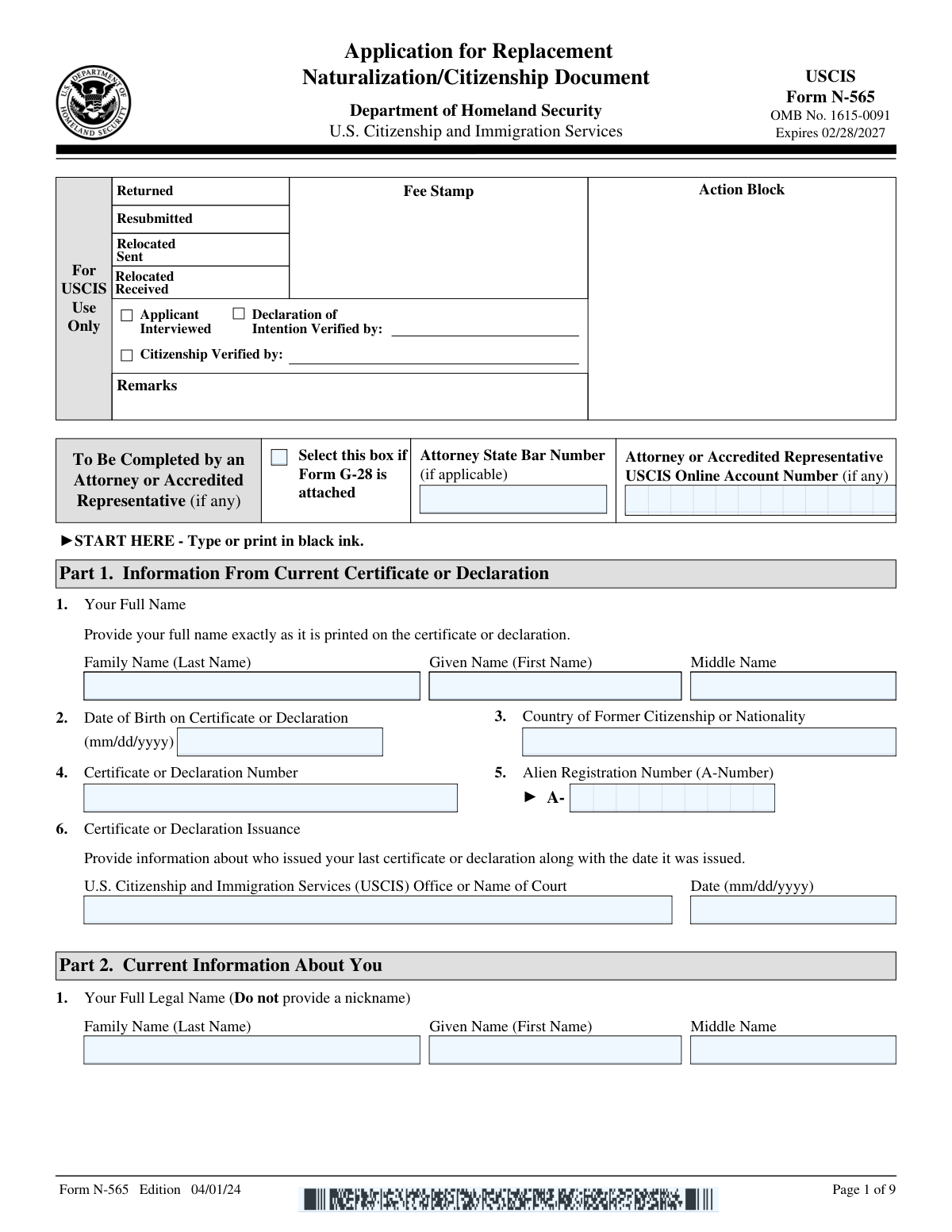
Form N-565, Application for Replacement Naturalization/Citizenship Document (Edition 04/01/24), page 1
Complex · 65/100Form Complexity Index

The AI does the filling. You just check it.

No typing into boxes, nothing to install.

Tell the AI about youAnswer a few questions in plain words, or upload a document you already have. That is all the typing there is.
AI fills every field in secondsIt puts each answer in the right box on every page, checkboxes included.
Check it and downloadReview every field, change anything, then download, print or sign the PDF.

What this form asks for

The AI fills all of it, from your answers or your documents.

Form N-565, officially known as the Application for Replacement Naturalization/Citizenship Document, is used by individuals who need to replace their naturalization or citizenship documents due to loss, theft, destruction, or errors. It is important to fill out to maintain valid proof of U.S. citizenship.
Fillable fields179
Pages9
Sections43
Form Complexity IndexComplex, 65/100

The AI checks your answers before you download

15 checks built for this form, so a wrong date or a missing answer is caught before anyone else sees it.

Ensures that all information is typed or printed in black ink as specified

The AI ensures that all entries on Form N-565 are completed using black ink, whether the information is typed or handwritten. This is in accordance with the form's instructions, which specify the color of ink to be used to maintain consistency and legibility. The AI checks for any deviations from this requirement and flags entries that are not in black ink for correction. This validation is crucial to prevent processing delays due to non-compliance with the form's specifications.

Confirms that Form G-28 is attached if an attorney or accredited representative is involved

The AI confirms the presence of Form G-28 when an attorney or accredited representative is acting on behalf of the applicant. This form is necessary to establish the authorization for representation in immigration matters. The AI verifies that Form G-28 is properly completed and attached to Form N-565. If the form is missing or incomplete, the AI alerts the user to rectify the issue, ensuring that the application process is not hindered by the absence of required legal documentation.

Verifies that all required information and supporting documents are provided as per the form instructions

The AI meticulously verifies that all mandatory fields on Form N-565 are filled out and that the necessary supporting documents are included as per the instructions. It checks for common omissions and errors, such as missing personal details, evidence of legal name changes, or previous naturalization documents. The AI's validation process helps to ensure that the application is complete upon submission, reducing the likelihood of requests for evidence or application denial due to incomplete information.

Checks that additional information is properly formatted with Page Number, Part Number, and Item Number when using Part 12 or separate sheets

When additional information is provided on Form N-565, the AI checks that it is properly formatted according to the form's guidelines. This includes ensuring that any information added in Part 12 or on separate sheets includes the correct Page Number, Part Number, and Item Number. This validation is essential for maintaining the organization of the information and for ease of reference by immigration officials. The AI's attention to detail in this aspect helps prevent processing errors and confusion.

Ensures that the applicant's name, A-Number (if any), and signature with date are included on each additional sheet

The AI ensures that each additional sheet or attachment to Form N-565 includes the applicant's name, Alien Registration Number (A-Number, if applicable), and a signature with the date. This validation is critical for associating the additional information with the correct application and verifying the authenticity of the documents. The AI's thorough check guarantees that these key identifiers are present on all supplementary materials, which is a requirement for the form's acceptance and processing.

Reviews the entire form for accuracy and completeness before submission.

Ensures that all required fields in Form N-565 are filled out accurately and completely prior to submission. Cross-references information provided with supporting documents to confirm consistency and correctness. Alerts the user to any discrepancies or missing information that could lead to delays or rejections. Maintains a checklist to systematically review each section of the form, ensuring no detail is overlooked.

And 9 more checks
  • Confirms that the application is signed and dated under penalty of perjury.
  • Verifies that a competent interpreter has assisted and completed Part 10 if the applicant is not fluent in English.
  • Ensures that Part 11 is completed by the preparer if someone other than the applicant prepares the form.
  • Checks that the appropriate fee is included with the submission of the completed form.
  • Verifies that the form and all required supporting documentation are submitted to the correct address as provided in the form instructions.
  • Ensures that a copy of the form and all documents submitted are retained for the applicant's records.
  • Confirms that the form is the most current version available for use.
  • Verifies the eligibility of the applicant for the replacement document requested.
  • Checks for the presence of an A-Number and ensures it is correctly entered if applicable.

Let AI fill out your N-565

No typing. Every field filled in seconds, checked, ready to sign.

7 days free, then $19.99/month · Cancel anytime

How to Fill Out N-565 Online for Free in 2026

What the AI walks you through.

  1. Visit instafill.ai site and select N-565
  2. Enter current certificate information
  3. Provide current personal information
  4. Select the type of application
  5. Complete sections based on application type
  6. Sign and date the form electronically
  7. Check for accuracy and submit form

Common Mistakes in Completing N-565

The ones the AI is built to catch.

Failing to use black ink for handwritten entries
Entries made on Form N-565 should always be completed using black ink if handwritten. Using other ink colors can cause issues during the scanning and processing of the document. To avoid this mistake, applicants should ensure they have a black ink pen before beginning to fill out the form. Double-checking the entries before submission can also help catch any errors that may have been overlooked initially.
Omitting Form G-28 when an attorney is involved
When an attorney or accredited representative is acting on behalf of the applicant, Form G-28, Notice of Entry of Appearance as Attorney or Accredited Representative, must be included with Form N-565. Failure to include this form can lead to processing delays. Applicants should confirm with their legal representative that Form G-28 is completed accurately and attached to the application packet before submission.
Leaving required fields blank or providing incomplete information
All required fields on Form N-565 must be completed to avoid delays or rejection of the application. Incomplete information can result in the need to resubmit the form, incurring additional time and potential costs. Applicants should carefully review each section of the form and provide complete responses to all questions. It is advisable to double-check the form after filling it out to ensure no required fields have been missed.
Neglecting to attach necessary supporting documents
Form N-565 requires various supporting documents, which must be attached as per the form instructions. Neglecting to include these documents can result in the application being delayed or denied. Applicants should carefully read the instructions to understand which documents are required and verify that each document is included before mailing the application. Keeping a checklist of required documents can be a helpful way to ensure that all necessary paperwork is gathered and submitted.
Forgetting to use Part 12 for additional information
If additional space is needed to provide complete answers to any questions on Form N-565, applicants should use Part 12, Additional Information section. Forgetting to use this section can lead to incomplete answers and potential processing delays. Applicants should review their completed form to confirm that all information is provided in full and use Part 12 to include any extra details that could not fit in the main sections of the form.
Not indicating Page, Part, and Item Numbers on additional sheets
Applicants often forget to indicate the Page, Part, and Item Numbers on additional sheets when providing extra information. This can lead to confusion and processing delays as USCIS may not be able to match the additional information to the correct section of the form. To avoid this mistake, always mark the top of each additional sheet with the Page Number, Part Number, and Item Number that the information is related to. Double-check that these references are accurate and clearly written to ensure that your additional information is considered in the context of your application.
Omitting name, A-Number, and signature on additional sheets
It is a common oversight to leave out one's name, Alien Registration Number (A-Number), and signature on additional sheets attached to the form. This omission can result in the USCIS being unable to associate the additional information with the correct applicant, potentially leading to incomplete application processing. To prevent this error, make sure to include your full legal name, A-Number, and a signature on each additional sheet. Verify that this information is legible and consistent with the details provided on the main form to ensure proper linkage and identification.
Failing to review the form for accuracy before signing
Many applicants sign the form without thoroughly reviewing it for accuracy, which can lead to submission of incorrect or incomplete information. This can cause significant delays in processing or even result in the denial of the application. To avoid this, take the time to carefully review each section of the form before signing. Ensure that all information is correct, complete, and up-to-date. If possible, have another person review the form as well to catch any errors you may have missed.
Signing without understanding due to language barriers
Applicants who face language barriers may sign the form without fully understanding the content, which can lead to unintentional misrepresentation or errors. It is crucial to comprehend all the information on the form before signing it. If you are not fluent in English, seek assistance from a competent interpreter or a legal representative who can explain the form's content to you. Ensure that you understand every part of the application, including the legal attestations and declarations, before providing your signature.
Not completing Part 10 with the help of a competent interpreter
When an interpreter is used, applicants sometimes neglect to complete Part 10 of the form, which is specifically for the interpreter's information. This part is essential to document that the applicant received assistance in understanding the form. To avoid this mistake, if you use an interpreter, ensure that Part 10 is filled out completely and accurately with the interpreter's information and signature. This will confirm that you had the necessary help to comprehend the form and that the interpreter attests to the accuracy of the translation and information provided.
Preparer forgetting to complete Part 11
Part 11 of Form N-565 is designated for the preparer's information and signature, if someone other than the applicant completed the form. Neglecting this section can lead to processing delays or even the rejection of the application. To avoid this mistake, individuals who have their forms prepared by someone else should ensure that the preparer reviews the entire form upon completion, fills out Part 11 with the required information, and provides their signature before submission.
Submitting the form without the appropriate fee
Failure to include the correct fee with Form N-565 can result in the rejection of the application. Applicants should verify the current fee amount on the USCIS website before submission, as fees may change. It is also important to follow the instructions for the payment method, such as using a check or money order payable to the U.S. Department of Homeland Security. Applicants should not send cash and must ensure that the payment is for the exact amount required.
Sending the form to an incorrect address
Sending Form N-565 to the wrong address can cause significant delays in processing or the form being returned to the sender. Applicants should carefully review the filing instructions provided by USCIS to determine the correct mailing address, which may vary depending on the form's purpose and the applicant's location. It is advisable to double-check the address before mailing and to consider using a trackable mailing service to confirm delivery.
Not retaining a copy of the form and supporting documents
Applicants who do not keep a copy of their completed Form N-565 and supporting documents may encounter difficulties if the original documents are lost or if USCIS requests additional information. It is crucial to make copies of all documents before sending them to USCIS. Retaining these copies will help applicants reference their submission if needed and provide proof of filing in case the documents are misplaced or additional evidence is requested during the application process.

Frequently Asked Questions About N-565


Is it really free for 7 days?
Yes. You pay $0 today. Cancel before Nov 17 and you are never charged. Keep it, and it is $19.99 a month for 5 fills of your N-565.
Can I fill other forms too?
This plan is for your N-565: your own AI agent fills it as often as 5 times a month. To fill other forms and upload your own, choose a Professional plan from your account.
How do I cancel?
From your account, in two clicks, any time. No email, no call.
How does the AI fill out N-565?
You answer a few questions in plain words, or upload a document you already have. The AI reads what you give it and puts each answer into the right field of N-565, on every page, in seconds. It checks the answers against the form's own rules, and you review and change anything before you download, print or sign.
What happens to my information?
It is encrypted in transit and at rest, and it is never used to train AI.
How complex is N-565 to fill out?
N-565 has a Form Complexity Index of 65 out of 100, in the complex tier: 179 fillable fields across 9 pages. Instafill.ai's AI fills it in under a minute, with every field there for you to review before you download.
What is Form N-565?
Form N-565, Application for Replacement Naturalization/Citizenship Document, is a form provided by the United States Citizenship and Immigration Services (USCIS) for individuals who need to replace their naturalization or citizenship document due to loss, theft, destruction, or mutilation. This form is also used to apply for a special certificate of naturalization as a U.S. citizen to be recognized by a foreign country.
Who needs to file Form N-565?
Form N-565 should be filed by individuals who have previously been issued a Certificate of Naturalization, Certificate of Citizenship, Declaration of Intention, or Repatriation Certificate and need to replace it because it has been lost, stolen, destroyed, or mutilated. Additionally, it is for those who need to apply for a special certificate of naturalization to be recognized by a foreign country.
What documents need to be attached to Form N-565?
When filing Form N-565, you need to attach the following documents: a copy of the lost, stolen, or destroyed naturalization/citizenship document if available; two passport-style photographs; any evidence that supports the reason for the application, such as a police report for a stolen document; and the appropriate filing fee. If the document is mutilated, you must submit the original document along with the form.
How do I report a lost, stolen, or destroyed naturalization/citizenship document?
To report a lost, stolen, or destroyed naturalization/citizenship document, you should file Form N-565 with USCIS. Along with the form, you should include any available evidence of the loss, theft, or destruction, such as a police report or a written statement explaining the circumstances. You will also need to pay the required fee and provide two passport-style photographs.
What should I do if my naturalization/citizenship document is mutilated?
If your naturalization/citizenship document is mutilated, you should file Form N-565 with USCIS to request a replacement. You must submit the original mutilated document along with the form, two passport-style photographs, and the required filing fee. Additionally, you should include a statement explaining how the document came to be mutilated.
How can I correct a typographical or clerical error on my naturalization/citizenship document?
To correct a typographical or clerical error on your naturalization or citizenship document, you need to file Form N-565, Application for Replacement Naturalization/Citizenship Document, with the U.S. Citizenship and Immigration Services (USCIS). You should include the document with the error, any evidence that supports your claim of an error, and the correct information. There is no filing fee if the error was made by USCIS. After filing, USCIS will review your application and issue a corrected document if the error is confirmed.
What is the process for changing the name on a naturalization/citizenship document?
To change your name on a naturalization or citizenship document, you must file Form N-565 with USCIS. This process typically requires a court order or marriage certificate as evidence of the name change. You must submit the original document that needs the name change, the legal document authorizing the name change, and the filing fee, unless you qualify for a fee waiver. USCIS will then process your application and issue a new document with your updated name.
How do I update my date of birth on a Certificate of Citizenship?
To update your date of birth on a Certificate of Citizenship, file Form N-565 with USCIS. You will need to provide evidence of the correct date of birth, such as a birth certificate or passport, along with the incorrect Certificate of Citizenship and the required filing fee. USCIS will review your application and, if approved, issue a new certificate with the correct date of birth.
What are the steps to change the gender listed on my naturalization/citizenship document?
To change the gender listed on your naturalization or citizenship document, file Form N-565 with USCIS. You should include the document with the incorrect gender, a court order or medical certification that verifies the gender change, and the appropriate filing fee. USCIS will evaluate your application and, upon approval, issue a new document reflecting the correct gender.
What is a Special Certificate of Naturalization and when is it needed?
A Special Certificate of Naturalization is issued by USCIS to a naturalized U.S. citizen who needs to prove their U.S. citizenship status to a foreign government. It is often needed when a naturalized citizen is seeking recognition of their U.S. citizenship by a foreign country, typically for the purpose of obtaining a foreign passport or fulfilling residency requirements. To obtain a Special Certificate of Naturalization, the individual must file Form N-565 and provide the necessary documentation and filing fee. USCIS will process the request and issue the certificate if all requirements are met.
What information is required from the foreign official for a Special Certificate of Recognition?
For a Special Certificate of Recognition, a foreign official typically needs to provide information that verifies the identity of the applicant and confirms their citizenship status. This may include the official's full name, title, and the agency or government they represent. They may also need to provide a statement or certification regarding the applicant's naturalization or citizenship status, as well as the official's signature and the date of certification. The specific information required can vary, so it's important to refer to the instructions for Form N-565 for detailed requirements.
What is the USCIS or Consular Official's Certification in Part 8 of Form N-565?
In Part 8 of Form N-565, the USCIS or Consular Official's Certification is a section where an authorized official of the U.S. government must certify the accuracy of the information provided in the form. This official may also need to verify the identity and citizenship status of the applicant. The certification typically includes the official's signature, the date, and may also require the official's seal or stamp to validate the document. This part of the form is crucial for the authentication of the application and is usually completed by the official after an in-person interview or review of the applicant's documentation.
What is the purpose of the Applicant's Statement, Contact Information, Certification, and Signature section?
The purpose of the Applicant's Statement, Contact Information, Certification, and Signature section in Form N-565 is for the applicant to provide personal statements regarding the application, to supply current contact information, to certify that all information provided in the application is true and correct, and to legally sign the form. This section is a declaration by the applicant that they have reviewed the application, understand the contents, and acknowledge that providing false information can result in penalties. The applicant's signature also serves as an agreement to the terms and conditions of the application process.
What are the consequences of submitting incomplete or false information on Form N-565?
Submitting incomplete or false information on Form N-565 can lead to serious consequences. An incomplete application may result in delays, a request for additional evidence, or even a denial of the application. Providing false information or fraudulent documentation is a federal offense and can lead to penalties such as fines, imprisonment, or both. Additionally, it can result in the revocation of citizenship or naturalization and may affect the applicant's ability to obtain future immigration benefits. It is crucial to provide accurate and complete information when filling out Form N-565.
Can I have an interpreter or preparer assist me with completing Form N-565?
Yes, you can have an interpreter or preparer assist you with completing Form N-565. If someone assists you in completing the form, whether they are an interpreter or preparer, there are sections within the form where the preparer must provide their information and sign, indicating that they have assisted you. The preparer must also certify that the information is complete and accurate to the best of their knowledge. It is important to ensure that the preparer is trustworthy and understands the importance of providing accurate information on the form.
What is the role of the interpreter in the Form N-565 application process?
The role of the interpreter in the Form N-565 application process is to assist the applicant in understanding the questions and instructions on the form if the applicant is not proficient in English. The interpreter must translate the information accurately and completely from English to the applicant's language and vice versa. The interpreter is also required to provide their personal information and sign the form, attesting that they have provided accurate translation services to the best of their ability.
What information must the preparer provide if they are completing Form N-565 on behalf of the applicant?
If a preparer is completing Form N-565 on behalf of the applicant, they must provide their full name, address, and contact information. The preparer must also sign and date the form, indicating that they have completed the form based on the information provided by the applicant. The preparer must also state their relationship to the applicant and whether they are being paid for their services. This information ensures accountability and accuracy in the preparation of the form.
What is the OMB No. and expiration date of Form N-565?
The OMB No. (Office of Management and Budget Control Number) for Form N-565 is a unique number assigned to the form for identification and control purposes. The expiration date is the date until which the current version of the form is valid and can be used. This information is typically found in the top right corner of the form. Applicants should ensure they are using the most recent version of the form by checking the OMB No. and expiration date before submission.
Where can I find additional space to provide information if the form does not have enough space?
If Form N-565 does not have enough space for you to provide all the necessary information, you can use additional sheets of paper. Make sure to indicate the part and item number to which your answer refers, and include your full name and Alien Registration Number (A-Number) on each additional sheet. Attach these sheets to your Form N-565 when you submit it.
What is the filing fee for Form N-565?
The filing fee for Form N-565 is subject to change and applicants should verify the current fee amount before submitting their application. The fee can be found on the USCIS website or by contacting the USCIS National Customer Service Center. It is important to provide the correct fee to avoid delays in the processing of the application. The fee can typically be paid by check, money order, or credit card using Form G-1450, Authorization for Credit Card Transactions.
Encrypted in transit and at restNever used to train AIDelete your forms any time

Get your N-565 filled out by AI

$0 today. Cancel before Nov 17 and you pay nothing.

7 days free, then $19.99/month · Cancel anytime