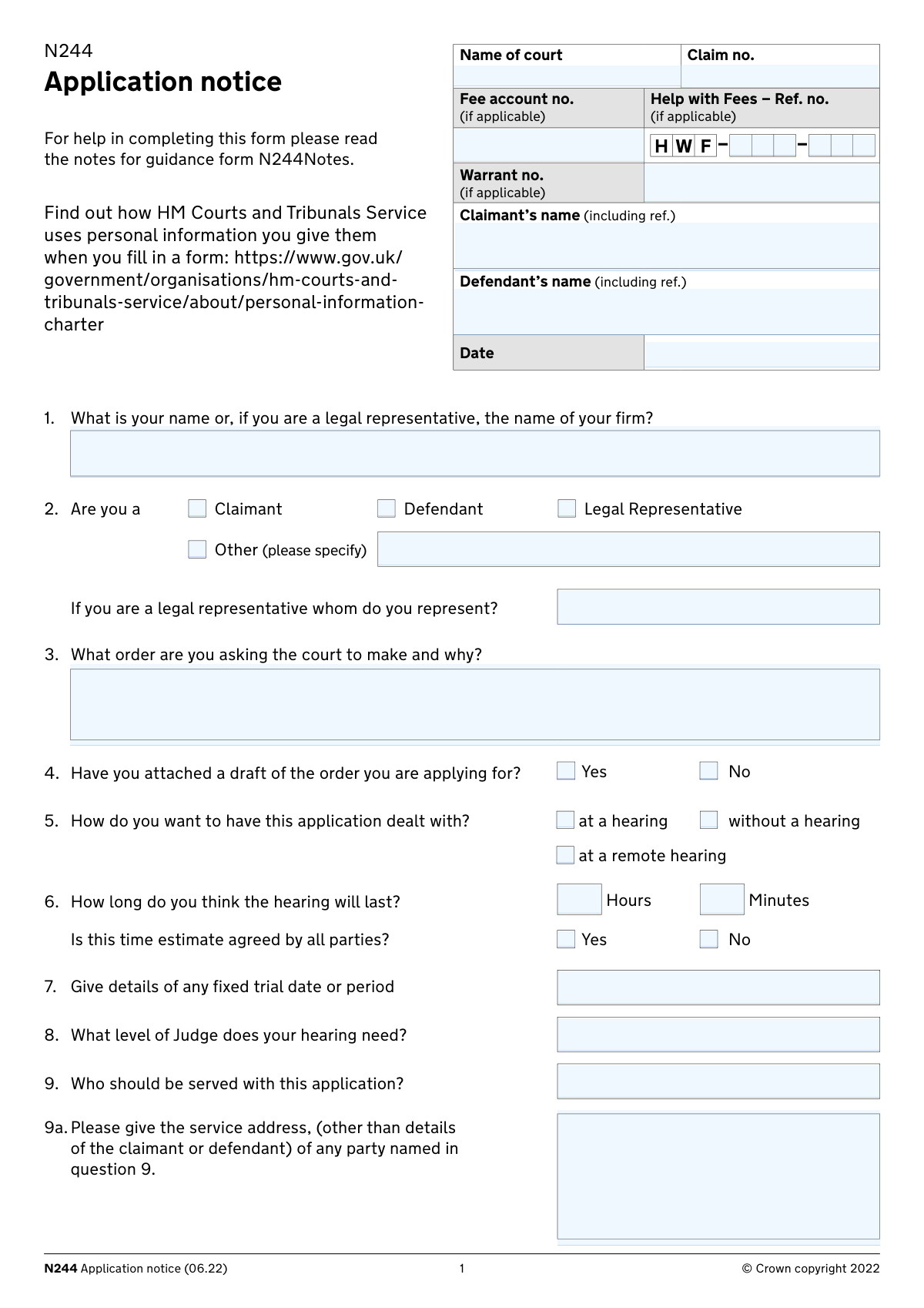
Yes! You can use AI to fill out Form N244, Application notice

Form N244, the Application Notice, is a standard court form in England and Wales used by a party in a civil proceeding to apply to the court for an order or a direction. It is a versatile and essential document for managing litigation, used for requests such as extending deadlines, setting aside judgments, or asking for specific case management instructions. Today, this form can be filled out quickly and accurately using AI-powered services like Instafill.ai, which can also convert non-fillable PDF versions into interactive fillable forms.
Our AI automatically handles information lookup, data retrieval, formatting, and form filling.
It takes less than a minute to fill out N244 using our AI form filling.
Securely upload your data. Information is encrypted in transit and deleted immediately after the form is filled out.

Form specifications

Form name: Form N244, Application notice
Number of fields: 59
Number of pages: 5
Language: English
main-image

Instafill Demo: How to fill out PDF forms in seconds with AI

How to Fill Out N244 Online for Free in 2026

Are you looking to fill out a N244 form online quickly and accurately? Instafill.ai offers the #1 AI-powered PDF filling software of 2026, allowing you to complete your N244 form in just 37 seconds or less.
Follow these steps to fill out your N244 form online using Instafill.ai:
  1. 1 Navigate to Instafill.ai and upload your N244 form or select it from the template library.
  2. 2 Provide the AI assistant with your case details, including the court name, claim number, and the names of the claimant and defendant.
  3. 3 Clearly state the court order you are requesting and the reasons for your application in the relevant section (Question 3).
  4. 4 Indicate how you wish the application to be dealt with (e.g., at a hearing, without a hearing) and provide any necessary details about the hearing's length and the required judge level.
  5. 5 Specify the information you will be relying on to support your application, such as a witness statement or evidence detailed within the form.
  6. 6 Complete the Statement of Truth by confirming the accuracy of your statements, then digitally sign and date the form.
  7. 7 Review the entire document to ensure all information populated by the AI is correct, then download your completed N244 for filing with the court.

Our AI-powered system ensures each field is filled out correctly, reducing errors and saving you time.

Why Choose Instafill.ai for Your Fillable N244 Form?

Speed

Complete your N244 in as little as 37 seconds.

Up-to-Date

Always use the latest 2026 N244 form version.

Cost-effective

No need to hire expensive lawyers.

Accuracy

Our AI performs 10 compliance checks to ensure your form is error-free.

Security

Your personal information is protected with bank-level encryption.

Frequently Asked Questions About Form N244

The N244 form is used to make an application to the court within an existing case. This is for when you need to ask a judge to make a specific order or give directions, such as changing a deadline or setting aside a judgment.

Any party involved in an ongoing court case, including the claimant, defendant, or their legal representatives, can fill out this form to make a request to the court.

In Section 3, you must clearly state the exact order you are asking the court to make and provide the specific reasons why you believe the court should grant your request. Be as clear and concise as possible.

While not always mandatory, it is highly recommended to attach a draft of the order you want the court to make. This helps the judge understand exactly what you are requesting and can speed up the process.

Requesting 'at a hearing' means you will attend court (in-person or remotely) to argue your case. 'Without a hearing' means the judge will decide based only on the submitted paperwork, which is often faster for simple, unopposed applications.

In Section 10, you must specify the information you are relying on to support your application. This could be an attached witness statement, the original statement of case, or evidence written directly into the box provided.

The Statement of Truth is a formal declaration that the facts presented in your application are true to the best of your knowledge. It must be signed by the applicant, their legal representative, or a litigation friend.

If you or a witness are vulnerable, you must state this in Section 11. Explain the nature of the vulnerability and what adjustments or support you need the court to consider for any hearings.

The Claim Number and Court Name are printed on all previous documents related to your case, such as the original claim form. It is essential to copy these details accurately onto the N244 form.

Yes, you may be eligible for financial assistance with court fees if you have a low income or receive certain benefits. If you have been approved for the 'Help with Fees' scheme, you must enter your reference number on the form.

Yes, services like Instafill.ai use AI to help you auto-fill form fields accurately and save time. This can help reduce errors and make the process of completing the N244 form much faster.

You can use a service like Instafill.ai to complete the N244 form online. Simply upload the form to the platform, and it will become an interactive, fillable document that guides you through the questions.

If you have a non-fillable or 'flat' PDF, you can use a tool like Instafill.ai to convert it into an interactive, fillable form. This allows you to easily type your information directly into the fields on your computer.

Compliance N244
Validation Checks by Instafill.ai

1
Validate Claim Number Presence and Format
This check ensures that the 'Claim no.' field is not empty and conforms to the standard format for UK court claim numbers (e.g., two letters, six digits, or similar patterns). This is critical for correctly associating the application with the existing case file. An invalid or missing claim number will prevent the application from being processed and filed correctly, causing significant delays.
2
Ensure Exclusive Applicant Role Selection
This validation verifies that exactly one role has been selected from the options: 'Claimant', 'Defendant', 'Legal Representative', or 'Other'. The form requires a clear identification of the applicant's standing in the case. Failure to select a single, unambiguous role would make it unclear who is making the application, leading to rejection or a request for clarification.
3
Conditional Requirement for Legal Representative Details
This check is triggered if the applicant selects 'Legal Representative' in question 2. It ensures the subsequent field, 'whom do you represent?', is filled out. It is essential for the court to know which party the legal representative is acting for. If this information is missing, the application is ambiguous and cannot be properly served or considered.
4
Conditional Requirement for 'Other' Role Specification
If the applicant selects 'Other (please specify)' in question 2, this validation ensures the adjacent text field for specifying the role is not empty. The court needs to understand the applicant's relationship to the case if they are not a primary party or legal representative. An empty specification would leave the applicant's standing unknown, likely halting the application's progress.
5
Mandatory Order Justification
This check verifies that the text box for question 3, 'What order are you asking the court to make and why?', is not empty. This field contains the core substance of the application. An application without a stated purpose and justification is fundamentally incomplete and would be immediately rejected by the court.
6
Logical Consistency of Hearing Request and Duration
This validation checks the relationship between the hearing preference (question 5) and the time estimate (question 6). If 'at a hearing' or 'at a remote hearing' is selected, the 'Hours' or 'Minutes' fields must be filled. Conversely, if 'without a hearing' is selected, the time estimate fields should be empty, as they are not applicable.
7
Conditional Requirement for Service Address
This check ensures that if any party other than the claimant or defendant is named in question 9 ('Who should be served with this application?'), then the service address field in question 9a must be completed. Proper service is a legal requirement, and without a valid address for all named parties, the application cannot proceed. This prevents procedural errors related to notifying relevant parties.
8
Conditional Requirement for Evidence Details
If the applicant checks 'the evidence set out in the box below' in question 10, this validation ensures the corresponding text box is not empty. The application relies on the evidence presented, and ticking this option without providing the evidence makes the submission incomplete. The court cannot evaluate the application's merits without the specified information.
9
Conditional Requirement for Vulnerability Explanation
This check is triggered if the applicant answers 'Yes' to question 11 regarding vulnerability. It mandates that the explanation box detailing the vulnerability and required adjustments must be filled. This is crucial for the court to make necessary arrangements and ensure a fair hearing process for all participants.
10
Statement of Truth Completion
This validation ensures the Statement of Truth section is fully completed, including the selection of a belief statement, a signature, the signatory's full name, and a complete date. The Statement of Truth is a legal declaration that the information is true, and an incomplete statement invalidates the entire application. The form cannot be accepted without it.
11
Signature Date Validity
This check verifies that the date provided in the Statement of Truth section is a complete, valid calendar date and is not set in the future. The date confirms when the declaration of truth was made. An invalid or future date would call the validity of the statement into question and could lead to the application being rejected.
12
Conditional Requirement for Legal Representative's Firm Details
If the person signing the Statement of Truth identifies as the 'Applicant’s legal representative', this check ensures the 'Name of applicant’s legal representative’s firm' field is completed. This is necessary for official identification and correspondence with the legal firm. Missing this information creates ambiguity about the representative's credentials and authority.
13
Mandatory Applicant Address Fields
This validation ensures that the core components of the applicant's mailing address ('Building and street', 'Town or city', and 'Postcode') are all provided. This address is the official address for service, where the court and other parties will send legal documents. An incomplete address would prevent proper communication and could have serious legal consequences for the applicant.
14
UK Postcode Format Validation
This check verifies that the value entered in the 'Postcode' field matches the standard format for a UK postcode (e.g., SW1A 1AA, M1 1AE). Using a valid format is essential for mail delivery systems to function correctly, ensuring that crucial court documents are successfully delivered to the applicant. An incorrectly formatted postcode could lead to returned mail and missed deadlines.
15
Email Address Format Validation
If an email address is provided in the applicant's contact details, this check ensures it conforms to a standard email format (e.g., contains an '@' symbol and a domain). While optional, if an email is provided, it must be valid to be useful for electronic communication from the court. An invalid format would render the field useless and could lead to missed electronic correspondence.

Common Mistakes in Completing N244

Entering Incorrect or Incomplete Case Details

Applicants often mistype the Claim Number, misspell the names of the Claimant or Defendant, or enter the wrong court name. This happens due to simple data entry errors or not having the original court papers to hand. This mistake can cause significant delays, as the court office may be unable to link the application to the correct case file, potentially leading to its rejection. To avoid this, always double-check the Claim Number and party names against the original Claim Form or previous court correspondence. AI-powered tools like Instafill.ai can help prevent these errors by saving and auto-filling correct case details across multiple documents, ensuring consistency.

Submitting a Vague or Unclear Order Request

In Question 3, many applicants fail to state precisely what they want the court to do, writing something generic like 'ask for an extension.' This ambiguity forces the judge to guess the applicant's intent, which can lead to the application being dismissed or an unhelpful order being made. You must clearly state the exact legal order you are seeking and explain the reasons, for example, 'An order that the time for filing the defence be extended by 14 days because key evidence is still outstanding.' A clear, specific request is crucial for success.

Failing to Attach a Draft Order

Many applicants, especially those without legal representation, tick 'No' in Question 4 and do not attach a draft of the order they are asking for. This is a missed opportunity to guide the court and can result in the judge creating an order that doesn't fully meet the applicant's needs. Providing a draft order clarifies your request and increases the likelihood of a favorable outcome. If you only have a non-fillable PDF of the form, tools like Instafill.ai can convert it into a fillable version, making it easier to manage your application and attachments digitally.

Invalidating the Statement of Truth

The Statement of Truth is a mandatory declaration, but it is frequently left unsigned, undated, or with the wrong capacity box ticked. An improperly completed Statement of Truth renders the evidence in section 10 invalid and can be grounds for the court to dismiss the application entirely. Always ensure you sign, date, print your full name, and tick the correct box to validate your application. Digital form-filling solutions can use validation rules to flag unsigned or incomplete Statement of Truth sections before submission, preventing this critical error.

Providing Insufficient Evidence in Section 10

Applicants often fail to provide concrete evidence in section 10 to justify the order they are requesting, or they tick a box for a witness statement but forget to attach it. The court makes decisions based on evidence, so failing to provide it means the application is likely to fail. You must clearly set out the facts, dates, and reasons that support your application. Using a structured form-filling tool can help organize your thoughts and ensure the evidence box is not left blank if you've indicated you will rely on it.

Underestimating the Required Hearing Time

In Question 6, applicants often provide an unrealistic, overly optimistic time estimate for the hearing, such as '10 minutes' for a contested issue. If the time allocated is insufficient, the hearing will be adjourned part-way through, causing significant delays and increased legal costs for all parties. It is crucial to realistically assess the complexity of the issues and consult with the other party to agree on a time estimate where possible. Failing to state whether the time is agreed is also a common omission.

Failing to Identify All Parties for Service

In Question 9, an applicant may forget to list all other parties to the claim who must be formally notified (served) of the application. This is a serious procedural error, as all parties have a right to know about and respond to any application made to the court. This mistake will almost certainly lead to the hearing being adjourned until proper service has been completed, wasting time and money. Using a tool like Instafill.ai, which can save party details from the main case, can help you create a checklist to ensure all necessary parties are included.

Providing an Incorrect Address for Service

A simple but critical error is entering an incorrect or incomplete mailing address on the final page of the form. The court and other parties will use this address to send all official documents, including the notice of the hearing date and the final order. If the address is wrong, you will not receive these documents, potentially causing you to miss your own hearing. AI-powered form fillers like Instafill.ai can use address validation and auto-completion to ensure the address is accurate and formatted correctly, reducing the risk of returned mail.

Incorrectly Handling Court Fee Information

Applicants often make mistakes related to the court fee, either by forgetting to include their Fee Account number or by incorrectly entering their 'Help with Fees' (HWF) reference number. This can lead to the application being returned as unpaid, causing critical delays, especially if the application is time-sensitive. Always ensure your payment method is clearly indicated and that any HWF reference is entered accurately and in full across the designated fields. Form-filling tools can validate the format of reference numbers and ensure that these critical fields are not left empty.

Ambiguity in Applicant's Role and Representation

In Questions 1 and 2, applicants can cause confusion by not clearly stating their role. A legal representative might fill in their own name in Question 1 but then forget to specify which party they represent in the subsequent field. This ambiguity requires the court staff to make assumptions or seek clarification, slowing down the process. Smart forms can use conditional logic to prevent such omissions, for example, by making the 'Whom do you represent?' field mandatory if 'Legal Representative' is selected. Tools like Instafill.ai implement such logic to guide users correctly.
Saved over 80 hours a year

ā€œI was never sure if my IRS forms like W-9 were filled correctly. Now, I can complete the forms accurately without any external help.ā€

Kevin Martin Green

Your data stays secure with advanced protection from Instafill and our subprocessors

Robust compliance program

Transparent business model

You’re not the product. You always know where your data is and what it is processed for.

ISO 27001, HIPAA, and GDPR

Our subprocesses adhere to multiple compliance standards, including but not limited to ISO 27001, HIPAA, and GDPR.

Security & privacy by design

We consider security and privacy from the initial design phase of any new service or functionality. It’s not an afterthought, it’s built-in, including support for two-factor authentication (2FA) to further protect your account.

Fill out N244 with Instafill.ai

Worried about filling PDFs wrong? Instafill securely fills form-n244-application-notice forms, ensuring each field is accurate.