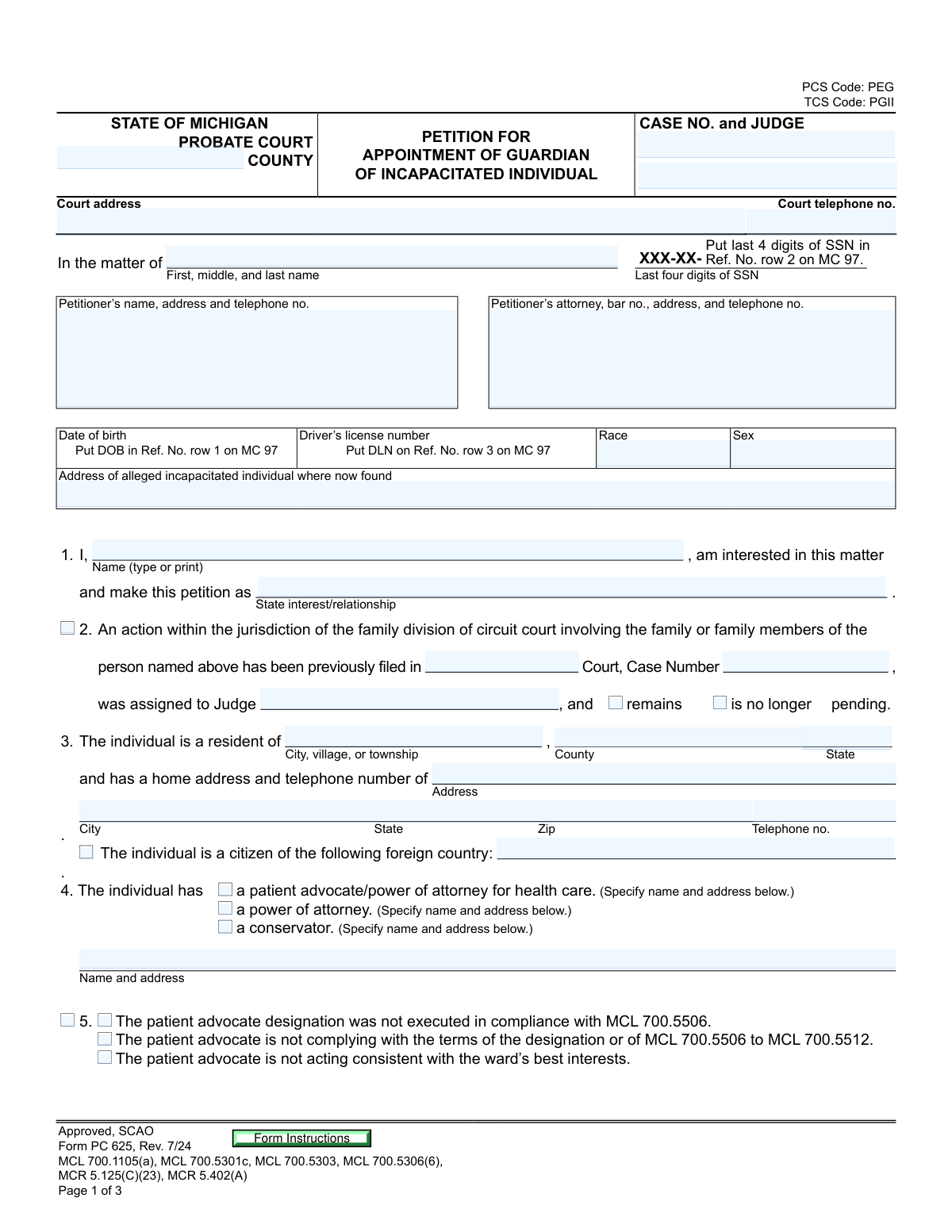
Yes! You can use AI to fill out Form PC 625, Petition for Appointment of Guardian of Incapacitated Individual

Michigan Form PC 625 is a legal document filed with a probate court to initiate the process of appointing a guardian for an adult who is believed to be incapacitated and unable to make informed decisions. It is a critical first step in establishing legal protection for a vulnerable individual, outlining the reasons for the petition and identifying the proposed guardian. Today, this form can be filled out quickly and accurately using AI-powered services like Instafill.ai, which can also convert non-fillable PDF versions into interactive fillable forms.
Our AI automatically handles information lookup, data retrieval, formatting, and form filling.
It takes less than a minute to fill out PC 625 using our AI form filling.
Securely upload your data. Information is encrypted in transit and deleted immediately after the form is filled out.

Form specifications

Form name: Form PC 625, Petition for Appointment of Guardian of Incapacitated Individual
Number of pages: 4
Language: English
main-image

Instafill Demo: How to fill out PDF forms in seconds with AI

How to Fill Out PC 625 Online for Free in 2026

Are you looking to fill out a PC 625 form online quickly and accurately? Instafill.ai offers the #1 AI-powered PDF filling software of 2026, allowing you to complete your PC 625 form in just 37 seconds or less.
Follow these steps to fill out your PC 625 form online using Instafill.ai:
  1. 1 Navigate to Instafill.ai and upload your Form PC 625 or select it from their template library.
  2. 2 Provide personal details for the petitioner, the alleged incapacitated individual, and any legal representatives involved.
  3. 3 Answer questions about the individual's condition, specifying the reasons for incapacity and providing factual examples of their recent conduct.
  4. 4 List the names and addresses of all interested parties, such as the individual's spouse, children, parents, and the nominated guardian.
  5. 5 Specify the type of guardianship requested (full or limited) and detail the powers being sought for the guardian.
  6. 6 Review all the information populated by the AI for accuracy, then e-sign and date the petition where required.
  7. 7 Download the completed, signed document, ready for filing with the appropriate Michigan Probate Court.

Our AI-powered system ensures each field is filled out correctly, reducing errors and saving you time.

Why Choose Instafill.ai for Your Fillable PC 625 Form?

Speed

Complete your PC 625 in as little as 37 seconds.

Up-to-Date

Always use the latest 2026 PC 625 form version.

Cost-effective

No need to hire expensive lawyers.

Accuracy

Our AI performs 10 compliance checks to ensure your form is error-free.

Security

Your personal information is protected with bank-level encryption.

Frequently Asked Questions About Form PC 625

This form is used to ask a Michigan probate court to appoint a guardian for an adult who is believed to be incapacitated and unable to make or communicate informed decisions about their personal care.

Any person interested in the individual's welfare can file this petition, including a family member, friend, or a government agency. You must state your relationship or interest in the matter in Section 1 of the form.

In Section 7, you must describe specific facts about the individual's recent behavior or condition that lead you to believe they need a guardian. Include examples that show they cannot make informed decisions for their own well-being.

A full guardian has all the legal powers to make decisions for the individual, while a limited guardian only has the specific powers granted by the court, which you must list on the form.

Form MC 97 is a separate form used to file Protected Personal Identifying Information (PII) like a date of birth or Social Security number. You must use it to keep this sensitive data private and reference it on the main petition as instructed.

You must disclose any existing Power of Attorney, Patient Advocate, or Conservator in Section 4 of the form. The court will consider these existing documents when deciding if a guardian is necessary.

You are required to list and notify the individual's spouse, adult children, and living parents. If none exist, you must list their presumptive heirs or notify the Michigan Attorney General.

Yes, in Section 14 you can request the appointment of a temporary guardian if an emergency exists that could cause harm to the individual. You must clearly describe the emergency on the form.

Yes, Section 15 provides a space for the alleged incapacitated individual to nominate a person they would prefer to be their guardian if the court determines one is needed.

You must file the completed petition and any accompanying forms, like MC 97, with the Probate Court in the Michigan county where the alleged incapacitated individual resides.

Yes, services like Instafill.ai use AI to help you accurately auto-fill form fields, which can save time and reduce errors on complex legal documents like this one.

Simply upload the PDF of Form PC 625 to the Instafill.ai platform. The service will make the document interactive, allowing you to fill it out online and use AI-powered assistance to complete the fields.

If you have a non-fillable or 'flat' PDF, you can upload it to a service like Instafill.ai. The platform can convert the document into an interactive, fillable form that you can easily complete on your computer.

Compliance PC 625
Validation Checks by Instafill.ai

1
Validates Last Four Digits of SSN
Checks that the 'Last four digits of SSN' field on the MC 97 form contains exactly four numeric digits. This validation ensures compliance with PII standards and proper identification for court and administrative systems that rely on this specific data point. A failed validation would prevent submission until a valid 4-digit number is entered, preventing data entry errors.
2
Ensures Date of Birth is a Valid Adult Age
This validation confirms the Date of Birth on the MC 97 form is a real calendar date and that the calculated age is 18 years or older. This is critical because this petition is specifically for an 'incapacitated individual,' which under Michigan law refers to an adult. An invalid date or an age under 18 would be rejected, as a different legal process applies to minors.
3
Conditional Requirement for Prior Court Case Details
Verifies that if the checkbox for a prior family division action is marked in Section 2, then the associated fields for Court Name, Case Number, Judge, and case status ('remains pending' or 'is no longer pending') are all filled. This information is essential for the court to understand the full legal context and avoid conflicting orders. Failure to provide these details would result in an incomplete submission error.
4
Requires Agent Details for Existing Legal Designations
This check ensures that if any box in Section 4 is checked (indicating a patient advocate, power of attorney, or conservator exists), the corresponding 'Name and address' field for that agent is completed. The court must be aware of any existing fiduciaries or agents who have authority over the individual's affairs. The form would be considered incomplete if this information is missing.
5
Mandatory Selection and Specification of Incapacity Reason
Confirms that at least one checkbox is selected in Section 6 to specify the reason for the individual's alleged incapacity. Furthermore, if the 'Other' checkbox is selected, the corresponding text field must contain a description. This is a foundational requirement of the petition, and failure to provide a reason would make the petition legally insufficient.
6
Verifies Factual Basis for Guardianship is Provided
Ensures that the text field in Section 7, which asks for 'Specific facts about the individual’s recent condition or conduct,' is not empty. This narrative is the core evidence supporting the petition and is legally required for the court to evaluate the need for a guardian. An empty field would lead to an immediate rejection of the form for being unsubstantiated.
7
Conditional Entry of VA Claimant Number
This validation checks that if the 'is' box is checked in Section 10, indicating entitlement to VA benefits, the 'Veterans Administration claimant number' field is filled. This is important for coordinating benefits and ensuring compliance with VA regulations regarding fiduciaries. The form would be flagged as incomplete if the number is missing when required.
8
Validates Completeness of Interested Parties Information
In Section 11, this check verifies that if a category of relatives (spouse, adult child, parent, or heir) is checked, at least one corresponding person with a full name and address is listed in the table. Due process requires that all interested parties receive legal notice of the proceedings. A failure would halt the process until all required parties are properly identified and listed.
9
Ensures Specification of Limited Guardian Powers
This check is triggered if the 'limited guardian' option is selected in Section 13. It verifies that the text field describing the specific powers requested for the guardian is not empty. This is critical to define the exact scope of the guardian's authority and protect the rights of the incapacitated individual, and an empty field would render the request ambiguous and invalid.
10
Requires Justification for Emergency Temporary Guardian
Verifies that if a temporary guardian is requested in Section 14, the text field describing the 'emergency' is filled out. Appointing a temporary guardian is an extraordinary measure that requires a clear and present emergency to justify bypassing the standard hearing process. The petition would be rejected without this critical justification.
11
Mandatory Petitioner Signature and Date
Confirms that the 'Petitioner signature' and 'Date' fields at the end of the petition are both completed. The signature, made under penalty of perjury, attests to the truthfulness of the petition's contents, and the date establishes when it was signed. A missing signature or date invalidates the legal declaration, preventing the court from accepting the filing.
12
PII Redaction from Public-Facing Form
This validation scans the main petition (Form PC 625) to ensure it does not contain sensitive Personal Identifying Information (PII) like a date of birth or full social security number. The form instructions explicitly direct this information to the separate, non-public MC 97 form. Finding PII on the main form would trigger a warning to redact the information to protect the individual's privacy and comply with court rules.

Common Mistakes in Completing PC 625

Placing Sensitive Data on the Public Petition Form

A critical error is entering the individual's date of birth, Social Security Number, or driver's license number directly onto the main petition (Form PC 625). These details are considered Protected Personal Identifying Information (PII) and must be placed on the separate MC 97 form. Placing PII on the public document can lead to identity theft and will cause the court clerk to reject the filing. To avoid this, carefully fill out Form MC 97 and use the corresponding reference numbers (e.g., 'Ref. No. 1') on the main petition.

Providing Vague or Insufficient Factual Details

In Section 7, petitioners often provide generic or emotional statements like 'they are confused' or 'can't care for themselves.' The court requires specific, recent, and observable facts that demonstrate the individual's inability to make informed decisions. Without concrete examples, dates, and descriptions of conduct, the petition lacks the necessary evidence and is likely to be dismissed. To avoid this, document specific incidents that illustrate the need for a guardian before filling out the form.

Failing to List All Required Interested Parties

Section 11 requires listing the individual's spouse, adult children, and living parents, or their presumptive heirs if none exist. Failing to identify and provide correct addresses for all these parties is a major procedural error. Since these individuals have a legal right to be notified of the proceedings, this mistake will cause significant delays or could even lead to the entire case being invalidated later. Diligently research and list all legally required relatives to ensure proper notice is given.

Inadequately Justifying an Emergency Temporary Guardian

Petitioners often misunderstand the high legal standard required for appointing a temporary guardian in Section 14. This section is only for true emergencies where there is an immediate risk of substantial harm or loss to the individual. Using this section for non-urgent matters will result in the request being denied by the judge. To avoid this, only request a temporary guardian if you can describe a specific, verifiable, and immediate crisis that cannot wait for a standard hearing.

Confusing Current Location with Legal Residence

The form asks for the address 'where now found' on page 1 (e.g., a hospital or rehab facility) and the individual's permanent 'home address' in Section 3. People frequently enter the same address in both places. This can create confusion regarding legal jurisdiction and proper service of court documents. To prevent this, carefully read each field and provide the distinct address required for each question.

Forgetting to Use Reference Numbers on the Main Petition

After correctly putting sensitive data on Form MC 97, many filers forget to write the corresponding reference number (e.g., 'Ref. No. 1' for DOB) in the appropriate blank on the main PC 625 petition. This leaves a blank space on the petition and fails to link the two forms, making the filing incomplete. This oversight can lead to rejection by the court clerk. AI-powered form filling tools like Instafill.ai can help prevent this by automatically populating the correct reference numbers.

Requesting a Limited Guardian Without Specifying Powers

When requesting a 'limited guardian' in Section 13, it is mandatory to describe the specific powers the guardian will need (e.g., 'authority to make medical decisions'). Many petitioners check the box but leave the description blank. The court cannot grant a guardianship with undefined powers, so this omission will halt the process until an amendment is filed, causing unnecessary delays.

Omitting Details of Prior Family Court Actions

Section 2 requires information on any prior family division cases, such as divorce or custody, involving the individual. Petitioners may be unaware of these cases or forget to include the case number and court name. This information is crucial for the court to have a complete legal history, and its omission can cause procedural delays while the court searches for related matters. It is important to check with family members or review personal records to ensure this section is completed accurately.

Providing Incomplete Contact Information for Relatives

In Section 11, petitioners must provide the full name, address, and telephone number for all listed relatives and nominated guardians. It is common for filers to provide partial addresses or omit phone numbers. Because these individuals must receive formal legal notice of the hearing, incomplete contact information will prevent the case from moving forward until the petitioner provides the missing details, causing significant delays. Verifying all contact information before filing is essential.

Failing to Complete the MC 97 Header Information

When using the separate MC 97 form for protected information, filers sometimes forget to fill out the top portion, including the case number, court name, and the name of the individual ('In the matter of'). Without this identifying information, the PII form cannot be correctly associated with the main petition. This can lead to the entire filing being rejected as incomplete or misfiled. Double-checking that both forms have matching header information is crucial for a successful submission.
Saved over 80 hours a year

“I was never sure if my IRS forms like W-9 were filled correctly. Now, I can complete the forms accurately without any external help.”

Kevin Martin Green

Your data stays secure with advanced protection from Instafill and our subprocessors

Robust compliance program

Transparent business model

You’re not the product. You always know where your data is and what it is processed for.

ISO 27001, HIPAA, and GDPR

Our subprocesses adhere to multiple compliance standards, including but not limited to ISO 27001, HIPAA, and GDPR.

Security & privacy by design

We consider security and privacy from the initial design phase of any new service or functionality. It’s not an afterthought, it’s built-in, including support for two-factor authentication (2FA) to further protect your account.

Fill out PC 625 with Instafill.ai

Worried about filling PDFs wrong? Instafill securely fills form-pc-625-petition-for-appointment-of-guardian-of-incapacitated-individual forms, ensuring each field is accurate.