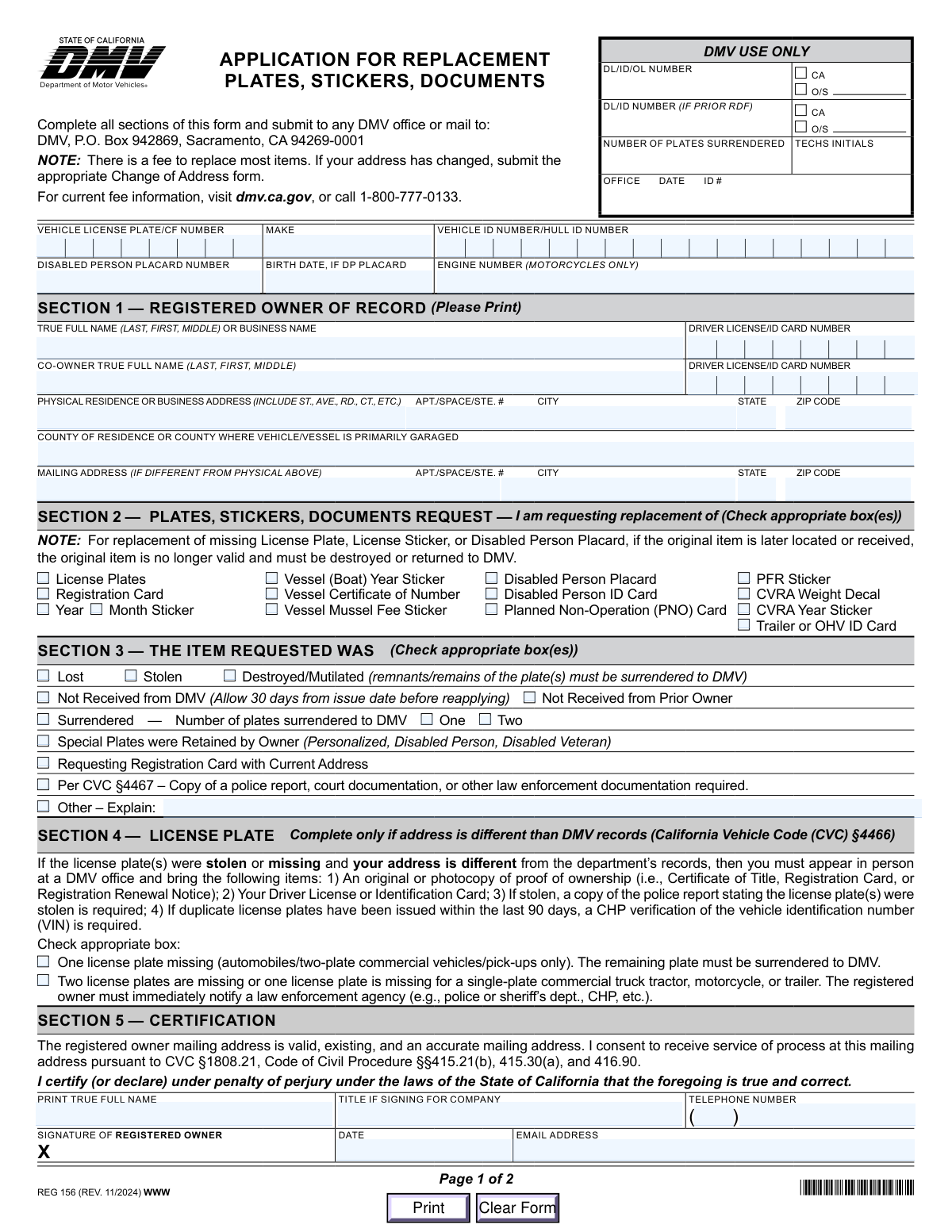
Yes! You can use AI to fill out Form REG 156, Application for Replacement Plates, Stickers, Documents

Form REG 156 is the official California Department of Motor Vehicles (DMV) application for registered vehicle or vessel owners to request replacements for items like license plates, registration cards, and stickers. It is essential for maintaining legal compliance, as operating a vehicle without proper plates or documentation can lead to penalties. The form requires you to specify the reason for the replacement, such as loss, theft, or damage, and certify the information provided. Today, this form can be filled out quickly and accurately using AI-powered services like Instafill.ai, which can also convert non-fillable PDF versions into interactive fillable forms.
Our AI automatically handles information lookup, data retrieval, formatting, and form filling.
It takes less than a minute to fill out REG 156 using our AI form filling.
Securely upload your data. Information is encrypted in transit and deleted immediately after the form is filled out.

Form specifications

Form name: Form REG 156, Application for Replacement Plates, Stickers, Documents
Number of fields: 58
Number of pages: 1
Language: English
main-image

Instafill Demo: How to fill out PDF forms in seconds with AI

How to Fill Out REG 156 Online for Free in 2026

Are you looking to fill out a REG 156 form online quickly and accurately? Instafill.ai offers the #1 AI-powered PDF filling software of 2026, allowing you to complete your REG 156 form in just 37 seconds or less.
Follow these steps to fill out your REG 156 form online using Instafill.ai:
  1. 1 Navigate to Instafill.ai and upload your REG 156 form, or select it from their library of official documents.
  2. 2 Allow the AI to scan and identify all the required fields on the Application for Replacement Plates, Stickers, Documents.
  3. 3 Enter your vehicle information (license plate, VIN, make) and the registered owner's details in the appropriate sections.
  4. 4 In Section 2, check the boxes for the specific items you are requesting to replace, such as license plates, registration card, or stickers.
  5. 5 In Section 3, indicate the reason for the replacement by checking the appropriate box (e.g., Lost, Stolen, Destroyed).
  6. 6 Carefully review all the information for accuracy, then electronically sign and date the certification in Section 5.
  7. 7 Download the completed form and submit it to the DMV as instructed, either by mail or in person, along with any required fees or supporting documents.

Our AI-powered system ensures each field is filled out correctly, reducing errors and saving you time.

Why Choose Instafill.ai for Your Fillable REG 156 Form?

Speed

Complete your REG 156 in as little as 37 seconds.

Up-to-Date

Always use the latest 2026 REG 156 form version.

Cost-effective

No need to hire expensive lawyers.

Accuracy

Our AI performs 10 compliance checks to ensure your form is error-free.

Security

Your personal information is protected with bank-level encryption.

Frequently Asked Questions About Form REG 156

This form is used to apply for replacement license plates, registration stickers, or other official vehicle documents that have been lost, stolen, destroyed, mutilated, or were never received from the DMV.

The registered owner of a vehicle or vessel in California who needs to replace official items like license plates, registration cards, or stickers must complete this form.

Yes, there is a fee to replace most items. For current fee information, you should visit the dmv.ca.gov website or call the DMV at 1-800-777-0133.

You must immediately notify a law enforcement agency to report the theft. When submitting this form, check the 'Stolen' box and attach a copy of the police report as required.

If you lost one plate from a two-plate vehicle like a car or pickup, you must surrender the remaining plate to the DMV when you apply for replacements using this form.

You can submit the completed form and any required fees to any DMV office in person or mail it to the DMV P.O. Box address listed at the top of the form.

You should wait at least 30 days from the issue date before reapplying. After that time, you can complete this form and check the box for 'Not Received from DMV' in Section 3.

If the original item is located after you've applied for a replacement, it is no longer valid. You must destroy the old item or return it to a DMV office.

No, this form cannot be used to change your address. You must submit a separate, appropriate Change of Address form with the DMV.

You will need your vehicle's license plate number and VIN, your personal information including your driver license number, and details about why you need a replacement.

You must appear in person at a DMV office and bring proof of ownership, your driver license or ID card, and a copy of the police report for the stolen plates.

Yes, services like Instafill.ai use AI to accurately auto-fill form fields with your information, which can save you time and help prevent errors.

You can use a service like Instafill.ai to fill out the REG 156 form online. Simply upload the form to their platform, and it will become an interactive, fillable document.

If you have a non-fillable PDF, you can use a service like Instafill.ai. It can convert flat PDFs into interactive, fillable forms that you can complete on your computer.

Compliance REG 156
Validation Checks by Instafill.ai

1
Validates Vehicle/Hull Identification Number Format
This check ensures the Vehicle Identification Number (VIN) or Hull Identification Number (HIN) is in the standard 17-character alphanumeric format, excluding the letters I, O, and Q. A valid VIN/HIN is critical for uniquely identifying the vehicle in the DMV database and retrieving the correct record. An invalid number will prevent the system from processing the request and result in an immediate application failure.
2
Ensures DP Placard Details are Provided When Requested
This validation confirms that if the 'Disabled Person Placard' box is checked in Section 2, then both the 'Disabled Person Placard Number' and 'Birth Date' fields are completed. These details are mandatory to verify the placard holder's identity and eligibility for a replacement. Failure to provide this information will halt the application process for the placard replacement until the required fields are filled.
3
Verifies at Least One Replacement Item is Selected
This validation ensures that the applicant has checked at least one box in Section 2, which lists the items available for replacement. The primary purpose of the form is to request a replacement, so submitting it without selecting an item is an invalid action. The form submission will be blocked with an error message prompting the user to select an item to be replaced.
4
Verifies a Reason for Replacement is Provided
This check confirms that the applicant has selected at least one reason in Section 3 (e.g., Lost, Stolen, Destroyed) to explain why the replacement is needed. This information is required for DMV records and may trigger different processing rules, such as the need for a police report. An application without a specified reason is considered incomplete and will be rejected.
5
Requires Explanation When 'Other' Reason is Selected
This validation ensures that if the 'Other – Explain' checkbox is selected in Section 3, the corresponding 'Other Explanation' text field is not empty. The DMV requires a specific, documented reason for the replacement if it does not fit into the standard categories. An empty explanation field will render the application incomplete and prevent submission until a reason is provided.
6
Confirms Police Report Acknowledgment for Stolen Items
If 'Stolen' is checked in Section 3, this validation verifies that the box for 'Per CVC §4467' is also checked, acknowledging the requirement for a police report. This confirms the applicant is aware of the legal requirement to provide law enforcement documentation for stolen items. Failing to acknowledge this can lead to immediate rejection or significant processing delays.
7
Ensures License Plate Section is Completed for Plate Replacement
This check verifies that if 'License Plates' is requested in Section 2, the applicant has completed the required selections in Section 4. Section 4 details whether one or two plates are missing, which is critical information for issuing the correct replacement and updating records. The form will be considered incomplete if this section is skipped when requesting new plates.
8
Validates Quantity of Surrendered Plates
If the 'Surrendered' box is checked in Section 3, this validation ensures that either the 'One' or 'Two' checkbox is also selected. This specifies the exact number of plates returned to the DMV, which is essential for accurate inventory and record-keeping. The application will be flagged as incomplete if the quantity is not specified after indicating plates were surrendered.
9
Validates Presence of Owner's Name and Signature
This check confirms that the 'PRINT TRUE FULL NAME' and 'SIGNATURE OF REGISTERED OWNER' fields in Section 5 are both completed. The signature legally certifies the information provided under penalty of perjury, making it a mandatory component of the application. An unsigned or unnamed application is legally invalid and will be rejected immediately.
10
Validates Birth Date Format and Plausibility
This validation checks that the 'Birth Date' provided for a DP Placard request is in a valid format (e.g., MM/DD/YYYY) and represents a plausible date. It prevents entries like future dates or dates from over 120 years ago, which are likely data entry errors. An invalid date would prevent verification of the placard holder and cause the application to fail.
11
Cross-References Applicant Info with DMV Records
This backend validation checks if the combination of 'Vehicle License Plate/CF Number,' 'Vehicle ID Number/HULL ID Number,' and 'Registered Owner True Full Name' matches an existing record in the DMV database. This is a critical security check to ensure the request is legitimate and is being made by the actual owner of record. A mismatch would indicate a potential error or fraudulent activity and would immediately halt the application for manual review.
12
Ensures Completeness of All Required Address Fields
This check verifies that the primary address block (Physical Residence, City, State, ZIP Code, County) is fully completed, as this information is mandatory. An incomplete address prevents the DMV from verifying the owner's residence or vehicle location. The submission will fail if any of these core address components are missing.
13
Validates State Field is a Two-Letter Abbreviation
This check ensures that the 'State' field for both physical and mailing addresses contains a valid two-letter postal abbreviation. Using a standardized format prevents ambiguity and ensures accurate address processing for both record-keeping and mailing. Submitting a full state name or an incorrect code would cause a validation failure.
14
Validates ZIP Code Format for All Addresses
This validation ensures that any entered 'ZIP Code' (for both physical and mailing addresses) consists of 5 digits. A correct ZIP code is essential for mail delivery of the replacement items and for verifying the address against DMV records. An invalid format will cause a validation error and must be corrected before submission.

Common Mistakes in Completing REG 156

Entering an Incorrect Vehicle Identification Number (VIN)

The VIN is a unique 17-character code used to identify a specific vehicle, and transcription errors are common due to its length and complexity (e.g., confusing 'O' with '0'). An incorrect VIN will cause the DMV's system to reject the application or, worse, process the request against the wrong vehicle record. To prevent this, carefully double-check the VIN against your current registration card and the physical VIN plate on your vehicle's dashboard or door jamb.

Confusing Physical and Mailing Addresses

Applicants often enter a P.O. Box as their physical address or fail to complete the mailing address section when it differs from their residence. The DMV requires a physical address to establish the vehicle's location but will send replacement items to the mailing address. This error can lead to application rejection or lost documents. Always provide a valid street address for the physical location and use the separate mailing address section if you receive mail elsewhere.

Forgetting to Sign or Date the Certification

An unsigned or undated application is legally invalid and will be immediately rejected, requiring a complete resubmission. This common oversight in Section 5 often happens when an applicant is in a hurry and forgets to perform a final check. This simple mistake is a primary cause of processing delays. Always review the entire form before submission, paying special attention to the signature and date fields.

Reporting Stolen Plates Without a Police Report

The form requires a copy of a police report or other law enforcement documentation when an item is reported as stolen. Many applicants check the 'Stolen' box in Section 3 but fail to include this mandatory document, resulting in an incomplete application that cannot be processed. If your items were stolen, you must first file a report with law enforcement and then submit a copy of that report along with this form.

Prematurely Reporting an Item as 'Not Received from DMV'

Applicants sometimes file for a replacement too soon, not realizing the form explicitly states to allow 30 days from the issue date before reapplying. Filing before the 30-day window has passed will result in a rejected application, as the original item may still be in transit. To avoid wasted time and effort, patiently wait for the full 30-day period to elapse before submitting a request for a non-received item.

Failing to Surrender the Remaining License Plate

When requesting a replacement for a single missing plate on a standard vehicle (Section 4), the form requires that the remaining plate be surrendered to the DMV. Applicants often overlook this requirement and show up to the DMV without the plate, causing their request to be denied. To ensure a successful transaction, read the instructions for your specific situation carefully and bring the remaining plate with you to the DMV office.

Ignoring In-Person Visit Requirements

Section 4 clearly states that if plates are missing and your address has changed from what is on DMV record, you *must* appear in person at a DMV office with specific documents. Some applicants miss this critical instruction and mail the form, only to have it returned unprocessed weeks later. If your situation matches the criteria in Section 4, do not mail the form; you must plan a visit to a DMV office to complete the transaction.

Omitting Birth Date for Disabled Person Placard Replacement

When requesting a replacement Disabled Person (DP) Placard, the form requires both the placard number and the placard holder's birth date for verification. Applicants often forget to enter the birth date, assuming the placard number is sufficient. This omission prevents the DMV from verifying the placard holder's identity and leads to a rejected application. Always ensure both the placard number and the corresponding birth date are filled in.

Incorrectly Formatting the Registered Owner's Name

Section 1 specifically asks for the owner's name in 'LAST, FIRST, MIDDLE' format, but many people instinctively write their name in the standard 'First Last' order. This formatting error can cause data mismatches in the DMV system, slowing down the verification process. To avoid delays, follow the specified format exactly as printed on the form. AI-powered form-filling tools like Instafill.ai can help by automatically parsing and formatting names correctly.

Submitting a Handwritten, Illegible Form

Many people download the form as a non-fillable PDF, print it, and fill it out by hand. Poor handwriting can make critical information like the VIN, address, or name illegible, leading to data entry errors by DMV staff and significant processing delays or rejection. To ensure clarity, use a fillable PDF or a tool like Instafill.ai, which can convert a flat PDF into an interactive version, ensuring all entries are typed, legible, and correctly formatted.
Saved over 80 hours a year

“I was never sure if my IRS forms like W-9 were filled correctly. Now, I can complete the forms accurately without any external help.”

Kevin Martin Green

Your data stays secure with advanced protection from Instafill and our subprocessors

Robust compliance program

Transparent business model

You’re not the product. You always know where your data is and what it is processed for.

ISO 27001, HIPAA, and GDPR

Our subprocesses adhere to multiple compliance standards, including but not limited to ISO 27001, HIPAA, and GDPR.

Security & privacy by design

We consider security and privacy from the initial design phase of any new service or functionality. It’s not an afterthought, it’s built-in, including support for two-factor authentication (2FA) to further protect your account.

Fill out REG 156 with Instafill.ai

Worried about filling PDFs wrong? Instafill securely fills form-reg-156-application-for-replacement-plates-stickers-documents forms, ensuring each field is accurate.